
IRO
Easy and powerful Colorizer for Python!
Powered by Yamato Nagata
The depth represents the block and style in the block affects elements within that block.
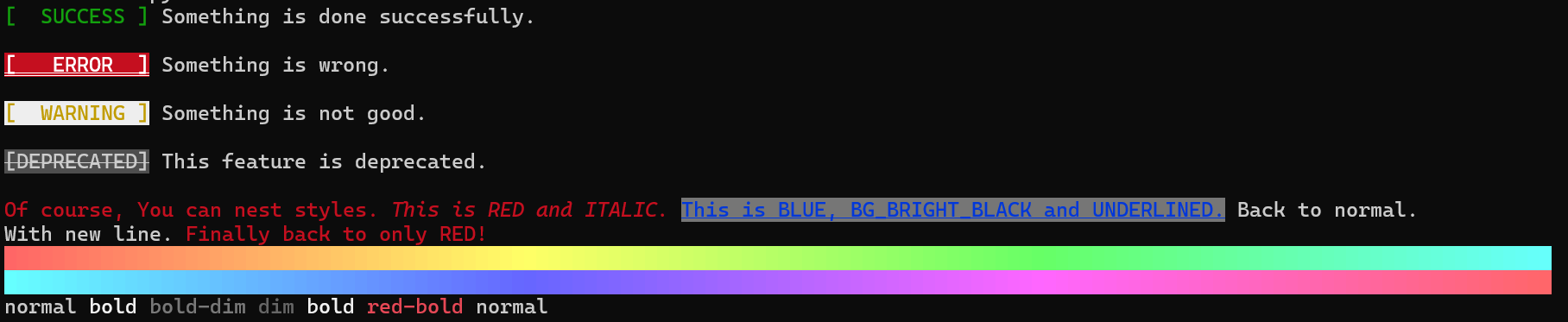
Code
from iro import Iro, FGColor, BGColor, Style, ColorRGB, Color256

from colorsys import hls_to_rgb

success = Iro((FGColor.GREEN, "[  SUCCESS ]"))
success_rendered = success.str  # You can get rendered string by .str attribute
error = Iro((ColorRGB(255, 255, 255), BGColor.RED, Style.DOUBLY_UNDERLINE, "[   ERROR  ]"))
warning = Iro((FGColor.YELLOW, Color256(255, bg=True), "[  WARNING ]"))
deprecated = Iro((Color256(7), Color256(239, True), Style.STRIKE, "[DEPRECATED]"))

print(success_rendered, 'Something is done successfully.\n')
print(error, 'Something is wrong.\n')
print(warning, 'Something is not good.\n')
print(deprecated, 'This feature is deprecated.\n')

print(Iro([
    FGColor.RED, "Of course, You can nest styles.",
    [
        Style.ITALIC,
        "This is RED and ITALIC."
    ],
    [
        FGColor.BLUE,
        "This is BLUE, BG_BRIGHT_BLACK and UNDERLINED.",
        BGColor.BRIGHT_BLACK,  # Style will be collected before rendering non-style elements
        Style.UNDERLINE,
        [
            Style.RESET,
            "Back to normal.\nWith new line."
        ]
    ],
    "Finally back to only RED!"
],
    sep=Iro(Style.RESET, " ")))

for h in range(256):
    print(Iro([ColorRGB(*map(lambda x: x * 255, hls_to_rgb(h / 256, 0.7, 1)), bg=True), ' ']), end='')

print(Iro([
    "normal", Style.BOLD, "bold", Style.DIM, "bold-dim", Style.OFF_BOLD, "dim", Style.OFF_DIM, Style.BOLD, "bold",
    FGColor.RED, "red-bold", Style.RESET, "normal"
], collect_styles_first=False, sep=Iro(Style.RESET, " ")))
Installation
$ pip install iro
Documentation
Iro(*values: Any, disable_rgb: bool = True, sep: str | Iro = "", collect_styles_first: bool = True)
| Parameter | Type | Description |
|---|---|---|
values |
Any |
values that will be rendered. Iro, IroElement, str, int, float, list, tuple, dict, etc. |
disable_rgb |
bool |
if True, ColorRGB will be converted to similar color of Color256. This is for supporting some consoles that does not support ColorRGB. |
sep |
str or Iro |
separator between elements. If str is given, it will be rendered as it is. If Iro is given, it will be rendered like it's part of the values. This will be rendered between non-style values. |
collect_styles_first |
bool |
if True, all styles in the nest depth will be collected before rendering non-style elements. If False, styles will be rendered as they are found. |
Iro().text or Iro().str to fetch result.
Iro().text -> str
Get rendered string.
Iro().str -> str
Get rendered string.
Style
Enum of defined Style.
| Style | Description |
|---|---|
RESET |
Reset all styles. including color and background color. |
NORMAL |
Alias of RESET. |
BOLD |
Bold or increased intensity. |
DIM |
Faint, decreased intensity, or dim. in some terminals, this may be implemented as a light font weight and this overrides BOLD. |
ITALIC |
Italic. Not widely supported. Sometimes treated as inverse. |
UNDERLINE |
Underline. |
SLOW_BLINK |
Slow Blink. |
RAPID_BLINK |
Rapid Blink. Not widely supported. |
INVERT |
Invert foreground and background colors. |
HIDE |
Hide text. Not widely supported. |
STRIKE |
Strikethrough. |
OVERLINE |
Overline. Not widely supported. |
GOTHIC |
Gothic. Rarely supported. |
DOUBLY_UNDERLINE |
Double underline. Rarely supported. |
and OFF_* styles to disable each style.
| Style | Description |
|---|---|
OFF_BOLD |
Disable BOLD. |
OFF_DIM |
Disable DIM. |
OFF_ITALIC |
Disable ITALIC. |
OFF_UNDERLINE |
Disable UNDERLINE. |
OFF_INVERT |
Disable INVERT. |
OFF_HIDE |
Disable HIDE. |
OFF_STRIKE |
Disable STRIKE. |
OFF_OVERLINE |
Disable OVERLINE. |
OFF_GOTHIC |
Disable GOTHIC. |
OFF_DOUBLY_UNDERLINE |
Disable DOUBLY_UNDERLINE. |
OFF_FONT |
Reset font to default. |
OFF_INTENSITY |
Disable BOLD and DIM. |
OFF_BLINK |
Disable SLOW_BLINK and RAPID_BLINK. |
OFF_FG_COLOR |
Reset foreground color. |
OFF_BG_COLOR |
Reset background color. |
FGColor, BGColor
Enum of 3-bit and 4-bit color.
FGColor is for foreground color, and BGColor is for background color.
Both FGColor and BGColor have the same color Enum values.
These Colors are supported in most terminals.
In terms of portability, it is recommended to use FGColor and BGColor instead of ColorRGB and Color256.
| normal | bright |
|---|---|
BLACK |
BRIGHT_BLACK |
RED |
BRIGHT_RED |
GREEN |
BRIGHT_GREEN |
YELLOW |
BRIGHT_YELLOW |
BLUE |
BRIGHT_BLUE |
MAGENTA |
BRIGHT_MAGENTA |
CYAN |
BRIGHT_CYAN |
WHITE |
BRIGHT_WHITE |
Color256(number: int, bg: bool = False)
- number: number of pre-defined 8-bit color.
0 <= number <= 255 - bg: if
True, This color will be applied to background.
ColorRGB(r: int, g: int, b: int, bg: bool = False)
| Parameter | Type | Description |
|---|---|---|
r |
int or float |
value of Red. 0 <= number <= 255 |
g |
int or float |
value of Green. 0 <= number <= 255 |
b |
int or float |
value of Blue. 0 <= number <= 255 |
bg |
bool |
if True, This color will be applied to background. |
ColorRGB.from_color_code(color_code: str, bg: bool = False) -> ColorRGB
| Parameter | Type | Description |
|---|---|---|
color_code |
str |
color code. #?[0-9a-fA-F]{6} |
bg |
bool |
if True, This color will be applied to background. |
Font(font_number: int)
| Parameter | Type | Description |
|---|---|---|
font_number |
int |
number of font. 0 is default font. up to 10. |
Q&A
Q: My ColorRGB and Color256 is not working!
The problem is most likely caused by the console not supporting it. Try another console or consider using FGColor
and BGColor.
Q: My ColorRGB is not the color that I specified!
If disable_rgb is True, Iro will convert every ColorRGB to similar Color256. Make sure disable_rgb is set
to False.
Q: Coloring, Styling and Fonts are not working!
Not all styles are supported by all consoles. Try another console.
Q: Weird string like ・[0m・[0m・[5m・[48;2;168;102;255m ・[0m・[0m・[5m are showing up and not working at all!
Your console is not supporting ANSI escape sequences. Try another console. Or, you can try colorama.
insert this code below in your Script
from colorama import init

init()
Q: How effective is optimization?
ok, Let me show some codes and screenshot.
from iro import Iro, FGColor, Style

values = [
    FGColor.RED, "[RED]",
    [
        Style.UNDERLINE, "[RED/UNDERLINE]",
        [
            Style.BOLD, FGColor.GREEN, "[GREEN/UNDERLINE/BOLD]",
            [
                Style.INVERT, "[GREEN/UNDERLINE/BOLD/INVERT]",
                [
                    Style.OFF_BOLD, "[GREEN/UNDERLINE/INVERT]"
                ]
            ],
            "[GREEN/UNDERLINE/BOLD]"
        ],
        "[RED/UNDERLINE]"
    ]
]
print(Iro(values))
output is below

Now, let's see how optimization works
print(repr(Iro(values).text))
# '\x1b[31m[RED]\x1b[4m[RED/UNDERLINE]\x1b[1m\x1b[32m[GREEN/UNDERLINE/BOLD]\x1b[7m[GREEN/UNDERLINE/BOLD/INVERT]\x1b[22m[GREEN/UNDERLINE/INVERT]\x1b[1m\x1b[27m[GREEN/UNDERLINE/BOLD]\x1b[22m\x1b[31m[RED/UNDERLINE]\x1b[0m'
Let's see how the ANSI escape sequences are optimized.
\x1b[31m   # FG_RED
[RED]      # (TEXT)
    \x1b[4m          = UNDERLINE
    [RED/UNDERLINE]  = (TEXT)
        \x1b[1m                 % BOLD
        \x1b[32m                % FG_GREEN
        [GREEN/UNDERLINE/BOLD]  % (TEXT)
            \x1b[7m                       # INVERT
            [GREEN/UNDERLINE/BOLD/INVERT] # (TEXT)
                \x1b[22m                     = OFF_BOLD
                [GREEN/UNDERLINE/INVERT]     = (TEXT)
                \x1b[1m                      = BOLD
            \x1b[27m                      # OFF_INVERT
        [GREEN/UNDERLINE/BOLD]  % (TEXT)
        \x1b[22m                % OFF_BOLD
    \x1b[31m         = FG_RED
    [RED/UNDERLINE]  = (TEXT)
\x1b[0m    # RESET
As you can see, the Iro instance will optimize the ANSI escape sequences to reduce the number of characters to be
rendered.
Q: Do I need to create a new Iro instance or list every time I want to change the style?
In default, Iro will collect all styles in the nest depth before rendering non-style elements.
This behavior prohibits the style from being changed in the middle of the same nest depth.
However, you can disable this behavior by setting collect_styles_first to False.
from iro import Iro, FGColor, Style

values_nested = (
    "Hello! I'm ",
    (
        FGColor.RED,
        Style.DOUBLY_UNDERLINE,
        "Iro!",
    ),
    " Nice to meet you!",
)

values_flatten = ("Hello! I'm ", FGColor.RED, Style.DOUBLY_UNDERLINE, "Iro!", Style.RESET, " Nice to meet you!")

print(Iro(values_nested))
print(Iro(values_flatten))
print(Iro(values_flatten, collect_styles_first=False))
1 maintainer

Metadata
1 maintainer
Release files for iro 1.0.0
For a detailed explanation of source distributions (sdists) and built distributions (wheels), please see the package formats documentation.
Source distribution (sdist)
| File | Size | Uploaded | Provenance | |
|---|---|---|---|---|
| iro-1.0.0.tar.gz | 185.4 kB | Without provenance | Details |
Built distribution (wheel)
| File | Interpreter | ABI | Platform | Reset |
|---|---|---|---|---|
| iro-1.0.0-py3-none-any.whl | Python 3 | none | any | Details |
Total release size: 198.7 kB
Release files / iro-1.0.0.tar.gz
| Download URL | iro-1.0.0.tar.gz |
|---|---|
| Size | 185.4 kB |
| Tags | Source |
|
SHA-256 checksum How to use checksums |
7e83729b257c5fabcfe36455ac044dc2fdf372e23f7ea97e9527f33448215f6c
|
|
BLAKE2b-256 checksum How to use checksums |
06ce38e1160c09ea3f0921cc0d00366a4cde4ac0c33f8d0d7be437a706358dcb
|
| Upload date | |
|
Uploaded using Trusted Publishing? What is trusted publishing? |
No |
| Uploaded via |
twine/4.0.2 CPython/3.12.3
|
Release files / iro-1.0.0-py3-none-any.whl
| Download URL | iro-1.0.0-py3-none-any.whl |
|---|---|
| Size | 13.3 kB |
| Tags | Python 3 |
|
SHA-256 checksum How to use checksums |
8e4df91a9d63b32fd2b691c1c14bc7ccb3617e27f710376f778c9be505372306
|
|
BLAKE2b-256 checksum How to use checksums |
23d7b605110c90fdca0c5f8efc26b08f17c08087c56a4e1acb45aaf71146f705
|
| Upload date | |
|
Uploaded using Trusted Publishing? What is trusted publishing? |
No |
| Uploaded via |
twine/4.0.2 CPython/3.12.3
|
Security for iro 1.0.0
Provenance
Provenance describes where a file came from. On PyPI, provenance is shared via attestations, which provide a verifiable record of the build or publishing details. View details, limitations and caveats.
No provenance found
None of the files in this release were uploaded with provenance metadata.
A note on package security
PyPI is a repository for distributing packages, not a service for auditing them. While third-party security researchers and our staff do their best to detect and remove malicious packages, PyPI cannot guarantee the quality, security or suitability of any given package.














