
⚙️ IronCore
The terminal coding agent that molds itself to your local model.
The intelligence is in the loop, not just the weights.



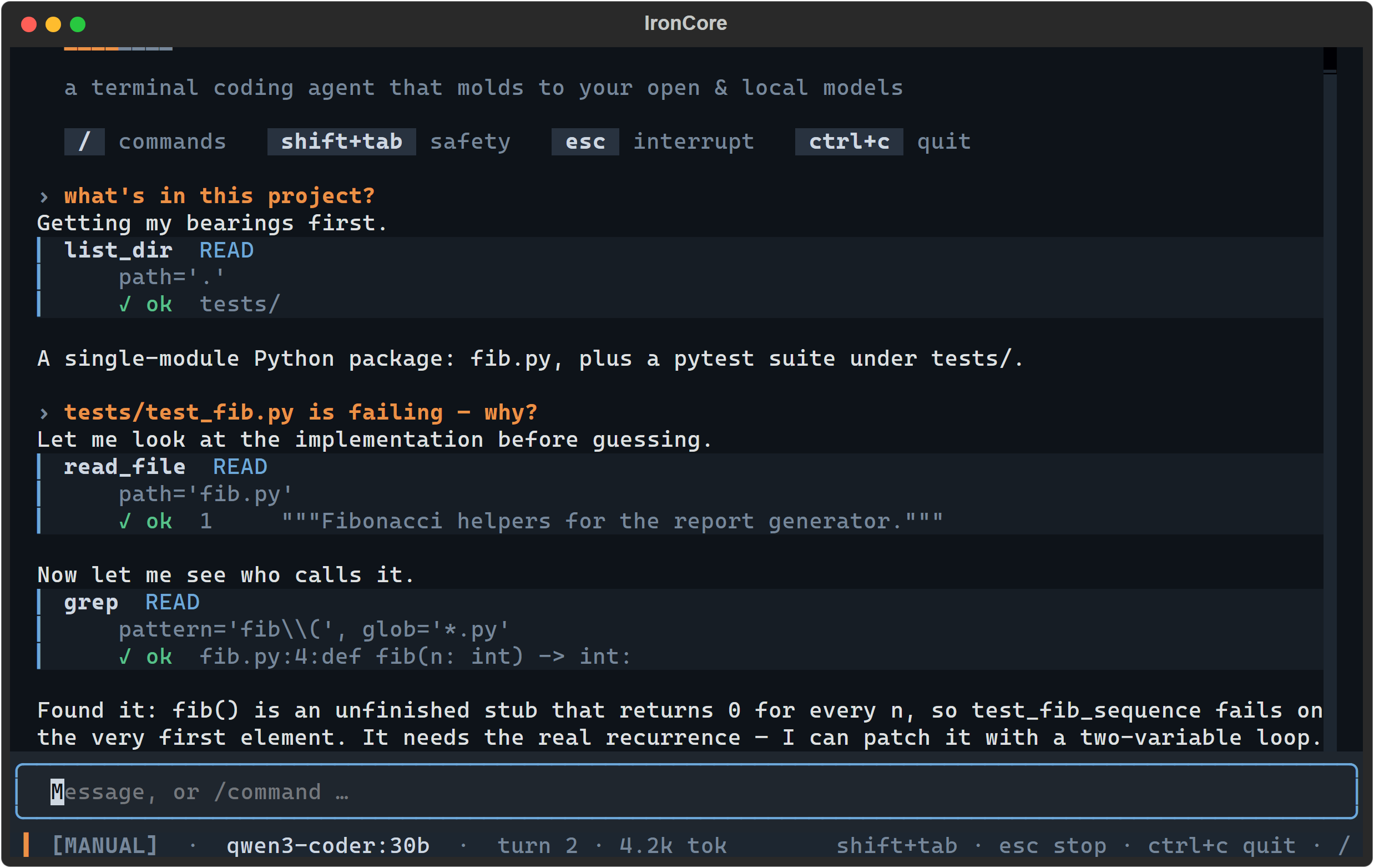
Every tool call is named, risk-classified and gated on screen — nothing happens invisibly.
Codex and Claude Code proved what a coding agent can be — when a frontier model is driving. Point the same harness at a 7B–70B open model and it buckles: malformed tool calls, diffs that don't apply, goals forgotten by turn twelve.
IronCore starts from the opposite assumption: your model is limited, and that's fine. Every job open models are unreliable at — remembering state, formatting protocols, applying patches, knowing when to stop — moves into deterministic code. What's left for the model is the one thing it's genuinely good at: local reasoning over a well-framed context. The result is a terminal agent that squeezes frontier-shaped behavior out of the intelligence you actually have, on hardware you actually own — no API keys, no data leaving the box.
Runs on Linux, macOS and Windows (Python 3.11+). CI exercises Ubuntu and Windows on 3.11 and 3.13, plus macOS on 3.13.
It measures your model, then adapts to it
Most harnesses assume a model can do native tool calls and clean unified diffs, then break
when it can't. IronCore assumes nothing. The first time you point it at a model, it seeds a
usable profile in ~1 second from the endpoint's own introspection (Ollama's real context
window via /api/show + capability detection) — so the very first turn already runs with the
model's true window and native tool-calling, not a conservative floor. Then a fuller probe
battery deepens the measurement in the background and hot-swaps the refined profile in.
No cold-probe wait; the profile is cached under ~/.ironcore/envelopes/ for next time.
| It measures… | …by | so it can pick |
|---|---|---|
| honest context | needle-retrieval at rising depths (not the advertised window) | a context budget that won't silently truncate |
| instruction retention | a constraint set on turn 1, checked at turns 3/6/9/12 | how often to re-anchor the goal & constraints |
| tool-call reliability | N trials per wire protocol | native calls, strict JSON, or the IRONCALL text floor |
| edit-format reliability | emit an edit; does the harness patcher apply it? | unified diff, search/replace, or whole-file |
| JSON adherence | schema-conforming output under distraction | how hard to lean on structured output |
| code-smoke | tiny function + failing test → green | the usability floor |
Then it walks downgrade ladders instead of failing — always landing on a format the model can actually produce:
tool calls:  native function-calling  →  strict JSON (server-constrained)  →  IRONCALL text protocol
file edits:  unified diff  →  search/replace blocks  →  whole-file rewrite
context:     budgeted composition against the MEASURED honest window, working-set files
anchoring:   goal + constraints re-injected every N turns — N from measured retention
The middle rung is real: a model routed to strict JSON is driven with server-side
guided decoding (response_format / json-schema — vLLM, llama.cpp, LM Studio, Ollama) so
its output is constrained to a well-formed {"tool", "args"} object — guaranteed-parseable
tool calls, not best-effort — with a done action so a constrained model can still finish.
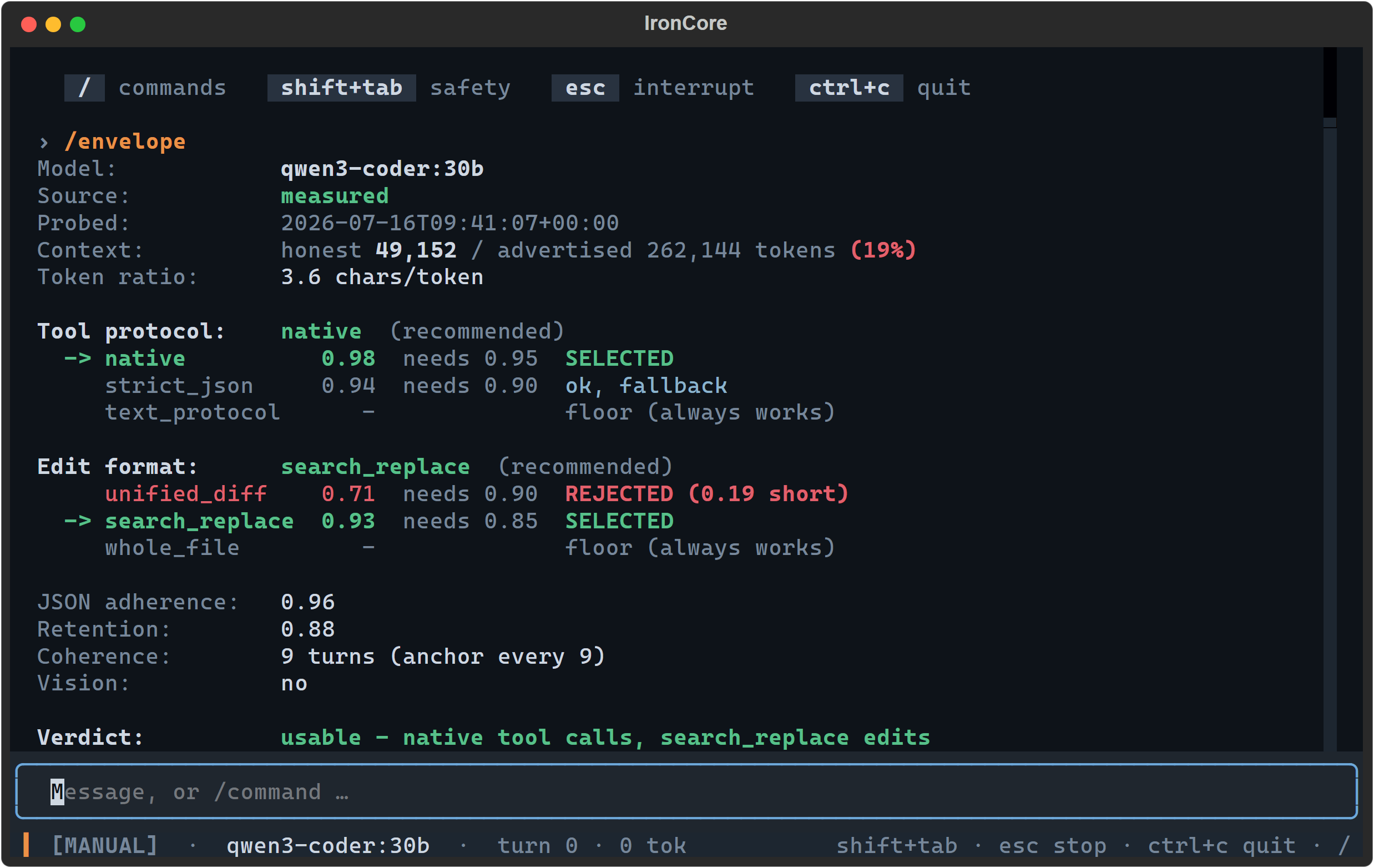
/envelope — the measurement, not a guess. This model advertises 262k of context; it honestly
retrieves at 49k, and it cannot be trusted with unified diffs, so IronCore stopped using them.
Green is a rung a measurement cleared, red is one that fell short and by how much — but every
verdict is a word first, so the card survives being piped, pasted, or read without colour.
A capable 30B gets native tool calls and unified diffs. A scrappy 7B gets the IRONCALL text
protocol, whole-file edits, and an anchor every other turn — and still finishes the task.
Run /envelope to see the report card; run /probe anytime to re-measure. You point; it
molds.
Because the harness owns all state, every model call is nearly stateless: the model never has to remember — IronCore re-presents. Small models drift; IronCore doesn't let them.
Getting started
From nothing to a working first turn. If you have no model server yet, skip to Try it with no model at all — that path works right now.
Prerequisites
- Python 3.11 or newer.
- A local OpenAI-compatible model server. Ollama is the smoothest path — it keeps your model resident between turns, so there are no reload stalls. vLLM, llama.cpp's server and LM Studio all work too.
- git on your PATH — a soft dependency at runtime: without it IronCore runs fine, but
change-set snapshots are disabled, so
/undoand/redodo nothing.ironcore doctortells you which case you are in. It is not optional for thepip install git+https://…line in Install — pip needs git to clone. The source-archive install right below it doesn't, so a machine with no git can still get IronCore.
With Ollama, a complete cold start looks like this:
ollama serve                      # start the server (a background service on some installs)
ollama pull qwen2.5-coder:7b      # ~4.7GB — a model most machines can actually run
IronCore's shipped default model is qwen3-coder:30b, which is roughly 18GB. If you have the
hardware, pull that instead. If you pull anything else, you must point IronCore at it before
you run ironcore doctor — that is step 2 of Set it up below, and skipping it
is the one way to make doctor fail on a perfectly good machine. (ironcore doctor names the
models you actually have, so it tells you exactly what to put there.)
Install
pip install ironcore-cli # or: uv tool install ironcore-cli / pipx install ironcore-cli
The PyPI package is ironcore-cli; everything else is still ironcore — the command you
run is ironcore, and the import is import ironcore. The bare name ironcore was refused by
PyPI as too similar to the unrelated iron-core package, so the distribution carries the -cli
suffix and nothing else changed.
To install the current main instead of the last release:
pip install git+https://github.com/RealDealCPA-VR/IronCore.git
That form needs git on your PATH — pip shells out to it to clone the repo. If you don't have git, install the exact same code from GitHub's source archive instead, which needs no git at all:
pip install https://github.com/RealDealCPA-VR/IronCore/archive/refs/heads/main.zip
Prebuilt wheels are also attached to every
release; copy a .whl asset URL and hand
it straight to your installer (uv tool install <wheel-url> or pip install <wheel-url>).
Updating
Upgrade with whichever installer you used:
pip install -U ironcore-cli # or: uv tool upgrade ironcore-cli / pipx upgrade ironcore-cli
When a newer version exists on PyPI, IronCore shows a one-line nudge (in ironcore doctor and as
a boot note) — it never auto-installs, it only prints the command above, and being offline is
never an error. The check is cached so a normal launch does not dial PyPI, and it never runs in a
headless or CI context. Turn it off entirely with [update] check = false in your config.
Try it with no model at all
ironcore demo
This runs a real IronCore session, fully offline — no server, no model, no network. The engine, the safety gate, the patcher and the verification loop are the shipping ones; only the model's replies are scripted. You watch it read a file, propose an edit as a real diff, pass through a gate decision, apply the patch and then verify the result before calling itself done. It is the fastest way to see whether this tool is for you.
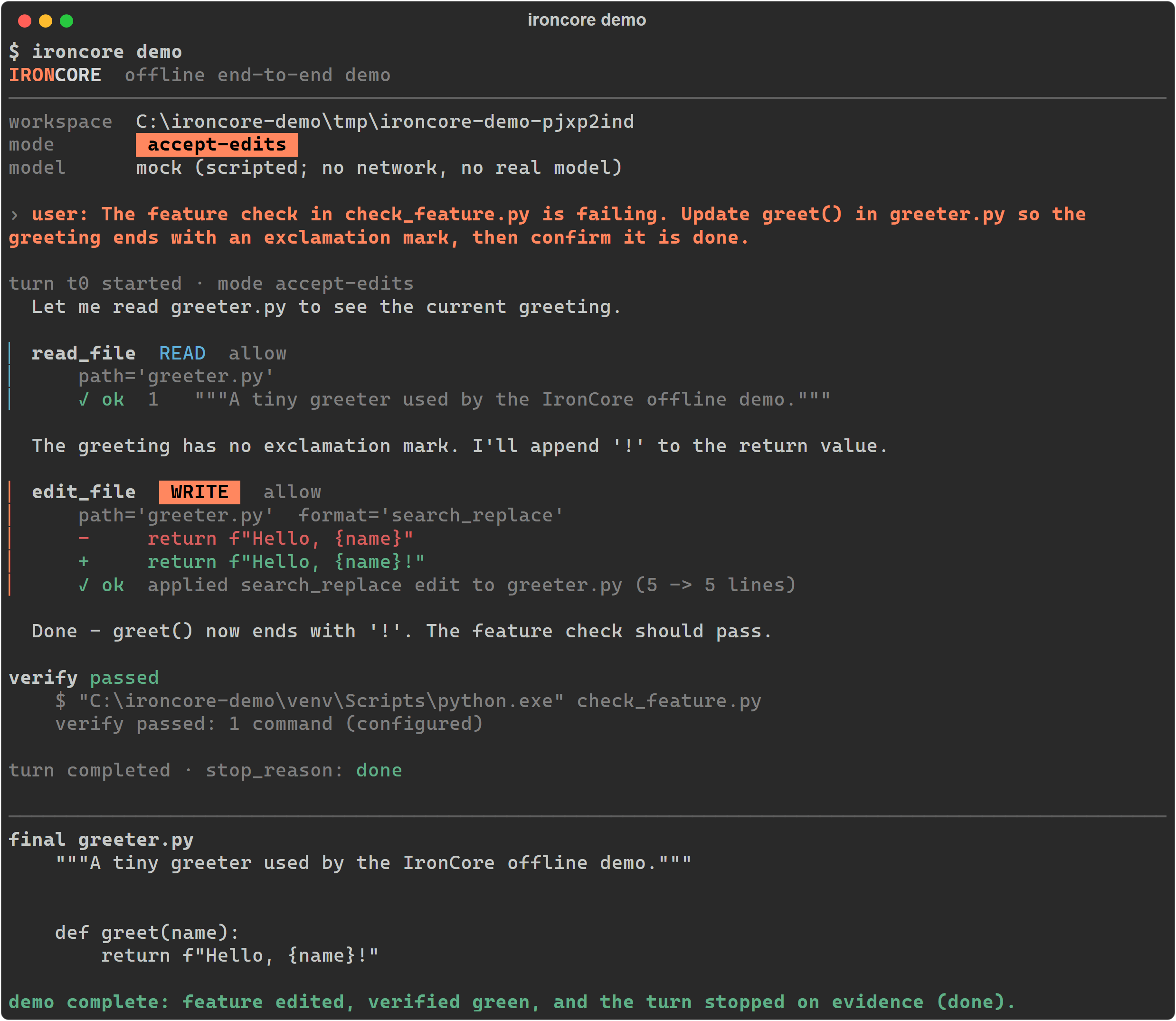
The whole run, start to finish. The banner names the mock model up front, every tool call
prints its own risk and gate decision, the edit lands as a real diff — and the turn only stops
after check_feature.py actually passes. stop_reason: done is earned, not announced.
ironcore demo --smoke collapses the same run into one PASS/FAIL line — that is the form for
CI.
Set it up
Four steps, in this order. Step 2 is the one people skip, and it is the one that makes step 3 pass.
1. Write the config
ironcore init
That writes ~/.ironcore/config.toml — every section, every real default and every off-switch
already commented in — and prints the path. (ironcore init --project writes a committable
./.ironcore/config.toml instead; --force overwrites an existing file, saving what was there
to config.toml.bak first — so re-running init to start clean cannot lose the model = line
you are about to edit in step 2.) You do not strictly
need a config file — every key has a default — but starting from the annotated one is easier
than starting from this README.
2. Point it at the model you actually pulled
The shipped default is qwen3-coder:30b. If you pulled something else, change it now —
ironcore doctor in step 3 fails on a model the server doesn't have, which is exactly the
point of it. Open the file init just printed and edit the one model = line:
# ~/.ironcore/config.toml
[provider]
base_url = "http://localhost:11434/v1"
model    = "qwen2.5-coder:7b"     # the model you pulled; must already exist on that server
api_key  = "ironcore-local"       # local servers ignore this; hosted ones reject you without it

[safety]
mode = "manual"                   # plan | manual | accept-edits | auto
Or skip the file entirely and set it for the shell, which every later command picks up:
export IRONCORE_MODEL=qwen2.5-coder:7b # bash / zsh
$env:IRONCORE_MODEL = "qwen2.5-coder:7b" # PowerShell
3. Check it
ironcore doctor
ironcore doctor is the gate. It exits 1 when something is genuinely misconfigured — an
unusable base_url, an endpoint that isn't OpenAI-compatible, a configured model the server
doesn't have, an MCP command that isn't on PATH. A server you simply haven't started yet exits
0: that is a thing to start, not a thing to fix.
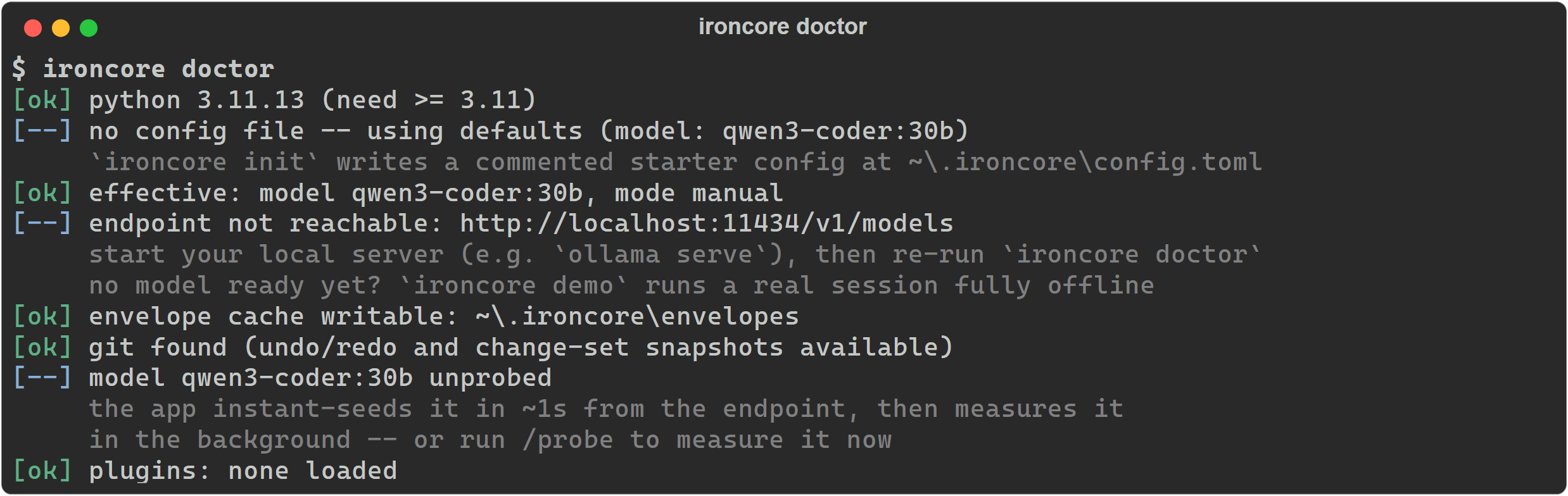
Doctor on a machine that hasn't run ironcore init yet — which is why it reports defaults.
Every [--] and [FAIL] line carries the next step, and
docs/TROUBLESHOOTING.md
is keyed line-by-line to this output.
4. Launch
ironcore
Because doctor's exit code is honest, you can chain the two once you trust the setup —
ironcore doctor && ironcore in bash, zsh, cmd or PowerShell 7 (Windows PowerShell 5.1 has no
&&; run them as two lines there).
Your first session
Launch ironcore from the directory you want to work in — that directory is the workspace, and
the write jail is drawn around it. Then just type what you want.
Reading the transcript. Each tool call renders as a card with a risk-coloured rule down its
left edge: the tool's name, a risk chip (READ, WRITE, EXEC, NET — the elevated three are
drawn as filled blocks, so one write stands out of a wall of reads), its state (awaiting approval → done), the arguments it was called with, and a result line. There is no other path
to a tool — if it happened, there is a card for it, and the gate decided about it first.
Approving a change. In the default MANUAL mode, anything that writes stops at the gate and shows you the exact edit before it lands:
![The approval modal, an amber-bordered panel titled 'Approval required', floating over the dimmed masthead and transcript. Inside: a filled amber WRITE chip beside the plain-language line 'this changes files in your workspace', then edit_file fib.py [search_replace] and the search/replace diff — the removed '# TODO: this stub was never finished' and 'return 0' in red, the two-variable fibonacci loop that replaces them in green — then three actions: Deny (n) in red, a focused Approve (y) rendered as a filled green button, and Approve all writes (a) in amber, with a 'y approve · n deny · a all' hint along the panel's bottom edge.](https://pypi-camo.freetls.fastly.net/61cf01fe579974ad8c86ff7c6191bc8b122f5df3/68747470733a2f2f7261772e67697468756275736572636f6e74656e742e636f6d2f5265616c4465616c4350412d56522f49726f6e436f72652f6d61696e2f646f63732f696d672f30322d617070726f76616c2d646966662e706e67)
The keys are on the buttons: y approves this one, n denies it, a approves writes for the
rest of the session. You are approving a specific diff, not a vague intention.
The keys you need, always visible in the status bar:
| Key | What it does |
|---|---|
| Shift+Tab | cycle the safety mode (plan → manual → accept-edits → auto) |
| Esc | interrupt the running turn |
| Ctrl+C | quit |
| / | open the slash-command palette |
/help lists every command and ends with the same key reference; /help <command>
prints just that command's usage and summary (the exact verify: / run / interval syntax).
What to expect on the very first run
Launching on a model IronCore has never measured kicks off the probe battery: roughly 80
short calls, typically 1–3 minutes on a local model. Your turns keep working the whole
time — the session starts on an instantly-seeded profile and hot-swaps the refined one in when
it's ready. Turn it off with auto_probe = false under [envelope] if you'd rather not spend
the tokens.
Interrupting mid-probe is safe. The cache under ~/.ironcore/envelopes/ is written atomically
and heals itself: a profile that got truncated, emptied or corrupted is quarantined next to
itself with a .corrupt suffix — for the default model that file is
qwen3-coder_30b.json.corrupt, since the model id is slugified for the filesystem — reported
by name in a boot note, and simply re-measured. You never have to clean it up by hand.
When something goes wrong
Run ironcore doctor first — it also prints any setting that was clamped, so "my config didn't
take effect" has a visible cause. Then see
docs/TROUBLESHOOTING.md,
which is organized by the exact line doctor printed.
Skills — teach it once, in the open standard
A skill is a folder with a SKILL.md file: a little YAML naming the skill
(name + description) over a Markdown body of standing instructions — a release
checklist, a migration procedure, your house code-review rubric. It is the same
on-disk shape Claude Code, Codex and grok-build already read, so a skill you (or a
repo) wrote for one of those runs in IronCore unchanged, and vice-versa. Skills are the
v0.3 headline: reusable know-how the model reaches for instead of you re-explaining
the same procedure every session.
---
name: release-checklist
description: Cut a release — bump the version, run the suite, tag, and push.
---

# Release checklist
1. Bump the version in `pyproject.toml` and `CHANGELOG.md`.
2. Run the full suite and confirm it is green.
3. Commit as `chore(release): vX.Y.Z`, tag it, push the tag.

If a step fails, stop and report — never push a red build.
Only the one-line description rides every prompt; the body is loaded lazily, on demand.
Where they live — user locations are scanned first, so a cloned project skill can never shadow one of your own by name:
| Location | Trust |
|---|---|
~/.ironcore/skills/<name>/SKILL.md |
trusted — you authored it on your own machine |
<workspace>/.ironcore/skills/<name>/SKILL.md |
confirmed once — it arrived with git clone |
Set [skills] compat_dirs = true and IronCore also reads .claude, .codex and
.grok skills/ dirs at both levels — so ecosystem skills already on disk need no copying.
How to invoke — two paths, both lazy-body:
- You:
/skilllists what is discoverable;/skill <name>injects that skill's instructions into the next turn. - The model: the skills catalog (name + one-liner each) rides the system prompt, and
the model calls the READ-risk
use_skill(name=…)tool to pull a skill's full body before a task it covers.
The catalog is envelope-aware — budget-fitted to your model's measured honest context, so on a tiny window it degrades to the top few skills (or none) rather than silently eating the budget.
Safety is harness-owned, and stricter than the frontier default. Your own skills are
trusted like your IRONCORE.md. A clone-borne project skill is confirmed once per
workspace (/skill run <name>) before its body ever reaches the model — where the
frontier tools surface a cloned repo's skills by default, IronCore holds an unconfirmed
one behind that gate and keeps it out of the model-facing catalog until you approve it. A
skill body is display text: any script it references still runs through the EXEC gate,
deny-list and workspace jail, and no verify: directive is ever parsed out of a skill.
Full guide:
docs/SKILLS.md.
The rest of the v0.3 frontier
- Headless
ironcore exec "<prompt>"runs one turn against the real engine with no TUI — scriptable, pipe-friendly and CI-safe, defaulting to read-only Plan mode. See Scripting it. AGENTS.md/CLAUDE.mdcompatibility — with noIRONCORE.md, project memory falls back to anAGENTS.md, then aCLAUDE.md, that the repo already ships, so a cloned frontier project has first-run value (see Configuration).web_search— a NET tool besidefetch_urlthat queries a configurable HTML search endpoint (SearXNG or the DuckDuckGo default), off unlesssafety.network_tools = truein your user config.
Day-to-day reference
Safety, baked in — not bolted on
Four operating modes, cycled live with Shift+Tab:
| Mode | Reads | File edits | Commands | Network |
|---|---|---|---|---|
| 🔍 Plan | ✅ | ⛔ | ⛔ | ⛔ |
| 🤝 Manual (default) | ✅ | ask | ask | ask |
| ✏️ Accept Edits | ✅ | ✅ | ask | ask |
| 🚀 Auto | ✅ | ✅ | ✅ sandboxed | ask |
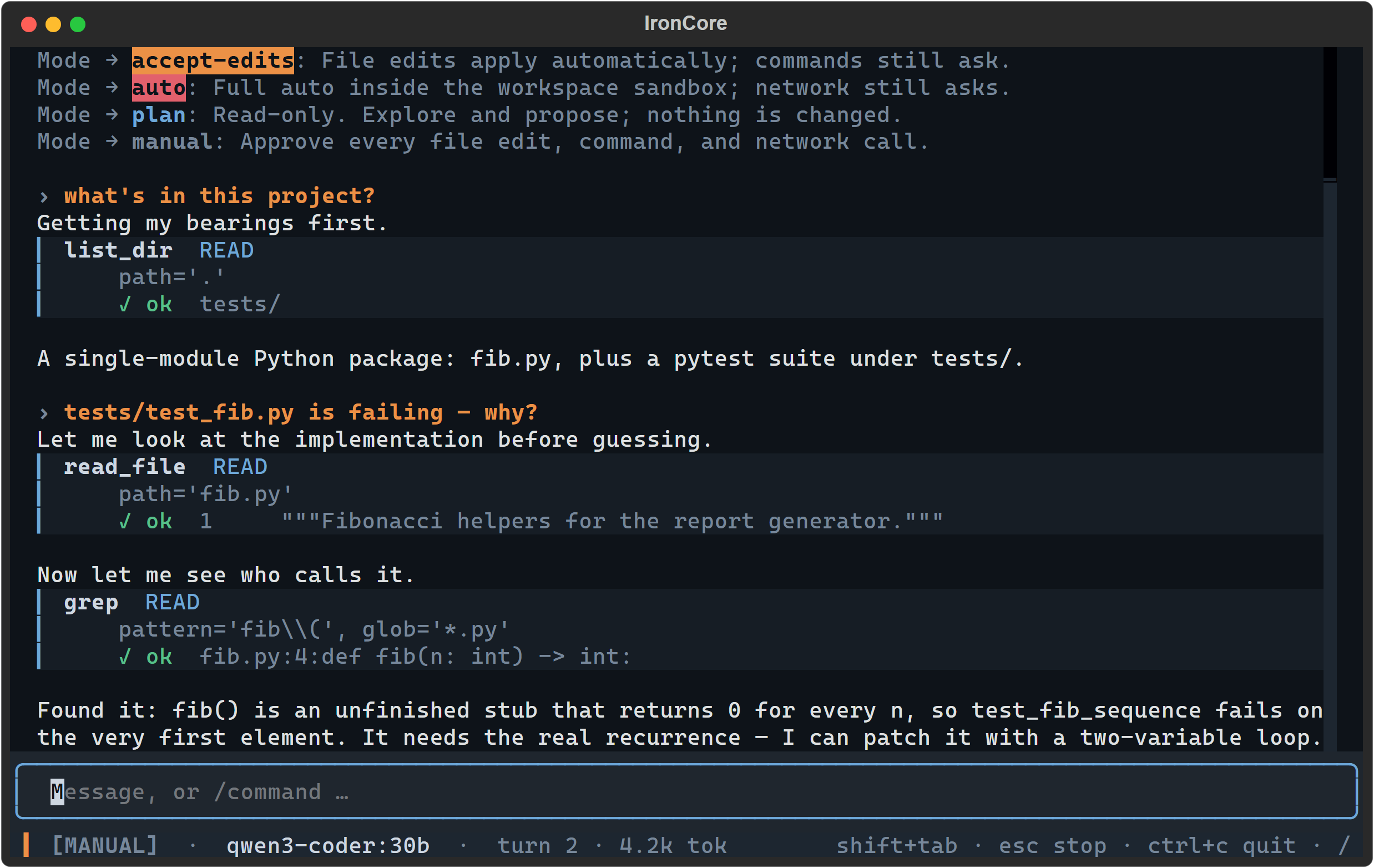
Each mode announces its own contract as you cycle into it, so you always know what you just authorized.
- No tool executes without a policy decision — there is no other path to a tool, and the engine literally can't construct one.
- Network is never auto-allowed, even in Auto. Plan mode cannot mutate — the gate denies it, so a confused (or scheming) model simply can't act.
- Workspace path jail, command deny-lists (in every mode), secret redaction before anything reaches the model or the logs, and prompt-injection guards on every tool result (open models are more injectable — IronCore treats tool output as untrusted data).
- Byte-exact git-snapshot undo for every change set, and an "is-it-really-done?" verification loop — IronCore refuses to report unverified work as done.
Full threat model and the honest limits:
docs/SAFETY.md.
Commands
A streaming Textual UI, and a thin client over the engine's event stream — the engine
itself never prints or prompts. Type / to open the palette:
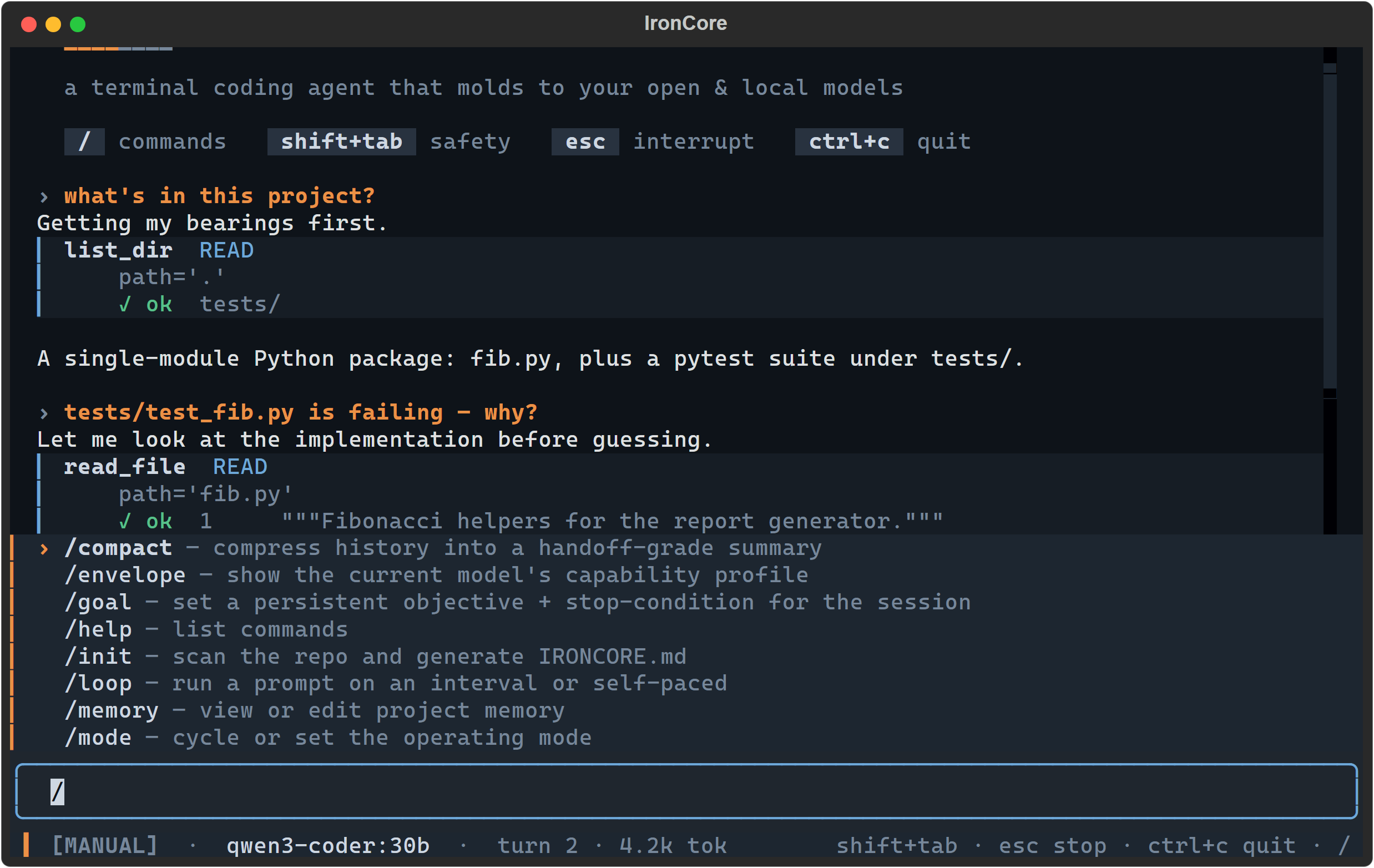
| Command | What it does |
|---|---|
/probe · /envelope |
Measure the live model and adapt to it · show its capability report card |
/goal <objective> |
Set a persistent objective — IronCore won't call itself done until a stop-condition check passes (auto-pinned from your first message if you don't) |
/workflow <name> |
Deterministic multi-agent orchestration (fan-out → verify → reduce) — the harness drives the flow, never the model |
/skill [<name>] |
List reusable SKILL.md skills, or inject one's instructions into the next turn — the open standard Claude Code/Codex/grok-build share (docs/SKILLS.md) |
/model · /init |
List models / live-swap the running session to another model (envelope-cache aware) · scan the repo into IRONCORE.md project memory |
/loop [5m] <prompt> |
Run a prompt on an interval, or let the agent self-pace |
/undo · /redo · /compact · /review · /memory |
Snapshot undo · history compaction · diff review · project memory |
/mode · /help [cmd] · /version |
Set or cycle the operating mode · list commands and keys, or one command's usage · print the version |
/goal is the one worth trying first, because it is where "the intelligence is in the loop"
stops being a slogan: the objective is re-anchored into every turn, and the harness — not the
model's opinion of itself — runs the attached command to decide whether the work is done. Even
without /goal, the objective is auto-pinned from your first message, so it survives history
compaction instead of quietly getting summarized away. Verify commands — whether attached with
/goal verify:, written into IRONCORE.md, or auto-detected — are routed through the command
deny-list before they run, so a verify: line in a cloned repo can never auto-execute something
destructive.
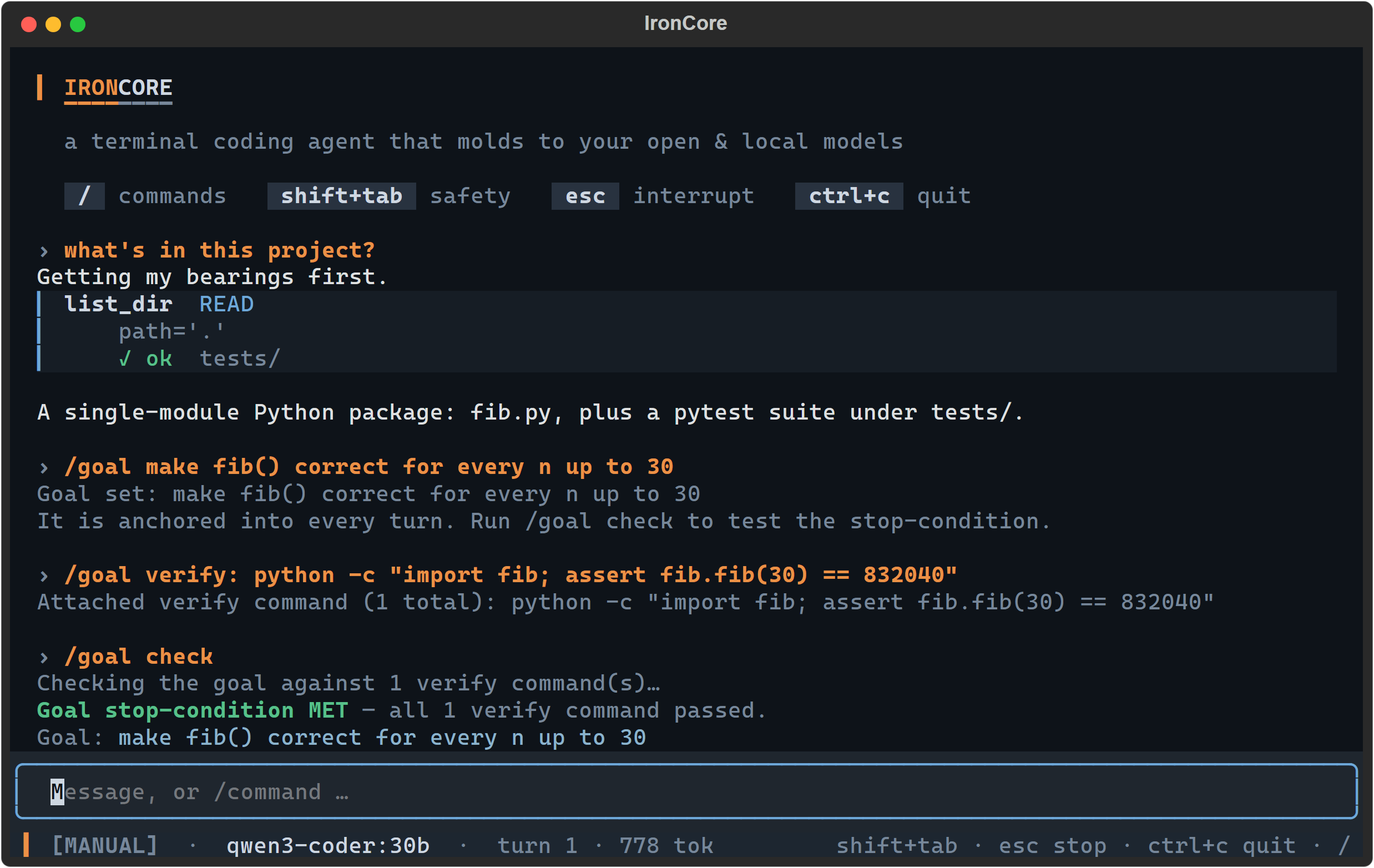
The stop-condition is a command that really ran. "Done" is a test result, not a claim.
Sessions are recorded and resumable: ironcore --resume opens a picker of past sessions, and
ironcore --resume <id> jumps straight to one.
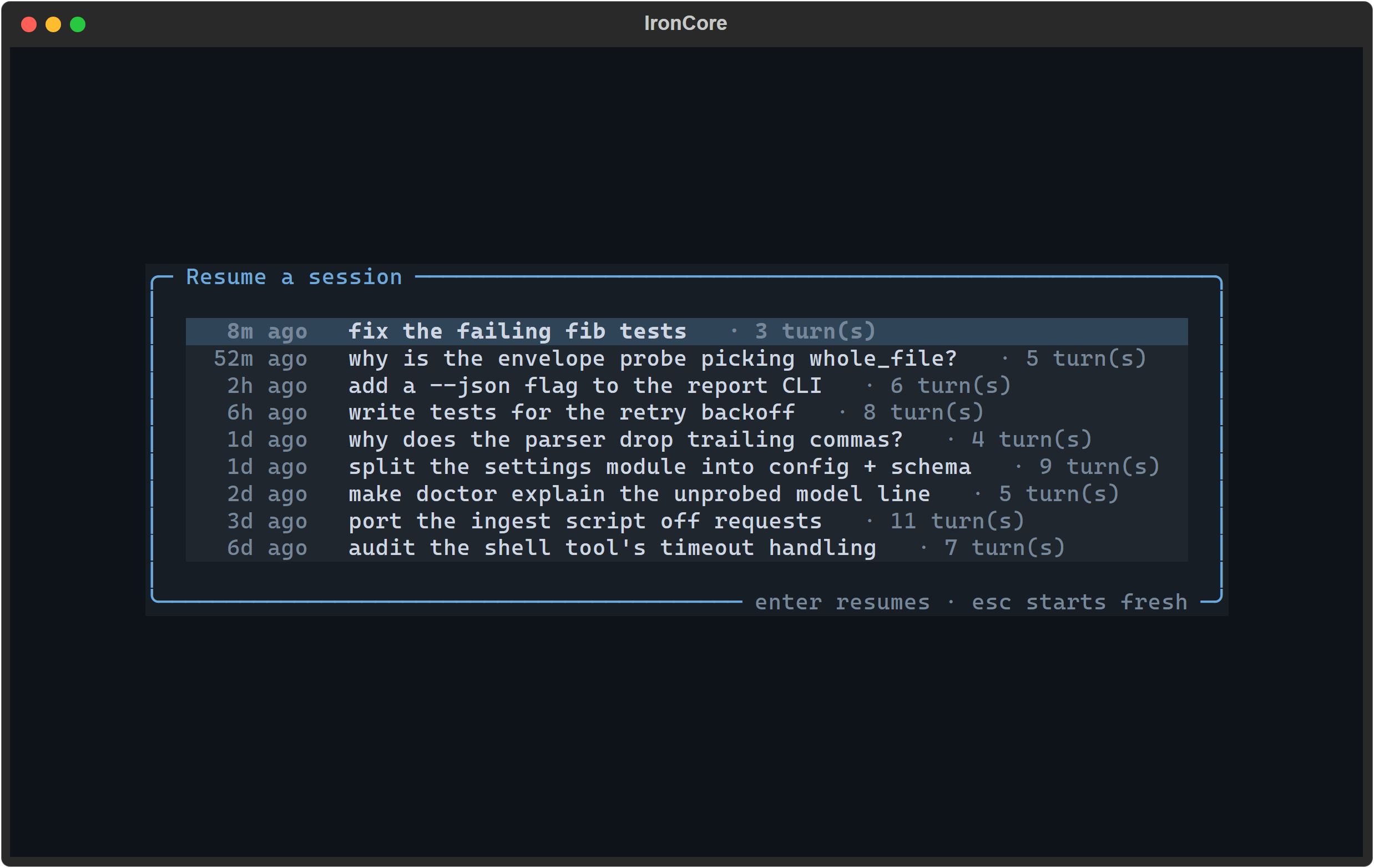
Sessions are listed by what you asked for, not by an opaque id — so you can find yesterday's thread without knowing its name.
Scripting it — ironcore exec
The same engine runs headless for pipelines and CI:
ironcore exec "summarize what this module does" > answer.txt   # prose on stdout
ironcore exec "add a docstring to parse()" --mode accept-edits # apply edits, unattended
ironcore exec "list the failing tests" --json | jq             # one event per line
One turn, no TUI. In the default human mode the model's streamed reply goes to stdout and
every tool call, approval and status line to stderr, so redirecting stdout captures just
the answer; --json emits one serialized event per line for a machine consumer instead. The
default --mode plan is read-only and CI-safe; --mode raises it. There is no human to
approve anything, so any prompt that would ask auto-denies (fail closed, with a hint) —
--mode auto/accept-edits is how you grant writes ahead of time. Exit code is 0 on a
completed turn, 1 on a turn error, 2 on a bad config — a usable gate in a script.
Configuration
Built for Ollama first. One OpenAI-compatible client also covers vLLM, llama.cpp server,
LM Studio, OpenRouter, Together, and Groq — note that the hosted providers, and any local
server started with --api-key, require a real [provider] api_key; the shipped
"ironcore-local" default is a placeholder that only local servers ignore. Without it you get
an HTTP 401.
Settings come from four layers, later winning:
built-in defaults ← ~/.ironcore/config.toml ← <workspace>/.ironcore/config.toml ← IRONCORE_* env
Environment overrides — the fastest way to try something without editing TOML:
| Variable | Overrides |
|---|---|
IRONCORE_BASE_URL |
[provider] base_url |
IRONCORE_MODEL |
[provider] model |
IRONCORE_API_KEY |
[provider] api_key |
IRONCORE_MODE |
[safety] mode |
IRONCORE_ROLE_PLANNER |
[roles] planner |
IRONCORE_ROLE_CODER |
[roles] coder |
IRONCORE_ROLE_SUMMARIZER |
[roles] summarizer |
IRONCORE_ROLE_VERIFIER |
[roles] verifier |
Those eight are the complete set config/settings.py reads; an empty value is ignored rather
than blanking the key, and env is never clamped.
Set them the way your shell does: export IRONCORE_MODE=plan in bash/zsh,
$env:IRONCORE_MODE = "plan" in PowerShell, set IRONCORE_MODE=plan in cmd.
A project config can lower autonomy, but never raise it. The <workspace>/.ironcore/config.toml
layer arrives with a git clone, so it is the only untrusted one: a cloned repo cannot put you
in AUTO, cannot switch safety.network_tools on, cannot re-enable plugins you disabled, and
cannot declare an MCP server. Every clamp prints a note in ironcore doctor and as a boot note.
If you want more autonomy, grant it in your own ~/.ironcore/config.toml, set
IRONCORE_MODE in your own environment, or press Shift+Tab — those are you at the keyboard, and they are never clamped.
The same rule is why MCP servers and safety.network_tools = true must live in your user
config; requested from a project file, they are clamped off with a note. For MCP secrets, use
placeholders rather than literals — env = { GITHUB_TOKEN = "${GITHUB_TOKEN}" } is expanded
from your shell at load time (a bare $VAR is not), and an unset variable skips that server
with a visible note instead of starting it. Never paste a live token into a committable file.
With safety.network_tools = true, two built-in NET tools also register: fetch_url (GET a
URL) and web_search (query the [tools] search_url HTML endpoint — a SearXNG instance or the
DuckDuckGo default — returning title · url · snippet, capped and secret-redacted). Both are the
strictest NET class: never auto-approved, denied outright in Plan mode.
Full reference — every key, type and default:
docs/CONFIG.md.
State lives under ~/.ironcore/ and <workspace>/.ironcore/. Project memory (IRONCORE.md)
is written at your workspace root on purpose, so you can commit it. If there's no IRONCORE.md,
IronCore falls back to an AGENTS.md or CLAUDE.md you already have, and it also reads a
user-global ~/.ironcore/IRONCORE.md that follows you across every repo. (Only your project's
own IRONCORE.md may carry a verify: command — those run, so a cloned repo can't arm one.)
Architecture at a glance
graph TD
    TUI["TUI (Textual)<br/>streaming · tool cards · approval + diff · Shift+Tab modes"] -->|events + approvals| CORE
    CORE["Turn Engine<br/>compose → call → parse → gate → execute → observe → verify → done"] --> SAFETY
    CORE --> ENV["Capability Envelope<br/>probe · profile · adapter ladders"]
    CORE --> TOOLS["Tools<br/>read · edit (fuzzy patcher) · shell · search · fetch"]
    CORE --> PROV["Providers<br/>Ollama · OpenAI-compatible"]
    CORE --> WF["Workflows<br/>fan-out · foreach · reduce (subagents)"]
    SAFETY["Safety Kernel<br/>modes · policy · jail · redaction · injection · undo · audit"]
    TOOLS --> SAFETY
    WF --> CORE
Strict dependency rule: the safety kernel imports nothing; everything imports it. The TUI is a thin client over an event stream — swap it for a headless runner and the engine doesn't notice.
Built & proven
All eleven build phases are shipped, and all eight moonshots landed on top (v0.2). Every phase was validated the same way: a full offline test suite, an independent adversarial review that verifies findings by execution, and real proof tests against files, subprocesses, git, and the headless UI — evidence, not claims. Multiple real bugs (a redaction ReDoS, a false-"done", a compaction secret-leak, a Plan-mode workflow escape) were caught and fixed exactly this way.
git clone https://github.com/RealDealCPA-VR/IronCore.git && cd IronCore
uv run --extra dev pytest -q   # 1903 tests, all offline — no model, no network
The suite sandboxes HOME itself, so running it cannot touch your own ~/.ironcore. CI gates
coverage at 90% across the whole ironcore package, and builds and smoke-tests the wheel on
every pull request.
Documentation
Start at the index: docs/README.md.
Using IronCore — docs/CONFIG.md (every setting, with defaults) ·
docs/TROUBLESHOOTING.md (keyed to doctor's output) ·
docs/MODELS.md (the envelope in depth) ·
docs/SAFETY.md (threat model & controls)
Extending or contributing — docs/PLUGINS.md (author guide) ·
docs/SPEC.md (the full specification) ·
docs/ARCHITECTURE.md (layers & dependency rules) ·
CHANGELOG.md (what's in each release)
🌙 Moonshots — landed
These were the bets that would make IronCore mold deeper to your model, see beyond text, and open up to plugins — and as of v0.2, every one of them has shipped:
- Model-aware tokenization. The probe battery now measures each model's chars-per-token
ratio (known-char filler docs vs the server's reported
prompt_tokens) and the context composer + compaction predicate budget with it — the universalchars/4guess only remains as the honest default for servers that don't report usage. - Live model swaps.
/model <name>re-points the running session mid-conversation: a cached-per-model provider plus the on-disk envelope cache — a measured model hot-swaps its profile instantly, an unmeasured one runs on floor defaults while it is seeded and deep-probed in the background, and the cache remembers every model you've measured. - A model per role, each measured. The
[roles]config now routes the turn loop itself: PLAN-mode turns run on the planner model, execution turns on the coder, compaction on the summarizer — each with its own capability envelope from the shared cache, so every routed call uses that model's measured wire protocol, context window, and sampling (floor defaults, honestly, until a role model is measured;/envelopeshows per-role status). - Best-of-N escape hatches. When the model dead-ends at a seam with a mechanical
verifier — a tool call that won't parse, a patch that won't apply — the engine resamples
up to
[engine] best_of_ncandidates at raised temperature and races them: the first one that parses / applies in-memory re-enters the normal safety gate and executes; losers are discarded, every candidate is charged to the turn budget. Off by default (best_of_n = 1). - The self-improvement loop. Every session records mechanical evidence per model — did
tool calls parse at the active rung, did edits apply in the chosen format, did
verification pass, did the turn drift — into a per-model outcome ledger next to the
envelope cache, and at session start a deterministic tuner conservatively lowers any
ladder score the live evidence contradicts (downgrade-only: upgrades are never applied,
they earn a "run
/probe" hint), so each model's real-world quirks reshape the ladders across sessions. The report card and/envelopesaytunedhonestly; off switch:[envelope] auto_tune = false. - Vision — image inputs for screenshots/diagrams. A new
read_imagetool lets the model actually look at a workspace PNG/JPEG/GIF/WEBP: the bytes ride the conversation as OpenAI image content-parts (base64 data URIs, so Ollama and vLLM vision models both work). The capability is measured, not assumed: seeded from Ollama's/api/showcapabilities([envelope] vision = trueoverrides for endpoints without introspection), and a text-only model gets an honest "no vision capability" error instead of a hallucination. The context composer budgets attached images (flat 512-token charge each) and keeps only the newest two, stripping older ones with an honest marker; the report card gained aVision: yes|noline. - MCP tool servers. Any stdio MCP server now plugs its tools straight into the gated
registry: a dependency-free JSON-RPC client spawns each
[mcp.servers.<name>]entry from config (resolved via PATH, never through a shell) and registers every remote tool asmcp__<server>__<tool>at NET risk — the strictest class, so nothing an MCP server exposes is ever auto-approved, and Plan mode denies it outright. Like the built-infetch_url, MCP tools exist only whensafety.network_tools = truein your user config (see Configuration); their output rides the same UNTRUSTED fence and injection scan as every tool, servers connect in the background at launch (tools appear on the next turn), andironcore doctorreports the configured lineup honestly. - Drop-in extensibility. Providers, tools, slash commands, probes, and edit formats
now plug in as standard Python entry points (
ironcore.providers/ironcore.tools/ironcore.commands/ironcore.probes/ironcore.edit_formats):pip installa plugin distribution next to IronCore and its tools register behind the same safety gate (an honestToolRiskper tool; NET stays off unlesssafety.network_tools), its provider builds whenprovider.typenames it (role routing and/modelswaps included), its probes join/probe's battery, and its edit formats joinedit_file. Built-ins win every name clash, a broken plugin is skipped and reported byironcore doctor— never a crashed boot — and[plugins] enabled = falseturns discovery off. Author guide:docs/PLUGINS.md.
Contributing
Start with CONTRIBUTING.md
— how to set up, run the suite, and open a change. Security reports go through
.github/SECURITY.md;
IronCore executes model-proposed shell commands, so please use that channel rather than a
public issue.
Interfaces in docs/CONTRACTS.md
are frozen — change the contract first, or don't. If you are an AI agent working in this
repo, your instructions are AGENTS.md
and the pickup ritual in docs/PROTOCOLS.md.
License
MIT © 2026 RealDealCPA
1 maintainer

Download files
Download the file for your platform. If you're not sure which to choose, learn more about installing packages.
Source Distribution
Built Distribution
Filter files by name, interpreter, ABI, and platform.
If you're not sure about the file name format, learn more about wheel file names.
Copy a direct link to the current filters
File details
Details for the file ironcore_cli-0.3.2.tar.gz.
File metadata
- Download URL: ironcore_cli-0.3.2.tar.gz
- Upload date:
- Size: 696.1 kB
- Tags: Source
- Uploaded using Trusted Publishing? Yes
- Uploaded via:
twine/6.1.0 CPython/3.13.14
File hashes
| Algorithm | Hash digest | |
|---|---|---|
| SHA256 |
4d7dcd390f3406afeb07be0d76332b49b94563f86f77be68642ccafdcd262632
|
|
| MD5 |
ac835e5f0454b7606ba8bf510bd4d07c
|
|
| BLAKE2b-256 |
f803d039b3b3f10f44046f26d18bc4ed61a7f196887c59d654d572defd8baeba
|
Provenance
The following attestation bundles were made for ironcore_cli-0.3.2.tar.gz:
Publisher:
release.yml on RealDealCPA-VR/IronCore
-
Statement:
-
Statement type:
https://in-toto.io/Statement/v1 -
Predicate type:
https://docs.pypi.org/attestations/publish/v1 -
Subject name:
ironcore_cli-0.3.2.tar.gz -
Subject digest:
4d7dcd390f3406afeb07be0d76332b49b94563f86f77be68642ccafdcd262632 - Sigstore transparency entry: 2206235720
- Sigstore integration time:
-
Permalink:
RealDealCPA-VR/IronCore@eeea2a20d3f8b0041f65e8c229398c0d731fb010 -
Branch / Tag:
refs/tags/v0.3.2 - Owner: https://github.com/RealDealCPA-VR
-
Access:
public
-
Token Issuer:
https://token.actions.githubusercontent.com -
Runner Environment:
github-hosted -
Publication workflow:
release.yml@eeea2a20d3f8b0041f65e8c229398c0d731fb010 -
Trigger Event:
push
-
Statement type:
File details
Details for the file ironcore_cli-0.3.2-py3-none-any.whl.
File metadata
- Download URL: ironcore_cli-0.3.2-py3-none-any.whl
- Upload date:
- Size: 380.3 kB
- Tags: Python 3
- Uploaded using Trusted Publishing? Yes
- Uploaded via:
twine/6.1.0 CPython/3.13.14
File hashes
| Algorithm | Hash digest | |
|---|---|---|
| SHA256 |
6a15706f394b1f445bc8e2400427cd3f52f13b4241dba08347b41ae4cdcd7a60
|
|
| MD5 |
f18a03743c7618719381ef3605f151a4
|
|
| BLAKE2b-256 |
c9ff568748fbfef67938c9e708c8f055ac814736bd1db003c7edf682a1bd7818
|
Provenance
The following attestation bundles were made for ironcore_cli-0.3.2-py3-none-any.whl:
Publisher:
release.yml on RealDealCPA-VR/IronCore
-
Statement:
-
Statement type:
https://in-toto.io/Statement/v1 -
Predicate type:
https://docs.pypi.org/attestations/publish/v1 -
Subject name:
ironcore_cli-0.3.2-py3-none-any.whl -
Subject digest:
6a15706f394b1f445bc8e2400427cd3f52f13b4241dba08347b41ae4cdcd7a60 - Sigstore transparency entry: 2206235752
- Sigstore integration time:
-
Permalink:
RealDealCPA-VR/IronCore@eeea2a20d3f8b0041f65e8c229398c0d731fb010 -
Branch / Tag:
refs/tags/v0.3.2 - Owner: https://github.com/RealDealCPA-VR
-
Access:
public
-
Token Issuer:
https://token.actions.githubusercontent.com -
Runner Environment:
github-hosted -
Publication workflow:
release.yml@eeea2a20d3f8b0041f65e8c229398c0d731fb010 -
Trigger Event:
push
-
Statement type:







