
irp-capture



Intent Record Protocol
IRP gives agents the reasons behind your decisions, including the options you turned down.
Agents can read it through MCP before they act, so they don't reopen settled debates or break a rule they can't see the point of. People read the same record when a decision is questioned later. Human why in, accountability out.
Confirm a decision → it's appended to a local file → any later edit shows.
# Before starting something new
irp why

# IRP-2026-04-08-001  Decision: Use Postgres for the reporting service
# Why: Redis rejected, query patterns require joins
#
# → No need to reopen this debate
Three sprints ago your team made a hard call on the architecture. Everyone was in the room. It was the right decision, for the right reasons. Last week, someone reopened the debate. Because the reasoning was not written down anywhere.
This is not a memory problem. It is a meaning or decision, reasoning traceability problem.
Who this is for
If your organisation makes decisions that somebody might one day have to answer for, this is for you.
That covers the cases where being unable to answer causes real harm:
- Public bodies and institutions deciding on benefits, eligibility, enforcement or access, where the person affected has a right to an explanation and usually cannot get one
- Regulated organisations in finance, health, employment and essential services, where "show us how you decided" is a question with legal weight behind it
- Anyone putting AI into a decision about a person, where the reasoning now happens partly inside a model and partly inside a human, and neither half is written down anywhere
And it covers the everyday version, which is the same failure at lower stakes:
- Engineering teams choosing between approaches
- Design and product teams approving a direction
- Any team where the person who knew why has left the room
Working alone on something reversible? This will feel unnecessary, and that is a fair reading. It becomes obvious the first time somebody asks you to justify a decision you made a year ago, and you find that you cannot.
The reasoning gap
"Why was this decided?"
It is one of the most common questions asked inside any organisation, and one of the least answerable. Everyone has hit the wall: a rule nobody can explain, a system nobody remembers choosing, a policy that outlived the person who understood it.
Usually that is merely expensive. Sometimes it ruins people.
The Post Office Horizon scandal. For more than fifteen years, accounting software reported shortfalls in branch accounts that were not real. More than 900 subpostmasters were convicted of theft and fraud. Some went to prison. The system said money was missing, and the people accused had no way to interrogate how that conclusion had been reached, or who had decided the system could be trusted over them.
The Dutch childcare benefits scandal. A self-learning algorithm at the tax authority used nationality as a proxy for fraud risk. Somewhere between 26,000 and 35,000 families, disproportionately from ethnic minorities, were wrongly accused of benefit fraud and ordered to repay sums they did not owe. More than 2,000 children were removed from their parents. The government resigned in 2021.
In both cases the decisions were made by people. Someone chose the system, someone accepted its output, someone decided a human's account was worth less than a machine's. Those decisions were real, and they were defensible or not on reasons that existed at the time. What did not exist was any record of those reasons in a form anyone could later examine. So the reconstruction happened years afterwards, in public inquiries, at enormous cost, and incompletely.
To be clear about what this changes. A decision record would not have fixed either algorithm. Bad decisions recorded honestly are still bad decisions. What it changes is whether the question can be answered at all, and how long that takes: months of inquiry, or minutes of reading.
That is the gap. Not that organisations lack data. They have too much. It is that nothing in the stack was ever designed to hold the reason a human gave at the moment they committed to something.
And it is widening. AI now participates in more decisions, faster, and leaves less human trace. Not through malice. Because the reasoning happens inside a session, and the session closes.
The same failure, in its harmless form, is the one you already recognise:
- A new engineer asks why the architecture is like this. Nobody knows.
- An auditor asks which human approved this. Nobody can say.
- A settled decision gets relitigated because the reasoning went with the person who left.
Storing everything is easy. Being able to answer for it is not.
Before / After
Without IRP
New engineer joins
→ asks why the system works this way
→ team debates again
→ decision gets re-made
With IRP
New engineer joins
→ runs `irp why`
→ sees the decision and the reasoning
→ moves forward without reopening it
What IRP does
IRP is an append-only decision ledger that lives alongside your work.
Think of it as a ship's log. Every course correction. Every judgment call. Every hard decision. Not because the ocean would remember but because the next watch needs to know why the ship is where it is.
When a human confirms a decision, IRP records it. That is the entire model.
No AI inference. No automatic capture. No vector search. A human confirms a decision. IRP records it. The ledger is a plain text file. It never changes an existing entry.
.irp/
  ledger.jsonl     ← append-only canonical record
  current.json     ← last 10 decisions, derived from ledger
Every entry looks like this:
{
  "id": "IRP-2026-04-08-001",
  "timestamp": "2026-04-08T14:32:11Z",
  "decision": "Use Postgres for the reporting service",
  "why": "Redis was considered but rejected. The query patterns require joins that do not map cleanly to key-value. Team aligned on this in the April 8 architecture review.",
  "source": "cli",
  "confirmed_by": "johan",
  "context": "Backend infrastructure Q2 2026"
}
Open the file. Read it. No tooling required.
The human confirmation invariant
IRP does not decide what matters. You do.
Every entry in the ledger was confirmed by a human. This is not a design limitation. It is the point.
An AI can produce a hundred options. Only one was chosen, and someone chose it for a reason. That reason is what IRP captures.
This makes the ledger auditable, defensible, and trustworthy in a way that ambient memory systems cannot be.
What survives
When systems change, most context is lost.
You move to a new tool. A team member leaves. The platform updates. Infrastructure changes. An AI service goes down.
Most knowledge disappears with it.
IRP ensures one thing survives:
- What was decided
- Why it was decided
The .irp/ directory travels with your work. It is not trapped in a tool or a service.
It is a plain text file. It lives where your code lives.
New team member joins?
They run irp why and see what was already decided.
New system, new tool, new team? The ledger travels. The reasoning survives.
This is not about memory. It is about meaning traveling across time, tools, and teams.
Under the hood
| Component | Choice | Why |
|---|---|---|
| Storage | Append-only .jsonl flat file |
Human-readable, no database required |
| Retrieval | Deterministic, read the ledger | No embeddings, no similarity guessing |
| Capture | Human-confirmed via sensor | No AI decides what matters |
| Format | Plain JSON per line | Works in any editor, any language |
| Dependencies | Python 3.9+, no cloud | Runs entirely on your machine |
No ChromaDB. No vector index. No model dependency. The ledger is the truth. Not an approximation of it.
Architecture
IRP is a small core with a wide edge. Decisions are captured wherever they happen, written once to an append-only record, and everything else (integrity proofs, the decision graph, the exports) is derived from that one file and never written back into it.
flowchart LR
    subgraph capture["Capture, where decisions happen"]
        direction TB
        CLI["CLI"]
        Slack["Slack"]
        Discord["Discord"]
        Figma["Figma"]
        VSCode["VS Code"]
        MCP["MCP"]
        API["REST API"]
    end
    subgraph core["Core"]
        direction TB
        Dispatch["irp dispatcher"]
        Resolve["resolve / why (conflict + lineage)"]
        Store["store (append-only writer)"]
    end
    Ledger[(".irp/ledger.jsonl, the append-only record")]
    subgraph integrity["Integrity, optional and verifiable"]
        direction TB
        Canon["canonical + manifest"]
        TS["RFC 3161 timestamp"]
        Attest["attest / verify"]
    end
    subgraph derived["Derived, recomputable, never written back"]
        direction TB
        Dyn["Dynamics (typed edges + PageRank lenses)"]
        Graph["export graph (foundations / lineage / impact)"]
    end
    subgraph share["Share the context"]
        direction TB
        SlackOut["Slack digest"]
        Obs["Obsidian"]
        Mem["Memory palace"]
        Agents["AGENTS.md / DECISIONS.md"]
    end
    capture --> Dispatch
    Dispatch --> Resolve
    Dispatch --> Store --> Ledger
    Resolve -. reads .-> Ledger
    Ledger --> Canon --> TS --> Attest
    Ledger --> Dyn --> Graph
    Ledger --> share
And IRP dogfoods itself. Below is the built-in demo ledger seen through the
foundations lens: the same 18 decisions you get from irp export graph --demo,
with node size showing which decisions the rest of the graph rests on.
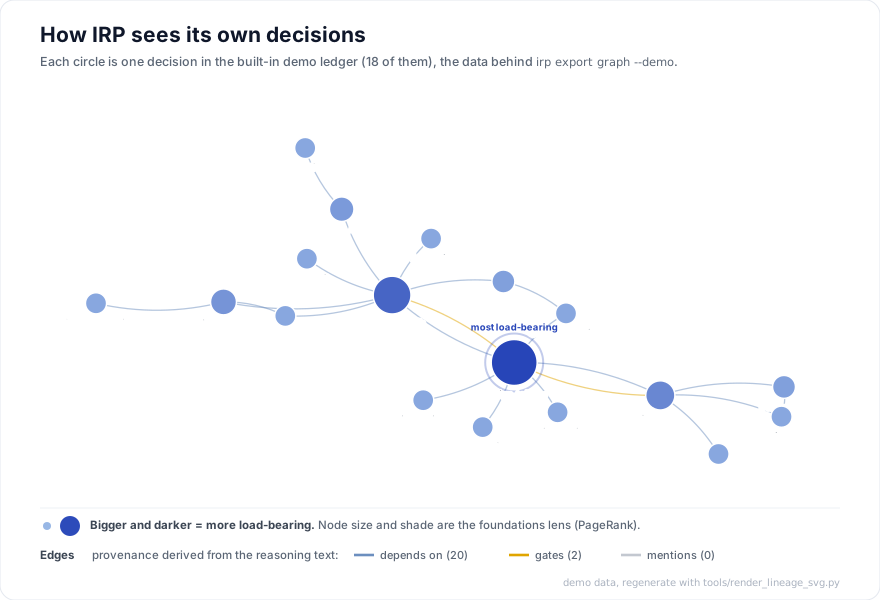
New to this? Here is how to read it, in plain words:
- Every circle is one decision. The label is its topic (this demo happens to be a small design-system project).
- The lines are called typed edges. A typed edge is a link between two decisions that also records what kind of link it is, its "type". IRP works out both the link and its type from the reasoning you wrote, not from anything you draw by hand. The three types are:
- depends on: this decision builds on an earlier one.
- gates: this decision sets a constraint that a later decision has to live within.
- mentions: a plain reference, with no clear before or after.
- The "foundations lens" ranks how load-bearing each decision is. A decision is load-bearing when many others trace back to it, so changing it would ripple the furthest. The lens is PageRank, the same idea Google used to rank web pages: you score highly when lots of other well-connected things point to you.
- Bigger, darker circles are more load-bearing. The biggest one, ringed and marked most load-bearing, is the decision the rest of the graph leans on the most. Here that is "Design tokens", which everything else was built on.
That figure is generated from the demo data by
tools/render_lineage_svg.py, which derives the
typed edges and runs the same PageRank the CLI uses. Explore the
live, draggable 3D version, or
run irp export graph --demo to make your own.
Applied to a record you already know
The demo above is IRP reading its own reasoning. To see the same engine on a real, documented record, there is a worked example built from Sweden's pandemic decisions, 2020 to 2022: 25 decisions, every one carrying its source and a confidence.
It is a reconstruction, assembled from public sources and carrying no
attestation, which is why it is exported with --reconstruction and uses its own
SE- id namespace. It takes no position on whether Sweden was right. Where the
sources disagree, and on the central questions they do, the graph shows the
disagreement rather than resolving it. Source data and method:
examples/sweden-2020/.
Get started
pip install irp-capture
# Set the context for your project
irp inherit "Project: My project, backend API, Q2 2026"

# Capture a decision
irp capture "Decision: Use Postgres for the reporting service" \
  --why "Redis considered but rejected, query patterns require joins"

# Review recent decisions
irp why
# Output:
# IRP-2026-04-08-001
# Decision: Use Postgres for the reporting service
# Why: Redis considered but rejected, query patterns require joins
#
# → No need to reopen this debate
The ledger is created at .irp/ledger.jsonl in your working directory.
That file is yours. It does not leave your machine unless you choose.
Sensors
Sensors are optional. The ledger is the system.
IRP captures decisions from the tools your team already uses. Nothing changes about how you work.
| Sensor | How it captures |
|---|---|
| Claude Code skill | Type capture inside any Claude session. Captures the decision the moment it is made, without leaving your workflow. |
| CLI | irp capture, capture any decision directly from the terminal |
| Discord | Right-click any message → "Capture decision" → fill in what/why/tags. Modal writes directly to ledger. Community-native, emoji-friendly. Setup: see DISCORD-SENSOR-SETUP.md. |
| Slack | Resolve a thread with a decision. The bot writes it to the ledger. |
| Figma | Resolve a design comment. The plugin captures the decision. Start the bridge with --project-root /path/to/project, see irp/figma_plugin/README.md. |
| Git hook | Capture architecture decisions at commit time |
| PR bot | Add to any GitHub repo, warns on PRs that conflict with active decisions. See setup below. |
| REST API | Build custom integrations via HTTP. pip install irp-capture[api], see irp/api/README.md. |
| MCP server | Expose IRP as MCP tools for any MCP-compatible client. pip install 'irp-capture[mcp]' then run irp-mcp. Works with Claude Code, Cursor, Windsurf, and custom agent frameworks. See CURSOR-GUIDE.md for Cursor-specific setup. |
| VS Code | Extension, IRP: Capture Decision (⌘⇧I), status bar, irp why output panel. Install: drag irp-capture-0.5.0.vsix into Extensions. |
No tool talks to another. Everything talks to the ledger.
The CLI asks you to confirm before it writes. Sensors, the REST API, MCP and
irp capture --stdin write what they're given, so confirming is the caller's
job, for example your client's tool-approval prompt. Each entry's source
field says where it came from.
Integrations
Integrations are optional sync targets. After each irp capture, IRP can write the decision to your knowledge base and agent memory, automatically.
Obsidian
Writes each decision as a .md file to your Obsidian vault. No extra dependencies needed, Obsidian vaults are plain directories.
# Set in your shell or project .env
export IRP_OBSIDIAN_VAULT="/Users/you/Notes"
Each decision lands at {vault}/decisions/IRP-YYYY-MM-DD-NNN.md with YAML frontmatter:
---
id: IRP-2026-04-15-001
type: decision
timestamp: 2026-04-15
confidence: high
tags: [architecture]
source: cli
---

# Use Postgres for the reporting service

## Why it matters

Redis considered but rejected, query patterns require joins.
MemPalace
Writes each decision into the MemPalace mempalace_drawers ChromaDB collection. Your agents can now semantically query past decisions alongside their other memories.
pip install 'irp-capture[mempalace]'

# Optional, defaults to ~/.mempalace/palace
export IRP_MEMPALACE_PATH="/Users/you/.mempalace/palace"
If MemPalace is not installed or the palace directory does not exist, IRP skips silently. No error. No friction.
The sovereign stack
Obsidian vault     ← your knowledge
MemPalace palace   ← your agent's memory
IRP ledger         ← your decisions

All three. All local. No SaaS required.
Portable working context
IRP decisions travel with your work. Export them as portable files that any agent or human can read, with full provenance.
# Export agent-facing rules (AGENTS.md)
irp export context --target agents.md

# Export human-readable decision log (DECISIONS.md)
irp export decisions

# Export interactive 3D decision graph (GRAPH.html)
irp export graph

# Scope graph to a date range or project tag
irp export graph --from 2026-01-01 --to 2026-06-30
irp export graph --project irp-capture

# Try a populated example without touching your ledger (18 decisions, 22 edges)
irp export graph --demo

# Provenance lenses: what is the reasoning resting on, and what depends on what
irp export graph --view foundations
irp export graph --view lineage --seed IRP-2026-04-25-018
irp export graph --view impact --seed IRP-2026-01-10-001

# Export compliance evidence package
irp export evidence                                  # EU AI Act (default)
irp export evidence --framework soc2                 # SOC 2
irp export evidence --framework gdpr                 # GDPR
irp export evidence --framework iso42001             # ISO 42001
irp export evidence --framework custom --config framework.json  # your own mapping

# Try with built-in Nordic lending platform sample (10 decisions)
irp export evidence --demo
AGENTS.md derives single-line constraints from your decisions, each citing its source IRP id. Drop it in any project root and agents know not just what the rules are, but where they came from.
DECISIONS.md renders your full decision history newest-first, confidence, tags, source, reasoning. Readable by any collaborator who doesn't run IRP.
EVIDENCE-<framework>.md maps every ledger decision to compliance controls, EU AI Act Art. 12/13/14, SOC 2 CC7.2/CC6.1/CC4.1, GDPR Art. 30/22/5, or ISO 42001 6.1/8.4/9.1. One command, structured evidence package, no manual assembly. Bring your own framework via --config for custom internal audit mappings. Try the built-in Nordic lending platform sample with --demo.
GRAPH.html renders all decisions as a self-contained interactive 3D force globe. Nodes are colour-coded by confidence (green / amber / red). Animated particles travel along provenance edges, every IRP id cross-reference in a why field becomes a directed edge. No server required, open in any browser.
Interaction model:
- Search (
/or⌘K) → find the decision you half-remember without walking the graph. Same semantics asirp find: a case-insensitive regex across id, what, why, tags and source. Non-matches recede, arrow keys walk the results, Enter flies the camera to it. A half-typed regex falls back to a literal substring instead of erroring - Click a node → tooltip freezes in place at cursor; camera flies to node; node turns light grey (#D3D3D3)
- Click a reference pill inside the tooltip → camera flies to the target; selection transfers; tooltip dissolves
- Long decisions scroll inside the tooltip (capped at 70vh) instead of running off the screen
- Click anywhere outside → dismisses, as does Escape. Clicks inside the tooltip are left alone, so its text stays selectable and reference pills keep working
- Persistent IRP-NNN labels float above each node; toggle via Hide IDs / Show IDs in the footer
Both context files ship read-only (chmod 444) by default. They are regenerable at any time. The ledger remains the source of truth.
Provenance lenses
A reference list tells you which decisions mention which. It cannot tell you which decisions matter. The lenses answer three questions your ledger already contains the answers to, using a random walk with restart over the decision graph, so a foundation reached through many paths outranks one that is merely cited once.
# What is the recorded reasoning resting on?
irp export graph --view foundations

# Why does this decision exist? (walks back through its antecedents)
irp export graph --view lineage --seed IRP-2026-04-25-018

# What depends on it? (blast radius, before you supersede)
irp export graph --view impact --seed IRP-2026-01-10-001
| Lens | Question | Why it is useful |
|---|---|---|
| foundations | What is everything else standing on? | Finds the load-bearing decisions: the ones that deserve an owner, a review cadence, and a second look before anyone touches them. It also exposes single points of conceptual failure. |
| lineage | Why does this decision exist? | Ranks the antecedents that genuinely explain it. A foundation reached through several paths outranks a direct parent, which is exactly what a flat reference list gets backwards. |
| impact | What depends on this? | Before superseding a decision, get a review list ranked by how much each downstream decision actually rests on it, instead of a flat dump of everything reachable. |
Typed edges, and why the graph is acyclic. Every IRP id in a why field becomes an edge, but the edges do not all mean the same thing. A foundation that writes "gates IRP-...-002" and the later decision that writes "builds on IRP-...-001" are describing one relationship, not two, and counting both produces a cycle that circulates probability and inflates whatever sits inside it. IRP types each reference from the timestamps (depends_on for a backward reference, gates for a forward one, mentions when undecidable) and walks only depends_on. Every walk edge therefore points strictly backward in time, so the walked graph is acyclic by construction. Gates and mentions stay visible in the view, dimmed, carrying no probability.
The lenses are analysis, never evidence. Scores are written under .irp/derived/, pinned to a hash of the exact ledger they were computed from, and never written back into the ledger. Delete .irp/derived/ and nothing is lost: it regenerates. Nothing here decides anything either. It ranks, it does not approve. Transitions are uniform and deliberately not weighted by confidence or attestation, because influence is not confidence (a decision you recorded as tentative can still be holding up everything else), and attestation proves properties of the record, not its importance.
In the browser, the toolbar switches lenses and clicking any node re-seeds the walk. Node size is structural centrality, brightness is the active lens probability, and colour remains confidence: three separate dimensions, never conflated. The default structure view is unchanged.
Guard: pre-commit conflict detection
irp guard watches your commits and warns when staged changes touch something your decisions already settled.
# Install once per project
irp guard install

# Check manually (what the hook calls)
irp guard run

# Show hook status
irp guard status
The hook is warn-only by default, it prints a conflict notice but never aborts a commit. To make it blocking:
IRP_GUARD_BLOCK=1 git commit -m "your message"
Severity levels:
- Conflict (3+ token overlap with an active decision) → exit 10, warn or block
- Warning (1–2 tokens) → informational only
- Clear → silent pass
The missing layer in the AI tool stack:
  AGENTS.md       ← what to do
  IRP ledger      ← why those rules exist
  GRAPH.html      ← how decisions connect
  irp guard       ← catches decisions being undone
Decision Control Plane: runtime enforcement for AI agents
The ledger captures decisions. The control plane enforces them at runtime.
Three commands designed to sit inside agent loops, CI pipelines, and agentic frameworks, not just developer terminals.
irp gate: single action evaluation
Evaluate any proposed action against active decisions before executing it. Designed for agentic loops: always returns JSON, never prompts.
irp gate "delete the authentication module"
{
  "verdict": "block",
  "score": 4,
  "action": "delete the authentication module",
  "top_match": {
    "id": "IRP-2026-04-01-001",
    "decision": "Do not delete the authentication module",
    "matched_on": ["delete", "authentication", "module"]
  },
  "defer_question": "Should we proceed given IRP-2026-04-01-001 states: 'Do not delete the authentication module'?",
  "exit_code": 20
}
Exit codes: 0 = allow, 10 = warn, 20 = block. Distinct from irp check, gate is built for machine consumers, not humans.
irp gate "deploy new service"              # → exit 0, clear
irp gate "change api response format"      # → exit 10, warn
irp gate "delete auth module"              # → exit 20, block

irp gate --strict "change api format"      # warn treated as block → exit 20
irp gate --tag security "delete module"    # only security-tagged decisions checked
irp watch: streaming gate for agent pipelines
Pipe a stream of proposed actions through irp watch. One JSON verdict line per input line. Composable with any agent framework.
# Pipe from an agent action log
cat proposed_actions.txt | irp watch

# Or read from file directly
irp watch --input actions.jsonl
{"verdict": "clear",  "score": 0, "action": "deploy zeppelin service", "exit_code": 0}
{"verdict": "warn",   "score": 1, "action": "change api endpoint",     "exit_code": 10, "defer_question": "..."}
{"verdict": "block",  "score": 4, "action": "delete auth module",      "exit_code": 20, "defer_question": "..."}
Exit code reflects the worst verdict across all lines: 0 = all clear, 10 = any warn, 20 = any block.
# Accepts plain text or {"action": "..."} JSON objects, mixed formats fine
echo '{"action": "delete auth module"}' | irp watch

# --strict, --tag, --scope all propagate to every evaluation
cat actions.txt | irp watch --strict --tag security
Typical integration pattern:
agent proposes action
    ↓
irp gate / irp watch
    ↓
exit 0 → execute
exit 10 → surface defer_question to human
exit 20 → block, log, escalate
irp mod: living decisions
Decisions change. irp mod makes supersession and retirement first-class operations, no manual ledger editing.
# Replace a decision with a new one
irp mod supersede IRP-2026-04-01-001 \
  --decision "Auth module may be split but never fully deleted" \
  --reason "Security policy updated after Q2 review"

# → {"old_id": "IRP-2026-04-01-001", "new_id": "IRP-2026-05-10-003"}
# → Resolver immediately excludes old decision from active set

# Retire a decision with no replacement
irp mod retire IRP-2026-04-02-001 \
  --reason "PostgreSQL migration complete, decision no longer applicable"

# Review recent changes
irp mod list
Both operations require --reason. The ledger is append-only, supersede and retire write new events, never edit existing entries. The resolver picks up the change immediately.
Use with Claude Code
If you clone this repo or have SKILL.md in your project root,
Claude Code discovers the IRP skill automatically.
Option A: Clone the repo (skill is included):
git clone https://github.com/S0tman/irp-capture.git
cd irp-capture
# Claude Code now has the IRP skill
Option B: Add the skill to an existing project:
pip install irp-capture
curl -O https://raw.githubusercontent.com/S0tman/irp-capture/main/SKILL.md
# Claude Code now has the IRP skill
Once active, type capture inside any Claude session to record a decision.
Daily workflow
The highest-signal moment
When you are working with an AI assistant and a decision crystallises,
that is when the reasoning is sharpest.
The Claude Code skill lets you capture it without switching context.
Type capture. The ledger is updated. You continue working.
The Claude skill captures decisions made with AI. The ledger records decisions made by humans.
When to capture
Capture when a decision is made, not when you remember to. The sensors are designed to trigger at the natural confirmation moment, a Slack thread resolved, a Figma comment approved, a commit pushed.
For decisions made in conversation or in a document, use the CLI:
irp capture "Decision: [what was decided]" --why "[why it was decided]"
What makes a good entry
A good decision entry answers two questions:
- What did we choose?
- What did we reject, and why?
The second question is the valuable one. Anyone can find what you chose. The rejected alternatives are what gets lost.
Review before starting something new
Before beginning a new phase, sprint, or project:
irp why
This shows the last 10 confirmed decisions. Takes 30 seconds. Prevents relitigating what was already decided.
Common mistakes
Capturing too much IRP is not a log. Do not capture every small choice. Capture decisions that would be hard to explain six months later. That is the right threshold.
Skipping the why The decision text without the reasoning is just a log entry. The reasoning is what makes it worth keeping. If you cannot write one sentence of why, the decision may not be ready to capture yet.
Expecting search
The ledger is intentionally small.
It is meant to be read, not queried.
irp why shows your last 10 confirmed decisions in order.
Read it the way you would read a ship's log.
Waiting until the end of a project The value of IRP compounds over time. A decision captured the day it was made is worth ten decisions captured a month later. Start capturing from day one, even if the entries are simple.
Quick reference
| Task | Command |
|---|---|
| Capture inside a Claude session | capture (Claude Code skill) |
| Set project context | irp inherit "Project: [name and context]" |
| Capture a decision | irp capture "Decision: [what]" --why "[why]" |
| Review recent decisions | irp why |
| Review specific decision | irp why --id IRP-2026-04-08-001 |
| Capture from stdin | irp capture --stdin |
| Check installation health | irp doctor |
| Gate a single action (agent runtime) | irp gate "proposed action" |
| Gate with strict mode | irp gate --strict "proposed action" |
| Stream actions through gate | cat actions.txt | irp watch |
| Watch from file | irp watch --input actions.jsonl |
| Supersede a decision | irp mod supersede IRP-ID --decision "..." --reason "..." |
| Retire a decision | irp mod retire IRP-ID --reason "..." |
| List recent mod events | irp mod list |
| Check proposal for conflicts (keyword overlap) | irp check "proposal text" |
| Resolve with ranked conflicts | irp resolve "proposal text" |
| Export agent constraints | irp export context --target agents.md |
| Export human decision log | irp export context --target decisions.md |
| Export interactive 3D graph | irp export graph |
| Foundations lens (what the reasoning rests on) | irp export graph --view foundations |
| Lineage lens (why this decision exists) | irp export graph --view lineage --seed IRP-ID |
| Impact lens (what depends on it) | irp export graph --view impact --seed IRP-ID |
| Export EU AI Act evidence package | irp export evidence |
| Export evidence with sample data | irp export evidence --demo |
| Install pre-commit guard hook | irp guard install |
| Check staged changes manually | irp guard run |
| Run execution governance critique | python3 tools/collab.py --mode critique "proposal" |
| JSON output | Add --json to any command |
Add the PR bot to your project
Copy .github/workflows/irp-pr-check.yml to your repo:
name: IRP PR Check
on:
  pull_request:
    types: [opened, synchronize, reopened]
permissions:
  pull-requests: write
jobs:
  irp-check:
    runs-on: ubuntu-latest
    steps:
      - uses: actions/checkout@v4
      - uses: actions/setup-python@v5
        with:
          python-version: '3.11'
      - uses: S0tman/irp-capture/.github/actions/irp-check@main
        with:
          github-token: ${{ secrets.GITHUB_TOKEN }}
The bot posts a warning comment when a PR title or description overlaps with an active decision in .irp/. Silently passes if no .irp/ is found. Warn-only, never blocks a merge.
Why not a memory tool?
Memory stores what happened.
Decisions explain why it mattered.
IRP focuses on the second.
Design principles
- Local-first. The ledger lives on your machine. No cloud required.
- Append-only by design. Official IRP commands add entries and never edit or delete them. Corrections are made by superseding entries, not by rewriting history. Because the ledger is local and owner-held, it is not independently tamper-proof on its own: see Trust model for exactly what IRP does and does not prove.
- Human-confirmed. No entry exists without a human confirming it.
- Model-agnostic. Works with Claude, GPT, Gemini, or no AI at all.
- Tool-agnostic. Any sensor can write to the same substrate.
- Plain text. The ledger is a
.jsonlfile. Open it in any editor.
Status
| Component | Status |
|---|---|
| Core CLI | Available |
| Claude Code skill | Available |
| Decision Resolver | Live, ranked conflict detection with provenance |
Runtime Gate (irp gate) |
Live, machine-readable JSON, exit 0/10/20 |
Streaming Gate (irp watch) |
Live, pipe agent actions through gate, one verdict per line |
Living Mod (irp mod) |
Live, supersede and retire decisions, resolver updates immediately |
Provenance lenses (irp export graph --view) |
Live in v0.8.0: foundations / lineage / impact over a derived typed-edge layer, plus in-graph search. Recomputable, never evidence. |
| Slack sensor | Available |
| Discord sensor | Live, v0 |
| Figma plugin | Live, v0 |
MCP server (irp-mcp) |
Available |
Execution governance (collab.py --mode critique) |
Available, v2 |
Agent middleware SDK (irp.sdk) |
Available, v0 |
| Git hook | Live, warn mode (enforce coming) |
| PR bot | Live, warn-only |
| pip package | Live, v0.8.0 (pip install irp-capture) |
| REST API | Live, v0 (pip install irp-capture[api]) |
| MCP server | Live, v0 (pip install 'irp-capture[mcp]') |
| Obsidian integration | Live, v0 (set IRP_OBSIDIAN_VAULT) |
| MemPalace integration | Live, v0 (pip install irp-capture[mempalace]) |
The IRP Book
Read the full technical guide at book.irp-compliance.xyz.
Parts 1–3 cover the IRP framework: architecture, state and conflict detection, capturing intent, decision validation, the Figma plugin, extensibility (REST API, MCP, sovereign stack integrations), and practical application.
Part 4, A Plain-Language Guide to EU AI Act Compliance extends the book for a non-technical audience. Nine chapters covering why the Act exists, the Provider/Deployer/Importer role taxonomy, the four-tier risk ladder, and plain-language breakdowns of Articles 12, 13, 14, 27, and 72. Each article chapter explains why existing systems fail the standard and why IRP-style decision records are the structural consequence of what the Act requires, not an optional add-on.
Contributing
IRP is used to capture real decisions across CLI and Slack workflows. It is early. If you are building in this space and the substrate model resonates, open an issue or reach out.
Development setup
IRP has no runtime dependencies. The test suite needs pytest, and the integrity
tests need the optional integrity extra. The dev extra installs both.
python3 -m venv .venv
source .venv/bin/activate          # Windows: .venv\Scripts\activate
pip install -e ".[dev]"

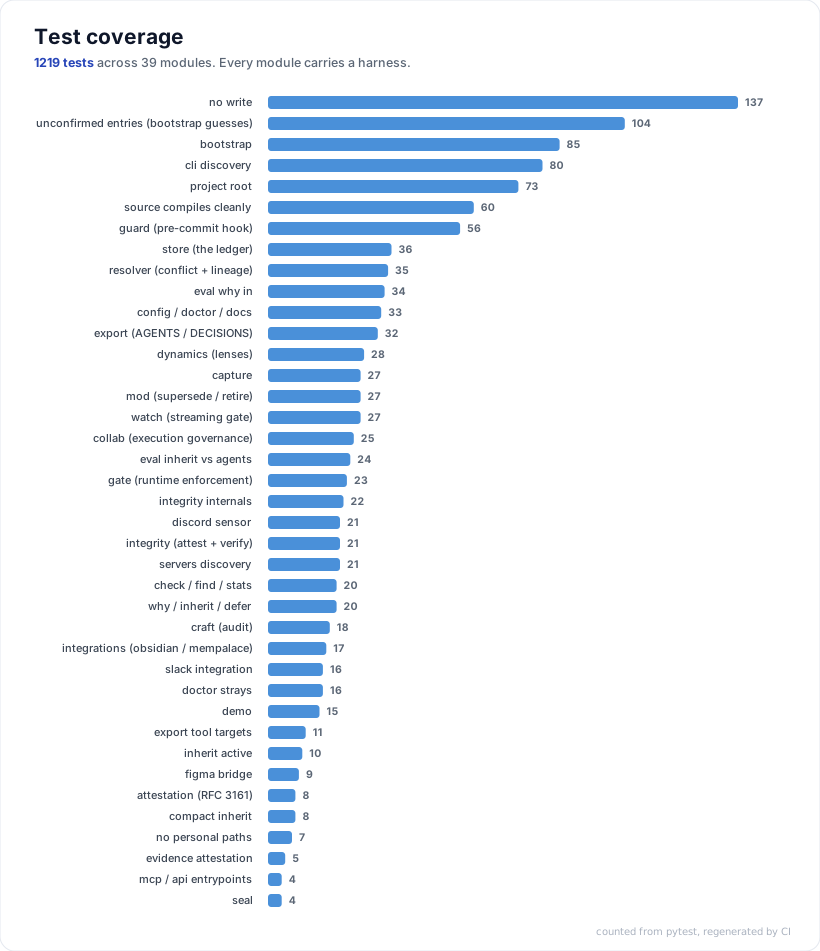
pytest tests/                      # expect: all green
A plain pip install -e . works too. Tests that need an optional dependency
skip themselves with a message naming the extra, so a base install still gives
a clean run rather than a wall of red.
python3 irp/core/irp.py --help # run the CLI from the repo without installing
The ledger format is the contract. Anything derived from it (exports, graphs,
lens scores) is regenerable and must never be written back into
.irp/ledger.jsonl.
💬 Join the discussion →, share your stack, ask questions, or show how you use IRP.
The sensor pattern is open. If you want to write a sensor for a tool your team uses, the format is simple and documented.
IRP does not tell you what to decide. It makes sure you remember why you did.
1 maintainer

Metadata
1 maintainer
Release files for irp-capture 0.9.0
For a detailed explanation of source distributions (sdists) and built distributions (wheels), please see the package formats documentation.
Source distribution (sdist)
| File | Size | Uploaded | Provenance | |
|---|---|---|---|---|
| irp_capture-0.9.0.tar.gz | 219.3 kB | Without provenance | Details |
Built distribution (wheel)
| File | Interpreter | ABI | Platform | Reset |
|---|---|---|---|---|
| irp_capture-0.9.0-py3-none-any.whl | Python 3 | none | any | Details |
Total release size: 385.9 kB
Release files / irp_capture-0.9.0.tar.gz
| Download URL | irp_capture-0.9.0.tar.gz |
|---|---|
| Size | 219.3 kB |
| Tags | Source |
|
SHA-256 checksum How to use checksums |
f4c911147e2cec7598bb20615a9fc32c7e0bc743caba3e6872763458c1c98ded
|
|
BLAKE2b-256 checksum How to use checksums |
5e4772dda77695d73397e32e34c2dfc4265c2b2b4dbe8f391db526edc128a88c
|
| Upload date | |
|
Uploaded using Trusted Publishing? What is trusted publishing? |
No |
| Uploaded via |
twine/7.0.0 CPython/3.14.6
|
Release files / irp_capture-0.9.0-py3-none-any.whl
| Download URL | irp_capture-0.9.0-py3-none-any.whl |
|---|---|
| Size | 166.6 kB |
| Tags | Python 3 |
|
SHA-256 checksum How to use checksums |
a8adf10910128a50cf5155f4dfe53788619e28f5c9add22ddaea481c84dbe6c2
|
|
BLAKE2b-256 checksum How to use checksums |
7e8b80519333dd60cc889be636e2e008c662b657b26b739a841af018b7409406
|
| Upload date | |
|
Uploaded using Trusted Publishing? What is trusted publishing? |
No |
| Uploaded via |
twine/7.0.0 CPython/3.14.6
|
Security for irp-capture 0.9.0
Provenance
Provenance describes where a file came from. On PyPI, provenance is shared via attestations, which provide a verifiable record of the build or publishing details. View details, limitations and caveats.
No provenance found
None of the files in this release were uploaded with provenance metadata.
A note on package security
PyPI is a repository for distributing packages, not a service for auditing them. While third-party security researchers and our staff do their best to detect and remove malicious packages, PyPI cannot guarantee the quality, security or suitability of any given package.
To learn more about protecting yourself from malicious actors, visit our package security documentation.














