
Irvy
Irvy simplifies the setup process for test automation using Selenium or Playwright across multiple programming languages. It serves as a valuable tool for both novice automation engineers and seasoned professionals, facilitating a seamless transition between programming languages such as Java, C#, or JavaScript by providing comparable building blocks.
In an ever-evolving technological landscape, the demand for efficient and versatile test automation tools has never been greater. Irvy, a command-line interface tool, steps up to this challenge by streamlining the setup process for test automation across a broad spectrum of programming languages. Whether you are a novice entering the world of automation engineering or a seasoned veteran, Irvy’s ability to provide comparable building blocks facilitates an effortless transition between different programming languages such as Java, C#, or JavaScript.
Harnessing the capabilities of popular automation tools like Selenium and Playwright, Irvy empowers users to initiate projects in their language of choice with a simple, interactive command-line interface. This process alleviates the potential complexities associated with the setup phase, allowing users to focus their attention on the development of high-quality, robust automation scripts.
In addition, Irvy fosters an environment of continuous learning and skill diversification. For seasoned professionals who have primarily worked in a single programming language, Irvy offers a comfortable, straightforward entry point to explore and adopt different languages. This not only widens their skillset but also broadens their perspective on the different strategies and approaches to test automation.
Features
- Setup Selenium projects in Python, C#, and JavaScript.
- Setup Playwright projects in Python, C#, and JavaScript.
- Interactive command-line interface.
Installation and Usage Guide for Irvy
This guide will walk you through installing Python and using Irvy on different operating systems. We will cover installation on Windows, MacOS, and Linux.
Prerequisites
Before we start, ensure you have the following:
- A working computer with one of the following operating systems: Windows, MacOS, Linux.
- Access to the command line terminal.
Installing Python
Irvy requires Python 3.7 or later. Follow the steps below to install Python on your operating system.
Windows
- Download the latest Python release from the official website (https://www.python.org/downloads/windows/).
- Run the installer, ensure "Add Python to PATH" is checked, then follow the installation prompts.
MacOS
-
MacOS comes preinstalled with Python, but it's typically an older version. You can use Homebrew to install the latest version.
-
If you don't have Homebrew, install it with the following command:
/bin/bash -c "$(curl -fsSL https://raw.githubusercontent.com/Homebrew/install/HEAD/install.sh)"
-
Install Python with Homebrew:
brew install python
Linux
Different Linux distributions have different methods to install Python. Here's how you can install Python on Ubuntu:
-
Update your system:
sudo apt update
sudo apt upgrade
-
Install Python:
sudo apt install python3
Verify Python Installation
Verify your Python installation by checking the version in your terminal:
python --version
You should see output like Python 3.11.3 or later.
Install Irvy
You can install Irvy directly from PyPI using pip:
pip install irvy
Using Irvy
After successfully installing Irvy, you can run it by simply typing the following command in your terminal:
irvy
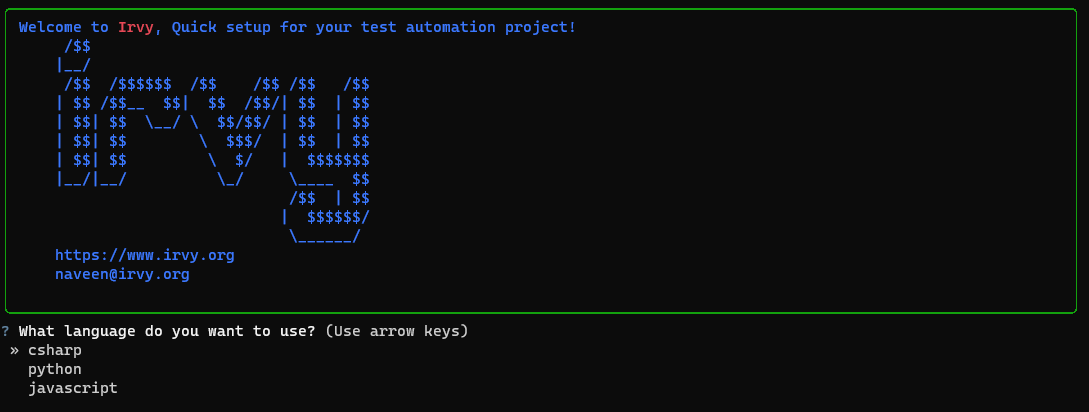
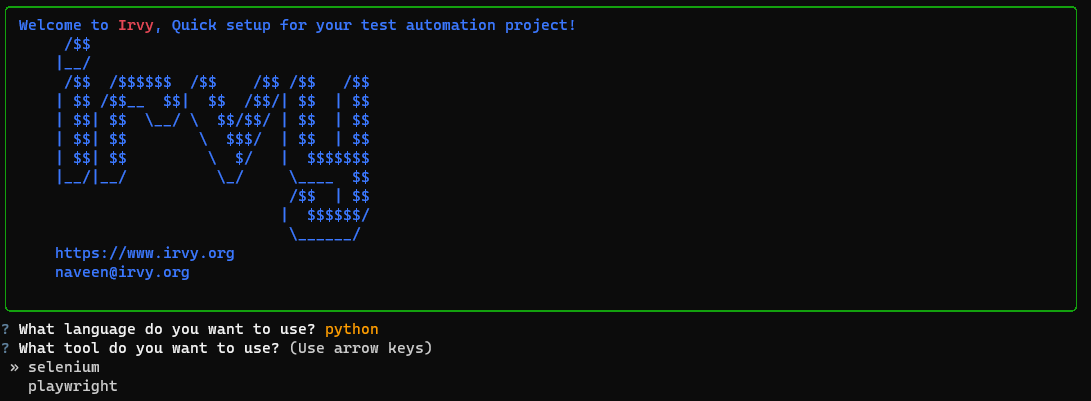
This will start an interactive command-line interface where you can select the language and tool you want to use for your project. Follow the prompts to generate your test automation project.
This will start an interactive command-line interface where you can choose the language and tool you want to use for your project.
Project Structure
project_name/
|-- .gitignore
|-- README.md
|-- package.json OR requirements.txt OR .csproj
|-- src/
    |-- tests/
        |-- test_example.js OR test_example.py OR test_example.cs
|-- node_modules/ OR venv/ OR packages/
https://github.com/automationpi/irvy/assets/82222256/4a780b2c-8779-4980-a568-1dd715bb319e
Technologies and Frameworks
Depending on the language and tool you choose, Irvy will use different testing frameworks:
Python: Irvy will use Pytest for both Selenium and Playwright projects.
C#: Irvy will use xUnit for both Selenium and Playwright projects.
JavaScript: Irvy will use Jest for both Selenium and Playwright projects.
Contributing
Pull requests are welcome. For major changes, please open an issue first to discuss what you would like to change.
Please make sure to update tests as appropriate.
website : irvy.org
License
MIT
1 maintainer

Metadata
1 maintainer
Release files for irvy 1.0.5
For a detailed explanation of source distributions (sdists) and built distributions (wheels), please see the package formats documentation.
Source distribution (sdist)
| File | Size | Uploaded | |
|---|---|---|---|
| irvy-1.0.5.tar.gz | 12.1 kB | Details |
Built distribution (wheel)
| File | Interpreter | ABI | Platform | Reset |
|---|---|---|---|---|
| irvy-1.0.5-py3-none-any.whl | Python 3 | none | any | Details |
Total release size: 24.2 kB
Release files / irvy-1.0.5.tar.gz
| Download URL | irvy-1.0.5.tar.gz |
|---|---|
| Size | 12.1 kB |
| Tags | Source |
|
SHA-256 checksum How to use checksums |
aaa7f05768a90839f9c2e6734ec9a5c3c3a475f88a4b457afb8f5bb84007b675
|
|
BLAKE2b-256 checksum How to use checksums |
b251ab6d434122f48b8f7fb48e7198164b86fa8c44d38ad4c5e73dde333f2241
|
| Upload date | |
|
Uploaded using Trusted Publishing? What is trusted publishing? |
No |
| Uploaded via |
twine/4.0.2 CPython/3.9.17
|
Release files / irvy-1.0.5-py3-none-any.whl
| Download URL | irvy-1.0.5-py3-none-any.whl |
|---|---|
| Size | 12.1 kB |
| Tags | Python 3 |
|
SHA-256 checksum How to use checksums |
c3551696a7197a251e91488bed3baba2ebbdcf208c5460e0faf15ac3ae67019e
|
|
BLAKE2b-256 checksum How to use checksums |
565fed9f40ceafd6ac2650f4613a18ccf7cbb4c5b07f37873176f18d6d64e940
|
| Upload date | |
|
Uploaded using Trusted Publishing? What is trusted publishing? |
No |
| Uploaded via |
twine/4.0.2 CPython/3.9.17
|














