
isar-tools


Source tooling for Isabelle/Isar projects: a formatter, project and source
checks, and statistics. Pure Python. Works on .thy and ROOT files without
running Isabelle.
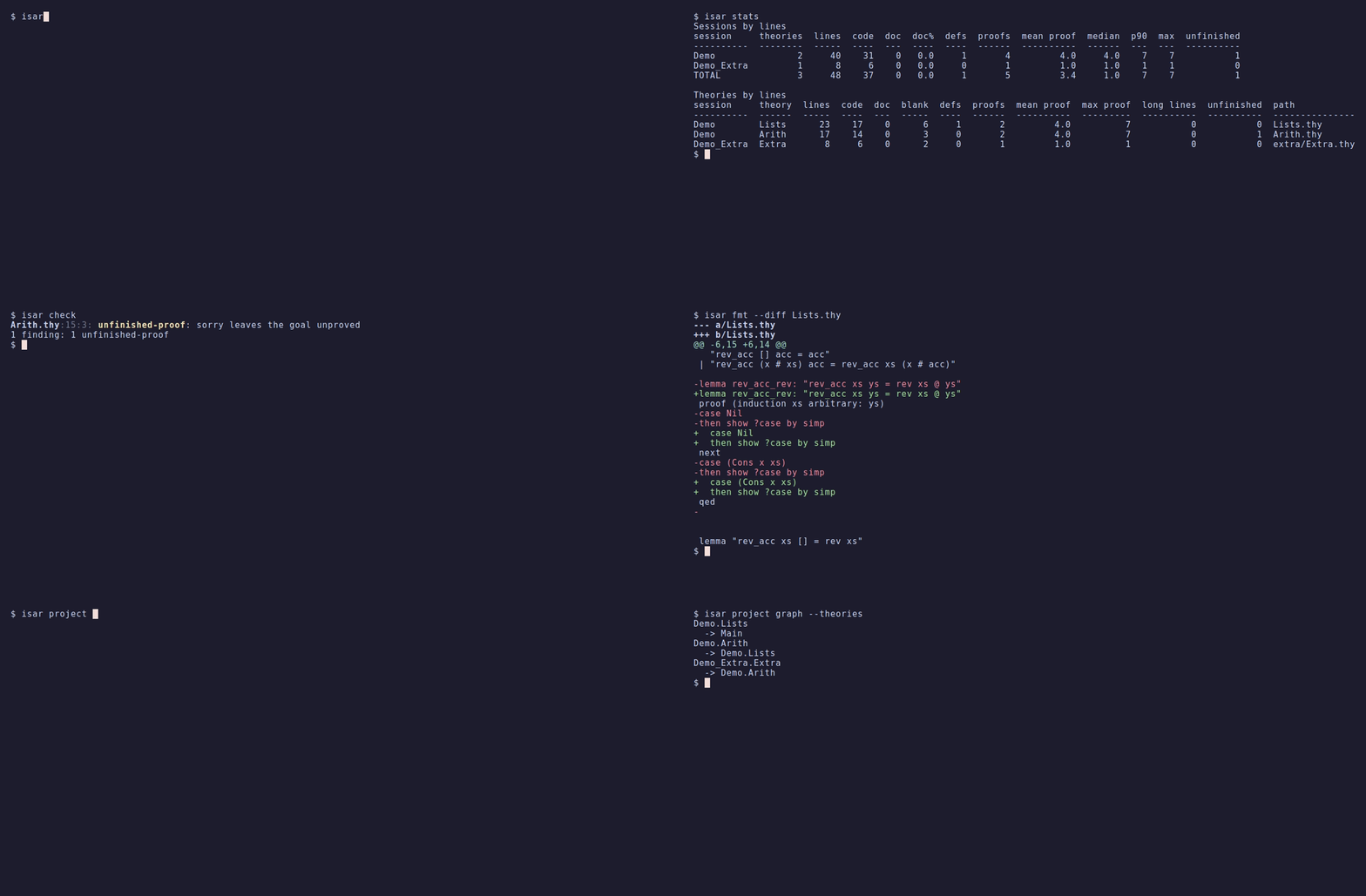
Status: pre-alpha. See CHANGELOG.md and
docs/PLAN.md.
Install
pip install isar-tools          # or: uv tool install isar-tools, pipx install isar-tools
isar --help
Python 3.11 or newer; no runtime dependencies. A conda-forge package
(pixi global install isar-tools) follows the first PyPI release.
Commands
| Command | What it does |
|---|---|
isar fmt [PATH...] |
Format theories: indentation, trailing whitespace, blank lines, and optional line wrapping |
isar check [GROUP] [PATH...] |
Report problems in ROOT files, proofs, syntax, symbols, docs, and locales |
isar stats [VIEW] [PATH...] |
Size, proof, and command statistics |
isar stats build BUILD_LOG |
Where theory elaboration time went in an isabelle build -v log |
isar project sessions|theories|graph |
Sessions, theories, and the session or theory import graph |
isar project hierarchy |
Class and locale declarations: parents, parameters, assumptions |
isar project names |
Named declarations: qualified name, kind, location, docstring; a Markdown index |
isar project extract NAME... |
The source of a declaration by name; keeps quoted declarations in sync with a manifest |
isar symbols normalize PATH... |
Rewrite symbols as \<name>, or as Unicode |
A path is a project directory, read like isabelle build -D (its ROOT, and
ROOTS recursively), or a .thy file. Commands that read a project default to the current
directory.
Exit status: 0 success, 1 findings or differences, 2 invalid invocation or
unreadable input. Data goes to stdout, diagnostics to stderr. JSON and CSV output
use stable snake_case keys and are never coloured.
Formatting
isar fmt                          # format every .thy below the current directory
isar fmt --check                  # list files that would change; exit 1 if any
isar fmt --diff Foo.thy           # show the change without writing
isar fmt --max-line-length 100    # also wrap long lines
isar fmt -                        # stdin to stdout, for editors
The formatter only changes layout. It never changes a token, never touches the
space between two tokens on a line, and never rewrites strings, cartouches,
comments, or ML. By default it only indents lines that are too shallow for their
proof structure; --normalize sets indentation exactly. See
docs/FORMATTER.md.
As a git hook with lefthook:
pre-commit:
  jobs:
    - name: isar-fmt
      glob: "*.thy"
      run: isar fmt {staged_files}
      stage_fixed: true
Checks
isar check                        # groups project, proofs, and syntax
isar check symbols src/           # non-ASCII characters outside comments
isar check docs src/              # theories, headings, locales, classes without a text block
isar check locales -d ~/afp/thys  # free variables in locale headers
isar check --ignore oops --format json
| Group | Codes |
|---|---|
project |
root-syntax, duplicate-session, missing-theory, missing-directory, missing-document-file, duplicate-theory-name, unreached-theory |
proofs |
unfinished-proof (sorry, \<proof>), oops, unclosed-proof |
syntax |
lexical-error, document-argument |
symbols |
non-ascii (opt-in) |
docs |
undocumented-theory, undocumented-heading, undocumented-locale, undocumented-class (opt-in) |
locales |
locale-free-variable (opt-in, heuristic) |
Project checks run for directory arguments only. isar check --help describes
every code.
locales is heuristic. Inside the terms of a locale or context header,
Isabelle reads an unknown identifier as a free variable and generalizes over
it, so an assumption citing a deleted or misspelt constant still builds. The
check reports identifiers that are no parameter of the header (its fixes,
for clause, defines, or those of the locales it extends, resolved through
imports), not bound in the term, and not used anywhere else in the project or
in the -d theories it imports. Only names of at least four characters with an
underscore (or \<^sub>) are reported; --allow NAME (repeatable) accepts a
name. Inner syntax is approximated lexically: see isar_tools/checks/locales.py.
Commands of other sessions
Whether a word is an Isar command depends on the theories a file imports. The
built-in table covers Pure and HOL, and commands declared in the theory headers
of the project are found automatically. For commands of other projects, such as
AFP entries, pass their directory with -d, as with isabelle build -d:
isar check -d ~/afp/thys .
isar project hierarchy --root numeric_domain -d ~/afp/thys --format json
Names
isar project names --kind locale                  # every locale, as Theory.locale
isar project names --format markdown > NAMES.md   # an index with docstrings
isar project names --name Foo.loc.bar_lemma       # exit 1 if no such declaration
Names are qualified as Isabelle renders them: a lemma inside context loc is
Theory.loc.name. With --name, a qualifier naming the wrong scope does not
match, and the error suggests the names that exist, so links into rendered
theories can be checked without building them. The docstring is a text block
directly before the declaration.
Quoting declarations
isar project extract combine_env locale_name.lemma_name
isar project extract --manifest snippets.toml --out generated/ --write   # regenerate
isar project extract --manifest snippets.toml --out generated/ --check   # diff; exit 1 on drift
A name is name, locale.name, Theory.name, or Theory.locale.name, and
must identify one declaration; its source is the command and, for a goal, its
proof. A manifest lists names as TOML tables, so a document that quotes a
definition fails its check when the definition changes or is renamed:
[snippets.combine_env]
why = "shown in chapter 3"     # free text, ignored
[snippets.succ_pos]
file = "src/B.thy"             # choose between declarations of the same name
Statistics
isar stats                               # sessions, then the largest theories
isar stats proofs --top 10               # the longest proofs
isar stats style --max-line-length 100   # long theories, long lines, sorry, watched methods
isar stats build build.log --budget HOL-Library=0
Limits
- Nothing runs Isabelle, so nothing is type-checked or proved. A formatted file is guaranteed to contain the same tokens; building it is the project's CI's job.
- The built-in command table is hand-written. A command of a session that is
neither built in nor passed with
-dis read as part of the previous command. project extractfinds names that commands declare; derived names (foo_def,foo.simps) and names made by interpretations are not found.project hierarchyfollows declared parents, notsublocale,subclass, orinterpretation.stats buildreads one log line format, observed in Isabelle2025 logs.
Development
Requires pixi.
pixi run pre-commit-install  # git hooks
pixi run test
pixi run coverage            # 100% line and branch coverage required
pixi run typecheck           # pyright, strict
pixi run lint
pixi run isar --help
pixi run demo                # re-record docs/demo/demo.gif with VHS
pixi run demo-check          # run the demo commands without recording
ISAR_CORPUS=~/afp/thys pixi run corpus   # integration tests over real projects
Expected output lives in golden files under tests/golden/ and
tests/formatter/. UPDATE_GOLDEN=1 pixi run test rewrites them, so a change in
output shows up as a diff in review.
The demo GIF is generated by VHS from
docs/demo/demo.tape, which runs the real commands on the
small project in docs/demo/project. The demo task uses
its own pixi environment, so VHS, ttyd, and ffmpeg stay out of the default one.
Releasing
- Check that formatting cannot break a build: format a real project with the
release candidate and build it with Isabelle (for Voblint, its
isar fmt round tripworkflow or the same steps locally). - In
CHANGELOG.md, rename## Unreleasedto## X.Y.Z (YYYY-MM-DD)and merge. - Tag the merge commit and push the tag (
git tag -a vX.Y.Z -m "isar-tools X.Y.Z",git push origin vX.Y.Z). TheBuildworkflow takes the version from the tag and publishes to PyPI; the conda-forge feedstock's bot opens the update.
License
MIT
1 maintainer

Metadata
1 maintainer
Release files for isar-tools 0.1.1
For a detailed explanation of source distributions (sdists) and built distributions (wheels), please see the package formats documentation.
Source distribution (sdist)
| File | Size | Uploaded | |
|---|---|---|---|
| isar_tools-0.1.1.tar.gz | 114.9 kB | Details |
Built distribution (wheel)
| File | Interpreter | ABI | Platform | Reset |
|---|---|---|---|---|
| isar_tools-0.1.1-py3-none-any.whl | Python 3 | none | any | Details |
Total release size: 197.4 kB
Release files / isar_tools-0.1.1.tar.gz
| Download URL | isar_tools-0.1.1.tar.gz |
|---|---|
| Size | 114.9 kB |
| Tags | Source |
|
SHA-256 checksum How to use checksums |
7c0f8704d16c5b26546b7188fd12829c41435b4506ed13c23a021461f937e207
|
|
BLAKE2b-256 checksum How to use checksums |
7653320edc415fc50c6c1d4134331f999bfd42b42ee0b5ab1e3b3c045fd06313
|
| Upload date | |
|
Uploaded using Trusted Publishing? What is trusted publishing? |
Yes |
| Uploaded via |
twine/7.0.0 CPython/3.13.14
|
Provenance
Provenance describes where a file came from. On PyPI, provenance is shared via attestations, which provide a verifiable record of the build or publishing details. View details, limitations and caveats.


PyPI Publish Attestation
PyPI verified that this artifact, at this checksum, originated from the publisher listed below.
Signed by GitHub Actions, verified by PyPI on Sep 27, 2026.
Transparency logRelease files / isar_tools-0.1.1-py3-none-any.whl
| Download URL | isar_tools-0.1.1-py3-none-any.whl |
|---|---|
| Size | 82.4 kB |
| Tags | Python 3 |
|
SHA-256 checksum How to use checksums |
53e12bf3a492563dcf4dca65144f790f02f777922ef3faf9ad0eb451ceb53f13
|
|
BLAKE2b-256 checksum How to use checksums |
14c41f9ad94b3756819e1fc480f3332962f3c908de5e782c4cd23f5a59cc83b3
|
| Upload date | |
|
Uploaded using Trusted Publishing? What is trusted publishing? |
Yes |
| Uploaded via |
twine/7.0.0 CPython/3.13.14
|
Provenance
Provenance describes where a file came from. On PyPI, provenance is shared via attestations, which provide a verifiable record of the build or publishing details. View details, limitations and caveats.
PyPI Publish Attestation
PyPI verified that this artifact, at this checksum, originated from the publisher listed below.
Signed by GitHub Actions, verified by PyPI on Sep 27, 2026.
Transparency log













