
isc-reporter




Reports and change-impact analysis for SailPoint Identity Security Cloud (ISC), from the
command line. isc-reporter turns what your tenant holds into Excel dashboards (KPI tiles, native
charts, filterable tables), PDF and CSV files people can read, and shows what a configuration
change would do before you make it. It only reads from the tenant.
isc-reporter is a community project. It is not affiliated with, endorsed or supported by SailPoint Technologies. SailPoint and Identity Security Cloud are trademarks of SailPoint Technologies, Inc.
What it helps with
- See what ISC holds. Identities with their roles, access profiles, entitlements and accounts on one line each, certification progress and reviewer workload, attribute changes with their old and new values. For IAM operations, managers and auditors.
- Understand the configuration. How every identity attribute is computed, in plain words, where else it is used (transforms, provisioning policies), and checks for likely mistakes. For ISC engineers and architects.
- Change safely. Before replacing a source or enabling attribute synchronization, see what would be impacted or updated, with draft JSON to review. For implementation teams and consultants.
- Keep audit evidence. Every certification decision with its reviewer comment, attribute change history, and the query behind each report, in files you can archive. For audit and compliance.
Commands
| Command | What you get | Output | Maturity |
|---|---|---|---|
search |
Any search (identities, access profiles, roles, entitlements, events, account activities, workflows) with one line per object: an identity's roles, access profiles, entitlements and accounts are consolidated instead of repeated on many lines. | xlsx, pdf, csv | Beta |
campaigns |
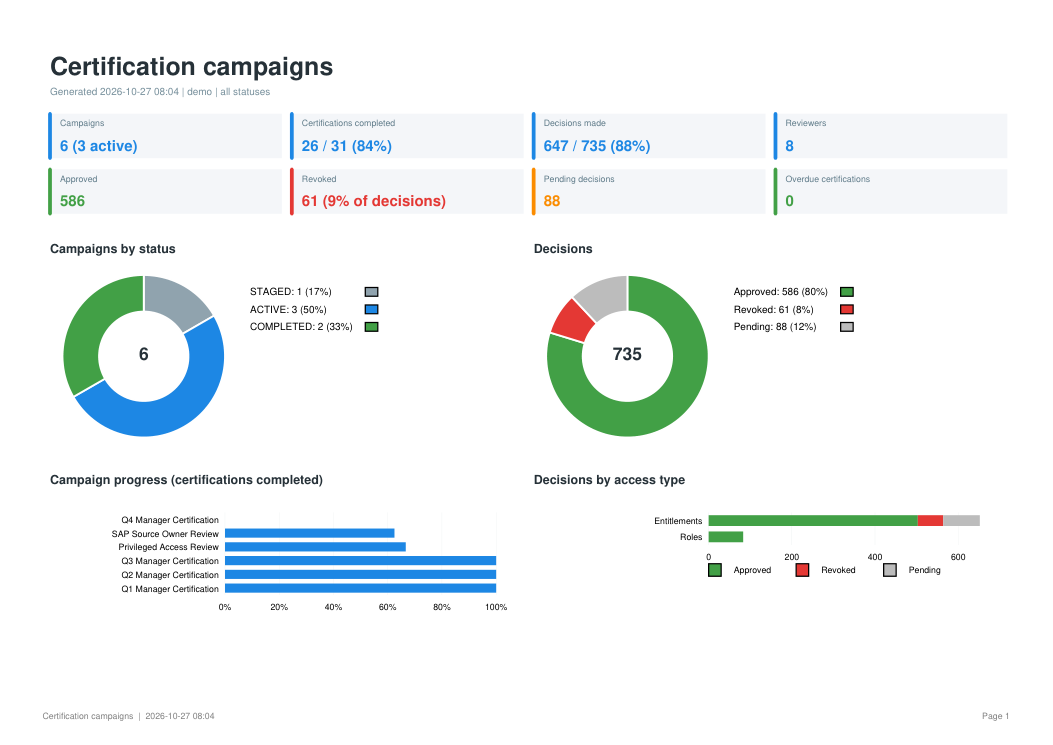
Certification campaign dashboard: progress, approved / revoked / pending decisions by access type, reviewer workload, overdue certifications, and every reviewed item for audit evidence. | xlsx, pdf | Beta |
changes |
Identity attribute changes with old and new values over a period (e.g. department and manager changes of the last 30 days), which ISC search cannot show. | xlsx, pdf, csv | Beta |
identity-profiles |
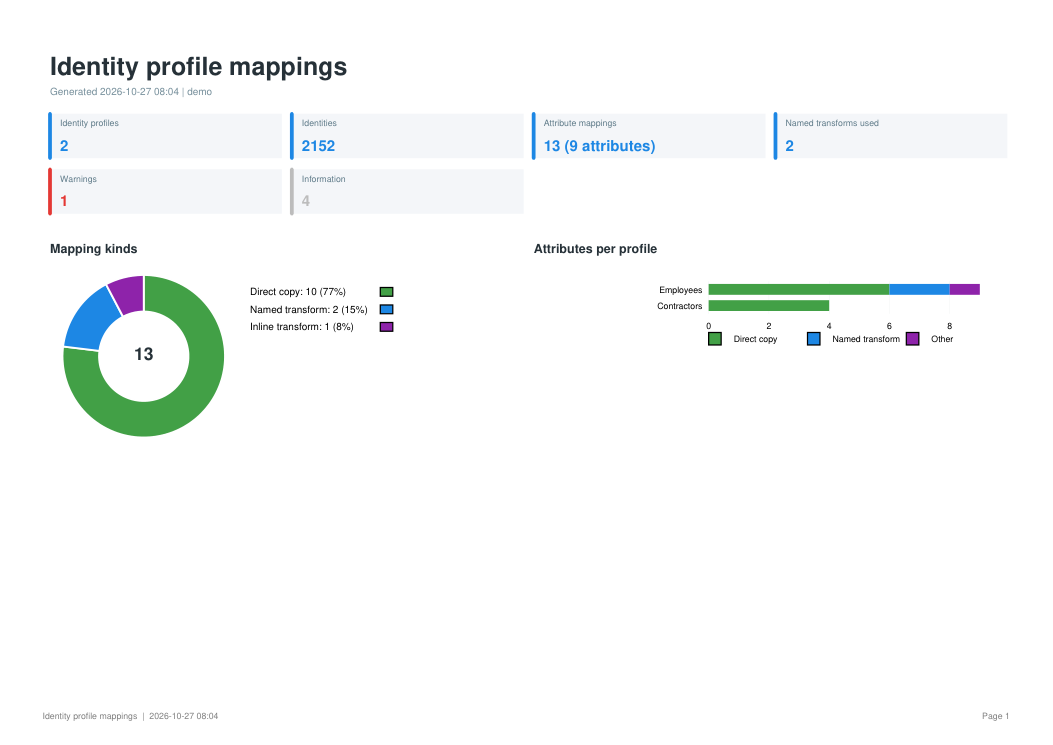
How every identity attribute is built, profile by profile: source, account attribute, transforms, a plain-language explanation, where else the attribute is used, and checks for likely mistakes. | xlsx, pdf | Beta |
migration |
Impact of replacing a source (typically a new HR system) on identity profiles, transforms and attribute mappings, before / after, with draft JSON for the new objects, and the role, segment and correlation criteria that use the impacted attributes. | xlsx, pdf, csv, JSON drafts | Beta |
analyze-before-sync |
Forecast of the updates ISC could send to a target system if attribute synchronization is enabled on a source: values added, changed or cleared, per attribute and per account. | xlsx, pdf, csv | Experimental |
leavers |
Identities in a leaver lifecycle state that still have enabled accounts, and for each account whether the lifecycle state should have disabled it (a failure to fix) or does not cover it (a configuration gap). | xlsx, pdf, csv | Beta |
demo |
Every report above, built from fictional data, without a tenant. | all of the above |
Beta: documented and covered by automated tests; needs validation on more real tenants. Experimental: new; its results rest on assumptions still to be confirmed on real tenants, and may change. A command becomes Stable once it has been used on several real tenants without open issues.
Quick start
You need Python 3.10 or later.
-
Install
python -m pip install isc-reporter
-
Try it without a tenant. This writes every report, built from fictional data, to
outputs/demo/:isc-reporter demo -
Connect to your tenant. Create a personal access token with the permissions of the commands you will use, then set:
export SAIL_BASE_URL="https://<tenant>.api.identitynow.com"   # PowerShell: $env:SAIL_BASE_URL = "..."
export SAIL_CLIENT_ID="<client id>"
export SAIL_CLIENT_SECRET="<client secret>"
-
Run a first report
isc-reporter search identities
iscr is a short name for the same command: iscr demo works too. If the command is not found, or
is blocked by an application control policy (common on managed Windows computers), run it through
Python instead: python -m iscr demo (py -m iscr demo on Windows).
Configuration
Credentials are read from the first of:
--config path/to/file.json;- the
SAIL_BASE_URL,SAIL_CLIENT_IDandSAIL_CLIENT_SECRETenvironment variables (SAILPOINT_*also work); - a
config.jsonin the folder you run from.
{
  "BaseURL": "https://<tenant>.api.identitynow.com",
  "ClientId": "<client id>",
  "ClientSecret": "<client secret>"
}
Every command writes its reports to outputs/ (change with --output-dir, or name the file with
-o) and its log to logs/ (--log-dir "" turns it off), and accepts --format (xlsx, pdf,
and csv where it makes sense). isc-reporter <command> --help lists every option.
Safety, permissions and privacy
- Read-only. isc-reporter only reads from your tenant: it never creates, changes or deletes
anything.
migrationwrites draft JSON to local files for you to review, andanalyze-before-syncforecasts updates without sending any. - Offline where it can be.
demo,identity-profiles --fromandmigration --fromuse fictional data or exported JSON files and never connect. - Least privilege. docs/permissions.md lists the endpoints, scopes and user levels each command needs, so the token can have no more than that.
- Credentials. Keep them in environment variables or in a
config.json, which.gitignorekeeps out of version control. isc-reporter does not write them to its logs or reports. - Personal data. Reports contain names, emails and access.
.gitignorekeepsoutputs/,logs/, spreadsheets and PDFs out of version control; handle reports under your organisation's data protection rules, and never attach real reports to public issues. - Load on the tenant. Searches are paged past the 10,000-result limit, and throttled calls are retried after the delay ISC asks for. Commands that make one call per identity or certification have options to narrow them: see load on the tenant.
Command reference
Search reports
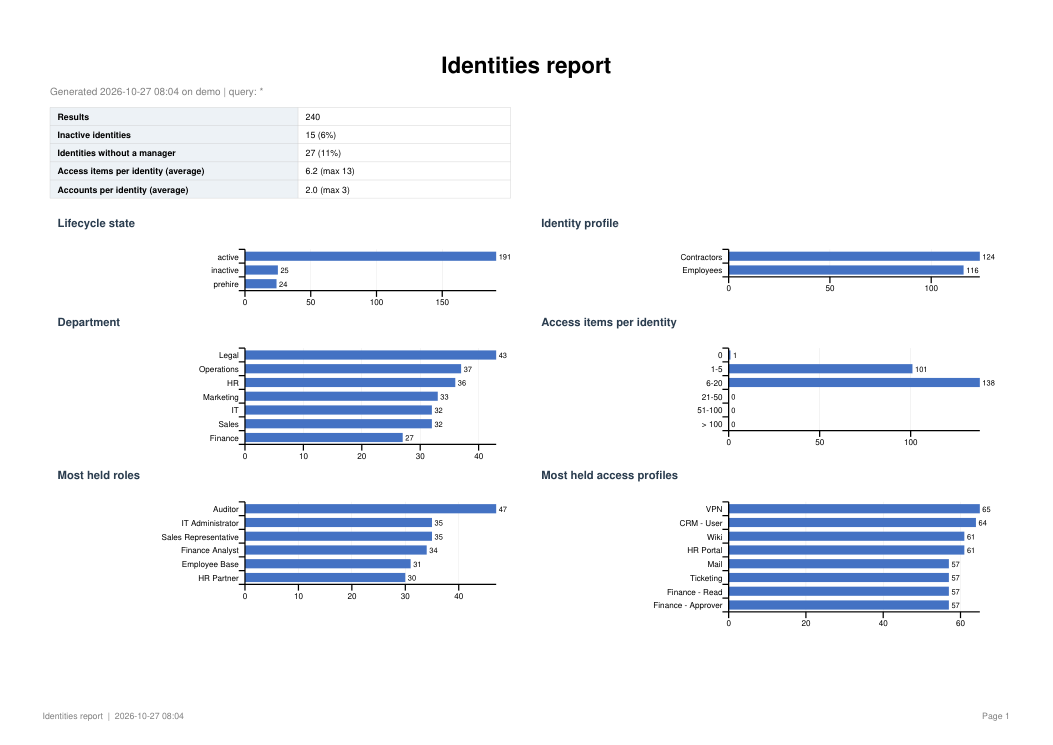
isc-reporter types                                        # available report types
isc-reporter search identities
isc-reporter search identities -q "attributes.department:Finance" --expand access
isc-reporter search entitlements -q "privileged:true" --format xlsx csv
isc-reporter search events -q "status:FAILED AND created:[now-7d TO now]"
isc-reporter search identities --columns displayName,email,attributes.location --group-by attributes.location
| Type | One line per | Consolidated into the line | --expand (one line per item) |
|---|---|---|---|
identities |
identity | roles, access profiles, entitlements, accounts (list + count) | access, accounts, apps |
access-profiles |
access profile | entitlements | entitlements |
roles |
role | access profiles, entitlements | access-profiles |
entitlements |
entitlement | ||
events |
event | ||
account-activities |
activity | account requests | account-requests |
workflows |
workflow execution |
The workbook has a Summary (key figures and a chart per breakdown), the Data as an Excel
table, a Detail sheet with --expand, and the Query used. Any other search index works too,
with columns chosen automatically or with --columns. Reports can be saved as JSON and shared:
see examples/reports/
and --definition.
Certification campaigns
isc-reporter campaigns                                    # every campaign
isc-reporter campaigns --status ACTIVE
isc-reporter campaigns --since 2026-01-01 --items         # with every reviewed access item
isc-reporter campaigns --campaign "Q3 Manager Certification" --format pdf
Sheets: Dashboard, Campaigns (progress bars, revocation rate, days left), Certifications
(one per reviewer), Reviewers (workload, most pending first), with --items Identities
(access grouped by decision) and Decisions (every item with its reviewer comment), and
Filters. Overdue items are shown in red. Role composition campaigns are listed with their
progress but have no reviewer detail (their reviews are not identity certifications).
Identity attribute changes
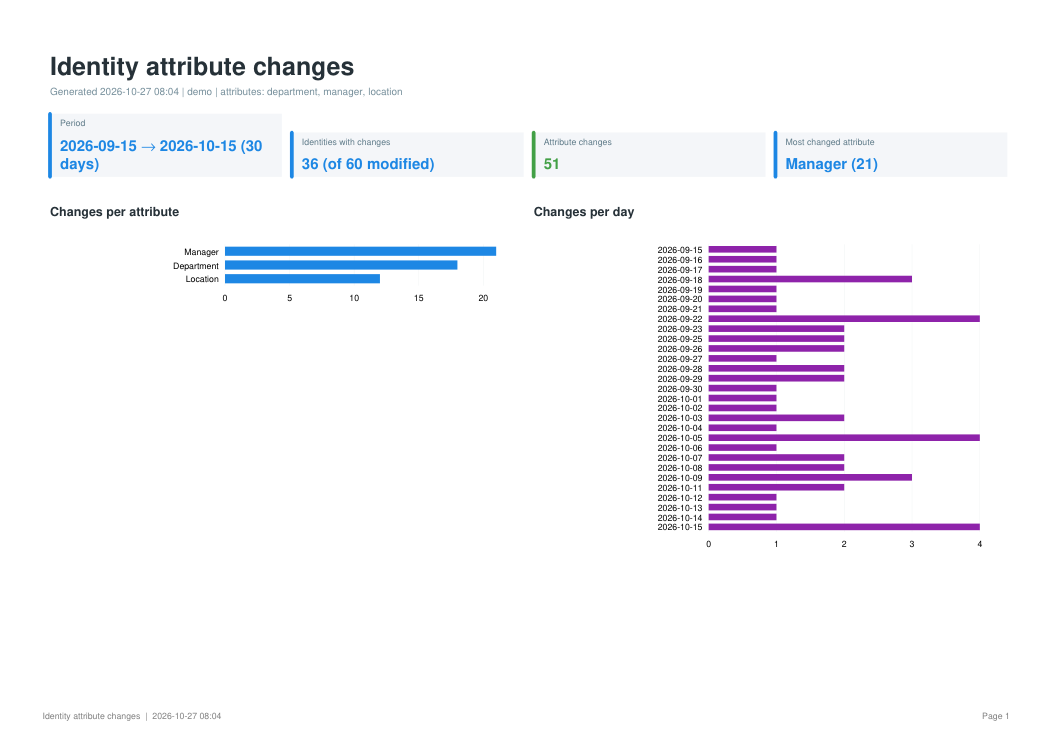
isc-reporter changes --attributes department,manager --days 30 --format xlsx pdf csv
isc-reporter changes --since 2026-10-01 -q "attributes.cloudLifecycleState:active"
isc-reporter changes --exclude someDailyAttribute
ISC search does not keep previous attribute values, so this report finds the identities modified
in the period and reads their history. By identity gives one line per identity with
Old <attribute> / New <attribute> columns; Changes lists every change. Manager ids are
shown as names. Attributes that change on most days (typically computed from today's date by a
transform) are flagged, as they fire an attribute change event every day. One history call is
made per modified identity: narrow large tenants with --query or --max-identities.
Identity profile mappings
isc-reporter identity-profiles
isc-reporter identity-profiles --profile Employees --profile Contractors
isc-reporter identity-profiles --from exports/            # offline, from exported JSON
One sheet per profile with, for every identity attribute, the mapping kind, a plain-language
explanation ("Value of 'hireDate' from HR System, converted by the transform 'Date to ISO8601'
(changes a date format)"), sources, transforms and the definition. Also: a matrix comparing
profiles, attribute coverage, the transforms used, and checks: required or common attributes not
mapped, missing transforms, lifecycle state copied as is, identical mappings, other sources.
--from reads a profile, a list of profiles or a configuration export, with transforms found in
the same files.
For every identity attribute the report also shows where else it is used, in the Also used in
column of each profile sheet and in two sheets: Attribute usage (one line per attribute: the
profiles that map it, the mappings and named transforms that read it, the source provisioning
policies that use it, and which sources) and Usage detail (one line per use). Provisioning
policies are read from every source of the tenant (a source that cannot be read is skipped with a
warning), or from a source export given to --from. Identity attributes used in rules (code)
cannot be detected.
Source migration analysis
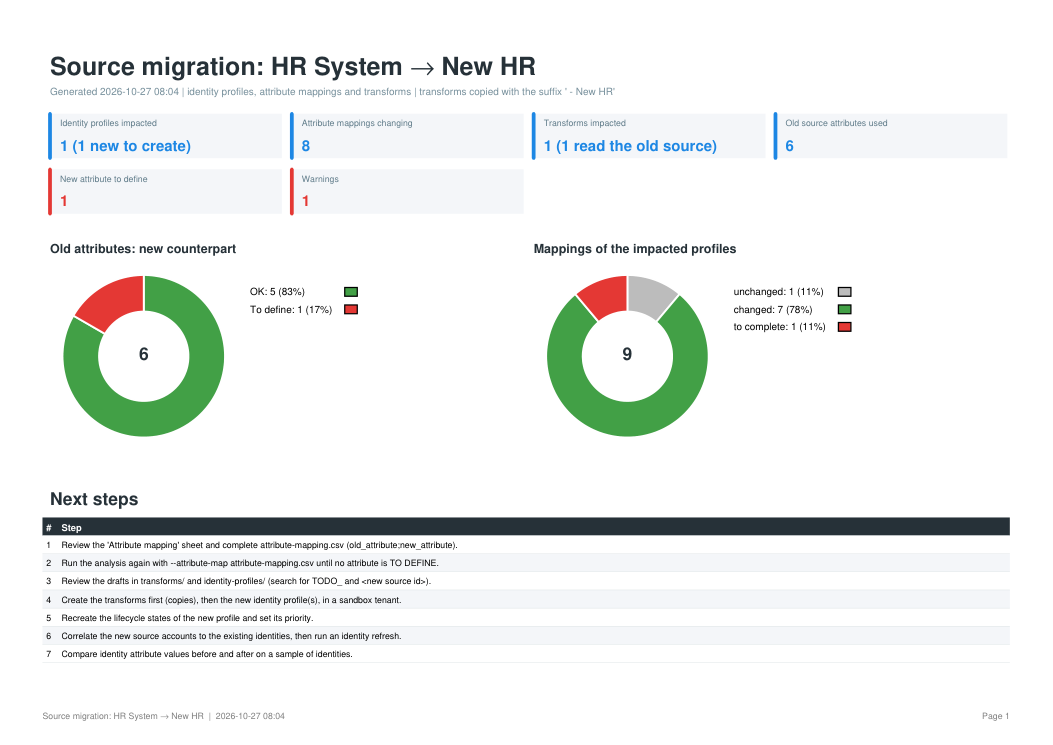
isc-reporter migration --old-source "HR System" --new-source "New HR"
# complete outputs/source-migration_<ts>/attribute-mapping.csv, then:
isc-reporter migration --old-source "HR System" --new-source "New HR" --attribute-map attribute-mapping.csv
Finds the identity profiles authoritative on or reading the old source, the transforms reading
it and those calling them, matches each old account attribute to the new source (mapping file,
or same name in the new account schema), shows every mapping before and after, and writes draft
JSON for the new identity profiles and transforms. Transforms are copied with a suffix so both
sources can run in parallel (--in-place to update them instead).
The Criteria sheet lists what selects identities or matches accounts on the identity attributes
computed from the old source (directly, or from another impacted attribute): role and dimension
membership criteria, segment visibility, and the account and manager correlation of the other
sources. Their result depends on the new values: if department gets new codes, identities gain
or lose roles, and their access, at the next identity refresh. Criteria that read the old source
itself (account attributes or entitlements in role criteria, and its own correlation) are listed
with their rewrite on the new source, and their account attributes are added to
attribute-mapping.csv. With --from, roles, segments and sources are read from the export when
it contains them. Lifecycle states, provisioning policies and workflows are listed as next steps,
not analysed.
Before enabling attribute synchronization
isc-reporter analyze-before-sync "Active Directory"
isc-reporter analyze-before-sync "Active Directory" --map location=physicalDeliveryOfficeName
isc-reporter analyze-before-sync "Active Directory" --map-file extra-mapping.csv --only-map
isc-reporter analyze-before-sync "Active Directory" --format xlsx pdf csv --threshold 5
(analyzebeforesync also works.) Enabling attribute synchronization on a source can send a bulk of
updates to the target system. The command changes nothing: it reads the source's provisioning
policy, finds the fields mapped directly to an identity attribute (ISC only synchronises those),
reads the accounts of the source and the identities they belong to, and counts what ISC could
write: values added, changed, cleared (the riskiest) or changed in case only.
--map IDENTITY=ACCOUNT (repeatable) and --map-file (a CSV with identity_attribute;account_attribute)
add comparisons that are not in the policy yet; --only-map uses only those; --usage reads other
policy usage types than CREATE. A verdict (No update expected, Limited updates, Bulk update
expected) is given, a bulk update being flagged when a value would be cleared or when --threshold
percent of the accounts (default 10) would be updated.
Sheets: Dashboard, Attributes (per mapped attribute: accounts compared, added, changed, cleared, share, risk), Accounts (worst first), Changes (current and new value of every update; the CSV has them all), Not analysed (policy fields that are not a direct copy), Checks. Every difference is counted, as if ISC evaluated all accounts, so read the figures as an upper bound. The Changes sheet contains real attribute values: protect the file.
Leavers who still have access
isc-reporter leavers                                       # states configured as inactive
isc-reporter leavers --states inactive gardenLeave inactive30j out
isc-reporter leavers --date-attribute endDate --grace 1 --exclude-source "Payslip Portal"
Lists the identities in a leaver lifecycle state that still have enabled accounts. By default the
leaver states are the lifecycle states configured as inactive in the identity profiles; give your
own with --states. Disabled accounts and accounts of authoritative sources are left out
(--include-authoritative keeps the latter), as are the sources given with --exclude-source.
For each enabled account, the lifecycle state's configuration gives the cause: Should be disabled
(or deleted) means the state should have done it, so provisioning failed, is pending or was
undone; Not covered by the lifecycle state means nothing disables accounts of that source, a
configuration gap. With --date-attribute (the identity attribute holding the departure date,
ISO 8601, dd/MM/yyyy or yyyyMMdd) the report shows the days since leaving, and with --grace the
accounts still enabled after that many days. Sheets: Dashboard, Leavers with access, Enabled
accounts (privileged first), By source, Lifecycle states (their account actions) and
Settings.
Roadmap and contributing
ROADMAP.md describes where the project is going; the next milestone is one format for every finding, with JSON output for automation. Contributions are welcome: a new check or report, test fixtures, documentation, or simply trying a command on your tenant and telling what you found. See CONTRIBUTING.md and the Code of Conduct. Report security problems privately, as described in SECURITY.md. Changes are listed in CHANGELOG.md.
Development
python -m venv .venv && . .venv/bin/activate       # Windows: .venv\Scripts\activate
pip install -e ".[dev]"
pytest
ruff check src tests
Tests need no tenant: the SDK is replaced by recording fakes and the real SDK models are used to check what would be read.
License
1 maintainer

Metadata
1 maintainer
Release files for isc-reporter 0.3.0
For a detailed explanation of source distributions (sdists) and built distributions (wheels), please see the package formats documentation.
Source distribution (sdist)
| File | Size | Uploaded | Provenance | Actions |
|---|---|---|---|---|
| isc_reporter-0.3.0.tar.gz | 120.9 kB | With provenance | Details for isc_reporter-0.3.0.tar.gz |
Built distribution (wheel)
| File | Interpreter | ABI | Platform | Actions Reset |
|---|---|---|---|---|
| isc_reporter-0.3.0-py3-none-any.whl | Python 3 | none | any | Details for isc_reporter-0.3.0-py3-none-any.whl |
Total release size: 221.2 kB
Release files / isc_reporter-0.3.0.tar.gz
| Download URL | isc_reporter-0.3.0.tar.gz |
|---|---|
| Size | 120.9 kB |
| Tags | Source |
|
SHA-256 checksum How to use checksums |
dd3e31f133a4c72819e85bf6cfb7cd96c0444fb6712040d06b70198868c2bc56
|
|
BLAKE2b-256 checksum How to use checksums |
38096141ccf32e27b6033e2680f49c01f0125f5ae78c3138d5043b66a6782434
|
| Upload date | |
|
Uploaded using Trusted Publishing? What is trusted publishing? |
Yes |
| Uploaded via |
twine/7.0.0 CPython/3.13.16
|
Provenance
Provenance describes where a file came from. On PyPI, provenance is shared via attestations, which provide a verifiable record of the build or publishing details. View details, limitations and caveats.


PyPI Publish Attestation
PyPI verified that this artifact, at this checksum, originated from the publisher listed below.
Signed by GitHub Actions, verified by PyPI on Oct 29, 2026.
Transparency logRelease files / isc_reporter-0.3.0-py3-none-any.whl
| Download URL | isc_reporter-0.3.0-py3-none-any.whl |
|---|---|
| Size | 100.4 kB |
| Tags | Python 3 |
|
SHA-256 checksum How to use checksums |
086978f22757a03b0ee6e426bdc3e48c6d4b9f2b6c7d1f27f39d131792d002be
|
|
BLAKE2b-256 checksum How to use checksums |
379f19fe2dd6714a3f3e3b5323b5db0914a541c5604f1e5248dca3bcf96c2122
|
| Upload date | |
|
Uploaded using Trusted Publishing? What is trusted publishing? |
Yes |
| Uploaded via |
twine/7.0.0 CPython/3.13.16
|
Provenance
Provenance describes where a file came from. On PyPI, provenance is shared via attestations, which provide a verifiable record of the build or publishing details. View details, limitations and caveats.
PyPI Publish Attestation
PyPI verified that this artifact, at this checksum, originated from the publisher listed below.
Signed by GitHub Actions, verified by PyPI on Oct 29, 2026.
Transparency logSecurity for isc-reporter 0.3.0
Provenance
Provenance describes where a file came from. On PyPI, provenance is shared via attestations, which provide a verifiable record of the build or publishing details. View details, limitations and caveats.
Full provenance
All 2 files in this release have been uploaded with provenance metadata.
Attestation for isc_reporter-0.3.0.tar.gz
PyPI Publish Attestation
PyPI verified that this artifact, at this checksum, originated from the publisher listed below.
Signed by GitHub Actions, verified by PyPI on Oct 29, 2026.
Transparency logA note on package security
PyPI is a repository for distributing packages, not a service for auditing them. While third-party security researchers and our staff do their best to detect and remove malicious packages, PyPI cannot guarantee the quality, security or suitability of any given package.
To learn more about protecting yourself from malicious actors, visit our package security documentation.














