
Introduction
Python continuous integration (CI) support tools.
To install: pip install isee
- Introduction
- Goal
- Workflow
- Results and Logs
- Versioning
- Skip CI
- Hosting
- How to setup CI
- Running CI Locally
- Useful resources
- Troubleshooting
Goal
The goal of CI is to automate code formatting, validation, deployment and publishing of packages.
Workflow
A CI pipeline is triggered when new code is pushed to a remote repository. Every CI pipeline does at least:
- Code formatting
- Apply automated linting on source code
- Push back the formatted code to the remote repository
- Code validation
- Testing (unit tests, integration tests, doctests)
- Docstring validation (only for frameworks)
- Deployment to an integration environment for applications / Publishing for frameworks -- (only on master and only if the Validation step succeeded)
- Semi-automated versioning (see the Versioning section) + Tag the repository with the new generated version number
- Packaging
- Deployment / Publishing
Results and Logs
You can see your CI pipeline's result and logs:
- From your GitLab project page → CI/CD → Pipelines
- From your GitHub project page → Actions → Continuous Integration
Versioning
Versioning is semi-automatically resolved: if you want the major or minor part to be bumped, you only have to add [bump major] or [bump minor] to your commit message on master (versioning is not applied to other branches).
Example, the current version number is 1.0.5. If you commit with the following message:
Added some new stuff.
the new version number will be 1.0.6. But if you commit with the following message:
Added some great new stuff! [bump minor]
the new version number will be 1.1.0. Finally, if you commit with the following message:
Added some extraordinary new stuff!!! [bump major]
the new version number will be 2.0.0.
Skip CI
You can prevent the CI pipeline from being triggered by adding [skip ci] to your commit message. Example:
Updated the README file. [skip ci]
Be careful! If you skip the CI process, any new code will not be validated and no new version will be deployed/published. So, think twice before using it.
Hosting
CI pipelines for GitHub public repositories are run on GitHub-hosted runners. See the GitHub documentation for more details
How to setup CI
This "How to" section applies to python package projects only. If you want to setup CI to an application project or another programing language, you will have to modify the CI pipeline definition according to your needs.
For a GitHub repository
- Add this ci.yml file to the
github/workflow/directory (create the directory if it doesn't exist) into your local repository. Note that wads does it for you by running the following command from the project's root directory (documentation here):
populate . --root-url=GITHUB_ROOT_URL
Note that you can specify the root directory (in case you're not in the root directory), root url (in case the directory is not already associated to a git repo), and have many other parametrization choices.
Fear not: populate will not create or modify the ci.yml file (or any other file) if there is one already.
- In the
ci.ymlfile, replace#PROJECT_NAME#with the project name (must be the exact same name as the main module of the project, not needed if you ran thepopulatetool because it did it for you) and modify the pipeline workflow to suit the project's needs. Documentation here. - Add secrets
PYPI_USERNAMEandPYPI_PASSWORDwith your PYPI credentials to the remote repository. Documentation here. - If you want the project's documentation to be published, configure the project's Github Pages for the project by selecting the
/docsfolder. Documentation here. - Push your code and see the execution of the new
Continuous Integrationworkflow. Documentation here. Consider using wads to automatically validate your code locally, commit and push by running the following command (documentation here):
pack check-in 'Your commit message.'
Running CI Locally
You can run your GitHub Actions CI workflow locally before pushing, using act. This helps catch issues early and saves CI minutes.
Quick Start
# Check if dependencies are installed
python -m isee.local_cli --check-deps

# Run your entire CI workflow locally
python -m isee.local_cli

# Run a specific job (e.g., validation)
python -m isee.local_cli -j validation

# Dry run to see what would execute
python -m isee.local_cli --dry-run
Prerequisites
Install act and ensure Docker is running:
macOS:
brew install act
Linux:
curl https://raw.githubusercontent.com/nektos/act/master/install.sh | sudo bash
Common Options
# Run with specific Python version
python -m isee.local_cli -j validation -m python-version:3.10

# Use custom workflow file
python -m isee.local_cli -w .github/workflows/test.yml

# Quiet mode (less output)
python -m isee.local_cli -q
For detailed documentation, see LOCAL_CLI_USAGE.md.
Useful resources
Troubleshooting
Common (non fatal) error during publishing
It has been reported that users get this error:
/home/runner/work/_temp/1a136567-cb0c-4c9f-a44f-4cbe6633d4eb.sh: line 2: --non-interactive: command not found
Error: Process completed with exit code 127.
when publishing. The package publishes fine, but this error causes the CI "publish" part to show up as red, which is annoying.
Solution: This will happen when any of the variables (most of the time, the PYPI_PASSWORD contain newlines in it, which breaks the twine upload ... command into several pieces.
This can happen, for example, when copy/pasting from doing a echo $PYPI_TOKEN | pbcopy since the echo adds a newline.
Try copying the pypi token again and ensure there's no newline in it.
Github token problems (e.g. tagging)
At the point of writing this, some jobs don't fail when there are (non-essential) errors.
One hidden problem that you might get in when "Tag Repository With New Version Number" does a Run isee tag-repo $VERSION. You'll get:
remote: Permission to thorwhalen/sung.git denied to github-actions[bot].
fatal: unable to access 'https://github.com/thorwhalen/sung/': The requested URL returned error: 403
Error executing git command: Command 'git --git-dir="/home/runner/work/sung/sung/.git" --work-tree="/home/runner/work/sung/sung" push origin 0.0.16' returned non-zero exit status 128.
Standard output:
Exit code: 128
Top cause and solution:
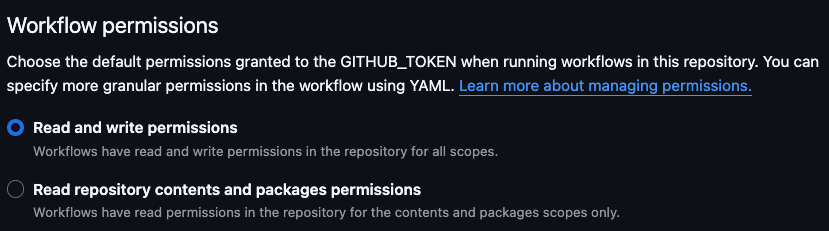
- Check Repository Permissions: Ensure that the
GITHUB_TOKENhas the necessary permissions (i.e. read and write) to push to the repository. You can configure this in the repository settings under Actions -> General -> Workflow permissions (https://github.com/{username_or_org}/{repo}/settings/actions).
Other possible problesm:
- Verify SSH keys: Did you put a ssh public key, and a corresponding SSH_PRIVATE_KEY in your environment), and are they correct?
Global ssh public keys can be managed here in user or org level settings.
Set repository secrets (envoronment variable) here:
https://github.com/{username_or_org}/{repo}/settings/secrets/actions. - Review the Token Usage
- Check Branch Protection Rules
Version tag misalignment
(Note: Normally this shouldn't happen anymore, since I included a
"version alignment" logic in get_new_version, which is used in the bump-version-number action via gen_semver. Still, I'll keep this around for historical reasons.)
Sometimes the twine PYPI publishing may fail with such a message:
WARNING  Skipping PKGNAME-0.1.4-py3-none-any.whl because it appears to already exist
WARNING  Skipping PKGNAME-0.1.4.tar.gz because it appears to already exist
This often means that your git tags are misaligned with the pyproject.toml
(or in older versions, setup.cfg) version.
You can see your git tags here: https://github.com/ORG/REPO/tags.
To repair, do this:
- go to the https://pypi.org/project/ project page and note the PYPI_VERSION number
- got to
setup.cfgand see what version is there, called it SETUP_VERSION - make a NEW_VERSION, which is a version number ABOVE the SETUP_VERSION and PYPI_VERSION.
- edit the
setup.cfgso it shows NEW_VERSION git tag NEW_VERSIONgit push origin NEW_VERSION
Sometimes I need to update the setup version again, and push again.
2 maintainers


Metadata
2 maintainers
Release files for isee 0.2.79
For a detailed explanation of source distributions (sdists) and built distributions (wheels), please see the package formats documentation.
Source distribution (sdist)
| File | Size | Uploaded | |
|---|---|---|---|
| isee-0.2.79.tar.gz | 47.9 kB | Details |
Built distribution (wheel)
| File | Interpreter | ABI | Platform | Reset |
|---|---|---|---|---|
| isee-0.2.79-py3-none-any.whl | Python 3 | none | any | Details |
Total release size: 68.0 kB
Release files / isee-0.2.79.tar.gz
| Download URL | isee-0.2.79.tar.gz |
|---|---|
| Size | 47.9 kB |
| Tags | Source |
|
SHA-256 checksum How to use checksums |
9b3c9d89fb005e0732e7a6f69598badc75ef291f8574263f472ce677df63380f
|
|
BLAKE2b-256 checksum How to use checksums |
fe5662b9de218d88da4dce59e00bbf3d7ef6f788a033c6b72afe7bf979a5cede
|
| Upload date | |
|
Uploaded using Trusted Publishing? What is trusted publishing? |
No |
| Uploaded via |
twine/7.0.0 CPython/3.10.21
|
Release files / isee-0.2.79-py3-none-any.whl
| Download URL | isee-0.2.79-py3-none-any.whl |
|---|---|
| Size | 20.0 kB |
| Tags | Python 3 |
|
SHA-256 checksum How to use checksums |
165d41c309e8a9926ca336ff9be78942d87ce4d4add8a9f719e850e5570d4bf2
|
|
BLAKE2b-256 checksum How to use checksums |
5ce7941a9b08a2d91397a55fe9c097a1e3a4b2b862056d1fb5f27669ddf6f5e3
|
| Upload date | |
|
Uploaded using Trusted Publishing? What is trusted publishing? |
No |
| Uploaded via |
twine/7.0.0 CPython/3.10.21
|














