
ISOx


A command-line tool for downloading and verifying Linux distribution ISOs.
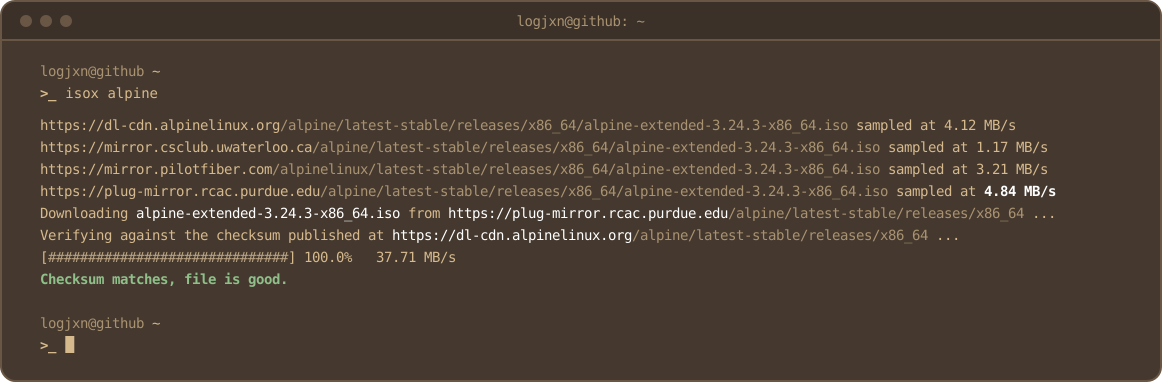
Select distro -> Compare mirror speeds -> Download .iso -> Verify checksum
                                          (fastest mirror)  (distro's own host)
Already have an ISO? isox <distro> --verify FILE checks it against the distro's own checksum without downloading anything.
Why
Manually verifying checksums gets tedious quickly, making it easy to skip. Skipping verification can pose an integrity risk (modified ISOs, corruption, etc.), so ISOx automates the process.
I hope this tool makes getting started with Linux a little faster, easier, and safer for anyone who wants to use it.
Install
From PyPI:
pip install isox
isox arch
Or straight from a clone:
pip install .
isox arch
Usage
Once installed from PyPI, isox works as a bare command. From a clone, use python isox.py. Examples below use the clone form.
List every supported distro:
python isox.py --list
Save somewhere other than ./ISOx_Downloads:
python isox.py arch --output-dir /example/directory
Pick an older release instead of the newest:
python isox.py ubuntu-server --release 24.04
python isox.py proxmox --release 8
python isox.py mint --release 22        # newest 22.x
Verify an ISO you already have (from a browser, a torrent, a USB stick):
python isox.py fedora --release 44 --verify ~/Downloads/Fedora-Workstation-Live-44-1.7.x86_64.iso
python isox.py ubuntu --release 24.04 --verify ubuntu-24.04.5.1-desktop-amd64.iso
Features
- Config-driven distro support - add supported distributions through
distros.jsonwithout changing code. - Version-folder auto-discovery - for distros with no stable "latest" alias, the current version-numbered directory is discovered by scanning a parent directory and sorting versions (folder names).
- Release selection -
--releasepicks an older release, such as Ubuntu 24.04 or Proxmox 8. A partial version like22gets the newest release in that series. - Mirror selection - tests available mirrors and selects the fastest.
- Resumable downloads - continues interrupted downloads, while discarding out of date copies.
- Live progress bar - shows percentage and real-time throughput, and degrades to a plain byte counter if the server won't report a total size.
- Verify existing ISOs -
--verifychecks a file you already have against the distro's checksum, without downloading or renaming anything.
Config format (distros.json)
Every distro entry needs mirrors, checksum_filename, and hash_algo at minimum. Everything else is optional and only needed if that distro deviates from the simplest cases.
If the included mirrors are not ideal for your location, you can easily update them. Just find a suitable mirror from the distro's official mirror list and replace the URL in distros.json. The tool will then handle the rest. HTTPS only.
{
    "arch": {
        "mirrors": ["https://fastly.mirror.pkgbuild.com/iso/latest/"],
        "checksum_base": "https://geo.mirror.pkgbuild.com/iso/latest/",
        "checksum_filename": "sha256sums.txt",
        "hash_algo": "sha256",
        "iso_filename": "archlinux-x86_64.iso"
    },
    "fedora": {
        "mirrors": [
            "https://dl.fedoraproject.org/pub/fedora/linux/releases/{version}/Workstation/x86_64/iso/",
            "https://mirror.cs.princeton.edu/pub/mirrors/fedora/linux/releases/{version}/Workstation/x86_64/iso/",
            "https://mirror.arizona.edu/fedora/linux/releases/{version}/Workstation/x86_64/iso/"
        ],
        "version_directory" : true,
        "version_discovery_url" : [
            "https://dl.fedoraproject.org/pub/fedora/linux/releases/",
            "https://mirror.arizona.edu/fedora/linux/releases/"
        ],
        "checksum_base": "https://dl.fedoraproject.org/pub/fedora/linux/releases/{version}/Workstation/x86_64/iso/",
        "checksum_filename" : "CHECKSUM",
        "checksum_discovery_method" : "html_scan",
        "checksum_format" : "bsd",
        "discovery_method": "html_scan",
        "hash_algo": "sha256",
        "iso_filename_contains": ["Workstation", "x86_64"]
    }
}
Checksum verification
The checksum is fetched on every run. Files that fail verification are renamed to .FAILED. Files that cannot be verified remain .UNVERIFIED.
Security
ISOx detects corruption, incomplete downloads, and ISOs that don't match their published checksums.
It does not authenticate the checksum itself. If a distribution's infrastructure is compromised, an attacker could replace both the ISO and its checksum.
ISOx does not verify GPG signatures. See SECURITY.md for details.
Requirements
- Python 3.10+
requestsbeautifulsoup4
Development
pip install -e '.[dev]'
pytest
black --check .
ruff check .
bandit isox.py

pytest -m live       # all distros
pytest -m live -s    # printing each resolved filename and hash
pytest -m live -k rocky
License
MIT License: see LICENSE for details. Feel free to use, modify, or build on this.
1 maintainer

Metadata
1 maintainer
Release files for isox 3.8.1
For a detailed explanation of source distributions (sdists) and built distributions (wheels), please see the package formats documentation.
Source distribution (sdist)
| File | Size | Uploaded | Provenance | Actions |
|---|---|---|---|---|
| isox-3.8.1.tar.gz | 32.8 kB | With provenance | Details for isox-3.8.1.tar.gz |
Built distribution (wheel)
| File | Interpreter | ABI | Platform | Actions Reset |
|---|---|---|---|---|
| isox-3.8.1-py3-none-any.whl | Python 3 | none | any | Details for isox-3.8.1-py3-none-any.whl |
Total release size: 49.3 kB
Release files / isox-3.8.1.tar.gz
| Download URL | isox-3.8.1.tar.gz |
|---|---|
| Size | 32.8 kB |
| Tags | Source |
|
SHA-256 checksum How to use checksums |
a0a1c762aaf95ff8873f2bd1b004fad43e281c4b641797c58b16a89e59cd0a2e
|
|
BLAKE2b-256 checksum How to use checksums |
c103197933bbd1561e0c182182a68c04a898782867b3cfcb3fd029d78c30429c
|
| Upload date | |
|
Uploaded using Trusted Publishing? What is trusted publishing? |
Yes |
| Uploaded via |
twine/7.0.0 CPython/3.13.16
|
Provenance
Provenance describes where a file came from. On PyPI, provenance is shared via attestations, which provide a verifiable record of the build or publishing details. View details, limitations and caveats.


PyPI Publish Attestation
PyPI verified that this artifact, at this checksum, originated from the publisher listed below.
Signed by GitHub Actions, verified by PyPI on Nov 5, 2026.
Transparency logRelease files / isox-3.8.1-py3-none-any.whl
| Download URL | isox-3.8.1-py3-none-any.whl |
|---|---|
| Size | 16.4 kB |
| Tags | Python 3 |
|
SHA-256 checksum How to use checksums |
fd8af0dcbd92828b4bbd1b0ae01dd7f515d0081e379847d72c69d19c27c70002
|
|
BLAKE2b-256 checksum How to use checksums |
3a85bb5cbef234f016ac566e8e988039599a18059d4e7c54dbc854da1b5518b0
|
| Upload date | |
|
Uploaded using Trusted Publishing? What is trusted publishing? |
Yes |
| Uploaded via |
twine/7.0.0 CPython/3.13.16
|
Provenance
Provenance describes where a file came from. On PyPI, provenance is shared via attestations, which provide a verifiable record of the build or publishing details. View details, limitations and caveats.
PyPI Publish Attestation
PyPI verified that this artifact, at this checksum, originated from the publisher listed below.
Signed by GitHub Actions, verified by PyPI on Nov 5, 2026.
Transparency logSecurity for isox 3.8.1
Provenance
Provenance describes where a file came from. On PyPI, provenance is shared via attestations, which provide a verifiable record of the build or publishing details. View details, limitations and caveats.
Full provenance
Both files in this release have been uploaded with provenance metadata.
Attestation for isox-3.8.1.tar.gz
PyPI Publish Attestation
PyPI verified that this artifact, at this checksum, originated from the publisher listed below.
Signed by GitHub Actions, verified by PyPI on Nov 5, 2026.
Transparency logA note on package security
PyPI is a repository for distributing packages, not a service for auditing them. While third-party security researchers and our staff do their best to detect and remove malicious packages, PyPI cannot guarantee the quality, security or suitability of any given package.
To learn more about protecting yourself from malicious actors, visit our package security documentation.














