
ispider_core
ispider is a module to spider websites
- Multicore and multithreaded
- Accepts hundreds/thousands of websites/domains as input
- Sparse requests to avoid repeated calls against the same domain
- The
httpxengine works in asyncio blocks defined bysettings.ASYNC_BLOCK_SIZE, so total concurrent threads areASYNC_BLOCK_SIZE * POOLS - It supports retry with different engines (httpx, curl, seleniumbase [testing])
It was designed for maximum speed, so it has some limitations:
- As of v0.7, it does not support files (pdf, video, images, etc); it only processes HTML
HOW IT WORKS - SIMPLE
-- Crawl - Depth == 0
- Get all the landing pages for domains in the provided list.
- If "robots" is selected, download the
robots.txtfile. - If "sitemaps" is selected, parse the
robots.txtand retrieve all the sitemaps. - All data is saved under
USER_DATA/data/dumps/dom_tld.
-- Spider - Depth > 0
- Extract all links from landing pages and sitemaps.
- Download the HTML pages, extract internal links, and follow them recursively.
HOW IT WORKS - MORE DETAILED
Crawl - Depth == 0
- Create objects in the form (
('https://domain.com', 'landing_page', 'domain.com', depth, retries, engine)) - Add them to the LIFO queue
qout - A thread retrieves elements from
qoutin variable-size blocks (depending onQUEUE_MAX_SIZE) - Fill a FIFO queue
qin - Different workers (defined in
settings.POOLS) get elements fromqinand download them toUSER_DATA/data/dumps/dom_tld - Landing pages are saved as
_.html - Each worker processes the landing page; if the result is OK (
status_code == 200), it tries to getrobots.txt - On failure, it tries the next available engine (fallback)
- It creates an object (
('https://domain.com/robots.txt', 'robots', 'domain.com', depth=1, retries=0, engine)) - Each worker retrieves the
robots.txt; if"sitemaps"is defined insettings.CRAWL_METHODS, it attempts to get all sitemaps fromrobots.txtanddom_tld/sitemaps.xml - It creates objects (
('https://domain.com/sitemap.xml', 'sitemaps', 'domain.com', depth=1, retries=0, engine)) and for other sitemaps found inrobots.txt - Every successful or failed download is logged as a row in
USER_FOLDER/jsons/crawl_conn_meta*jsonwith all information available from the engine; these files are useful for statistics/reports from the spider - When there are no more elements in
qin, after a 90-second timeout, jobs stop.
Spider - Depths > 0
- It reads entries from
USER_FOLDER/jsons/crawl_conn_meta*jsonfor the domains in the list - It retrieves landing pages and sitemaps
- If sitemaps are compressed, it uncompresses them
- Extract all links from landing pages and sitemaps
- Create objects (
('https://domain.com/link1', 'internals', 'domain.com', depth=2, retries=0, engine)) - Use the same engine that was used for the last successful request to the domain TLD
- Add these objects to
qout - Thread
qinmoves blocks fromqouttoqin, sparsing them - Download all links, save them, and save data in JSON
- Parse the HTML, extract all INTERNAL links, follow them recursively, increasing depth
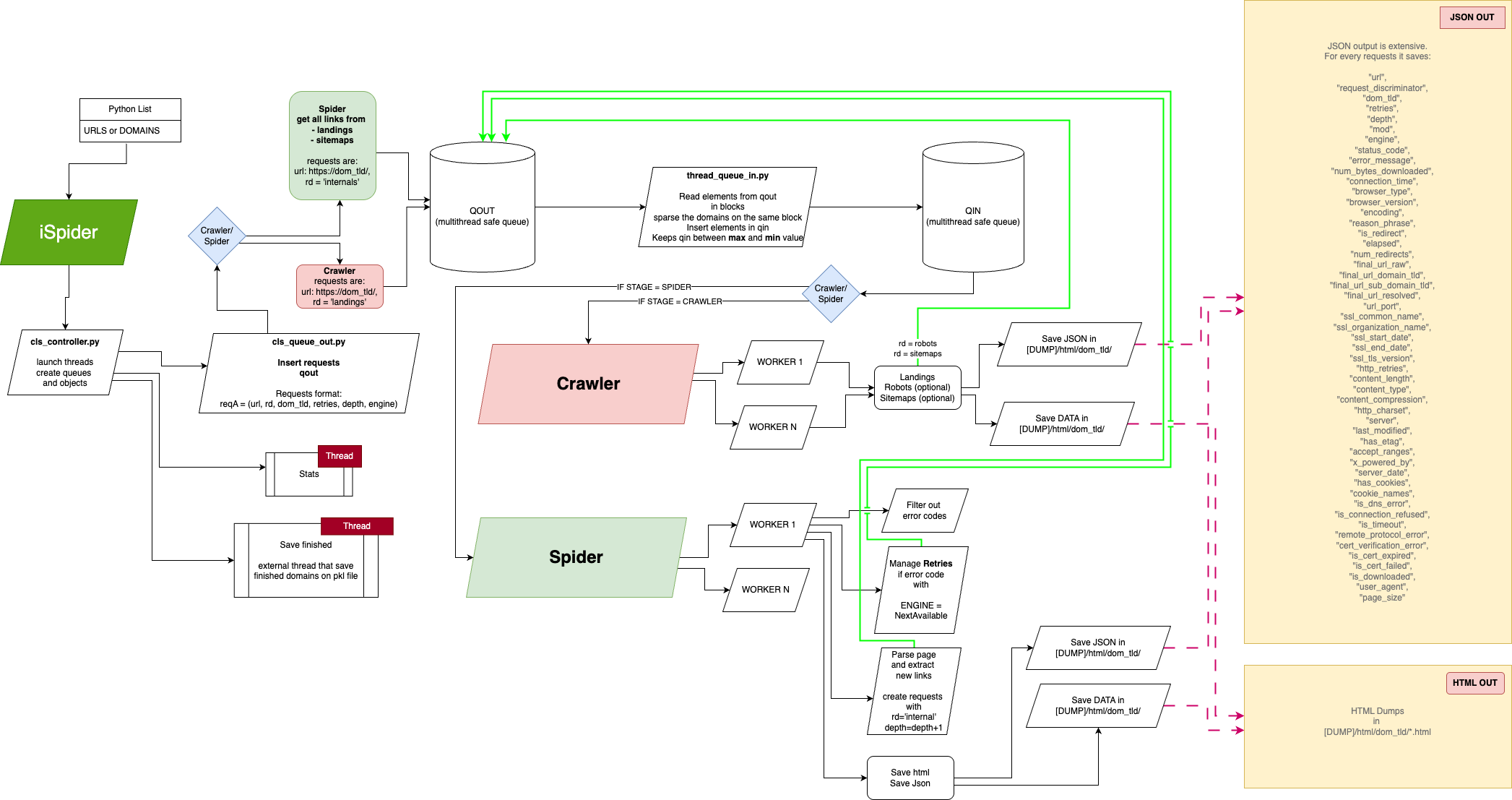
Schema
This is the projectual schema of the crawler/spider
USAGE
Install it
pip install ispider
First use
from ispider_core import ISpider

if __name__ == '__main__':
    # Check the readme for the complete avail parameters
    config_overrides = {
        'USER_FOLDER': '/Your/Dump/Folder',
        'POOLS': 64,
        'ASYNC_BLOCK_SIZE': 32,
        'MAXIMUM_RETRIES': 2,
        'CRAWL_METHODS': [],
        'CODES_TO_RETRY': [430, 503, 500, 429],
        'CURL_INSECURE': True,
        'ENGINES': ['curl'],
        'EXCLUDED_DOMAINS': ['facebook.com', 'instagram.com']
    }

    # Specify a list of domains
    doms = ['domain1.com', 'domain2.com'....]

    # Run
    with ISpider(domains=doms, **config_overrides) as spider:
        spider.run()
TO KNOW
At first execution,
-
It creates the folder settings.USER_FOLDER
-
It creates settings.USER_FOLDER/data/ with dumps/ and jsons/
-
settings.USER_FOLDER/data/dumps are the downloaded websites
-
settings.USER_FOLDER/data/jsons are the connection results for every request
SETTINGS
Actual default settings are:
    """
    ## *********************************
    ## GENERIC SETTINGS
    # Output folder for controllers, dumps and jsons
    USER_FOLDER = "~/.ispider/"

    # Log level
    LOG_LEVEL = 'DEBUG'

    ## i.e., status_code = 430
    CODES_TO_RETRY = [430, 503, 500, 429]
    MAXIMUM_RETRIES = 2

    # Delay time after some status code to be retried
    TIME_DELAY_RETRY = 0

    ## Number of concurrent connection on the same process during crawling
    # Concurrent por process
    ASYNC_BLOCK_SIZE = 4

    # Concurrent processes (number of cores used, check your CPU spec)
    POOLS = 4

    # Max timeout for connecting,
    TIMEOUT = 5

    # This need to be a list,
    # curl is used as subprocess, so be sure you installed it on your system
    # Retry will use next available engine.
    # The script begins wit the suprfast httpx
    # If fail, try with curl
    # If fail, it tries with seleniumbase, headless and uc mode activate
    ENGINES = ['httpx', 'curl', 'seleniumbase']

    CURL_INSECURE = False

    ## *********************************
    # CRAWLER
    # File size
    # Max file size dumped on the disk.
    # This to avoid big sitemaps with errors.
    MAX_CRAWL_DUMP_SIZE = 52428800

    # Max depth to follow in sitemaps
    SITEMAPS_MAX_DEPTH = 2

    # Crawler will get robots and sitemaps too
    CRAWL_METHODS = ['robots', 'sitemaps']

    ## *********************************
    ## SPIDER
    # Queue max, till 1 billion is ok on normal systems
    QUEUE_MAX_SIZE = 100000

    # Max depth to follow in websites
    WEBSITES_MAX_DEPTH = 2

    # This is not implemented yet
    MAX_PAGES_POR_DOMAIN = 1000000

    # This try to exclude some kind of files
    # It also test first bits of content of some common files,
    # to exclude them even if online element has no extension
    EXCLUDED_EXTENSIONS = [
        "pdf", "csv",
        "mp3", "jpg", "jpeg", "png", "gif", "bmp", "tiff", "webp", "svg", "ico", "tif",
        "jfif", "eps", "raw", "cr2", "nef", "orf", "arw", "rw2", "sr2", "dng", "heif", "avif", "jp2", "jpx",
        "wdp", "hdp", "psd", "ai", "cdr", "ppsx"
        "ics", "ogv",
        "mpg", "mp4", "mov", "m4v",
        "zip", "rar"
    ]

    # Exclude all urls that contains this REGEX
    EXCLUDED_EXPRESSIONS_URL = [
        # r'test',
    ]

    # If not empty, follow only URLs that match these regex patterns
    INCLUDED_EXPRESSIONS_URL = [
        # r'/\d{4}/\d{2}/\d{2}/',
    ]

    # Exclude specific domains from crawling/spidering.
    # Accepts values like "example.com" or full URLs.
    EXCLUDED_DOMAINS = []

    """
NOTES
- Deduplication is not 100% safe, sometimes pages are downloaded multiple times, and skipped in file check. On ~10 domains, check duplication has small delay. But on 10000 domains after 500k links, the domain list is so big that checking if a link is already downloaded or not was decreasing considerably the speed (from 30000 urls/min to 300 urls/min). That's why I preferred avoid a list, and left just "check file".
SEO checks (modular)
You can run independent SEO checks during crawling/spidering. Results are stored in each JSON response row under seo_issues.
Available checks:
response_crawlability: flags 3xx/4xx/5xx, redirect chains, and timeouts.broken_links: generic status >= 400 detector.http_status_503: dedicated 503 detector.title_meta_quality: validates<title>and meta description length/presence and flagstitle == h1.h1_too_long: validates H1 length threshold.heading_structure: checks h1 count and heading-order skips.indexability_canonical: checks canonical presence/self-reference, homepage canonicals, andnoindexdirectives.schema_news_article: detectsNewsArticlestructured data and required properties.image_optimization: flags missing image dimensions/ALT and oversized hero hints.internal_linking: flags weak anchors, no internal links, and too many external links.url_hygiene: validates URL length/case/params/special chars and the newsroom pattern/yyyy/mm/dd/slug/.content_length: flags thin content (default<250words).security_headers: checks HSTS, CSP, and X-Frame-Options.
SEO issue codes (priority + short description)
| Code | Priority | Description |
|---|---|---|
BROKEN_LINK |
medium | URL returned an HTTP status code >= 400. |
CANONICAL_MISSING |
medium | Canonical tag is missing. |
CANONICAL_NOT_SELF |
low | Canonical URL is not self-referential. |
CANONICAL_TO_HOMEPAGE |
high | Canonical points to homepage from an internal page. |
CONTENT_TOO_THIN |
medium | Visible content word count is below the configured minimum. |
H1_MISSING |
high | No H1 heading found on the page. |
H1_MULTIPLE |
high | More than one H1 heading found. |
H1_TOO_LONG |
low | H1 text length exceeds configured maximum (SEO_H1_MAX_CHARS). |
HEADING_ORDER_SKIP |
low | Heading hierarchy skips levels (for example h2 -> h4). |
HERO_IMAGE_FETCHPRIORITY_MISSING |
low | First image is missing fetchpriority=high. |
HERO_IMAGE_TOO_LARGE |
medium | Hero image appears larger than configured size threshold. |
HTTP_3XX |
low | Response is a redirect (3xx). |
HTTP_4XX |
high | Response is a client error (4xx). |
HTTP_5XX |
high | Response is a server error (5xx). |
HTTP_503 |
high | Response specifically returned 503 Service Unavailable. |
IMAGE_ALT_MISSING |
low | At least one image is missing ALT text. |
IMAGE_LAZY_LOADING_MISSING |
low | Non-hero image missing loading=lazy. |
META_DESCRIPTION_LENGTH |
low | Meta description length is outside recommended range. |
META_DESCRIPTION_MISSING |
medium | Meta description is missing. |
NOINDEX_DETECTED |
high | noindex detected in meta robots or x-robots-tag. |
NO_INTERNAL_LINKS |
medium | No internal links found on the page. |
REDIRECT_CHAIN |
medium | Redirect chain length is greater than 1. |
REQUEST_TIMEOUT |
high | Request timed out. |
SCHEMA_NEWSARTICLE_MISSING |
high | NewsArticle JSON-LD schema not found. |
SCHEMA_REQUIRED_FIELDS_MISSING |
high | NewsArticle schema is missing required fields. |
SECURITY_HEADERS_MISSING |
low | One or more security headers are missing (HSTS, CSP, X-Frame-Options). |
TITLE_EQUALS_H1 |
low | <title> is identical to H1. |
TITLE_LENGTH |
medium | <title> length is outside recommended range. |
TITLE_MISSING |
high | <title> tag is missing. |
TOO_MANY_EXTERNAL_LINKS |
low | Unique external domains exceed configured threshold. |
URL_HAS_PARAMETERS |
low | URL contains query parameters. |
URL_NEWS_PATTERN_MISMATCH |
medium | URL does not match expected /yyyy/mm/dd/slug/ pattern. |
URL_SPECIAL_CHARS |
low | URL path contains special characters. |
URL_TOO_LONG |
low | URL length exceeds configured threshold. |
URL_UPPERCASE |
low | URL path contains uppercase letters. |
WEAK_ANCHOR_TEXT |
low | Generic anchor texts detected (for example “read more”, “click here”). |
Configure with settings:
config_overrides = {
    'SEO_CHECKS_ENABLED': True,
    'SEO_ENABLED_CHECKS': ['response_crawlability', 'title_meta_quality', 'schema_news_article'],
    'SEO_DISABLED_CHECKS': ['http_status_503'],
    'SEO_H1_MAX_CHARS': 70,
}
Tip for Google News-focused runs: combine INCLUDED_EXPRESSIONS_URL with a day filter (example: r'^.*/2026/02/07/.*$') and keep response_crawlability, indexability_canonical, and schema_news_article enabled.
To add a new check, create a class in ispider_core/seo/checks/ with name and run(resp) and register it in ispider_core/seo/runner.py.
1 maintainer

Metadata
1 maintainer
Release files for ispider 0.8.9
For a detailed explanation of source distributions (sdists) and built distributions (wheels), please see the package formats documentation.
Source distribution (sdist)
| File | Size | Uploaded | |
|---|---|---|---|
| ispider-0.8.9.tar.gz | 52.2 kB | Details |
Built distribution (wheel)
| File | Interpreter | ABI | Platform | Reset |
|---|---|---|---|---|
| ispider-0.8.9-py3-none-any.whl | Python 3 | none | any | Details |
Total release size: 120.6 kB
Release files / ispider-0.8.9.tar.gz
| Download URL | ispider-0.8.9.tar.gz |
|---|---|
| Size | 52.2 kB |
| Tags | Source |
|
SHA-256 checksum How to use checksums |
809f2c462c6dd71ada6b8fcee42c6f188110aeb0d24c0b7533ed527c050e60c6
|
|
BLAKE2b-256 checksum How to use checksums |
e02b17685a3052472d950176919fba660698577f6580cd89ad08528ba4b144af
|
| Upload date | |
|
Uploaded using Trusted Publishing? What is trusted publishing? |
Yes |
| Uploaded via |
twine/7.0.0 CPython/3.13.14
|
Provenance
Provenance describes where a file came from. On PyPI, provenance is shared via attestations, which provide a verifiable record of the build or publishing details. View details, limitations and caveats.


PyPI Publish Attestation
PyPI verified that this artifact, at this checksum, originated from the publisher listed below.
Signed by GitHub Actions, verified by PyPI on Aug 17, 2026.
Transparency logRelease files / ispider-0.8.9-py3-none-any.whl
| Download URL | ispider-0.8.9-py3-none-any.whl |
|---|---|
| Size | 68.5 kB |
| Tags | Python 3 |
|
SHA-256 checksum How to use checksums |
d2af3610e3262f6fe80bd7dc64d40ea4d77cc436884a2f69186c80a845c7c383
|
|
BLAKE2b-256 checksum How to use checksums |
17721dd612fc60052bf45ea0e68ac962e2134ec5ef9533bb1c7a16d7c67cd944
|
| Upload date | |
|
Uploaded using Trusted Publishing? What is trusted publishing? |
Yes |
| Uploaded via |
twine/7.0.0 CPython/3.13.14
|
Provenance
Provenance describes where a file came from. On PyPI, provenance is shared via attestations, which provide a verifiable record of the build or publishing details. View details, limitations and caveats.
PyPI Publish Attestation
PyPI verified that this artifact, at this checksum, originated from the publisher listed below.
Signed by GitHub Actions, verified by PyPI on Aug 17, 2026.
Transparency log













