
📢 About



isqa is a CLI utility designed to help you manage issues of a GitLab repository.
This CLI utility could be used for quality assurance of GitLab issues. Name
isqais comes from merging the termissuesandquality assurance.
The intended use is to use cron or a similar approach to run the CLI in the background with a time interval. For insstance, a version running in th docker can use the following docker job scheduler: mcuadros/ofelia
📦 Installation
- Install using pip
pip install --upgrade isqa - Check
configurationsection afterward
🧩 Development Setup
This guide walks through setting up the project for local development using uv.
-
Create a new virtual environment in a
.venvdirectory and activates it.uv venv -
Activate the environment (macOS/Linux):
source .venv/bin/activate -
Activate the environment (Windows):
call .venv/Scripts/activate.bat -
Install Package in Editable Mode Installing the package in editable mode (
-e) is the key to development. It links theisqacommand in your environment directly to your source code.uv pip install -e .
⚙️ Configuration
This tool requires access to your GitLab repository (scopes: api, read_api). It uses a .env file to securely load your API credentials.
-
Create a
.envfile in the root of the project -
Add your GitLab URL and a Access Token to the
.envfile.GITLAB_URL=https://gitlab.your-company.com GITLAB_PROJECT_ID="Project_Name" GITLAB_PRIVATE_TOKEN=Your_Access_Token_Here
Note: You can generate a Access Token (AT) from your GitLab repository under Settings > Access Tokens. Make sure to check upon creation the following scopes:
api,read_api.Never commit your
.envfile to version control. -
To send notifications via email, a file
extra.envwith email configs is required.cp samples/sample.extra.env extra.env nano extra.env
🌟 Usage
Once installed, the isqa command is available directly in your terminal.
NOTE: In case you want to work with multiple repositories, then you need to create multiple .env files. Then each .env file could be explicitly passed/injected into CLI via parameter.
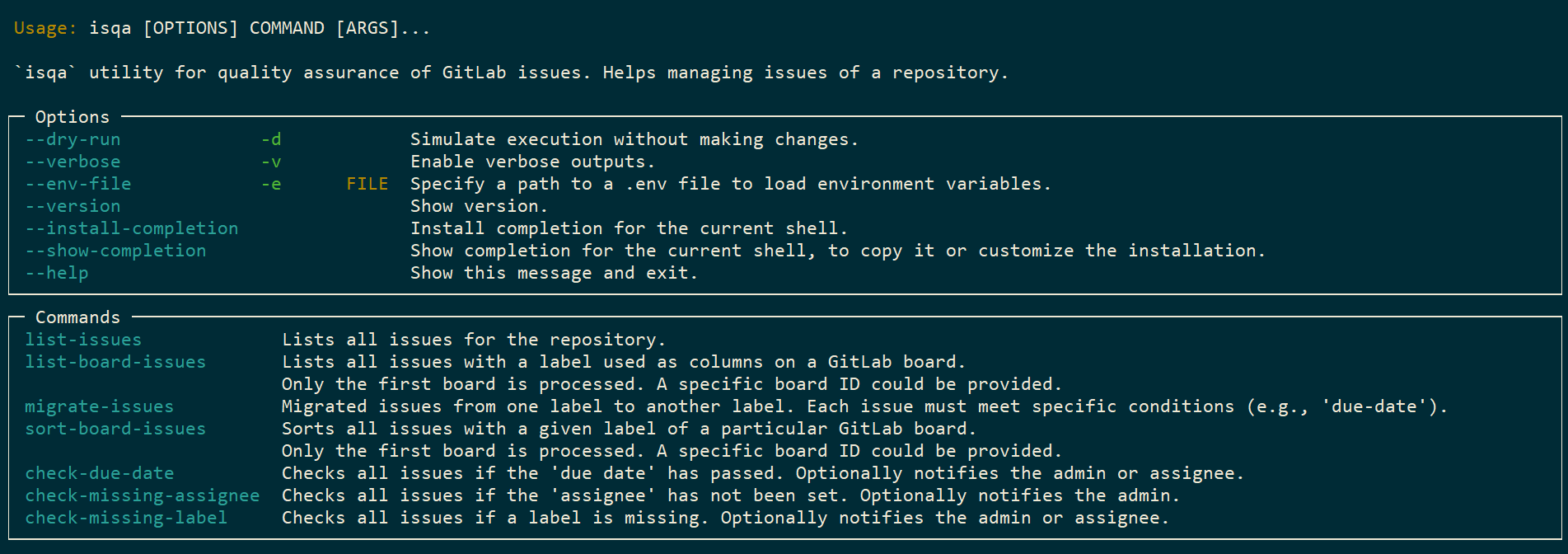
Because it's a typer application, you can explore all its commands and options by simply running:
- Help
isqa --help
Here is a list of examples, which demonstrate the core features of the utility:
- List board issues
isqa list-board-issues --board-name tasks - List board issues (without visible labels on the board)
isqa list-board-issues --without-labels - Use a custom
test.envfileisqa --env-file test.env list-issues - Run a check of a due date property of the issues and notify admin via email, if some issues are due
isqa check-due-date --notify-admin - Run a check of missing labels of the issues and notify admin via email, if some issues got no labels assigned
isqa check-missing-label --notify-admin - Run a check of missing assignee for the issues and notify admin via email, if some issues got no assignee
isqa check-missing-assignee --notify-admin - Migration issues from label
In Progressto labeladministrationwhen conditiondue-datemet (issues have been due)isqa migrate-issues --from-label "In Progress" --to-label "administration" --check-condition due-date - Sorting the issues on a board within the label
projects(NOTE: it make take a while, because after eachsortpass, the script will be pause for10seconds in order not to overload server )isqa sort-board-issues --label projects - Sorting the issues on a board within the label
projectsin descending order.isqa sort-board-issues --label projects --descending
CLI UI
Note
In order to get emails notifications, each Gitlab user must set his/her email as public inside the personal Gitlab profile (this could be differ according to your Gitlab default configurations). Otherwise only configured in the .env file admin will receive notification emails.
Documentation
License
1 maintainer

Release files for isqa 0.6.2
For a detailed explanation of source distributions (sdists) and built distributions (wheels), please see the package formats documentation.
Source distribution (sdist)
| File | Size | Uploaded | |
|---|---|---|---|
| isqa-0.6.2.tar.gz | 17.6 kB | Details |
Built distribution (wheel)
| File | Interpreter | ABI | Platform | Reset |
|---|---|---|---|---|
| isqa-0.6.2-py3-none-any.whl | Python 3 | none | any | Details |
Total release size: 35.9 kB
Release files / isqa-0.6.2.tar.gz
| Download URL | isqa-0.6.2.tar.gz |
|---|---|
| Size | 17.6 kB |
| Tags | Source |
|
SHA-256 checksum How to use checksums |
876c82760e937d60cafa468751376ddc29bcc3898da5056e2bf66516e7f54738
|
|
BLAKE2b-256 checksum How to use checksums |
950b56eec6d6a140a987c095040c429f25d664199e5863beb422d5b1448f8d1c
|
| Upload date | |
|
Uploaded using Trusted Publishing? What is trusted publishing? |
Yes |
| Uploaded via |
twine/7.0.0 CPython/3.13.14
|
Provenance
Provenance describes where a file came from. On PyPI, provenance is shared via attestations, which provide a verifiable record of the build or publishing details. View details, limitations and caveats.


PyPI Publish Attestation
PyPI verified that this artifact, at this checksum, originated from the publisher listed below.
Signed by GitHub Actions, verified by PyPI on Aug 7, 2026.
Transparency logRelease files / isqa-0.6.2-py3-none-any.whl
| Download URL | isqa-0.6.2-py3-none-any.whl |
|---|---|
| Size | 18.3 kB |
| Tags | Python 3 |
|
SHA-256 checksum How to use checksums |
a3a601f8f533970744f800e9ee143b180c87139d65bd2f10a5eb2f52ec7259ed
|
|
BLAKE2b-256 checksum How to use checksums |
f6de7452d7a6589350c0312280440d62b91b991abe813cc261207a7dadcecad0
|
| Upload date | |
|
Uploaded using Trusted Publishing? What is trusted publishing? |
Yes |
| Uploaded via |
twine/7.0.0 CPython/3.13.14
|
Provenance
Provenance describes where a file came from. On PyPI, provenance is shared via attestations, which provide a verifiable record of the build or publishing details. View details, limitations and caveats.
PyPI Publish Attestation
PyPI verified that this artifact, at this checksum, originated from the publisher listed below.
Signed by GitHub Actions, verified by PyPI on Aug 7, 2026.
Transparency log













