
Data-driven information-theoretic causal bounds under unmeasured confounding.

Project description
Information-Theoretic Causal Bounds under Unmeasured Confounding
This repo implements the method in "Information-Theoretic Causal Bounds under Unmeasured Confounding (Jung & Kang, 2026)." It provides lower and upper bounds on causal estimands under unmeasured confounding without bounded outcomes, sensitivity parameters, instruments/proxies, or full SCM specification.
Target estimands (paper notation):
θ(a, x) = E_{Q_{a,x}}[φ(Y)],  Q_{a,x} = P(Y | do(A=a), X=x)
θ(a)    = E_{Q_a}[φ(Y)]
Install (step-by-step, very detailed)
Below is a public, copy‑paste friendly guide. The key idea is that pip install . installs the package from the current directory (this repo) into your currently active Python environment.
0) Open a terminal and go to the repo root
You must run these commands in the repository root (the folder containing pyproject.toml).
If you haven’t cloned the repo yet:
git clone https://github.com/yonghanjung/Information-Theretic-Bounds.git
cd Information-Theretic-Bounds
If you already have the repo locally, just cd into it:
cd <your-local-repo-path>
Check you are in the right place:
ls pyproject.toml
If it prints pyproject.toml, you are in the correct directory.
1) Create and activate a clean virtual environment (recommended)
This keeps dependencies isolated to this project.
python -m venv .venv
Activate it:
source .venv/bin/activate # macOS/Linux
On Windows (PowerShell):
.venv\\Scripts\\Activate.ps1
On Windows (cmd.exe):
.venv\\Scripts\\activate.bat
After activation, your shell prompt usually shows (.venv).
2) Upgrade pip inside the venv
python -m pip install --upgrade pip
3) Install this package from the repo directory
This installs itbound into the active environment.
python -m pip install .
What this means:
.means “the current folder.”- So
pip install .tells pip to readpyproject.tomlhere and install the package.
4) (Optional) Development install (editable)
Use this if you want local code changes to be reflected immediately without reinstalling.
python -m pip install -e .
5) (Optional) Extras for figure reproduction
If you want to run the reproduce command and create figures:
python -m pip install '.[experiments]'
6) Quick sanity check
python -m itbound --help
If you see the CLI help output, the installation worked.
10-Minute Quickstart (Opt-in Wrapper)
quick is an opt-in wrapper around itbound.fit(...); default math remains paper-equivalent (mode=paper-default).
python -m venv .venv && source .venv/bin/activate
python -m pip install --upgrade pip
python -m pip install .
python -m itbound example --out /tmp/itbound_example.csv
python -m itbound quick --data /tmp/itbound_example.csv --treatment a --outcome y --covariates x1,x2 --outdir /tmp/itbound_quick
What the outputs mean:
lower/upper: robust causal bound endpoints, not a single identified point estimate.width = upper - lower: interval uncertainty under the allowed confounding set.valid_interval: whether each row has a finite valid interval after domain/validity checks.
Artifact location:
- All quick outputs are written under
--outdir(for example/tmp/itbound_quick). - Expected files:
summary.txt,results.json,claims.json,claims.md,plots/, optionalreport.html. - Details:
docs/quickstart.md,docs/artifact_contract.md, schemadocs/results_schema_v0.md.
Python API
New wrapper (recommended):
import itbound
Standard-library function:
from itbound.standard import run_standard_bounds

result = run_standard_bounds(
    csv_path="/tmp/itbound_toy.csv",
    outcome_col="y",
    treatment_col="a",
    covariate_cols=["x1", "x2"],
    divergences=["KL", "JS", "Hellinger", "TV", "Chi2"],
    aggregation_mode="paper_adaptive_k",
    outdir="/tmp/itbound_standard",
    write_html=True,
)
Legacy import (still supported):
import fbound
CLI
Run bounds from config
itbound run --config docs/cli-config.example.yaml
You can override output path:
itbound run --config docs/cli-config.example.yaml --out /tmp/itbound_bounds.csv
Run a quick synthetic example
itbound example --out /tmp/itbound_example.csv
Reproduce arXiv plots
itbound reproduce --dry-run
Notes:
reproduceexpects the final-arxiv JSON summaries underexperiments/final-arxiv.- If you installed the package, run
itbound reproducefrom the repo root so the data files are found. - Install extras first:
pip install .[experiments].
Standard-library run (CSV -> bounds + claims JSON + plots + optional HTML)
itbound standard \
  --csv /tmp/itbound_toy.csv \
  --y-col y \
  --a-col a \
  --x-cols x1,x2 \
  --outdir /tmp/itbound_standard \
  --divergences KL,JS,Hellinger,TV,Chi2 \
  --aggregation-mode paper_adaptive_k \
  --html
Aggregation modes:
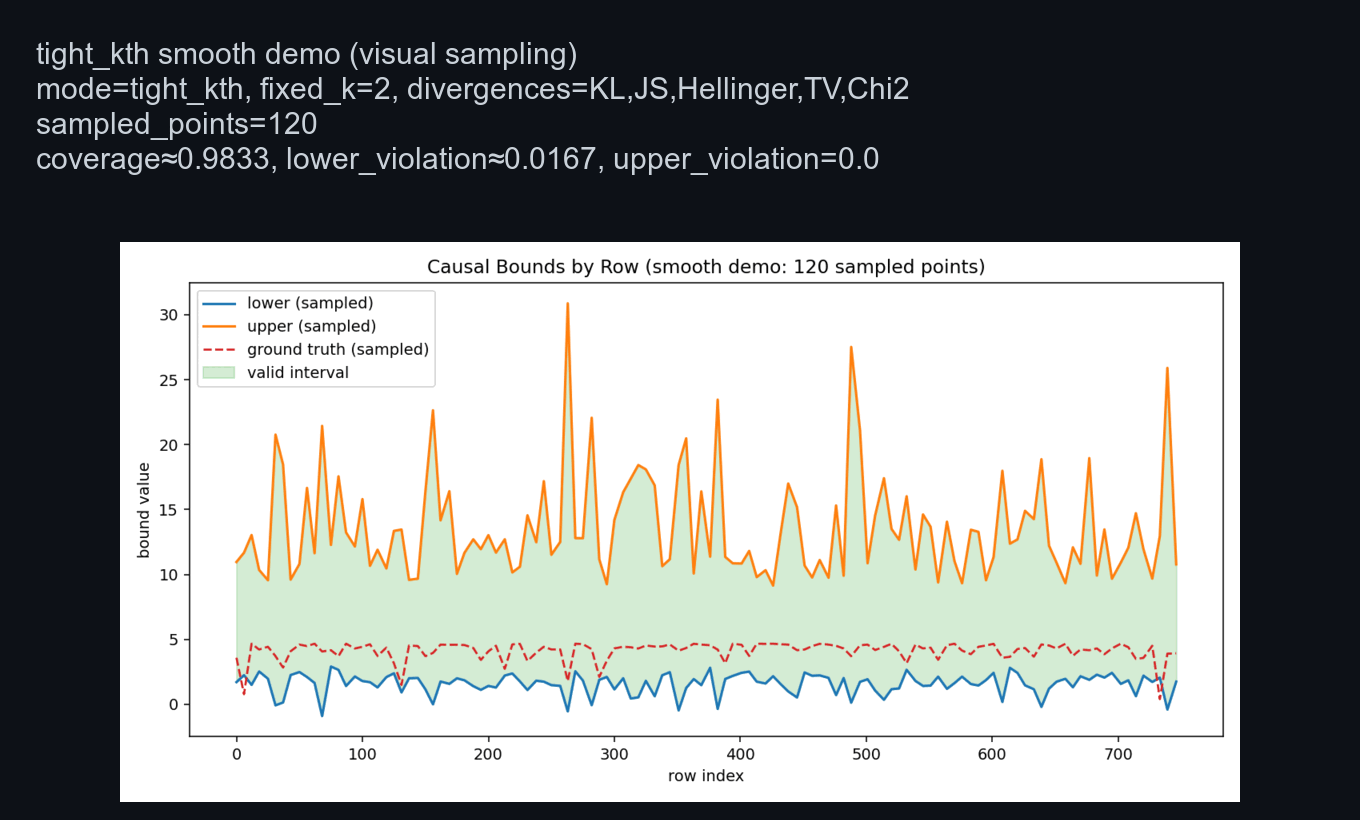
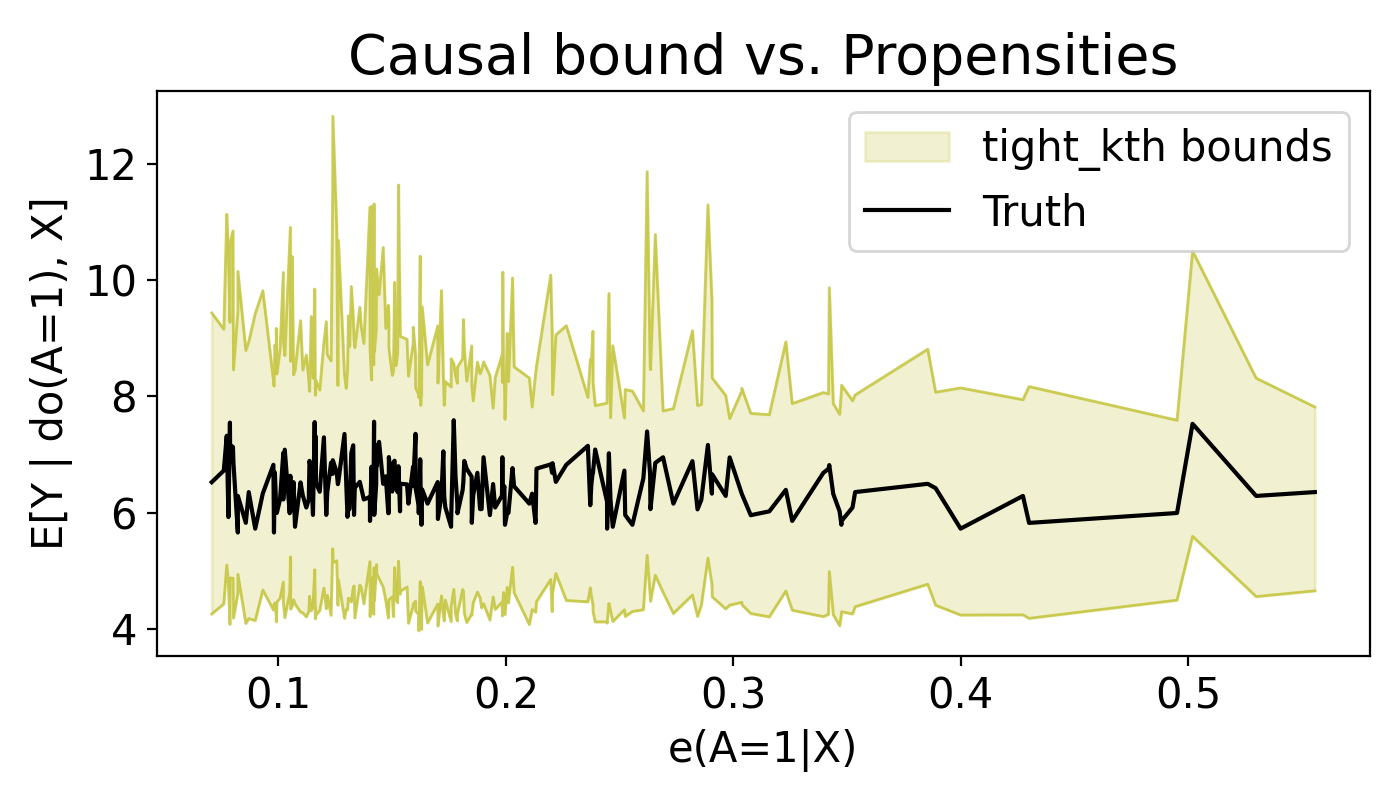
paper_adaptive_k(default): increase endpoint-k until feasible interval is found.fixed_k_endpoint: use exactly--fixed-kfor both endpoints.tight_kth: experiment-style tight-kth aggregation (starts from large k, relaxes down).- default divergences for this mode are the same built-in 5:
KL,JS,Hellinger,TV,Chi2. - you can override to a subset with
--divergences(for exampleKL,TV).
- default divergences for this mode are the same built-in 5:
Ground-truth plot overlay options (visualization only; math unchanged):
--ground-truth-col <col>: draw per-row truth values from a column.--ground-truth-effect <float>: draw a scalar horizontal truth line.--no-ground-truth-auto: disable auto detection frommu1-mu0.- default behavior auto-detects
mu1-mu0when available.
Example (tight_kth):
itbound standard \
  --csv /tmp/itbound_toy.csv \
  --y-col y \
  --a-col a \
  --x-cols x1,x2 \
  --outdir /tmp/itbound_standard_tight \
  --aggregation-mode tight_kth
Example (tight_kth subset override + explicit truth column):
itbound standard \
  --csv /tmp/itbound_toy.csv \
  --y-col y \
  --a-col a \
  --x-cols x1,x2 \
  --outdir /tmp/itbound_standard_tight_kltv \
  --divergences KL,TV \
  --aggregation-mode tight_kth \
  --ground-truth-col tau_true
Artifacts written to --outdir:
bounds.csvsummary.json(claims + diagnostics + run config)- plot PNGs when
matplotlibis available report.htmlwhen--htmlis enabled
If matplotlib is missing, plotting is skipped with a warning and other artifacts are still produced.
See also: docs/aggregation_modes.md
Artifact Contract Run (schema-versioned results.json)
itbound artifacts \
  --csv /tmp/itbound_toy.csv \
  --y-col y \
  --a-col a \
  --x-cols x1,x2 \
  --outdir /tmp/itbound_artifacts \
  --divergences KL
This opt-in command writes a fixed folder contract:
summary.txtresults.json(schema versioned; seedocs/results_schema_v0.md)claims.jsonclaims.mdplots/report.html(optional with--html)
Quick Wrapper Run (itbound.fit via CLI)
itbound quick \
  --data /tmp/itbound_toy.csv \
  --treatment a \
  --outcome y \
  --covariates x1,x2 \
  --outdir /tmp/itbound_quick
quick is an opt-in wrapper around itbound.fit(...) with default mode=paper-default,
and writes the same artifact contract (summary.txt, results.json, claims.json, claims.md, plots/).
Live Demo (Toy + Benchmark)
IHDP scenario preview (GIF rendered from the actual CLI run):
Run a fast IHDP demo with explicit KL + truth-coverage envelope:
itbound demo --scenario ihdp --divergence KL --enforce-truth-coverage --eval-points 240 --rounds 5 --n-folds 5 --outdir /tmp/itbound_live_demo --batch-size 8
Run on a benchmark-style IHDP CSV:
itbound demo --scenario ihdp --ihdp-data /path/to/ihdp_npci_1.csv --divergence KL --enforce-truth-coverage --eval-points 240 --rounds 5 --n-folds 5 --outdir /tmp/itbound_live_demo --batch-size 8
Run both in one command:
itbound demo --scenario both --toy-n 1000 --divergence KL --enforce-truth-coverage --eval-points 240 --rounds 5 --n-folds 5 --outdir /tmp/itbound_live_demo --batch-size 8
The demo writes per-scenario artifact folders (toy/, ihdp/) plus live_demo_summary.md under --outdir.
By default, IHDP plots use a demo-only truth-aware envelope so every point satisfies lower < truth < upper visually.
Use --no-enforce-truth-coverage to disable this visualization aid.
Use --eval-points (e.g., 240) to render fewer evaluation points for smoother, less spiky demo plots.
To regenerate the GIF:
bash scripts/demo/make_quick_demo.sh
Good Example (End-to-End)
Install, run a quick example, and verify the output columns:
pip install .
itbound example --out /tmp/itbound_example.csv

python - <<'PY'
import pandas as pd
df = pd.read_csv("/tmp/itbound_example.csv")
print(df.columns.tolist())
PY
Expected columns include lower and upper.
Example Diagram
flowchart LR
    A[Config YAML/JSON] --> B[Data Loader]
    B --> C[Bound Estimator]
    C --> D[Bounds CSV]
    B --> E[Diagnostics]
    C --> E
Example Plot
Config schema (CLI)
The config must be YAML or JSON and include:
data: one ofsynthetic,npz_path, orcsv_pathdivergencepropensity_modelm_modeldual_net_configfit_configseed
Optional:
phi(default:identity)output_path(default:itbound_bounds.csv)
See docs/cli-config.example.yaml for a complete example.
For a full field-by-field explanation, see docs/config.md.
Toy CSV example
Create a toy CSV and run:
python - <<'PY'
import numpy as np
import pandas as pd

rng = np.random.default_rng(0)
n = 50
x1 = rng.normal(size=n)
x2 = rng.normal(size=n)
a = (x1 + rng.normal(scale=0.5, size=n) > 0).astype(int)
y = 1.0 + 0.5 * a + 0.3 * x1 - 0.2 * x2 + rng.normal(scale=0.1, size=n)

df = pd.DataFrame({"y": y, "a": a, "x1": x1, "x2": x2})
df.to_csv("/tmp/itbound_toy.csv", index=False)
print("/tmp/itbound_toy.csv")
PY

cat <<'YAML' > /tmp/itbound_toy.yaml
data:
  csv_path: /tmp/itbound_toy.csv
  y_col: y
  a_col: a
  x_cols: [x1, x2]
divergence: KL
phi: identity
propensity_model: logistic
m_model: linear
dual_net_config:
  hidden_sizes: [8, 8]
  activation: relu
  dropout: 0.0
  h_clip: 10.0
  device: cpu
fit_config:
  n_folds: 2
  num_epochs: 2
  batch_size: 16
  lr: 0.005
  weight_decay: 0.0
  max_grad_norm: 5.0
  eps_propensity: 0.001
  deterministic_torch: true
  train_m_on_fold: true
  propensity_config:
    C: 1.0
    max_iter: 200
    penalty: l2
    solver: lbfgs
    n_jobs: 1
  m_config:
    alpha: 1.0
  verbose: false
  log_every: 1
seed: 123
YAML

itbound run --config /tmp/itbound_toy.yaml --out /tmp/itbound_toy_bounds.csv
Agent Skill
Agent-friendly usage is documented in docs/agent/SKILL.md.
Theory at a glance (ITB.pdf)
Divergence bound from propensity (Theorem 1)
For any action a and covariates x with P(a|x) > 0:
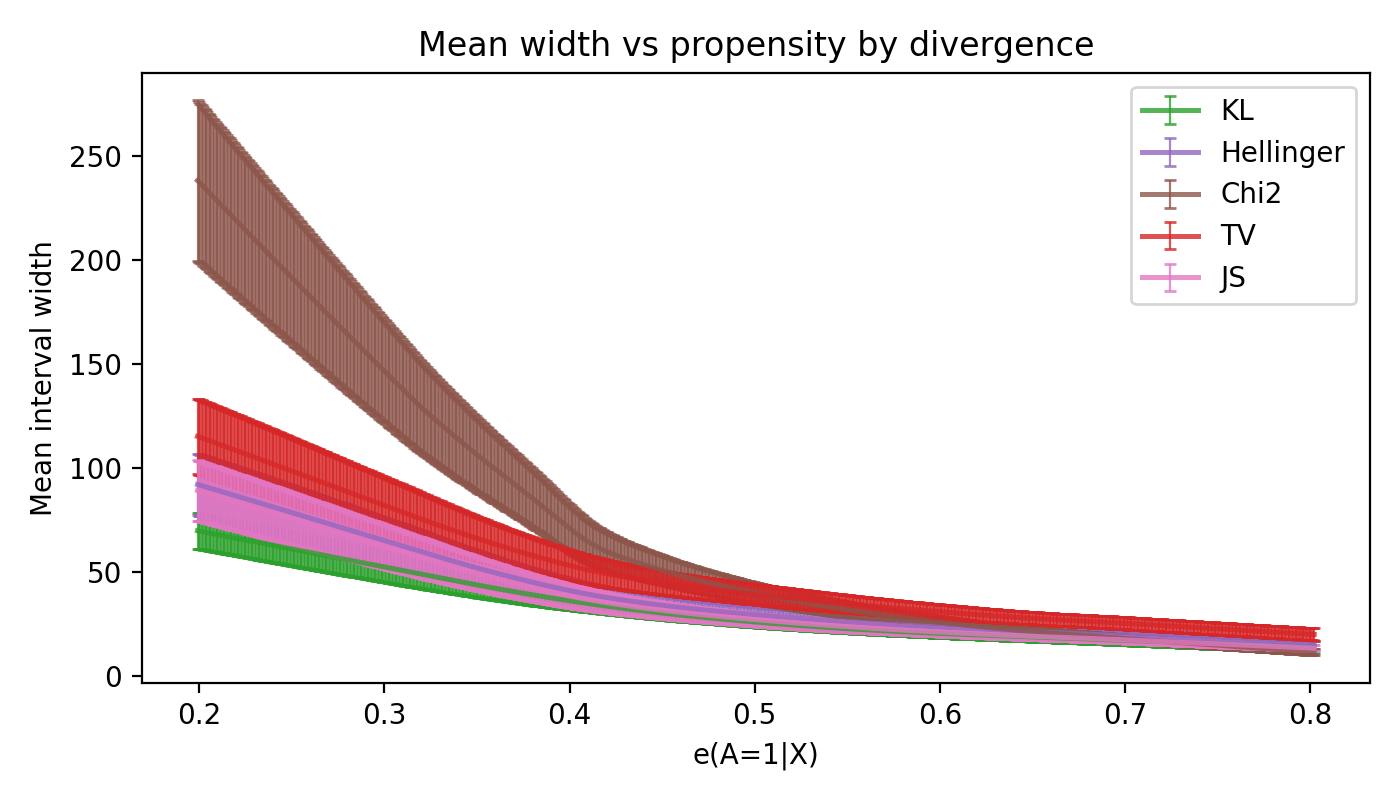
D_f(P_{a,x} || Q_{a,x}) <= B_f(e_a(x)), B_f(e) = e f(1/e) + (1-e) f(0)
This upper bound depends only on the propensity score, making the divergence radius fully propensity-score-based.
Specializations used in the code:
KL:D_KL(P||Q) <= -log eHellinger:D_H(P||Q) <= 1 - sqrt(e)Chi2:D_chi2(P||Q) <= (1-e)/(2e)TV:D_TV(P||Q) <= 1 - eJS:D_JS(P||Q) <= B_fJS(e)(closed form in the paper)
Dual causal bound (Theorem 2)
Define g(s)=s f(1/s) and its convex conjugate g*(t). The upper bound solves:
θ_up(a,x) = inf_{λ>0, u in R} { λ η_f(a,x) + u + λ E_{P_{a,x}}[g*((φ(Y)-u)/λ)] }
Debiased semiparametric estimator (Section 5)
The code minimizes the paper's risk function (Definition 4) with cross-fitting and a Neyman-orthogonal correction, using:
- PyTorch dual nets for
h(a,x)andu(a,x)withλ(a,x)=exp(h(a,x)) - sklearn propensity + outcome regressors for nuisances
Diagnostics (AGENTS P0)
Endpoint-wise aggregation reports per-point diagnostics:
n_eff_up,n_eff_lo: effective candidate counts after filtering.k_used_up,k_used_lo: order-statistic index used (default 1).invalid_up,invalid_lo,nonfinite_upper,nonfinite_lower,inverted_filtered: rejection counts.
Run example outputs include validity masks and these diagnostics in the saved tables.
Release history Release notifications | RSS feed


Download files
Download the file for your platform. If you're not sure which to choose, learn more about installing packages.
Source Distribution
Built Distribution
Filter files by name, interpreter, ABI, and platform.
If you're not sure about the file name format, learn more about wheel file names.
Copy a direct link to the current filters
File details
Details for the file itbound-0.1.0.tar.gz.
File metadata
- Download URL: itbound-0.1.0.tar.gz
- Upload date:
- Size: 74.3 kB
- Tags: Source
- Uploaded using Trusted Publishing? Yes
- Uploaded via: twine/6.1.0 CPython/3.13.7
File hashes
| Algorithm | Hash digest | |
|---|---|---|
| SHA256 |
9d0cef3beb8a615bacf34f93876da1f2ab5b4d91bedd620bebe87b8e9d86c7b3
|
|
| MD5 |
346492154dd6283b80f2a0e66cb5f55b
|
|
| BLAKE2b-256 |
15b0558272152ddbccd92c268aad71ee3a904283b0997d0302ea11f68f4bf6a0
|
Provenance
The following attestation bundles were made for itbound-0.1.0.tar.gz:
Publisher:
release.yml on yonghanjung/Information-Theretic-Bounds
-
Statement:
-
Statement type:
https://in-toto.io/Statement/v1 -
Predicate type:
https://docs.pypi.org/attestations/publish/v1 -
Subject name:
itbound-0.1.0.tar.gz -
Subject digest:
9d0cef3beb8a615bacf34f93876da1f2ab5b4d91bedd620bebe87b8e9d86c7b3 - Sigstore transparency entry: 1043794747
- Sigstore integration time:
-
Permalink:
yonghanjung/Information-Theretic-Bounds@bfae54c8f2c5e9fbb3d05be5ab3d1df29296e82f -
Branch / Tag:
refs/tags/v0.1.0 - Owner: https://github.com/yonghanjung
-
Access:
public
-
Token Issuer:
https://token.actions.githubusercontent.com -
Runner Environment:
github-hosted -
Publication workflow:
release.yml@bfae54c8f2c5e9fbb3d05be5ab3d1df29296e82f -
Trigger Event:
push
-
Statement type:
File details
Details for the file itbound-0.1.0-py3-none-any.whl.
File metadata
- Download URL: itbound-0.1.0-py3-none-any.whl
- Upload date:
- Size: 64.1 kB
- Tags: Python 3
- Uploaded using Trusted Publishing? Yes
- Uploaded via: twine/6.1.0 CPython/3.13.7
File hashes
| Algorithm | Hash digest | |
|---|---|---|
| SHA256 |
c5076274f43f5b2f44cb8a631f56ffa0be1c0d56c843bfe4955cb01b219f428b
|
|
| MD5 |
d238f4dc9016b50b9e13ac50476c8e0c
|
|
| BLAKE2b-256 |
9076ab74a801d52b259918fb2261a92a8e871cbca11284d1c973ba6bf06208b6
|
Provenance
The following attestation bundles were made for itbound-0.1.0-py3-none-any.whl:
Publisher:
release.yml on yonghanjung/Information-Theretic-Bounds
-
Statement:
-
Statement type:
https://in-toto.io/Statement/v1 -
Predicate type:
https://docs.pypi.org/attestations/publish/v1 -
Subject name:
itbound-0.1.0-py3-none-any.whl -
Subject digest:
c5076274f43f5b2f44cb8a631f56ffa0be1c0d56c843bfe4955cb01b219f428b - Sigstore transparency entry: 1043794803
- Sigstore integration time:
-
Permalink:
yonghanjung/Information-Theretic-Bounds@bfae54c8f2c5e9fbb3d05be5ab3d1df29296e82f -
Branch / Tag:
refs/tags/v0.1.0 - Owner: https://github.com/yonghanjung
-
Access:
public
-
Token Issuer:
https://token.actions.githubusercontent.com -
Runner Environment:
github-hosted -
Publication workflow:
release.yml@bfae54c8f2c5e9fbb3d05be5ab3d1df29296e82f -
Trigger Event:
push
-
Statement type:






