
itd-sdk



SDK для работы с https://xn--d1ah4a.com на python.
Документация: https://itdsdk.qzz.io/docs (wip)
Установка
uv add itd-sdk
или через pip:
pip install itd-sdk
Вход
Сейчас есть 3 способа авторизации в SDK:
- Без авторизации. Доступен поиск и хэштэги.
- Авторизация через
access_token. Доступны все запросы кроме тех, которые связаны с авторизацией. Токен действует 15 минут. - Авторизация через
refresh_token. Доступны все запросы. Токен действует 7 дней.
Получение refresh_token
- Откройте итд.com в браузере
- Откройте DevTools (F12)
- Перейдите на вкладку "Network" \ "Сеть"
- Обновите страницу
- Найдите запрос к
/v1/auth/refresh - Скопируйте значение refresh_token из Cookies \ Куки

Получение access_token
- Откройте итд.com в браузере
- Откройте DevTools (F12)
- Перейдите на вкладку "Network" \ "Сеть"
- Откройте любой запрос (если запросов нету, подождите 1-3сек - итд постоянно посылает запросы на обновление статистики постов)
- Скопируйте значение authozation из Request headers \ Заголовки запроса

API
from itd import ITDClient, init_client, Me, User, Post, Posts, File, Hashtag, Notifications

init_client() # попросит ввести refresh token в консоли
ITDClient(access='access token') # через access token
ITDClient('refresh token') # одноразовая инициализация (не рекомендуется)

me = Me() # получить себя
me.privacy.update(is_private=True)

user = User('itd_sdk') # получить пользователя
user.follow()

post = Post('725681ba-2aaa-42d8-87fb-490c0f44e162') # получить пост
post.like()
post.add_comment('тест комент 6 7')
Post('02bcbba4-f365-4b98-9291-d0bc1fb36fe4').poll.vote('тест') # голосования в опросах

posts = Posts() # получить посты из ленты
for i, post in enumerate(Posts()):
    post.like() # встроенные защиты, из-за которых рейт-лимит будет получить сложнее + авто ожидание окончания рейт лимита
    if i > 10:
        break

post = user.posts[5] # индексация, авто-получение до нужного значения
post.repost()

file = File.from_path('1.jpg') # загрузка файлов
Post.new('всем привет!', attachments=file) # attachments может быть списком, файлом, или UUID

hashtag = Hashtag('тестапи') # получить данные хэштэга
print(hashtag.posts_count)
hashtag.posts[0].like()

notifications = Notifications() # получить уведы
notifications[30].read()
notifications.read_all()
for notification in notifications.stream(): # SSE уведомлений
    print(notification.type.value)
    break

def on_like(notification):
    print('лайк от', notification.actor.username)
    notifications.stop_stream()
notifications.on_like = on_like
stream = notifications.stream_bg() # background SSE
Весь API - https://itdsdk.qzz.io/docs/
Прочее
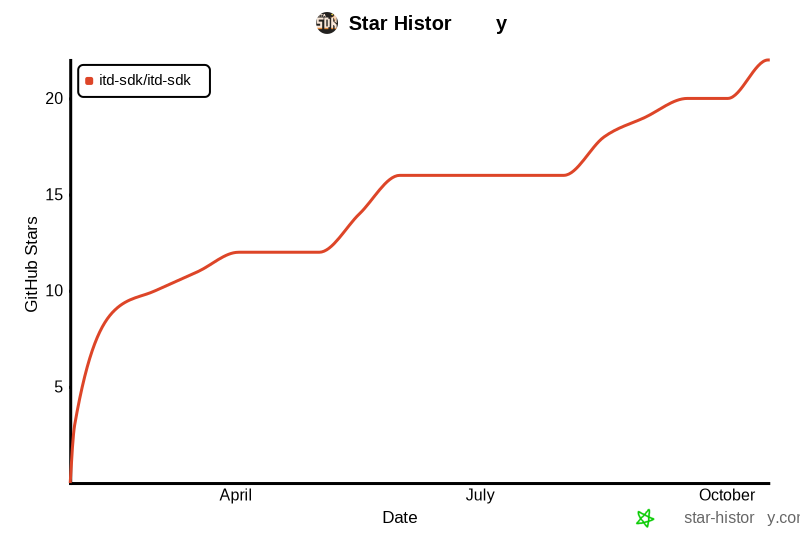
Star History
1 maintainer

Metadata
1 maintainer
Release files for itd-sdk 2.12.0
For a detailed explanation of source distributions (sdists) and built distributions (wheels), please see the package formats documentation.
Source distribution (sdist)
| File | Size | Uploaded | Provenance | Actions |
|---|---|---|---|---|
| itd_sdk-2.12.0.tar.gz | 63.8 kB | Without provenance | Details for itd_sdk-2.12.0.tar.gz |
Built distribution (wheel)
| File | Interpreter | ABI | Platform | Actions Reset |
|---|---|---|---|---|
| itd_sdk-2.12.0-py3-none-any.whl | Python 3 | none | any | Details for itd_sdk-2.12.0-py3-none-any.whl |
Total release size: 147.5 kB
Release files / itd_sdk-2.12.0.tar.gz
| Download URL | itd_sdk-2.12.0.tar.gz |
|---|---|
| Size | 63.8 kB |
| Tags | Source |
|
SHA-256 checksum How to use checksums |
9a1b1f43947d33b7009740f3307c5ba492acf0ca9174b4ab7d0fd388726d3fe6
|
|
BLAKE2b-256 checksum How to use checksums |
8d2d052ccd74d5635baa063374ebe56a1dc74ff238ebdbc34eb353d669181e6a
|
| Upload date | |
|
Uploaded using Trusted Publishing? What is trusted publishing? |
No |
| Uploaded via |
uv/0.13.5 {"installer":{"name":"uv","version":"0.13.5","subcommand":["publish"]},"python":null,"implementation":{"name":null,"version":null},"distro":{"name":"Linux Mint","version":"22.3","id":"zena","libc":null},"system":{"name":null,"release":null},"cpu":null,"openssl_version":null,"setuptools_version":null,"rustc_version":null,"ci":null}
|
Release files / itd_sdk-2.12.0-py3-none-any.whl
| Download URL | itd_sdk-2.12.0-py3-none-any.whl |
|---|---|
| Size | 83.7 kB |
| Tags | Python 3 |
|
SHA-256 checksum How to use checksums |
091678e5f8691c8b250d8325e29e51536786ea37cecf5dce8043d0ec2d21d32a
|
|
BLAKE2b-256 checksum How to use checksums |
39d1ce62c388bfdb574ec01e4e6cc6a25fcbe4c5b19491d50c86f80b5008d3d4
|
| Upload date | |
|
Uploaded using Trusted Publishing? What is trusted publishing? |
No |
| Uploaded via |
uv/0.13.5 {"installer":{"name":"uv","version":"0.13.5","subcommand":["publish"]},"python":null,"implementation":{"name":null,"version":null},"distro":{"name":"Linux Mint","version":"22.3","id":"zena","libc":null},"system":{"name":null,"release":null},"cpu":null,"openssl_version":null,"setuptools_version":null,"rustc_version":null,"ci":null}
|
Security for itd-sdk 2.12.0
Provenance
Provenance describes where a file came from. On PyPI, provenance is shared via attestations, which provide a verifiable record of the build or publishing details. View details, limitations and caveats.
No provenance found
None of the files in this release were uploaded with provenance metadata.
A note on package security
PyPI is a repository for distributing packages, not a service for auditing them. While third-party security researchers and our staff do their best to detect and remove malicious packages, PyPI cannot guarantee the quality, security or suitability of any given package.
To learn more about protecting yourself from malicious actors, visit our package security documentation.














