
itk-jupyter-widgets



Interactive Jupyter widgets to visualize images in 2D and 3D.
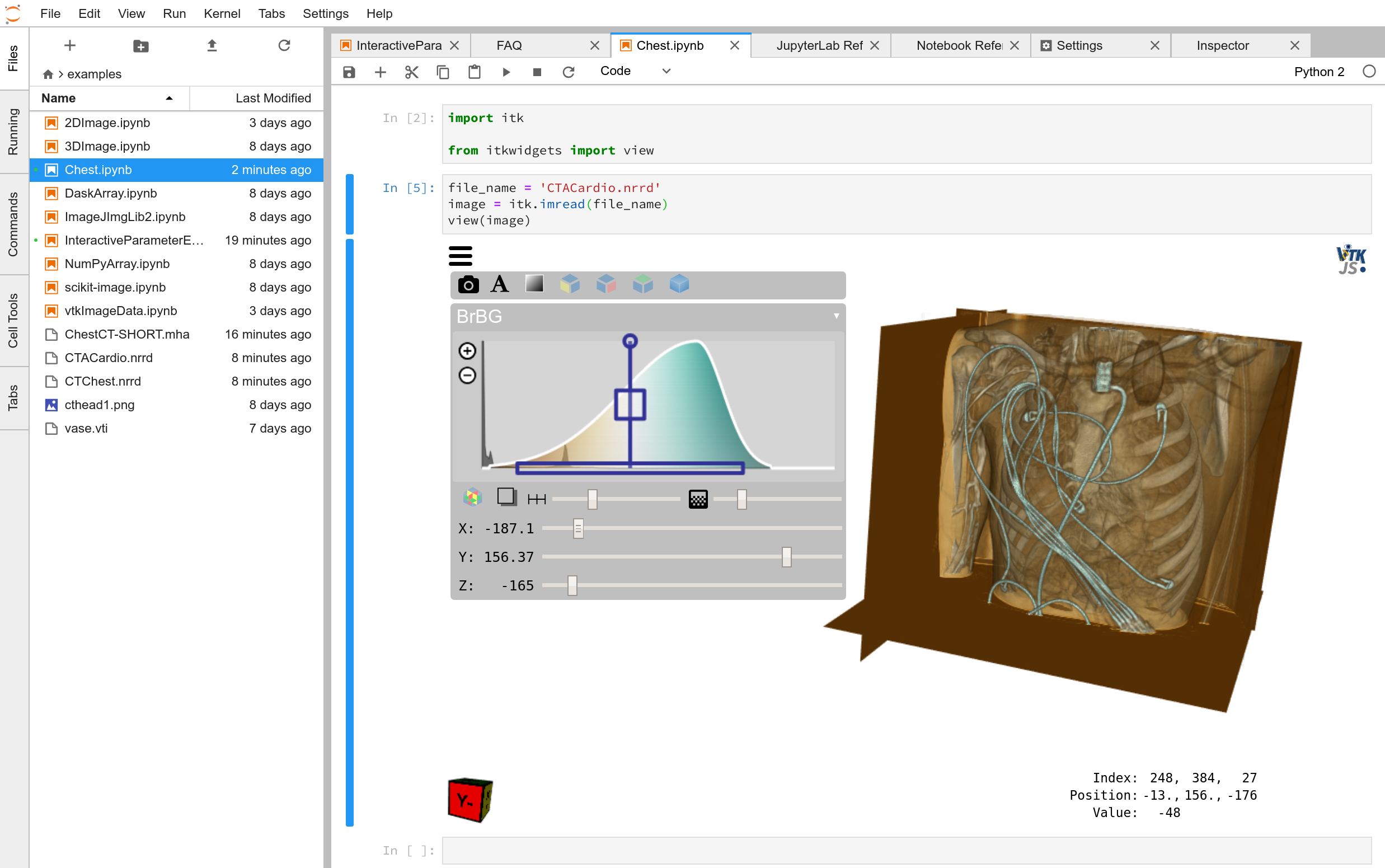
Key Features:
Exquisite volume rendering
Tri-plane volume slicing
Innovative, powerful opacity transfer function / window / level widget
Support for
NumPy Arrays
itk.Image
vtk.vtkImageData
Dask Arrays
ImageJ / Fiji / ImageJ2 images
Additional NumPy Array-like objects
Anisotropic voxel spacing supported
3D and 2D image support
Line profiles
Combine with other ipywidgets to quickly create graphical interfaces to algorithms

These widgets are designed to support image analysis with the Insight Toolkit (ITK), but they also work with other spatial analysis tools in the scientific Python ecosystem.
These widgets are built on itk.js and vtk.js.
Examples on Binder
Data types:
Tasks:
Installation
To install the widgets for the Jupyter Notebook:
pip install itkwidgets
For Jupyter Lab, additionally run:
jupyter labextension install @jupyter-widgets/jupyterlab-manager itk-jupyter-widgets
Usage
In Jupyter, import the view function:
from itkwidgets import view
Then, call the view function at the end of a cell, passing in the image to examine:
view(image)
For information on additional options, see the view function docstring:
view?
Other available widgets:
itkwidgets.line_profile
Advanced Usage
The itk-jupyter-widgets are based on ipywidgets. As a consequence, widgets traits can be queried, assigned, or observed with the viewer object returned by the view function. itk-jupyter-widgets can be combined with other ipywidgets to quickly explore algorithm parameters, create graphical interfaces, or create data visualization dashboards.
Mouse Controls
- Left click + drag
Rotate
- Right click + drag or shift + left click + drag
Pan
- Mouse wheel or control + left click + drag or pinch
Zoom
- Alt + left click + drag left-right
Change color transfer function window
- Shift + left click + drag top-bottom
Change color transfer function level
- Shift + alt + left click + drag top-bottom
Change primary Gaussian volume opacity transfer function magnitude
Keyboard Shortcuts
Keyboard shortcuts take effect when the mouse is positioned inside the viewer. All shortcuts are prefixed with Alt+. Corresponding keys for the Dvorak keyboard layout have the same effect.
- Alt + 1
X-plane mode
- Alt + 2
Y-plane mode
- Alt + 3
Z-plane mode
- Alt + 4
Volume rendering mode
- Alt + q
Toggle user interface
- Alt + w
Toggle region of interest (ROI) selection widget
- Alt + e
Reset ROI
- Alt + r
Reset camera
- Alt + s
Toggle slicing planes in volume rendering mode
- Alt + f
Toggle fullscreen
Examples
After installation, try the following examples that demonstrate how to visualize:
ImageJ ImgLib2 images (requires conda and a local Fiji installation)
or how to:
Troubleshooting
If you experience the notebook warning:
IOPub data rate exceeded.
The notebook server will temporarily stop sending output
to the client in order to avoid crashing it.
To change this limit, set the config variable
`--NotebookApp.iopub_data_rate_limit`.
Set the notebook configuration value:
jupyter notebook --NotebookApp.iopub_data_rate_limit=1e12
Hacking
Participation is welcome! For a development installation (requires Node.js):
git clone https://github.com/InsightSoftwareConsortium/itk-jupyter-widgets.git
cd itk-jupyter-widgets
python -m pip install -r requirements-dev.txt -r requirements.txt
python -m pip install -e .
jupyter nbextension install --py --symlink --sys-prefix itkwidgets
jupyter nbextension enable --py --sys-prefix itkwidgets
jupyter nbextension enable --py --sys-prefix widgetsnbextension
python -m pytest
The above commands will setup your system for development with the Jupyter Notebook. To develop for Jupyter Lab, additionally run:
jupyter labextension install @jupyter-widgets/jupyterlab-manager
jupyter labextension install ./js


Release files for itkwidgets 0.15.0
For a detailed explanation of source distributions (sdists) and built distributions (wheels), please see the package formats documentation.
Source distribution (sdist)
| File | Size | Uploaded | Provenance | Actions |
|---|---|---|---|---|
| itkwidgets-0.15.0.tar.gz | 2.5 MB | Without provenance | Details for itkwidgets-0.15.0.tar.gz |
Built distribution (wheel)
| File | Interpreter | ABI | Platform | Actions Reset |
|---|---|---|---|---|
| itkwidgets-0.15.0-py2.py3-none-any.whl | Python 3, Python 2 | none | any | Details for itkwidgets-0.15.0-py2.py3-none-any.whl |
Total release size: 6.6 MB
Release files / itkwidgets-0.15.0.tar.gz
| Download URL | itkwidgets-0.15.0.tar.gz |
|---|---|
| Size | 2.5 MB |
| Tags | Source |
|
SHA-256 checksum How to use checksums |
479ef5128de8bbf25a45b98dc25e7ae492ba0927991ee2253daacd0908526970
|
|
BLAKE2b-256 checksum How to use checksums |
226ba031b066ae5e5b0c9187688232036c8bb10ac6335a45839289f1cfdc3680
|
| Upload date | |
|
Uploaded using Trusted Publishing? What is trusted publishing? |
No |
| Uploaded via |
twine/1.12.1 pkginfo/1.4.2 requests/2.19.1 setuptools/40.4.3 requests-toolbelt/0.8.0 tqdm/4.23.4 CPython/2.7.13
|
Release files / itkwidgets-0.15.0-py2.py3-none-any.whl
| Download URL | itkwidgets-0.15.0-py2.py3-none-any.whl |
|---|---|
| Size | 4.2 MB |
| Tags | Python 2 Python 3 |
|
SHA-256 checksum How to use checksums |
bf71de62b62c43f385e0b9ca29a3ea1df2044691f0d8f28f0dcd7cd2442791e5
|
|
BLAKE2b-256 checksum How to use checksums |
e39c1f953ea9b70526938934ea95701647d23e3078b6fec12046ac84f6f59fd3
|
| Upload date | |
|
Uploaded using Trusted Publishing? What is trusted publishing? |
No |
| Uploaded via |
twine/1.12.1 pkginfo/1.4.2 requests/2.19.1 setuptools/40.4.3 requests-toolbelt/0.8.0 tqdm/4.23.4 CPython/2.7.13
|
Security for itkwidgets 0.15.0
Provenance
Provenance describes where a file came from. On PyPI, provenance is shared via attestations, which provide a verifiable record of the build or publishing details. View details, limitations and caveats.
No provenance found
None of the files in this release were uploaded with provenance metadata.
A note on package security
PyPI is a repository for distributing packages, not a service for auditing them. While third-party security researchers and our staff do their best to detect and remove malicious packages, PyPI cannot guarantee the quality, security or suitability of any given package.
To learn more about protecting yourself from malicious actors, visit our package security documentation.














