
iTop AI Assistant


AI-powered middleware for Combodo iTop that reduces ticket back-and-forth and helps engineers start working faster.
The problem
Engineers waste time on tickets that arrive without enough information: vague descriptions, missing hardware details, no steps to reproduce. Before any work can start, they have to write back to the user and wait. This creates delays, drops SLA metrics and frustrates everyone.
How it works
The engineer sees the ticket only when it's ready to work on.
When a new ticket arrives, the assistant intercepts it via webhook — there is no extension to install into iTop. Processing runs as a single AI agent that decides what the ticket needs and acts through a fixed set of tools:
- Classify — if the ticket has no service or subcategory, the agent reads the service catalog from iTop and writes the best match back to the ticket. The classification tools validate every id against the catalog, so the agent cannot invent a category.
- Ask — if the ticket is too vague to classify or to work on, the agent posts exactly one focused clarifying question in the public log and stops. The user replies through the portal as usual, which triggers a new webhook and a fresh round. By default three questions per ticket at most, of which at most two may be spent on working out its category, then the ticket moves on with whatever is available.
- Hand off — once the picture is clear, the agent writes a structured internal note for the engineer and marks the ticket done.
- Quote what already worked — where a vector index is configured, the note carries references to similar solved tickets. Only what iTop still shows the run gets quoted, and internal correspondence never does.
The subcategory's own description in iTop is what the agent treats as the completeness criteria — so the questions it asks are specific to the service context, not generic prompts.
Each of the four actions has its own switch: a deployment that only wants routing, or only wants the engineer's summary, turns off the rest. A switched-off action is not asked to be skipped — its tool is never handed to the model, so it cannot happen at all (which actions the module performs).
The agent decides the order; the tools enforce the rules. The round limits, the "one question per run" rule and the "stop once an engineer takes the ticket" guard are plain code, not instructions in a prompt — a model that misbehaves gets its call rejected rather than the ticket damaged.
All AI actions are performed under a dedicated iTop service account, so every comment is clearly attributed and auditable.
Examples
Scenario 1 — incomplete ticket
A user opens a ticket in the service portal:
Title: printer broken
Description: Not printing.
The service subcategory is Hardware, which requires: device model, OS and exact error. The description provides none of this. The assistant posts in the public log within seconds:
AI Assistant
Thank you for reaching out! To help us resolve this quickly, could you please provide:
— the manufacturer and model of the printer (e.g. HP LaserJet 400 M401dn);
— your operating system and version;
— the exact error message or what happens when you try to print.
Scenario 2 — complete ticket
Another user submits:
Title: HP LaserJet 400 M401dn not printing after Windows 11 update
Description: My HP LaserJet 400 M401dn stopped printing after a Windows 11 update yesterday evening. Error: "Driver unavailable". Already restarted both printer and PC.
All required fields are present. No question is asked. Instead, the engineer immediately sees an internal note:
AI Assistant (internal note)
Issue: HP LaserJet 400 M401dn stopped printing after a Windows 11 update. Error: "Driver unavailable".
Already tried: Restarted printer and PC.
Suggested next step: Reinstall or update the printer driver from HP's website; check if Windows Update pushed an incompatible driver version.
The flow
Ticket created           User commented
       │                        │
       └───────────┬────────────┘
                   │
                   ▼
┌─ guard (plain code) ──────────────────────────────┐
│  Already processed?      ──yes──▶  stop           │
│  Engineer assigned?      ──yes──▶  stop           │
│  Last comment was ours?  ──yes──▶  stop           │
└─────────────────────────┬─────────────────────────┘
                          │ no
                          ▼
┌─ agent session ───────────────────────────────────┐
│  In the prompt: the ticket, the conversation,     │
│  plus the service catalog while the ticket is     │
│  still unclassified.                              │
│                                                   │
│  The agent picks a tool, the tool enforces:       │
│                                                   │
│   classify    service + subcategory checked       │
│               against the catalog, then the       │
│               session continues                   │
│   ask         one question in the public log,     │
│               session ends                        │
│   hand off    internal note for the engineer,     │
│               session ends                        │
└─────────────────────────┬─────────────────────────┘
                          ▼
Ticket marked processed, or left waiting for a reply
that arrives as the next webhook
What you get around it
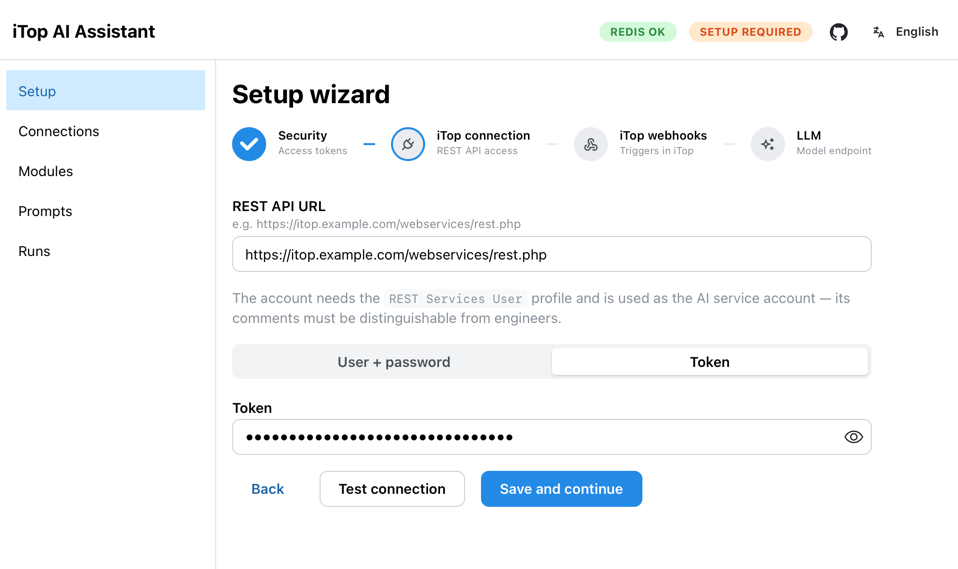
- A setup wizard, not a configuration file — security, iTop connection, webhook provisioning and the model, in four steps. Everything it sets can be re-edited later from the admin UI, and applies from the next ticket without a restart. (Setup)
- Dry run — the assistant processes your live queue exactly as it would in production, records every decision, and writes nothing to iTop. Watch it work on your own tickets, then decide. (Dry run)
- A run journal — every run, step by step: each model turn, each tool call and its result, tokens and wall time, with the full text of the question or note it would have posted. (Runs)
- Optional self-hosted LLM tracing — the prompt and the raw model answer, exported over OTLP to a receiver you run yourself. Off by default; the bundled stack ships one behind a compose profile. (LLM tracing)
- Your model, your infrastructure — OpenAI, Google Gemini, Ollama, or any OpenAI-compatible endpoint, including a model running on your own hardware. Nothing about the design assumes a cloud provider.
- Prompts you can edit — every prompt the agent uses is editable in the UI or shadowed from a directory on disk, with the packaged default one click away. (Customizing prompts)
- An admin UI in 12 languages, module settings included — a module ships its own labels, so the settings screen speaks the same language as the rest.
Requirements
- iTop 3.x with REST API enabled — no extension to install, only a service account, a trigger and a webhook, which the wizard can create for you
- Redis (included in the Docker Compose stack)
- An LLM that calls tools reliably — OpenAI, Google Gemini, Ollama, or any OpenAI-compatible endpoint (LM Studio, vLLM, LiteLLM Proxy, DeepSeek, Azure); see supported providers
- Qdrant and an embeddings endpoint — optional; they power the similar-solved-tickets references in the handoff note and the semantic index upcoming features build on. Qdrant is in the compose stack; leave
QDRANT_URLunset and the assistant runs Redis-only, with those references simply absent. See vector index - Docker and Docker Compose for the quick start; uv for local development
Quick start
git clone https://github.com/knowitop/itop-ai-assistant.git
cd itop-ai-assistant/docker
cp .env.dist .env
docker compose up -d
The compose stack starts iTop, Redis, Qdrant and the assistant together. If you already have an iTop, Redis or Qdrant instance, comment out those services in docker-compose.yml.
Once running:
| Service | URL |
|---|---|
| iTop | http://localhost:8000 |
| Admin UI | http://localhost:8001/ui |
| API docs | http://localhost:8001/docs |
Open http://localhost:8001/ui — the Setup Wizard starts automatically and walks you through all the required steps.
Documentation
- Setup — setup wizard walkthrough, manual iTop configuration, and how to try the assistant on your own data first
- Admin UI — Connections, Modules, Prompts, Runs and Vector index screens
- Configuration — environment variables, module settings, dry run, LLM tracing, supported LLM providers and the vector index
- Customizing prompts — editing LLM prompts via UI or files
- Telemetry — the anonymous daily document: every field, who receives it, and how to switch it off
Roadmap
The current release covers the first-contact intake loop — intercepting new tickets, asking clarifying questions and preparing them for the engineer. Planned next phases:
- Pattern analysis — background jobs that surface recurring issues and trends across tickets.
- Knowledge base maintenance — automatically flag outdated KB articles and suggest updates based on resolved tickets.
- Change Management review — AI-assisted risk and impact assessment for RFCs.
- Engineer console — an AI panel inside the iTop ticket page: explicit slash commands for summaries, similar past tickets and draft replies, plus free-text questions answered by a read-only agent that cannot change the ticket.
- User memory — persistent context per user across tickets: no repeated questions about device or department, automatic adaptation to technical vs. non-technical communication style and pattern detection across a user's ticket history.
Feedback and ideas are welcome in GitHub Issues.
Local development
Requires uv.
cd assistant
uv sync
cp ../docker/.env.dist .env   # fill in LLM and iTop settings
uv run uvicorn itop_ai_assistant.main:app --host 0.0.0.0 --port 8001 --reload
Tests:
uv run pytest                    # unit tests (mocked LLM, iTop and Redis), with coverage
uv run pytest test/integration   # the agent against a real LLM (needs .env.test)
Only the unit tests run by default; the integration suite is opt-in because it needs a reachable model endpoint.
Admin UI (requires Node.js; the dev server proxies /api to the backend on :8001):
cd ui
npm ci
npm run dev     # hot-reload dev server
npm run build   # production build, straight into the Python package
Architecture details and development conventions are in CLAUDE.md.
License
1 maintainer

Download files
Download the file for your platform. If you're not sure which to choose, learn more about installing packages.
Source Distribution
Built Distribution
Filter files by name, interpreter, ABI, and platform.
If you're not sure about the file name format, learn more about wheel file names.
Copy a direct link to the current filters
File details
Details for the file itop_ai_assistant-0.5.1.tar.gz.
File metadata
- Download URL: itop_ai_assistant-0.5.1.tar.gz
- Upload date:
- Size: 780.8 kB
- Tags: Source
- Uploaded using Trusted Publishing? Yes
- Uploaded via:
twine/7.0.0 CPython/3.13.14
File hashes
| Algorithm | Hash digest | |
|---|---|---|
| SHA256 |
3a010ac9ac81745065f0b7d5a36375681f5b48833fb85b4f2c495cbb9562b17a
|
|
| MD5 |
0f77d59b2423208e97dd6f225740bdaf
|
|
| BLAKE2b-256 |
3ecf403d52df64027a2bf2f794e3abd835efa70d7a5d4285d57f1f62fa2fa6fd
|
Provenance
The following attestation bundles were made for itop_ai_assistant-0.5.1.tar.gz:
Publisher:
publish-pypi.yml on knowitop/itop-ai-assistant
-
Statement:
-
Statement type:
https://in-toto.io/Statement/v1 -
Predicate type:
https://docs.pypi.org/attestations/publish/v1 -
Subject name:
itop_ai_assistant-0.5.1.tar.gz -
Subject digest:
3a010ac9ac81745065f0b7d5a36375681f5b48833fb85b4f2c495cbb9562b17a - Sigstore transparency entry: 2607945771
- Sigstore integration time:
-
Permalink:
knowitop/itop-ai-assistant@2884e20aff966453c32ae9d116b81e6f0f64df8b -
Branch / Tag:
refs/tags/v0.5.1 - Owner: https://github.com/knowitop
-
Access:
public
-
Token Issuer:
https://token.actions.githubusercontent.com -
Runner Environment:
github-hosted -
Publication workflow:
publish-pypi.yml@2884e20aff966453c32ae9d116b81e6f0f64df8b -
Trigger Event:
push
-
Statement type:
File details
Details for the file itop_ai_assistant-0.5.1-py3-none-any.whl.
File metadata
- Download URL: itop_ai_assistant-0.5.1-py3-none-any.whl
- Upload date:
- Size: 616.7 kB
- Tags: Python 3
- Uploaded using Trusted Publishing? Yes
- Uploaded via:
twine/7.0.0 CPython/3.13.14
File hashes
| Algorithm | Hash digest | |
|---|---|---|
| SHA256 |
478c1332cff2f86e8985dbfa3fd44180c7d57f6a5b998e7f77add471e24b0548
|
|
| MD5 |
027c576f396775416cd2eba6ccf04266
|
|
| BLAKE2b-256 |
729ba65bb222433529d86bc9f4292043d4e8de8b1b08bc1e5ab5629581779de8
|
Provenance
The following attestation bundles were made for itop_ai_assistant-0.5.1-py3-none-any.whl:
Publisher:
publish-pypi.yml on knowitop/itop-ai-assistant
-
Statement:
-
Statement type:
https://in-toto.io/Statement/v1 -
Predicate type:
https://docs.pypi.org/attestations/publish/v1 -
Subject name:
itop_ai_assistant-0.5.1-py3-none-any.whl -
Subject digest:
478c1332cff2f86e8985dbfa3fd44180c7d57f6a5b998e7f77add471e24b0548 - Sigstore transparency entry: 2607946009
- Sigstore integration time:
-
Permalink:
knowitop/itop-ai-assistant@2884e20aff966453c32ae9d116b81e6f0f64df8b -
Branch / Tag:
refs/tags/v0.5.1 - Owner: https://github.com/knowitop
-
Access:
public
-
Token Issuer:
https://token.actions.githubusercontent.com -
Runner Environment:
github-hosted -
Publication workflow:
publish-pypi.yml@2884e20aff966453c32ae9d116b81e6f0f64df8b -
Trigger Event:
push
-
Statement type:














