
It's a Live

It's a Live is a utility that helps you make live coding demos less error-prone by taking the "live" component and killing it.
It's a Live lets you write commands and keystrokes in a file, which it will then read and open a new terminal for you. Every time you press a key, It's a Live will write one character from the file into the terminal, making it look like you're typing every single command with the practiced ease of a consummate professional.
What it looks like
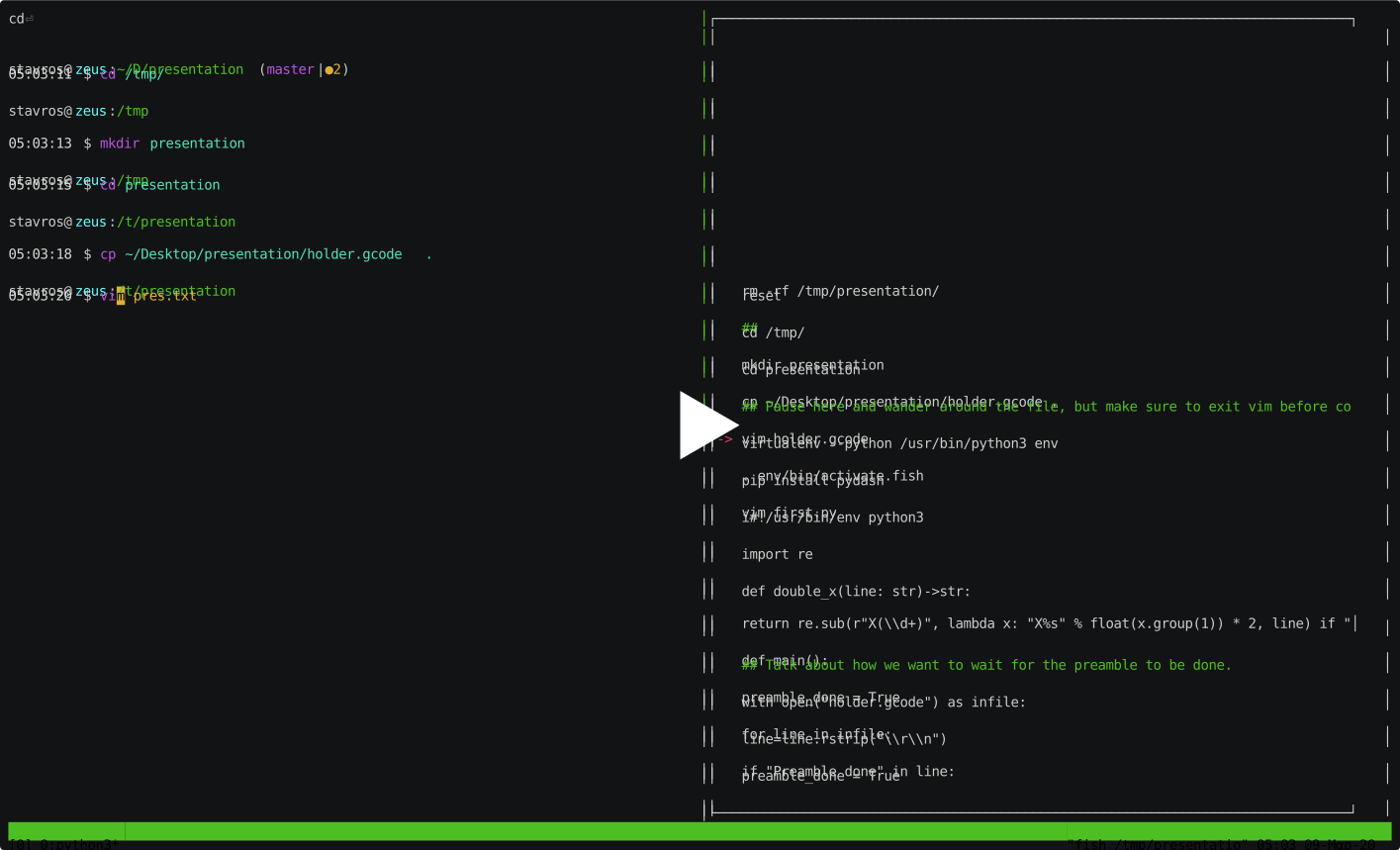
This is what it looks like:

The typing terminal is on the left and the presenter view is on the right.
Here's a screencast of It's a Live in operation. Keep in mind that the presenter is pressing keys randomly after the program starts:
Installation
You can install It's a Live with pip:
pip install itsalive
That's about it.
Usage
Using It's a Live is pretty simple:
Just write some keystrokes or commands in a file and run itsalive with it:
itsalive <command_file>
It's a Live will wait for you to press a key, and, when you do, it will instead emit one character from the command file. This way, you can type whatever old crap and it will look perfectly rehearsed, every time, with no backspaces (unless you add them in). It will also wait for you to press Enter at the end of commands, so you will never skip ahead to the next command by mistake.
What's more, It's a Live is actually running the commands you're typing, so you have full interoperability with other programs.
It's a Live also supports various commands:
Ctrl+dwill immediately terminate the playback.Ctrl+pwill pause automatic playback and give you control of the terminal. This is useful for doing actually live stuff, just make sure to leave everything in a state so that playback can resume later.Ctrl+rwill resume playback.Ctrl+fwill skip forward to the next command.Ctrl+gwill skip back to the previous command.Ctrl+uwill send aCtrl+ukeystroke (wiping anything on to the left of the cursor) and rewind the current command.Ctrl+ewill type out the current command in its entirety.
Presenter view
It's a Live supports a presenter view, which will show the next command to be typed. To launch the presenter view, start the presentation and run, on a separate terminal:
itsalive presenter_view
If you want to leave yourself notes, you can add comments to the command file. Comments must start with ## as the
first thing on the line, and they will not be typed. They will only be shown above the command in the presenter view.
Special commands
There are special commands you can add to your files. The line must start with them, with no spaces before them.
##@include <filename>: This inserts the contents of <filename> at the position of the include command. The
file will be typed out, as if you had pasted it in the commands file.
Example: ##@include somefile.py.
##@pause: Pause automatic playback. This is useful when you're executing a command and know that the command that follows will be manually interacted with. This functionality is only available post command execution and is ignored when using skip key combinations (Ctrl+f / Ctrl+g).
License
It's a Live is licensed under the GPL v3 or any later version.
Acknowledgements
I would like to thank my bestie Ian Cromwell, without whom this project would be nameless.
Changelog
v0.2.4 (2022-08-11)
Features
-
Feat: Add
##@pausecommand. [James Spurin] -
Colored presenter live updates. [James Spurin]
Fixes
- Fix description. [Stavros Korokithakis]
v0.2.3 (2022-02-28)
Fixes
- Don't eat characters when OSC codes are emitted. [James Spurin]
v0.2.2 (2021-09-30)
Features
- Add "--clear" flag. [Stavros Korokithakis]
Fixes
- Don't freeze in case a presentation packet is exactly as large as the buffer size. [Stavros Korokithakis]
v0.2.1 (2020-03-10)
Features
- Add command gutter so empty lines are more obvious. [Stavros Korokithakis]
Fixes
-
Disallow jumping past the last command (and ending playback) [Stavros Korokithakis]
-
Don't skip over the last empty command. [Stavros Korokithakis]
-
Fix race condition where the socket thread printed things to the screen before curses was set up. [Stavros Korokithakis]
-
Add the missing
--addressargument. [Stavros Korokithakis]
v0.2.0 (2020-03-09)
Features
-
Add curses-based presenter view. [Stavros Korokithakis]
-
Add Ctrl+r as a resumption shortcut. [Stavros Korokithakis]
Fixes
-
Only update the presenter view if the command changes. [Stavros Korokithakis]
-
Change Ctrl+b to Ctrl+g, as the former clashed with tmux. [Stavros Korokithakis]
0.1.3 (2020-03-04)
Features
- Feat: Add
##@includedirective. [Stavros Korokithakis]
1 maintainer

Release files for itsalive 0.2.4
For a detailed explanation of source distributions (sdists) and built distributions (wheels), please see the package formats documentation.
Source distribution (sdist)
| File | Size | Uploaded | |
|---|---|---|---|
| itsalive-0.2.4.tar.gz | 24.1 kB | Details |
Built distribution (wheel)
| File | Interpreter | ABI | Platform | Reset |
|---|---|---|---|---|
| itsalive-0.2.4-py3-none-any.whl | Python 3 | none | any | Details |
Total release size: 47.5 kB
Release files / itsalive-0.2.4.tar.gz
| Download URL | itsalive-0.2.4.tar.gz |
|---|---|
| Size | 24.1 kB |
| Tags | Source |
|
SHA-256 checksum How to use checksums |
953fdfe807eff7573946dbb2caa2d10dfe55374939a5b2f22dd79c8c3125ebdd
|
|
BLAKE2b-256 checksum How to use checksums |
344fd13584f005239a0308f63ecf9767c4df0fdae4b272a8d324cbac4791be2a
|
| Upload date | |
|
Uploaded using Trusted Publishing? What is trusted publishing? |
No |
| Uploaded via |
twine/4.0.1 CPython/3.8.13
|
Release files / itsalive-0.2.4-py3-none-any.whl
| Download URL | itsalive-0.2.4-py3-none-any.whl |
|---|---|
| Size | 23.3 kB |
| Tags | Python 3 |
|
SHA-256 checksum How to use checksums |
b39fabad2e1372be95d116ce2527655361f81bab768d94e37825ce8da7b6292f
|
|
BLAKE2b-256 checksum How to use checksums |
b445f4e566fce550e0b1ec59785d8d007813a76e89b2a7ea01fbe5b4c64a4402
|
| Upload date | |
|
Uploaded using Trusted Publishing? What is trusted publishing? |
No |
| Uploaded via |
twine/4.0.1 CPython/3.8.13
|














