
iv8 — Run JavaScript with a Full Browser Environment in Python
中文 | English




iv8 is a high-performance Python native extension built on the V8 engine. It implements browser APIs at the C++ level, providing highly controllable, high-fidelity BOM/DOM/CSSOM emulation with built-in API call chain monitoring and Chrome DevTools remote debugging. Run JavaScript that depends on a web environment directly in Python — no browser required.
Suitable for browser environment emulation, automated script execution, security research, JS engine testing, and more.
This repository is the Community Edition of iv8, offering a fully functional baseline browser environment emulation that covers the vast majority of everyday use cases.
iv8 also offers a Pro Edition, which adds a CSS layout engine (cascade, inheritance, box model layout), CSS animation and transition drivers, a protocol stack built by deep-trimming Chromium's network module (not a Cronet wrapper), multi-context Worker parallel execution, enhanced API semantic/timing/boundary alignment (covering more spec edge cases), and deep algorithmic optimizations for computation performance and memory footprint. The Community Edition continues to evolve, and mature Pro features will progressively be backported.
The Python–V8 interop layer draws on the design of STPyV8, with optimized design and implementation.
Key Highlights
| Feature | Description |
|---|---|
| C++ Native Browser APIs | Pure C++ implementation of BOM / DOM / CSSOM / Events / Crypto / Canvas / WebGL and more, covering 70+ HTML elements, 25+ CSS rule types, 80+ event types |
| Streaming HTML Parser | page.load aligns with browser navigation flow: HTML parsing → <script> pause & execute → stylesheet processing → DOMContentLoaded / load event dispatch |
| Programmable Event Loop | Micro/macro-task tiered scheduling (aligned with HTML spec); sleep(5000) completes instantly in logical time mode |
| Browser Fingerprint Config | Ships with Chrome/Windows default fingerprint (200+ fields); selectively override via environment, JS-side behavior matches real browsers |
| Multi-thread Parallelism | Each Context owns a V8 Isolate; GIL released during execution; ~4.7x speedup measured with 8 threads |
| DevTools Remote Debugging | Breakpoints, API access breakpoints, Elements / Application panels; built-in anti-debug protection (debugger; disabled) |
| API Monitoring | Debug mode auto-records browser API access chains and JS built-in reflection paths to locate environment probing logic |
| Trusted Input Events | Dispatches isTrusted=true mouse / pointer events (click / mousedown / pointerdown, etc.) |
| Function Disguise | wrapNative disguises JS functions as [native code], reducing observable differences introduced by local patches |
Architecture Overview
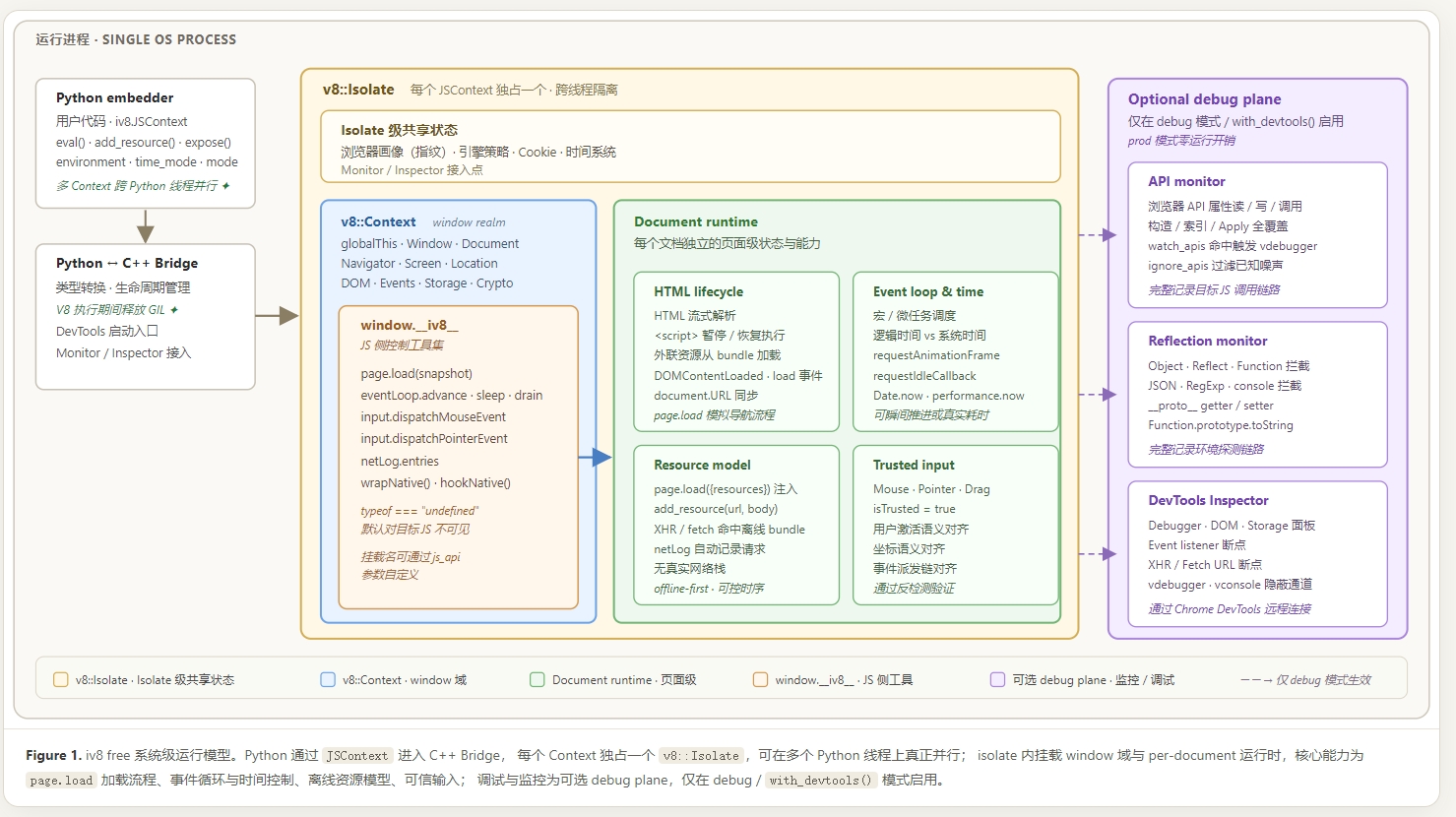
Python enters the C++ Bridge through
JSContext, each Context owns a dedicatedv8::Isolateenabling true parallelism across multiple Python threads; within the isolate, the window scope and per-document runtime are mounted, with core capabilities including thepage.loadloading flow, event loop and time control, offline resource model, and trusted input; monitoring and debugging form an optional debug plane, activated only indebug/with_devtools()mode.
Quick Start
pip install --upgrade iv8 -i https://pypi.org/simple
We recommend installing or upgrading from the official PyPI index. Some third-party mirrors may lag behind and may not have the latest release immediately.
Supports Python 3.8 – 3.14, Windows (x64), and Linux (x64). The Linux build is compiled to the manylinux standard and runs on CentOS, Ubuntu, Debian, Fedora, and other mainstream distributions.
import iv8

with iv8.JSContext() as ctx:
    # Execute JavaScript
    print(ctx.eval("1 + 2"))  # 3

    # Browser APIs work out of the box
    print(ctx.eval("navigator.userAgent"))   # Mozilla/5.0 ...
    print(ctx.eval("navigator.webdriver"))   # False

    # Load an HTML page (streaming parse + script execution + event dispatch)
    ctx.eval("""
        window.__iv8__.page.load({
            baseURL: 'https://example.com',
            html: '<html><body><div id="app">Hello</div></body></html>'
        });
    """)
    print(ctx.eval("document.getElementById('app').textContent"))  # "Hello"
Performance Characteristics
The following data was measured on Intel Core i7-14700 / Windows 10 / Python 3.11; results may vary on different hardware.
| Dimension | Metric | Data |
|---|---|---|
| Speed | JSContext create + eval + destroy | ~3.3 ms / call |
Simple eval throughput (1+1) |
~950,000 ops/s | |
| Browser API calls (navigator / DOM / crypto) | 340,000 – 570,000 ops/s | |
| Real webpage DOM parse (Wikipedia JavaScript article, ~440 KB) | ~7 ms / page (incl. Context create+destroy ~11.5 ms, serial ~86 pages/s) | |
| Memory | First load (import iv8 + 1st Context) |
+15 MB |
| Per-round peak increment (batch loop) | ~9 MB | |
| 100-round long-run cumulative drift | +2 MB | |
| Multi-thread | Speedup (2 / 4 / 8 threads) | 1.86x / 3.26x / 4.71x |
Memory figures are iv8 marginal increments (excluding the Python interpreter itself). Multi-thread test uses compute-intensive JS (200K sin/cos loop iterations); real-world scenarios (executing hundreds of KB of obfuscated JS) typically show better speedup. For GIL release mechanism, Context creation overhead, and page.load vs innerHTML guidance, see the Best Practices section below.
Browser API Compatibility
iv8 provides an extensive browser API emulation layer on top of the V8 engine, covering the following web standards (some are interface-level stubs):
| Category | Coverage |
|---|---|
| DOM & HTML | Document, Element, Node inheritance chain, 70+ HTML element interfaces, ShadowRoot, MutationObserver, Range, Custom Elements, etc. |
| SVG | SVGElement inheritance chain with 50+ SVG element interfaces, SVGAnimated* series |
| CSS & CSSOM | CSSStyleSheet, 25+ CSSRule subclasses, CSSStyleDeclaration, CSS Typed OM (CSSUnitValue / CSSMath*), Highlight API |
| Event System | EventTarget / Event inheritance chain, 80+ event types (UI / Mouse / Pointer / Keyboard / Touch / Drag / Clipboard / Animation, etc.) |
| Window & Navigator | Window, Location, History, Navigator, Screen, Performance API, Navigation API |
| Network | XMLHttpRequest, Fetch API (Request / Response / Headers), Streams, WebSocket, WebTransport, Beacon. The Community Edition does not include a built-in real HTTP/HTTPS transport; XHR / fetch / external resources receive responses via add_resource or page.load.resources, giving users full control over real request details (proxy / TLS fingerprint / cookie pool) |
| Encoding & File | TextEncoder / Decoder, Blob, File, FileReader, URL / URLSearchParams, File System Access |
| Storage | localStorage, sessionStorage, CookieStore, IndexedDB, Storage Buckets |
| Crypto | crypto.getRandomValues, SubtleCrypto (AES-GCM / AES-CBC / RSA-OAEP / RSA-PSS / ECDH / ECDSA / HMAC / HKDF / PBKDF2 / digest algorithms, etc.) |
| Canvas & Graphics | Canvas 2D, WebGL / WebGL2 (30+ extensions, parameters from environment.webgl.*), WebGPU, OffscreenCanvas |
| Media | HTMLMediaElement, Web Audio API (20+ AudioNode subclasses), MediaStream, WebRTC, WebCodecs |
| Timers & Scheduling | setTimeout / setInterval / requestAnimationFrame / requestIdleCallback, Scheduler API |
| Web Animations | Animation, KeyframeEffect, DocumentTimeline, ScrollTimeline, ViewTimeline |
| Geometry | DOMPoint, DOMRect, DOMQuad, DOMMatrix and ReadOnly variants |
| Performance | PerformanceTiming, PerformanceResourceTiming, PerformanceObserver, MemoryInfo, etc. |
| Permissions & Security | Permissions API, Credential Management, Trusted Types, CSP |
| Device APIs | Clipboard, Notification, Geolocation, DeviceOrientation, Sensor API, BatteryManager |
| Communication | MessagePort, Web MIDI, Presentation API |
| Workers | Worker / SharedWorker / ServiceWorker / Worklet |
Feature Details
1. JavaScript Execution & Type Conversion
Built on the modern V8 engine with full ES6+ syntax support (class, modules, Promise, async/await, optional chaining, private fields, top-level await, etc.). Return values are automatically converted to Python types.
with iv8.JSContext() as ctx:
    # Primitive types auto-convert
    print(ctx.eval("42"))                    # int: 42
    print(ctx.eval("'hello'"))               # str: "hello"
    print(ctx.eval("[1, 2, 3]"))             # list: [1, 2, 3]

    # to_py=True recursively converts complex nested objects
    data = ctx.eval("({name: 'test', items: [1,2,3]})", to_py=True)
    print(data['items'])  # [1, 2, 3]

    # Full ES6+ support
    ctx.eval("""
        const { name, scores } = { name: 'Alice', scores: [90, 85, 92] };
        var avg = scores.reduce((a, b) => a + b, 0) / scores.length;
    """)
    print(ctx.eval("avg"))  # 89
2. Browser Environment & Fingerprint Configuration
iv8 ships with a complete Chrome desktop / Windows baseline fingerprint (200+ fields) — ready to use without passing environment.
Use the environment dict to selectively override fingerprint fields; unspecified fields retain their defaults.
The exposed browser version is determined by navigator.userAgent / navigator.userAgentData fields, freely overridable by users — built-in defaults serve only as out-of-the-box fallbacks and do not constitute a commitment to a specific Chrome version.
with iv8.JSContext(environment={
    "navigator": {
        "userAgent": "Mozilla/5.0 (Windows NT 10.0; Win64; x64) AppleWebKit/537.36 Chrome/124.0.0.0 Safari/537.36",
        "platform": "Win32",
        "language": "zh-CN",
        "languages": ["zh-CN", "en-US"],
        "hardwareConcurrency": 8,
        "deviceMemory": 8,
    },
    "screen": {
        "width": 1920, "height": 1080, "colorDepth": 24,
    },
    "location": {
        "href": "https://example.com/page",
    },
    "webgl": {
        "vendor": "Google Inc. (NVIDIA)",
        "renderer": "ANGLE (NVIDIA, NVIDIA GeForce RTX 3060)",
    },
}) as ctx:
    print(ctx.eval("navigator.userAgent"))
    print(ctx.eval("navigator.hardwareConcurrency"))  # 8
    print(ctx.eval("screen.width"))                    # 1920
View all configurable fields: get_defaults() returns all supported paths and their default values, making it easy to discover the full override surface:
for path, value in sorted(iv8.JSContext.get_defaults().items()):
    print(f"{path} = {value!r}")
# navigator.userAgent = 'Mozilla/5.0 ...'
# screen.width = 1920
# window.devicePixelRatio = 1.0
# ...
3. DOM Manipulation & Page Loading
Full DOM engine with HTML streaming parse, element creation, and node manipulation.
Two ways to load HTML:
-
page.load(snapshot)— Streaming load aligned with key browser navigation stages: parse HTML by chunk, pause on<script>for execution (including external resources from the bundle), process<style>and<link>stylesheets, dispatch DOMContentLoaded / load events, syncdocument.URL/location.href. Best for scenarios requiring script execution, lifecycle events, or simulating a real page load. -
document.documentElement.innerHTML— Direct assignment that only builds the DOM tree — no script execution, no event dispatch, no URL synchronization. Lower overhead, ideal for simple scenarios where only the DOM structure is needed (e.g., parsing HTML, extracting data).
page.load(snapshot) parameters:
| Field | Type | Required | Description |
|---|---|---|---|
baseURL |
string | Yes | Page URL, synced to document.URL and location.href |
html |
string | Yes | HTML source |
resources |
Object | No | External resource mapping (URL → content); <script src> / <link href> in HTML and runtime XHR / fetch all match against this |
headers |
Object/Array | No | Main document response headers (CSP, Set-Cookie, etc.) |
resources format: Keyed by URL; values support shorthand and full format:
resources: {
    // Shorthand: value is the content string directly
    'https://example.com/lib.js': 'var LIB = true;',

    // Full format: specify HTTP status, response headers, body
    'https://example.com/app.js': {
        body: 'var APP = true;',
        status: 200,
        headers: [['content-type', 'application/javascript']],
    }
}
with iv8.JSContext() as ctx:
    ctx.eval("""
        window.__iv8__.page.load({
            baseURL: 'https://example.com',
            html: '<html><head><script src="/app.js"></script></head><body></body></html>',
            resources: {
                'https://example.com/app.js': { body: 'window.APP_LOADED = true;' }
            }
        });
    """)
    print(ctx.eval("window.APP_LOADED"))  # True
4. Event Loop & Timer Control
Implements micro-task / macro-task two-phase scheduling (aligned with HTML spec event loop), with macro-tasks prioritized by level and fine-grained time control APIs.
- Macro-tasks: setTimeout, setInterval, requestAnimationFrame, XHR/fetch callbacks, etc.
- Micro-tasks: Promise.then/catch/finally, queueMicrotask, MutationObserver callbacks, etc.
with iv8.JSContext(time_mode="logical") as ctx:
    ctx.eval("""
        var log = [];
        setTimeout(() => log.push('macro-100'), 100);
        setTimeout(() => log.push('macro-200'), 200);
        Promise.resolve().then(() => log.push('micro'));
        queueMicrotask(() => log.push('micro-2'));
    """)

    ctx.eval("window.__iv8__.eventLoop.advance(250)")
    print(ctx.eval("log"))
    # ['micro', 'micro-2', 'macro-100', 'macro-200']
Event loop control methods:
| Method | Description |
|---|---|
advance(total, step?) |
Advance virtual time frame-by-frame (default step ~16.67ms), simulating rAF rhythm |
sleep(ms?, max?) |
Advance virtual time by ms milliseconds, draining the task queue in chronological order |
tick(ms?) |
Advance ms milliseconds and run one event loop iteration |
drain(max?) |
Drain all due tasks without advancing time |
drainMicrotasks() |
Drain only the micro-task queue |
drainTimers() |
Process only due timer callbacks |
setAutoAdvanceStep(ms) |
Set the auto-increment step for performance.now() (default 0.001ms) |
setDateAdvanceStep(ms) |
Set the auto-increment step for Date.now() (default 1ms) |
Time modes:
| Mode | Description | Use Case |
|---|---|---|
logical (default) |
Pure logical advancement; sleep(5000) completes instantly |
Automation, fast execution |
system |
Anchored to system time; Date.now() reflects real elapsed time during JS execution |
Time-sensitive scenarios (PoW, time-delta checks) |
5. Network Request Interception
Community Edition network boundary: The Community Edition does not directly send real HTTP/HTTPS requests and does not include the Chromium network transport stack. XHR / fetch / external resources match responses from the offline bundle by default; real requests should be performed by the user's Python HTTP client and then injected via
add_resource()orpage.load.resources. The Pro Edition provides a real protocol stack built from a deeply trimmed Chromium net module.
add_resource() and the resources parameter of page.load write into the same offline resource bundle.
During HTML parsing, <script src> / <link href> / CSS @import, as well as runtime XHR / fetch, all match against this bundle.
netLog automatically records all XHR / fetch / navigation requests initiated from the JS side, enabling analysis of the target JS network behavior.
with iv8.JSContext() as ctx:
    ctx.eval("""
        window.__iv8__.page.load({
            baseURL: 'https://example.com',
            html: '<html><body></body></html>'
        });
    """)

    # XHR requests are automatically captured by netLog
    ctx.eval("""
        var xhr = new XMLHttpRequest();
        xhr.open('GET', 'https://api.example.com/data', false);
        xhr.send();
    """)
    print(ctx.eval("xhr.status"))  # 200

    entries = ctx.eval("window.__iv8__.netLog.entries", to_py=True)
    for entry in entries:
        print(f"  {entry.get('method', '')} {entry.get('url', '')}")
Collaborating with real HTTP requests: iv8's network APIs do not send HTTP requests directly; instead they match responses from the offline bundle. This design gives users full control over the network layer (proxy, TLS fingerprint, cookie pool, etc., are all determined by the user's HTTP client). Typical workflow: JS initiates request → pause event loop → Python sends real HTTP request → inject response → resume event loop.
import requests

with iv8.JSContext() as ctx:
    ctx.eval("""
        window.__iv8__.page.load({
            baseURL: 'https://example.com',
            html: '<html><body></body></html>'
        });
    """)

    # JS initiates an async XHR
    ctx.eval("""
        var xhr = new XMLHttpRequest();
        xhr.open('GET', 'https://api.example.com/data');
        xhr.onload = function() { window._result = xhr.responseText; };
        xhr.send();
    """)

    # Python sends the real request and injects the response into the offline bundle
    resp = requests.get("https://api.example.com/data")
    ctx.add_resource(
        url="https://api.example.com/data",
        body=resp.text,
        status=resp.status_code,
        headers=dict(resp.headers),
    )

    # Resume the event loop — the XHR callback will match the just-injected resource
    ctx.eval("window.__iv8__.eventLoop.drain()")
    print(ctx.eval("window._result"))
6. Monitoring & Debugging
Runtime modes:
| Mode | Description |
|---|---|
prod (default) |
Zero monitoring overhead, suitable for production use |
debug |
Enables API call chain tracing, reflection interceptor monitoring, and DevTools debugging |
API monitoring in debug mode: Automatically records all monitored browser API property reads/writes, method calls, and constructor calls (high-frequency built-in types like Math / JSON / Array / typed arrays are silenced by default to reduce noise; adjustable via ignore_apis). Also instruments JS built-in reflection paths (Object.keys / getOwnPropertyDescriptor / defineProperty, Reflect.ownKeys / get / has, Function.prototype.toString, JSON.parse / stringify, etc.), recording the target JS environment probing chain.
DevTools debugging: Built-in Chrome DevTools Protocol (CDP) support.
Anti-debug Protection & Replacement Tools:
debugger;→vdebugger;: iv8 disables nativedebugger;statements (they won't trigger breakpoints) because target JS commonly exploits infinitedebuggerloops for anti-debugging. Usevdebugger;instead — its behavior is identical to standarddebugger.console→vconsole: Some anti-scraping JS detects the debugging environment through behavioral differences in theconsoleAPI. After settingenable_console=Falseto disable standardconsoleDevTools reporting, usevconsole.log()/vconsole.warn()etc. as replacements.vconsoleoutput appears only in the DevTools Console panel and is completely invisible to target JS.
# Basic debugging
with iv8.JSContext(mode='debug').with_devtools(port=9229) as ctx:
    ctx.eval("vdebugger;")  # Pauses in Chrome DevTools

# API access breakpoints + covert debug channel
with iv8.JSContext(mode='debug').with_devtools(
    port=9229,
    watch_apis=["navigator.userAgent", "document.cookie", "canvas.toDataURL"],
    enable_console=False,
) as ctx:
    ctx.eval("let ua = navigator.userAgent;")  # Triggers breakpoint
    ctx.eval("vconsole.log('debug info', ua);")  # Only visible in DevTools
Supported DevTools features: Breakpoint debugging (vdebugger;), API access breakpoints (watch_apis), event listener breakpoints, XHR/Fetch URL breakpoints, DOM element structure inspection (Elements panel), Cookie / Storage inspection and editing (Application panel), step-through execution, variable inspection and modification.
7. Input Event Simulation
Dispatches trusted mouse / pointer events with isTrusted=true; capture → target → bubble chain and isTrusted semantics aligned with Chrome.
with iv8.JSContext() as ctx:
    ctx.eval("""
        window.__iv8__.page.load({
            baseURL: 'https://example.com',
            html: '<html><body><button id="btn">Click</button></body></html>'
        });

        var clicked = false;
        document.getElementById('btn').addEventListener('click', e => {
            clicked = e.isTrusted;  // true
        });

        window.__iv8__.input.dispatchMouseEvent({
            type: 'click',
            target: document.getElementById('btn'),
            clientX: 50, clientY: 25,
            button: 0, buttons: 0
        });
    """)
    print(ctx.eval("clicked"))  # True
8. Function Disguise
with iv8.JSContext() as ctx:
    ctx.eval("""
        var myFunc = window.__iv8__.wrapNative(function(x) { return x * 2; }, 'myFunc');
    """)
    print(ctx.eval("myFunc.toString()"))     # "function myFunc() { [native code] }"
    print(ctx.eval("myFunc(21)"))            # 42
9. Python ↔ JS Interop
expose() exposes Python objects to the __iv8__.data namespace in JS, without polluting the window global scope.
When JS calls an exposed Python function, the GIL is automatically acquired (blocking the current V8 execution and other Python threads), so exposed functions should be kept lightweight.
import requests

with iv8.JSContext() as ctx:
    # Method 1: Named expose
    ctx.expose(requests.get, "httpGet")
    # JS: __iv8__.data.httpGet("https://...")

    # Method 2: Auto-named (uses the function's __name__ attribute)
    def fetch_data(url):
        return requests.get(url).text
    ctx.expose(fetch_data)
    # JS: __iv8__.data.fetch_data("https://...")

    # Method 3: Keyword argument batch expose
    ctx.expose(get=requests.get, post=requests.post)
    # JS: __iv8__.data.get(...), __iv8__.data.post(...)

    # Expose non-function data (dicts, lists, etc.)
    ctx.expose({"token": "abc123", "debug": True}, "config")
    result = ctx.eval("__iv8__.data.config.token")  # "abc123"
Python API Reference
iv8.JSContext
Main entry class. Creates an independent V8 context with browser APIs.
Constructor parameters:
| Parameter | Type | Default | Description |
|---|---|---|---|
mode |
str |
"prod" |
"prod" production mode / "debug" debug mode |
environment |
dict |
None |
Browser fingerprint configuration (navigator / screen / location / webgl, etc.) |
config |
dict |
None |
Framework behavior configuration (timezone, permissions.*, etc.; full paths via get_defaults()) |
ignore_apis |
list |
Built-in default | APIs to exclude from monitoring logs |
time_mode |
str |
"logical" |
"logical" logical time / "system" system time |
js_api |
str |
"__iv8__" |
JS-side utility object mount name |
Methods:
| Method | Description |
|---|---|
eval(source, name="", line=-1, col=-1, to_py=False, devtools=True) |
Execute JS code; return value auto-converts to Python types |
close(gc="none") |
Release the context. gc can be "low_memory" (or "v8" / True) / "aggressive" to trigger GC |
add_resource(url, body, status=200, headers=None) |
Inject an offline HTTP response |
with_devtools(port=9229, watch_apis=None, enable_console=True) |
Enable DevTools debugging |
expose(obj, name?) / expose(**kwargs) |
Expose Python objects to the __iv8__.data namespace |
get_defaults() |
Get all supported environment/config paths and their default values |
Context manager usage (recommended):
with iv8.JSContext() as ctx:
    ctx.eval("...")
# Resources automatically released
JS-side Utility Object
When a context is created, iv8 mounts a utility object window.__iv8__ on the global scope (customizable via the js_api parameter).
This object is designed to be "undetectable" (typeof window.__iv8__ === "undefined") and does not affect target JS behavior.
| Utility | Description |
|---|---|
__iv8__.eventLoop.* |
Event loop control (advance / sleep / tick / drain, etc.) |
__iv8__.page.load(snapshot) |
Stream-load an HTML document |
__iv8__.input.dispatchMouseEvent(init) |
Dispatch trusted mouse events (isTrusted=true) |
__iv8__.input.dispatchPointerEvent(init) |
Dispatch trusted pointer events |
__iv8__.netLog.entries |
Captured network request log array |
__iv8__.wrapNative(fn, name) |
Disguise a JS function as a native function |
__iv8__.help() |
Print all available utilities and descriptions |
Best Practices
GIL & Multi-threading
iv8 releases the Python GIL during V8 JavaScript execution, allowing multiple threads to truly execute JS code in parallel.
When V8 calls back into Python (e.g., a function exposed via expose() is invoked by JS), the GIL is automatically reacquired.
Python eval() → Release GIL → V8 executes → (JS calls Python → Acquire GIL → Execute → Release GIL) → V8 returns → Acquire GIL → Return to Python
Each JSContext owns an independent V8 Isolate — no additional locking required for multi-threaded use:
import threading

def run_js(thread_id, environment):
    with iv8.JSContext(environment=environment) as ctx:
        ua = ctx.eval("navigator.userAgent")
        print(f"Thread {thread_id}: {ua}")

threads = []
for i in range(4):
    t = threading.Thread(target=run_js, args=(i, {
        "navigator": {"userAgent": f"ThreadBot/{i}"}
    }))
    threads.append(t)
    t.start()
for t in threads:
    t.join()
Since the GIL is released during V8 execution, multi-threading achieves near-multiprocess parallelism while avoiding the overhead of inter-process communication and memory copying. For scenarios requiring simultaneous execution of multiple JS environments (e.g., concurrently running scripts from different sites), prefer multi-threading.
Context Creation Overhead
JSContext creation (including an independent V8 Isolate + browser API surface) and destruction are lightweight — approximately 3ms per cycle (~300 ctx/s) in practice. There is no need to aggressively reuse contexts.
Creating a fresh JSContext each time provides a clean environment state, avoiding side-effect contamination from previous executions.
page.load vs innerHTML
| Approach | Overhead | Use Case |
|---|---|---|
page.load(snapshot) |
Higher: streaming parse + script execution + event dispatch | When full page lifecycle is needed (script execution, event triggering) |
innerHTML = html |
Lower: builds DOM tree only | When only DOM structure is needed (parsing HTML, extracting data) |
If the target JS does not depend on DOMContentLoaded / load events or external script execution, using innerHTML assignment can significantly reduce overhead.
Changelog
0.1.3
- Fixed overly strict Latin1 validation in
btoa(), so inputs such asString.fromCharCode(0xE9)now encode correctly. - Fixed a DevTools local debugging issue where
localhostcould resolve to IPv6 on some Windows / Chrome environments and cause the WebSocket connection to disconnect. - Improved parser-time
document.write()behavior inpage.load(), so DOM written by inline scripts is now persisted in the document tree. - Fixed
innerHTMLserialization only returning the first child node; it now serializes all child nodes in order.
License
The iv8 Community Edition is currently distributed as pre-compiled binaries. Browser-environment emulation is an ongoing process of behavioral alignment and adversarial iteration; opening the full implementation too early may make it easier to build targeted detections. As the project becomes more refined and its interfaces and behaviors stabilize, we will evaluate gradually opening more implementation details or source code in the future.
- Free for personal, educational, and non-commercial use
- Reverse-engineering, decompilation, and disassembly are prohibited
- Commercial use (integration into commercial products or services) requires a commercial license (Pro Edition)
- Unauthorized redistribution is prohibited
See the LICENSE file for details.
Disclaimer
This project is intended solely for learning, research, security testing, and lawful automation purposes. Users must comply with the terms of service and robots policies of target websites, as well as all applicable laws and regulations. The author assumes no responsibility for any misuse.
For more real-world usage examples, see the examples/ directory.
Acknowledgments
- STPyV8 — Design reference for the Python–V8 interop layer
1 maintainer

Download files
Download the file for your platform. If you're not sure which to choose, learn more about installing packages.
Source Distributions
Built Distributions
Filter files by name, interpreter, ABI, and platform.
If you're not sure about the file name format, learn more about wheel file names.
Copy a direct link to the current filters
File details
Details for the file iv8-0.1.4-cp314-cp314-win_amd64.whl.
File metadata
- Download URL: iv8-0.1.4-cp314-cp314-win_amd64.whl
- Upload date:
- Size: 53.3 MB
- Tags: CPython 3.14, Windows x86-64
- Uploaded using Trusted Publishing? No
- Uploaded via:
twine/6.2.0 CPython/3.11.9
File hashes
| Algorithm | Hash digest | |
|---|---|---|
| SHA256 |
2fafb1cd36866c39f4184b8bfd6d913c4b1982b0106fe742ef3990c57d8cd915
|
|
| MD5 |
5de19e34100a65eaa00ba582af48ef37
|
|
| BLAKE2b-256 |
d65c7e0cdeb21a5c1bf314f733ee87a05de8c1d6853dfbbb4498c7f9b2530f62
|
File details
Details for the file iv8-0.1.4-cp314-cp314-manylinux2014_x86_64.manylinux_2_17_x86_64.whl.
File metadata
- Download URL: iv8-0.1.4-cp314-cp314-manylinux2014_x86_64.manylinux_2_17_x86_64.whl
- Upload date:
- Size: 83.9 MB
- Tags: CPython 3.14, manylinux: glibc 2.17+ x86-64
- Uploaded using Trusted Publishing? No
- Uploaded via:
twine/6.2.0 CPython/3.11.9
File hashes
| Algorithm | Hash digest | |
|---|---|---|
| SHA256 |
3c8deace89a9bbfee366f93e47436826c52852bef80e3991dea472c868c60bcc
|
|
| MD5 |
95aecc2106362988da2b46770bd2a2b6
|
|
| BLAKE2b-256 |
f30284a04252e7c6e919cba3c00a65cb0728dee8da78006fba95f97863fd108d
|
File details
Details for the file iv8-0.1.4-cp314-cp314-manylinux2014_aarch64.manylinux_2_17_aarch64.whl.
File metadata
- Download URL: iv8-0.1.4-cp314-cp314-manylinux2014_aarch64.manylinux_2_17_aarch64.whl
- Upload date:
- Size: 74.8 MB
- Tags: CPython 3.14, manylinux: glibc 2.17+ ARM64
- Uploaded using Trusted Publishing? No
- Uploaded via:
twine/6.2.0 CPython/3.11.9
File hashes
| Algorithm | Hash digest | |
|---|---|---|
| SHA256 |
87b4cadc717d674419f91b940a98b51c23d91beea235161985c03ade004c3ebc
|
|
| MD5 |
c62ccce89f33ab1b2a7b751233846d39
|
|
| BLAKE2b-256 |
2ab83e2b10b47eab1dbd9aeb48c0cae2bb385608645b1590bb7dfa2c5b19e8bc
|
File details
Details for the file iv8-0.1.4-cp314-cp314-macosx_14_0_x86_64.whl.
File metadata
- Download URL: iv8-0.1.4-cp314-cp314-macosx_14_0_x86_64.whl
- Upload date:
- Size: 90.5 MB
- Tags: CPython 3.14, macOS 14.0+ x86-64
- Uploaded using Trusted Publishing? No
- Uploaded via:
twine/6.2.0 CPython/3.11.9
File hashes
| Algorithm | Hash digest | |
|---|---|---|
| SHA256 |
c150c90b80eabae063c645f2125e15b9cf818c46c0cbe31b5161ff9c306356fa
|
|
| MD5 |
113eab570a3cd743f753814ded945f41
|
|
| BLAKE2b-256 |
8479b41c40fe977e2f50f4977dfda33b30bda8745a24ac9da212170f0f74777e
|
File details
Details for the file iv8-0.1.4-cp314-cp314-macosx_14_0_arm64.whl.
File metadata
- Download URL: iv8-0.1.4-cp314-cp314-macosx_14_0_arm64.whl
- Upload date:
- Size: 91.4 MB
- Tags: CPython 3.14, macOS 14.0+ ARM64
- Uploaded using Trusted Publishing? No
- Uploaded via:
twine/6.2.0 CPython/3.11.9
File hashes
| Algorithm | Hash digest | |
|---|---|---|
| SHA256 |
1324383bd0a0250f773b28c80ba4f2138afd6c4248d7e6a52830a5efa7552932
|
|
| MD5 |
d337e81625e79ff9651c3eb1f6af9c94
|
|
| BLAKE2b-256 |
fe8e9616296ee6b43284c1016ac8bb92c7a16b9e7bdc533d13dff09b1403e1b4
|
File details
Details for the file iv8-0.1.4-cp313-cp313-win_amd64.whl.
File metadata
- Download URL: iv8-0.1.4-cp313-cp313-win_amd64.whl
- Upload date:
- Size: 52.5 MB
- Tags: CPython 3.13, Windows x86-64
- Uploaded using Trusted Publishing? No
- Uploaded via:
twine/6.2.0 CPython/3.11.9
File hashes
| Algorithm | Hash digest | |
|---|---|---|
| SHA256 |
9099eb5b8037b5ee5a4e6ef8cb71c3d69f9169e9dac8f79d26b8dc9b8c382865
|
|
| MD5 |
cc69db6ee67bbd8304d616d0a09355a9
|
|
| BLAKE2b-256 |
351eaac9fa7e4ecdfc57a9598215222f248461265032c24a565219b9f46f0708
|
File details
Details for the file iv8-0.1.4-cp313-cp313-manylinux2014_x86_64.manylinux_2_17_x86_64.whl.
File metadata
- Download URL: iv8-0.1.4-cp313-cp313-manylinux2014_x86_64.manylinux_2_17_x86_64.whl
- Upload date:
- Size: 83.9 MB
- Tags: CPython 3.13, manylinux: glibc 2.17+ x86-64
- Uploaded using Trusted Publishing? No
- Uploaded via:
twine/6.2.0 CPython/3.11.9
File hashes
| Algorithm | Hash digest | |
|---|---|---|
| SHA256 |
a646f8a003ee9f1dd98381e005d185e83970eb5ff45228928ba659c45e729b04
|
|
| MD5 |
34d002e8292d501d782b29ed462b9fb6
|
|
| BLAKE2b-256 |
5a5b7a667cef3bb5ee68363f8e2d23cd99e6795d6e5ee653e91eeef8ce6a21b4
|
File details
Details for the file iv8-0.1.4-cp313-cp313-manylinux2014_aarch64.manylinux_2_17_aarch64.whl.
File metadata
- Download URL: iv8-0.1.4-cp313-cp313-manylinux2014_aarch64.manylinux_2_17_aarch64.whl
- Upload date:
- Size: 74.8 MB
- Tags: CPython 3.13, manylinux: glibc 2.17+ ARM64
- Uploaded using Trusted Publishing? No
- Uploaded via:
twine/6.2.0 CPython/3.11.9
File hashes
| Algorithm | Hash digest | |
|---|---|---|
| SHA256 |
bc1dd7adc762212f76f83362467ddd85fdfe7025c5c88859f7ad6dcb0dd4d3a4
|
|
| MD5 |
2a93bc0e234c08cb644ed1e7594e2771
|
|
| BLAKE2b-256 |
4c270e19fd6a2e25cd0ee243b4dfd44ddb68d20f5bb13a18b85087475b823700
|
File details
Details for the file iv8-0.1.4-cp313-cp313-macosx_14_0_x86_64.whl.
File metadata
- Download URL: iv8-0.1.4-cp313-cp313-macosx_14_0_x86_64.whl
- Upload date:
- Size: 90.5 MB
- Tags: CPython 3.13, macOS 14.0+ x86-64
- Uploaded using Trusted Publishing? No
- Uploaded via:
twine/6.2.0 CPython/3.11.9
File hashes
| Algorithm | Hash digest | |
|---|---|---|
| SHA256 |
7d280601a460a292ac4b1483bca60fa0ca432f71ed2f560ea3662d85b6fab3b1
|
|
| MD5 |
6511cd83d98b5994448d96471dae5b54
|
|
| BLAKE2b-256 |
833480235843b3b14cad3fa069ba6c803d27d5350bc249f639e2ccc8d630824e
|
File details
Details for the file iv8-0.1.4-cp313-cp313-macosx_14_0_arm64.whl.
File metadata
- Download URL: iv8-0.1.4-cp313-cp313-macosx_14_0_arm64.whl
- Upload date:
- Size: 74.9 MB
- Tags: CPython 3.13, macOS 14.0+ ARM64
- Uploaded using Trusted Publishing? No
- Uploaded via:
twine/6.2.0 CPython/3.11.9
File hashes
| Algorithm | Hash digest | |
|---|---|---|
| SHA256 |
b596a16a581b4785c97156fc163f3b2742d74f2f4bb0faf33d5d2006fbd41b10
|
|
| MD5 |
1703d119c03918c65552f8bc28145ea1
|
|
| BLAKE2b-256 |
283de7b44e11f3f259964f3d1dba41e40b0748884131af32b5ee6e46bd8c59c9
|
File details
Details for the file iv8-0.1.4-cp312-cp312-win_amd64.whl.
File metadata
- Download URL: iv8-0.1.4-cp312-cp312-win_amd64.whl
- Upload date:
- Size: 52.6 MB
- Tags: CPython 3.12, Windows x86-64
- Uploaded using Trusted Publishing? No
- Uploaded via:
twine/6.2.0 CPython/3.11.9
File hashes
| Algorithm | Hash digest | |
|---|---|---|
| SHA256 |
e269bce31690cdc5445a579754497e327b7dc1f94ddc2ff6297a1e116d46f459
|
|
| MD5 |
c916a45925a4a4fb8c960017d6531303
|
|
| BLAKE2b-256 |
e468ab82469386c6277546c778dd2ca75168797f9a9f769dcee51743e2af5288
|
File details
Details for the file iv8-0.1.4-cp312-cp312-manylinux2014_x86_64.manylinux_2_17_x86_64.whl.
File metadata
- Download URL: iv8-0.1.4-cp312-cp312-manylinux2014_x86_64.manylinux_2_17_x86_64.whl
- Upload date:
- Size: 83.9 MB
- Tags: CPython 3.12, manylinux: glibc 2.17+ x86-64
- Uploaded using Trusted Publishing? No
- Uploaded via:
twine/6.2.0 CPython/3.11.9
File hashes
| Algorithm | Hash digest | |
|---|---|---|
| SHA256 |
9464d6c286de69e2a249043a96d9883c79ec4f541e07f4a8f0b49bfd960ce5ee
|
|
| MD5 |
66be585aae37a5353a51afdfe0702176
|
|
| BLAKE2b-256 |
28376aeef035c504fe3d2d33ae6c285db0debbf9fbd8b00e1d8b192dd2545822
|
File details
Details for the file iv8-0.1.4-cp312-cp312-manylinux2014_aarch64.manylinux_2_17_aarch64.whl.
File metadata
- Download URL: iv8-0.1.4-cp312-cp312-manylinux2014_aarch64.manylinux_2_17_aarch64.whl
- Upload date:
- Size: 74.8 MB
- Tags: CPython 3.12, manylinux: glibc 2.17+ ARM64
- Uploaded using Trusted Publishing? No
- Uploaded via:
twine/6.2.0 CPython/3.11.9
File hashes
| Algorithm | Hash digest | |
|---|---|---|
| SHA256 |
411e2b609e15978b6a15493a8bdc5fccec1036d29193f23ae99ae894b0f65ab7
|
|
| MD5 |
e36dbd7301484791badc66c087195bcd
|
|
| BLAKE2b-256 |
b3a3be3b08e23e464c98c8515754b5cd6fc7aa912d2b75d3adc3c5d4e5cffa40
|
File details
Details for the file iv8-0.1.4-cp312-cp312-macosx_14_0_x86_64.whl.
File metadata
- Download URL: iv8-0.1.4-cp312-cp312-macosx_14_0_x86_64.whl
- Upload date:
- Size: 90.5 MB
- Tags: CPython 3.12, macOS 14.0+ x86-64
- Uploaded using Trusted Publishing? No
- Uploaded via:
twine/6.2.0 CPython/3.11.9
File hashes
| Algorithm | Hash digest | |
|---|---|---|
| SHA256 |
26798237090d83fd2064f8d0f0e8730039c2e652f6a3a0f80af2f682663fb070
|
|
| MD5 |
3b8b8f8c5d13dac0bde242f60bd92e35
|
|
| BLAKE2b-256 |
2f03c9ac03a3a460e840bc5d09e2d2903b1d70747cf5854c13802dbea5a53a45
|
File details
Details for the file iv8-0.1.4-cp312-cp312-macosx_14_0_arm64.whl.
File metadata
- Download URL: iv8-0.1.4-cp312-cp312-macosx_14_0_arm64.whl
- Upload date:
- Size: 74.9 MB
- Tags: CPython 3.12, macOS 14.0+ ARM64
- Uploaded using Trusted Publishing? No
- Uploaded via:
twine/6.2.0 CPython/3.11.9
File hashes
| Algorithm | Hash digest | |
|---|---|---|
| SHA256 |
73a7f66de2d9009d212445d9b871cf3d963e688f67a5823bc477cd78a81289eb
|
|
| MD5 |
018df55fde2e975c9030e26f25c12c29
|
|
| BLAKE2b-256 |
f7b6bbb87c9974178745ad945628abf16bfba38a1b86ee5d8a67751e6da06f85
|
File details
Details for the file iv8-0.1.4-cp311-cp311-win_amd64.whl.
File metadata
- Download URL: iv8-0.1.4-cp311-cp311-win_amd64.whl
- Upload date:
- Size: 52.5 MB
- Tags: CPython 3.11, Windows x86-64
- Uploaded using Trusted Publishing? No
- Uploaded via:
twine/6.2.0 CPython/3.11.9
File hashes
| Algorithm | Hash digest | |
|---|---|---|
| SHA256 |
1776feca55c51796146bc65e06eba7aac8595e15092002b27ba970ead089f865
|
|
| MD5 |
a3ee98fb099e1830ce51df64bca1bbce
|
|
| BLAKE2b-256 |
e68e174f5990a69a0270db785a92f86191461543c1e3f7e6e85f9d2566ae4ece
|
File details
Details for the file iv8-0.1.4-cp311-cp311-manylinux2014_x86_64.manylinux_2_17_x86_64.whl.
File metadata
- Download URL: iv8-0.1.4-cp311-cp311-manylinux2014_x86_64.manylinux_2_17_x86_64.whl
- Upload date:
- Size: 83.9 MB
- Tags: CPython 3.11, manylinux: glibc 2.17+ x86-64
- Uploaded using Trusted Publishing? No
- Uploaded via:
twine/6.2.0 CPython/3.11.9
File hashes
| Algorithm | Hash digest | |
|---|---|---|
| SHA256 |
c4ce2c3a7e7da4d73626152f0b4a40a3d1242357d326bd3da1b77fbefdd7d444
|
|
| MD5 |
ee47dfda6cf757f9598e3bddfaddd736
|
|
| BLAKE2b-256 |
721bdd59906a201f0269650f84b1b3f6f7cb5b9ebb598c3fd8f6c6a7bbdce2f7
|
File details
Details for the file iv8-0.1.4-cp311-cp311-manylinux2014_aarch64.manylinux_2_17_aarch64.whl.
File metadata
- Download URL: iv8-0.1.4-cp311-cp311-manylinux2014_aarch64.manylinux_2_17_aarch64.whl
- Upload date:
- Size: 74.9 MB
- Tags: CPython 3.11, manylinux: glibc 2.17+ ARM64
- Uploaded using Trusted Publishing? No
- Uploaded via:
twine/6.2.0 CPython/3.11.9
File hashes
| Algorithm | Hash digest | |
|---|---|---|
| SHA256 |
51101b0ab48d727b164bdb0bc02b8e8c17ec281f852dd2fd323ea090bbbbfa13
|
|
| MD5 |
4bc14026a5c5598fcf459cfc0e28c090
|
|
| BLAKE2b-256 |
4ed0bfd2634e562163f5a720347addc62d5a86729127ba09b29bd67d77c28ee7
|
File details
Details for the file iv8-0.1.4-cp311-cp311-macosx_14_0_x86_64.whl.
File metadata
- Download URL: iv8-0.1.4-cp311-cp311-macosx_14_0_x86_64.whl
- Upload date:
- Size: 90.5 MB
- Tags: CPython 3.11, macOS 14.0+ x86-64
- Uploaded using Trusted Publishing? No
- Uploaded via:
twine/6.2.0 CPython/3.11.9
File hashes
| Algorithm | Hash digest | |
|---|---|---|
| SHA256 |
9a18ba690c54739b460e40dfc08133a0ec9f72d07defa93c891b5aed0ffc47d7
|
|
| MD5 |
0b09b9f0a0d0f23f09ddcdaa67d0086c
|
|
| BLAKE2b-256 |
e1b1f6e3be52ea25fd103983094c2a6803c5b8b2576981fef9c8464efa0163a7
|
File details
Details for the file iv8-0.1.4-cp311-cp311-macosx_14_0_arm64.whl.
File metadata
- Download URL: iv8-0.1.4-cp311-cp311-macosx_14_0_arm64.whl
- Upload date:
- Size: 74.9 MB
- Tags: CPython 3.11, macOS 14.0+ ARM64
- Uploaded using Trusted Publishing? No
- Uploaded via:
twine/6.2.0 CPython/3.11.9
File hashes
| Algorithm | Hash digest | |
|---|---|---|
| SHA256 |
b8a0a18992bdfaf42c3c4a3b89076f47aa0079459183d26bed5b3214d48f6b84
|
|
| MD5 |
1f40474597aec982cf0864c35cd929d7
|
|
| BLAKE2b-256 |
0860e6fde21ab699dccad0f9d6669e2fbb3e9cdcd43dd625530d24b9f02a49bb
|
File details
Details for the file iv8-0.1.4-cp310-cp310-win_amd64.whl.
File metadata
- Download URL: iv8-0.1.4-cp310-cp310-win_amd64.whl
- Upload date:
- Size: 52.6 MB
- Tags: CPython 3.10, Windows x86-64
- Uploaded using Trusted Publishing? No
- Uploaded via:
twine/6.2.0 CPython/3.11.9
File hashes
| Algorithm | Hash digest | |
|---|---|---|
| SHA256 |
1277dfe9e8f5db92eeaa27601075466e4a6df6e29c6391779c36c7b57b655e4b
|
|
| MD5 |
da69bb22666038c8bf0d5f8e959881a8
|
|
| BLAKE2b-256 |
580ec79ff58a9f45f85a59c88501771cf1d574c424f08f7e823ab7cf5c00fd29
|
File details
Details for the file iv8-0.1.4-cp310-cp310-manylinux2014_x86_64.manylinux_2_17_x86_64.whl.
File metadata
- Download URL: iv8-0.1.4-cp310-cp310-manylinux2014_x86_64.manylinux_2_17_x86_64.whl
- Upload date:
- Size: 83.9 MB
- Tags: CPython 3.10, manylinux: glibc 2.17+ x86-64
- Uploaded using Trusted Publishing? No
- Uploaded via:
twine/6.2.0 CPython/3.11.9
File hashes
| Algorithm | Hash digest | |
|---|---|---|
| SHA256 |
825b6a04528f07074d44e5cb5dcac44b43bb6fc2e6c33b6c8a7dc0904f352561
|
|
| MD5 |
7575627ed2b2379ab5f7913a0d810bf2
|
|
| BLAKE2b-256 |
8b20744229619850d6e1fc4e0c78c291622a80179248f3f6f08d87e23a35cc62
|
File details
Details for the file iv8-0.1.4-cp310-cp310-manylinux2014_aarch64.manylinux_2_17_aarch64.whl.
File metadata
- Download URL: iv8-0.1.4-cp310-cp310-manylinux2014_aarch64.manylinux_2_17_aarch64.whl
- Upload date:
- Size: 74.8 MB
- Tags: CPython 3.10, manylinux: glibc 2.17+ ARM64
- Uploaded using Trusted Publishing? No
- Uploaded via:
twine/6.2.0 CPython/3.11.9
File hashes
| Algorithm | Hash digest | |
|---|---|---|
| SHA256 |
988d773ba3f3eedc4f00fcdc65dc995da7fd4058e4e8918bd7a6b7178437ae58
|
|
| MD5 |
d3153c1282fb4315a7eb1e437923e792
|
|
| BLAKE2b-256 |
f7487905e4a9e9157101bc09215f740793f0cfd4814b6b53e55166ba7a3054bc
|
File details
Details for the file iv8-0.1.4-cp39-cp39-win_amd64.whl.
File metadata
- Download URL: iv8-0.1.4-cp39-cp39-win_amd64.whl
- Upload date:
- Size: 52.5 MB
- Tags: CPython 3.9, Windows x86-64
- Uploaded using Trusted Publishing? No
- Uploaded via:
twine/6.2.0 CPython/3.11.9
File hashes
| Algorithm | Hash digest | |
|---|---|---|
| SHA256 |
84612fb2b2f65088ef1a6ed701a8ab89ef3f109a75c4c55d436787ded6f8504d
|
|
| MD5 |
b9f84242cce5d69223969c00a6c4d911
|
|
| BLAKE2b-256 |
a91997652b63e2c9015a8e0d4efee99854ef8e5be6e9d92f64ed73be3919b2b9
|
File details
Details for the file iv8-0.1.4-cp39-cp39-manylinux2014_x86_64.manylinux_2_17_x86_64.whl.
File metadata
- Download URL: iv8-0.1.4-cp39-cp39-manylinux2014_x86_64.manylinux_2_17_x86_64.whl
- Upload date:
- Size: 83.9 MB
- Tags: CPython 3.9, manylinux: glibc 2.17+ x86-64
- Uploaded using Trusted Publishing? No
- Uploaded via:
twine/6.2.0 CPython/3.11.9
File hashes
| Algorithm | Hash digest | |
|---|---|---|
| SHA256 |
5a7674144f33515fd91d7cac8ea28fcde861242ecb20239f72a60aaaf9955eb3
|
|
| MD5 |
3410270999882c5493ad85d6af989ba6
|
|
| BLAKE2b-256 |
8997248c1f5e4793b7679f13d089f52c156dfb79fc278e540d36efa4e412b938
|
File details
Details for the file iv8-0.1.4-cp39-cp39-manylinux2014_aarch64.manylinux_2_17_aarch64.whl.
File metadata
- Download URL: iv8-0.1.4-cp39-cp39-manylinux2014_aarch64.manylinux_2_17_aarch64.whl
- Upload date:
- Size: 74.8 MB
- Tags: CPython 3.9, manylinux: glibc 2.17+ ARM64
- Uploaded using Trusted Publishing? No
- Uploaded via:
twine/6.2.0 CPython/3.11.9
File hashes
| Algorithm | Hash digest | |
|---|---|---|
| SHA256 |
5841e5570d3b469843342fc6e212ce22746867296f11a29cabfed25365881a80
|
|
| MD5 |
9efcce2d1252a1e9a01d8e85d7c2f5a6
|
|
| BLAKE2b-256 |
5c97b3e4da1848a0ba49675d178a31489c31ff0188ddea452bf5024453a914b7
|














