
Invisible Hand




Overview
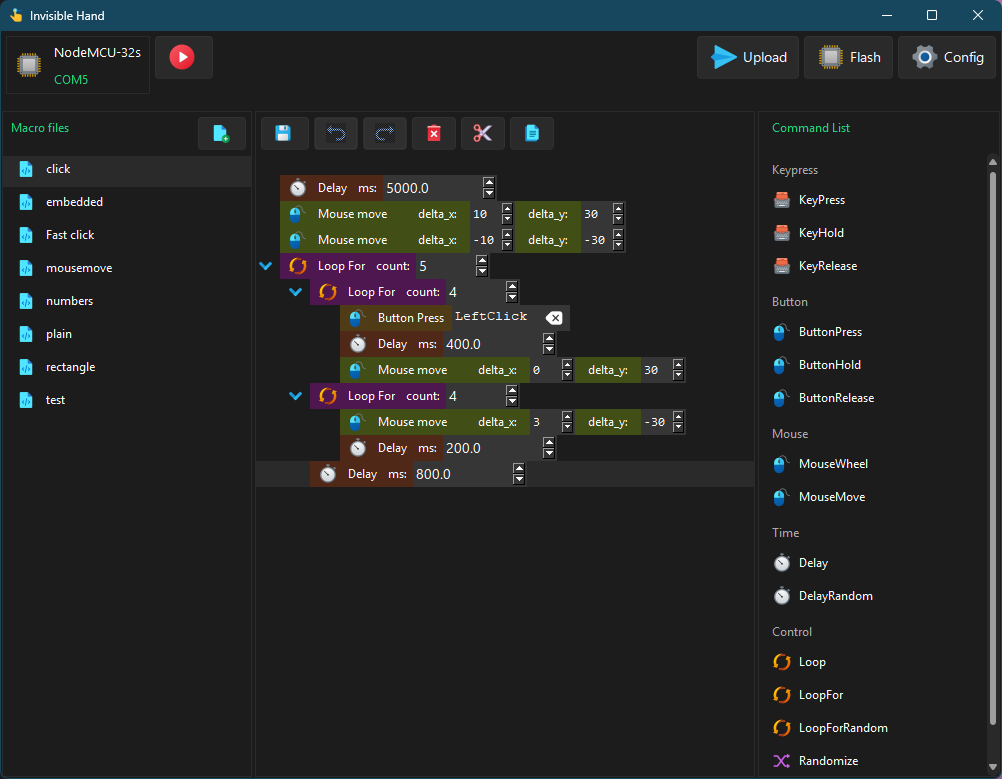
Invisible Hand is a toolset that turns common microcontrollers (MCUs) — such as those in the ESP32 family — into programmable keyboards and mice. Depending on the capability of the MCU, this can be achieved over Bluetooth or USB.
For detailed documentation, check out the wiki.
Setup
Windows
Installer
Download the Windows installer from the releases page and run it. This includes start menu and desktop shortcuts.
Python
You can also install the Python package directly. Note that this method does not create start menu or desktop shortcuts.
pip install ivh
ivh start
Linux
The only supported installation method on Linux is via the Python package. This requires Python 3.10 or later.
pip install ivh
ivh start
The desktop interface requires the tk and imagetk libraries. On Debian-based distros (Ubuntu, Mint, etc.), install them with:
sudo apt update
sudo apt install python3-tk python3-pil.imagetk
macOS
⚠️ macOS is not officially supported. Installing the Python package may work, but is untested.
Make sure Python 3.10+ is installed, then run:
pip install ivh
ivh start
Preparing Your Hardware
You will need:
- An ESP32 board with onboard Bluetooth support
- A data-capable USB cable to connect your board to your PC (not a charge-only cable)
Windows USB Drivers
On Windows, you may need to install a driver to enable serial communication with your board. The chip used varies by board model — check the small IC near the USB port and install the appropriate driver:
| Chip | Driver |
|---|---|
| CP210x | Installation guide — Random Nerd Tutorials |
| CH34X | Installation guide — Adafruit |
| FTDI | VCP drivers — ftdichip.com |
Not sure which chip you have? Check your board's documentation or look for a small square IC labelled with one of the chip names above near the USB connector.
1 maintainer

Release files for ivh 2026.0.4
For a detailed explanation of source distributions (sdists) and built distributions (wheels), please see the package formats documentation.
Source distribution (sdist)
| File | Size | Uploaded | |
|---|---|---|---|
| ivh-2026.0.4.tar.gz | 2.2 MB | Details |
Built distribution (wheel)
| File | Interpreter | ABI | Platform | Reset |
|---|---|---|---|---|
| ivh-2026.0.4-py3-none-any.whl | Python 3 | none | any | Details |
Total release size: 4.6 MB
Release files / ivh-2026.0.4.tar.gz
| Download URL | ivh-2026.0.4.tar.gz |
|---|---|
| Size | 2.2 MB |
| Tags | Source |
|
SHA-256 checksum How to use checksums |
aea6d0aeb3c674fb62544bcc508efa5578fc501a6012ec58eda287606589ad12
|
|
BLAKE2b-256 checksum How to use checksums |
81c4084e00577fedb722a58b54e7e1d34265a6009f5bf3e8c29b3d0028eabc18
|
| Upload date | |
|
Uploaded using Trusted Publishing? What is trusted publishing? |
No |
| Uploaded via |
twine/7.0.0 CPython/3.14.0
|
Release files / ivh-2026.0.4-py3-none-any.whl
| Download URL | ivh-2026.0.4-py3-none-any.whl |
|---|---|
| Size | 2.3 MB |
| Tags | Python 3 |
|
SHA-256 checksum How to use checksums |
38c701dca60232b7b1fb85750bc7ac8bed356fa7ac9362d68bf363ba9d8f3e7f
|
|
BLAKE2b-256 checksum How to use checksums |
deb38f5401b6518fa385278727b117b96eef5cd52cefc7af065a487d4181e318
|
| Upload date | |
|
Uploaded using Trusted Publishing? What is trusted publishing? |
No |
| Uploaded via |
twine/7.0.0 CPython/3.14.0
|














