
IVM
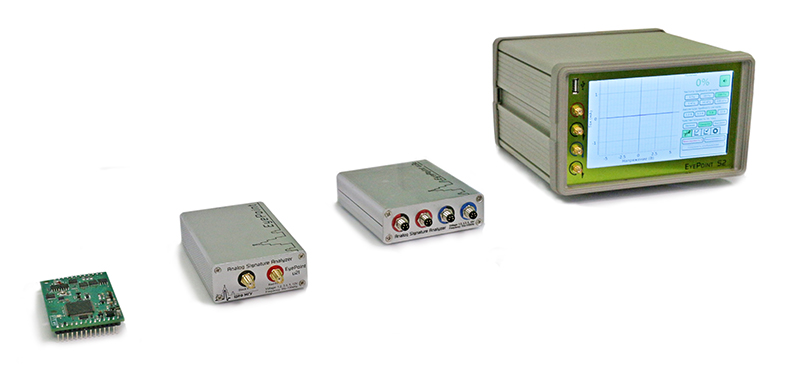
This is a python binding for IVM cross-platform library for EyePoint Signature Analyzers.
Installation
python -m pip install --upgrade pip
python -m pip install ivm
python3 instead of python should be used on some linux distributions.
Minimal example
from ivm import IvmDeviceHandle
from math import ceil
import time

# Useful constants
MEASUREMENT_COMPLETE = IvmDeviceHandle.CheckMeasurementStatusResponse.ReadyStatus.MEASUREMENT_COMPLETE
FRAME_SIZE = IvmDeviceHandle.GetMeasurementRequest.FrameNumber.FRAME_SIZE

# Set correct device URI here
# Format for Windows: com:\\.\COM1
# Format for Linux: com:///dev/ttyACM0
# Format for MacOS: com:///dev/tty.usbmodem000001234
device_uri = r'com:\\.\COM4'

try:
    device = IvmDeviceHandle(device_uri)
    print("Device opened")
    print("Read device information... ", end="")
    device_info = device.get_identity_information()
    print("Done")
except RuntimeError:
    print("Cannot open device {}.".format(device_uri))
    print("Please check URI and try again.")
    exit()

print("  -- Device information --")
print("  Product: {} {}".format(
    bytes(device_info.manufacturer).decode("utf-8"),
    bytes(device_info.product_name).decode("utf-8")
))
print("  Hardware version: {}.{}.{}".format(
    device_info.hardware_major,
    device_info.hardware_minor,
    device_info.hardware_bugfix
))
print("  Serial number: {}".format(device_info.serial_number))
print("  Firmware version: {}.{}.{}".format(
    device_info.firmware_major,
    device_info.firmware_minor,
    device_info.firmware_bugfix
))

# Launch single measurement in non-blocking mode
print("Measuring IV-curve... ", end="")
device.start_measurement()
# Wait for measurement to finish
while device.check_measurement_status().ready_status != MEASUREMENT_COMPLETE:
    time.sleep(0.05)
print("Done")

# Number of points in a single curve measurement
number_of_points = device.get_measurement_settings().number_points
print("Number of points in a single curve measurement: {}".format(number_of_points))

# Get all measurement results
currents = []
voltages = []
# Measurements are stored in frames of size FRAME_SIZE
number_of_frames = ceil(number_of_points/FRAME_SIZE)
for frame_index in range(number_of_frames):
    currents += list(device.get_measurement(frame_index).current)
    voltages += list(device.get_measurement(frame_index).voltage)

print("List of measured currents (in mA):")
print(*("{:.4f}".format(k) for k in currents), sep=", ")

print("List of measured voltages (in V):")
print(*("{:.4f}".format(k) for k in voltages), sep=", ")

# Close the device
device.close_device()
print("Device closed")
More information
For documentation, software, examples of using the API and bindings for Python and C#, you can visit the Eyepoint website:
- English version: https://eyepoint.physlab.ru/en/
- Russian version: https://eyepoint.physlab.ru/ru/.
1 maintainer

Metadata
1 maintainer
Release files for ivm 1.1.2
For a detailed explanation of source distributions (sdists) and built distributions (wheels), please see the package formats documentation.
Source distribution (sdist)
| File | Size | Uploaded | |
|---|---|---|---|
| ivm-1.1.2.tar.gz | 3.3 MB | Details |
Built distribution (wheel)
| File | Interpreter | ABI | Platform | Reset |
|---|---|---|---|---|
| ivm-1.1.2-py3-none-any.whl | Python 3 | none | any | Details |
Total release size: 6.6 MB
Release files / ivm-1.1.2.tar.gz
| Download URL | ivm-1.1.2.tar.gz |
|---|---|
| Size | 3.3 MB |
| Tags | Source |
|
SHA-256 checksum How to use checksums |
50898d307afe78d76b8773740223b8ec8c63c1c2937afb28b2fccc8afa185dd5
|
|
BLAKE2b-256 checksum How to use checksums |
b08f1f05ba4530a416cf61a41d3e6939b86392ad7aab1cdb81da129de2da71c7
|
| Upload date | |
|
Uploaded using Trusted Publishing? What is trusted publishing? |
No |
| Uploaded via |
twine/6.1.0 CPython/3.8.7
|
Release files / ivm-1.1.2-py3-none-any.whl
| Download URL | ivm-1.1.2-py3-none-any.whl |
|---|---|
| Size | 3.3 MB |
| Tags | Python 3 |
|
SHA-256 checksum How to use checksums |
2929d2ad7e45e1e4f6e052d640a03cf5d71b0267d8a54bd2effdf5cf857c53d5
|
|
BLAKE2b-256 checksum How to use checksums |
ecb4a0854c2dc36b0725828771fcb43341d77fa5e63bcaf79d268e95d734ecee
|
| Upload date | |
|
Uploaded using Trusted Publishing? What is trusted publishing? |
No |
| Uploaded via |
twine/6.1.0 CPython/3.8.7
|














