
MCP server for ivoryOS.

Project description
IvoryOS MCP server


Serve as a robot control interface using IvoryOS and Model Context Protocol (MCP) to design, manage workflows, and interact with the current hardware/software execution layer.
🚀 Quickstart with Claude Desktop
Install uv. Open up the configuration file, and add IvoryOS MCP config.
- macOS: ~/Library/Application Support/Claude/claude_desktop_config.json
- Windows: %APPDATA%\Claude\claude_desktop_config.json
{
  "mcpServers": {
    "IvoryOS MCP": {
      "command": "uvx",
      "args": [
        "ivoryos-mcp"
      ],
      "env": {
        "IVORYOS_URL": "http://127.0.0.1:8000/ivoryos",
        "IVORYOS_USERNAME": "<IVORYOS_USERNAME>",
        "IVORYOS_PASSWORD": "<IVORYOS_PASSWORD>"
      }
    }
  }
}
📦 Installation
Install uv.
1. Clone the Repository
git clone https://gitlab.com/heingroup/ivoryos-mpc
cd ivoryos-mcp
2. Install dependencies
When using IDE (e.g. PyCharm), the uv environment might be configured, you can skip this section.
python -m venv .venv
source .venv/bin/activate  # On Windows: .venv\Scripts\activate
uv pip install -r uv.lock
⚙️ Configuration
Option 1: in .env, change ivoryOS url and login credentials.
IVORYOS_URL=http://127.0.0.1:8000/ivoryos
IVORYOS_USERNAME=admin
IVORYOS_PASSWORD=admin
Option 2: In ivoryos_mcp/server.py, change ivoryOS url and login credentials.
url = "http://127.0.0.1:8000/ivoryos"
login_data = {
    "username": "admin",
    "password": "admin",
}
🚀 Install the server (in Claude Desktop)
mcp install ivoryos_mcp/server.py
✨ Features
| Category | Feature | Route | Description |
|---|---|---|---|
| ℹ️ General Tools | platform-info |
GET /api/control |
Get ivoryOS info and signature of the platform |
execution-status |
GET /api/runner/status |
Check if system is busy and current/last task status | |
| ℹ️ Workflow Design | list-workflow-scripts |
GET /database/scripts/<deck_name> |
List all workflow scripts from the database |
load-workflow-script |
GET /database/scripts/edit/<script_name> |
Load a workflow script from the database | |
submit-workflow-script |
POST /api/design/submit |
Save a workflow Python script to the database | |
| ℹ️ Workflow Data | list-workflow-data |
GET /database/workflows/ |
List available workflow execution data |
load-workflow-data |
GET /database/workflows/<workflow_id> |
Load execution log and data file | |
| 🤖 Direct Control | execute-task |
POST /api/control |
Call platform function directly |
| 🤖 Workflow Run | run-workflow-repeat |
POST /design/campaign |
Run workflow scripts repeatedly with static parameters |
run-workflow-kwargs |
POST /design/campaign |
Run workflow scripts with dynamic parameters | |
run-workflow-campaign |
POST /design/campaign |
Run workflow campaign with an optimizer | |
| 🤖 Workflow Control | pause-and-resume |
GET /api/runner/pause |
Pause or resume the workflow execution |
abort-pending-workflow |
GET /api/runner/abort_pending |
Finish current iteration, abort future executions | |
stop-current-workflow |
GET /api/runner/abort_current |
Safe stop of current workflow |
⚠️ ℹ️ are resources, but decorated as tool due to the current issue with MCP Python SDK and Claude Desktop integration.
It's recommended to only useallow alwaysfor ℹ️ tasks
and useallow oncefor 🤖 tasks. These tasks will trigger actual actions on your hosted Python code.
🧪 Examples
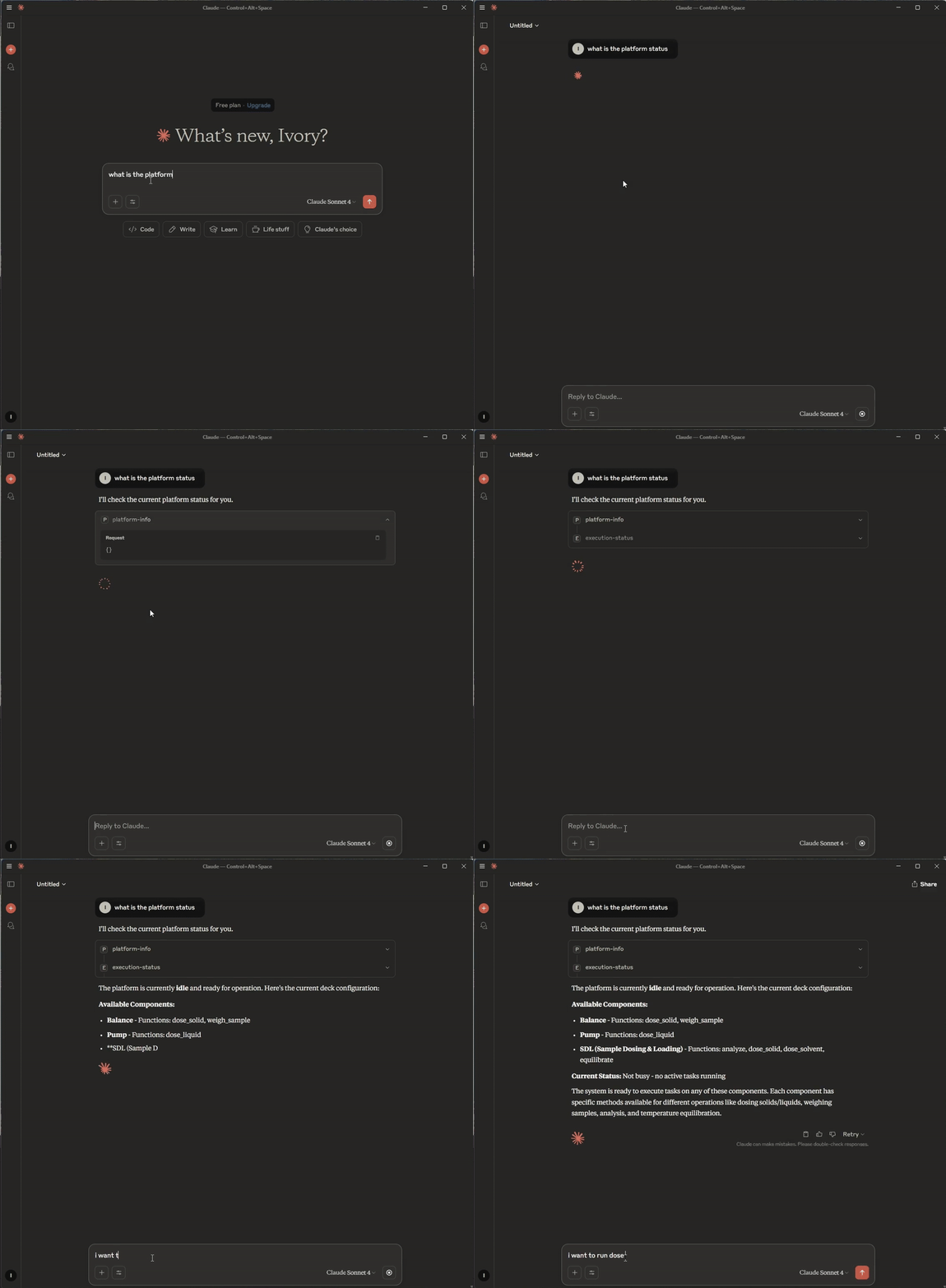
The example prompt uses the abstract SDL example.
Platform info
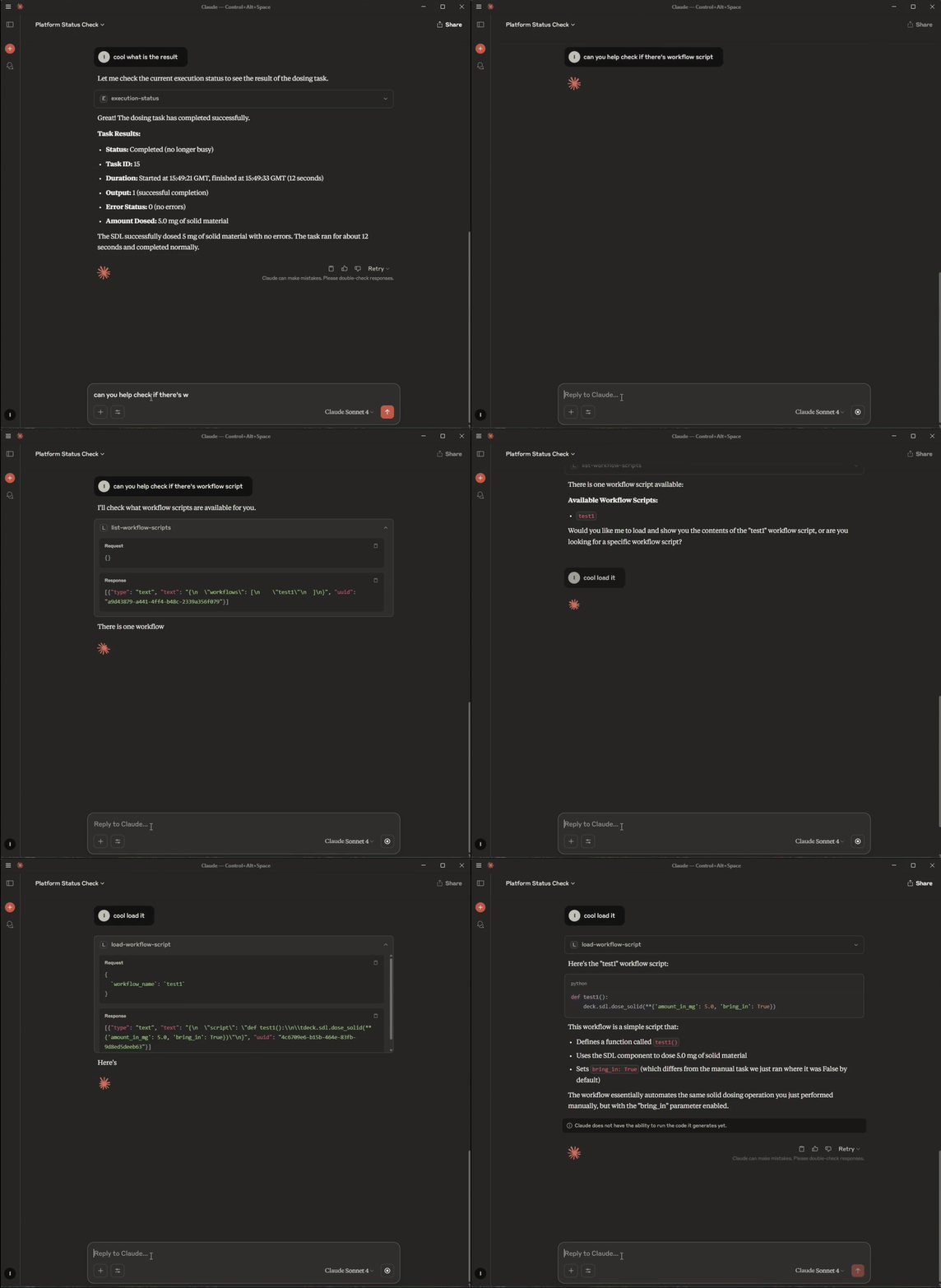
Load prebuilt workflow script


Download files
Download the file for your platform. If you're not sure which to choose, learn more about installing packages.
Source Distribution
Built Distribution
Filter files by name, interpreter, ABI, and platform.
If you're not sure about the file name format, learn more about wheel file names.
Copy a direct link to the current filters
File details
Details for the file ivoryos_mcp-0.1.3.tar.gz.
File metadata
- Download URL: ivoryos_mcp-0.1.3.tar.gz
- Upload date:
- Size: 7.0 kB
- Tags: Source
- Uploaded using Trusted Publishing? No
- Uploaded via: uv/0.7.6
File hashes
| Algorithm | Hash digest | |
|---|---|---|
| SHA256 |
b084d637681a864f1254a3992734485924be33b63db693a3a7483823fc7e3d4c
|
|
| MD5 |
a58f155dde26d1f63ddcaefdeb6928dc
|
|
| BLAKE2b-256 |
b80481f6d3164324cfb3a62ef0e3dfb3e0552273e2206692563adc35fbce2f71
|
File details
Details for the file ivoryos_mcp-0.1.3-py3-none-any.whl.
File metadata
- Download URL: ivoryos_mcp-0.1.3-py3-none-any.whl
- Upload date:
- Size: 7.5 kB
- Tags: Python 3
- Uploaded using Trusted Publishing? No
- Uploaded via: uv/0.7.6
File hashes
| Algorithm | Hash digest | |
|---|---|---|
| SHA256 |
5676abb0383d4fc418086ddc9df2f4277e91ac7631885780f95ea6fe3003ed40
|
|
| MD5 |
16f8bd6102e4a2ded2512404ae59a16a
|
|
| BLAKE2b-256 |
c1205553a7db0096e24ad5b18c63c7134237eddd1d5d9dcc851ea6d94369c2aa
|






