
A nice image viewer in the spirit of ACDSee

Project description
jaggimage-viewer
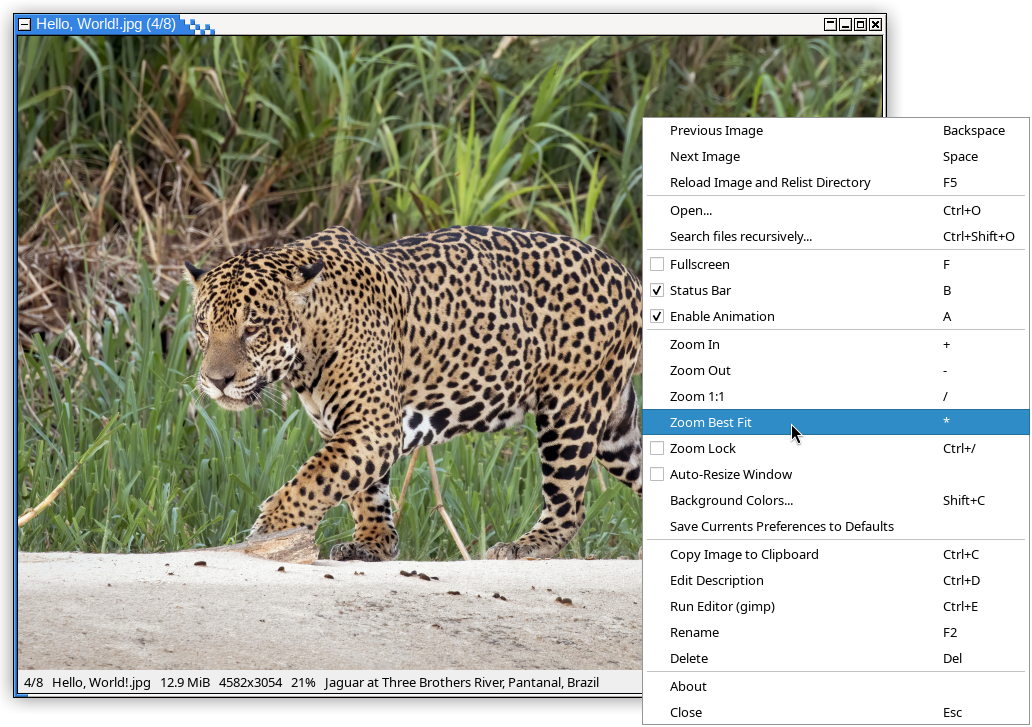
I was so used to my 25+ years old version of ACDSee to quickly see my files, i just made my own image viewer with Python and Qt.
Usage
- You can run it without argument in any directory containing pictures, it will show the first of files with any recognized extension, and next/prev will show others files in current directory
- You can run it with one file name as argument to display it (or associate jaggimage-viewer with images files), next/prev will also show others files of the same directory
- You can run it with several files as argument, the first one will be displayed, next/prev will show others images you listed
Shortcuts
Most keyboard shortcuts are shown in the contextual menu (right click), but some functions have several. I tried to keep the sames shortcuts than ACDSee.
| Shortcut(s) | Functionality |
|---|---|
Space, Page Down, Scroll wheel |
Next image |
Backspace, Page Up, Scroll wheel |
Previous image |
Home |
First image |
End |
Last image |
+, Ctrl/Shift + Scroll wheel |
Zoom in |
-, Ctrl/Shift + Scroll wheel |
Zoom out |
/ |
Zoom 1:1 ("pixel perfect") |
* |
Toggle zoom best-fit / full width or height |
Ctrl+/ |
Toggle zoom lock (zoom level not changing when displaying another image) |
F, F11, Double-click |
Toggle full-screen mode |
B |
Toggle status bar |
Ctrl+D |
Edit file description |
Arrows keys (with Ctrl: faster, with Shift: slower) |
Panning image (if not zoomed best fit) |
Alt+← and Alt+→ |
Rotating image view |
F2 |
Rename file (and .txt description file, if present) |
Del |
Delete current file (and display next image) |
F5 |
Reload file and relist directory |
F10 |
Show contextual menu |
Ctrl+O |
Open a specific file (in same or different directory) |
Ctrl+C |
Copy current image to clipboard |
Ctrl+E |
Open the image with an external editor (gimp by default) |
Escape, Ctrl+W (and probably Alt+F4 too) |
Quit the program |
Installation
From PyPI
This assumes you have either Python and pip, or uv installed.
With pip:
pip install jaggimage-viewer
With uv:
uv tool install jaggimage-viewer
From sources
-
Have
uvinstalled: https://docs.astral.sh/uv/#installation -
Clone the repository:
git clone https://github.com/clxjaguar/jaggimage-viewer.git
-
Run the installation:
cd jaggimage-viewer
uv build
uv tool install .
Release history Release notifications | RSS feed


Download files
Download the file for your platform. If you're not sure which to choose, learn more about installing packages.
Source Distribution
Built Distribution
Filter files by name, interpreter, ABI, and platform.
If you're not sure about the file name format, learn more about wheel file names.
Copy a direct link to the current filters
File details
Details for the file jaggimage_viewer-1.1.3.tar.gz.
File metadata
- Download URL: jaggimage_viewer-1.1.3.tar.gz
- Upload date:
- Size: 192.4 kB
- Tags: Source
- Uploaded using Trusted Publishing? No
- Uploaded via: uv/0.8.22
File hashes
| Algorithm | Hash digest | |
|---|---|---|
| SHA256 |
3a65412b5e8188fe90d27d30141ac6b8969a5dc38d3366fb16f14e56b064626a
|
|
| MD5 |
1071cc33976a3e0352daa7f5e44acefe
|
|
| BLAKE2b-256 |
1f09b3135aa6f08176f060c641de0ceb2716cd3e37026c09de41ab853dc20259
|
File details
Details for the file jaggimage_viewer-1.1.3-py3-none-any.whl.
File metadata
- Download URL: jaggimage_viewer-1.1.3-py3-none-any.whl
- Upload date:
- Size: 24.7 kB
- Tags: Python 3
- Uploaded using Trusted Publishing? No
- Uploaded via: uv/0.8.22
File hashes
| Algorithm | Hash digest | |
|---|---|---|
| SHA256 |
65bda976dd81da0aa011e7ac99a723560051bd439c78cd7721a146901cc94fb6
|
|
| MD5 |
ebf6d1389e34550e4d90aef64e159061
|
|
| BLAKE2b-256 |
6f9efea5eaaed3e7fcdfa849dad9efc5376e4852707ea4062a1cc9073690dfd3
|






