


JailBee runs isolated, per-branch development environments in Incus system containers. Spin up multiple full stacks in parallel on one host — each with its own services, Docker daemon, IDE, and browser — without port conflicts, Docker name clashes, or shared-database collisions.
The CLI is jailbee, or jb for short. Release announcements are at
jailbee.gisgro.io/news.
JailBee is project-agnostic: every repo supplies its own .jailbee/config.yaml. The
golden image ships stack-neutral by default — language toolchains (JDK, Node,
Python venv/pip, Docker) are bundled but opt-in, enabled per repo via
golden.stacks / golden.enable_snippets. It was built at GISGRO, which is
its origin, not its scope.
See it work
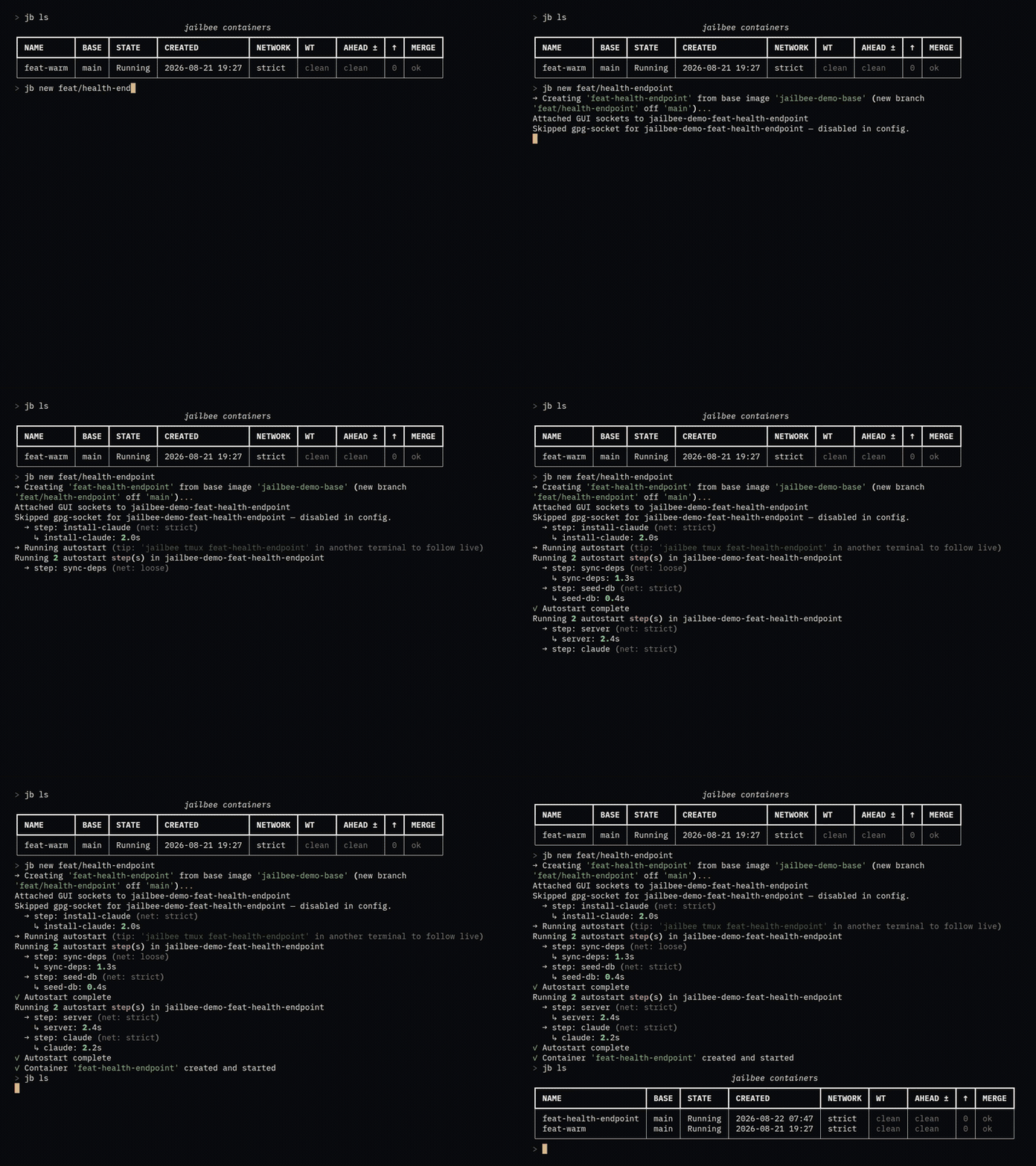
What the full clip shows, end to end. A branch gets a container of its own,
cloned from the golden image with the app's dependencies synced, its database
seeded and its dev server already listening on port 8080. A coding agent gets a
window inside it and is asked for a /health endpoint with a test; the human
detaches, checks the running service from outside, and comes back to find the
work committed. jb git pull brings that commit onto the host as a merge —
asking before it destroys anything — and jb destroy throws the container away
as its own deliberate step.
Every command and every line of output is real. Two stretches of the clip are sped up and say so on screen; nothing else is edited.
Key features
- Per-branch isolation — one full-stack container per git branch, running in parallel without port or Docker-name collisions.
- Host↔container git bridge — the container acts as a git remote; move
commits with
jailbee git push/pull/checkoutinstead of round-tripping through GitHub. - Submodules that travel — sub-repos are initialised offline on
jailbee newand their objects move with the superproject on every push/pull, so a repo with submodules needs no manual setup on either side. - Nested Docker —
security.nesting=trueout of the box on Ubuntu 26.04. - GUI passthrough — launch a JetBrains IDE (
jailbee ide), Chrome or Firefox (jailbee chrome,jailbee firefox), or any other app registered underapps:(jailbee apps run <name>), from inside a container onto your Wayland session. - Host sockets, shared — the Wayland display and (with
gpg.enabled) the gpg-agent are attached to every container, PulseAudio and D-Bus on request (gui.audio,gui.dbus), sogit commit -Sandsshwork inside while the private key never leaves the host (a smartcard still asks for its touch). Mount any other host socket the same way and use it from inside. - Host services, forwarded in — declare
host_ports: [{ name: adb, port: 5037 }]and every container of the repo reaches that host service on its own localhost, so plainadb devicesworks inside with noADB_SERVER_SOCKETjuggling.jailbee portadds or removes a forward on one container without touching the config, in either direction —to-hostfor the rarer case where you do want a container's service on the host. - Network modes — per-container egress allowlist with
strictandloosepolicies (jailbee net), safe for unattended agent runs. Entries are hostnames and ports (api.example.com:443), not IP addresses: JailBee resolves them into the kernel ACL, keeps a cumulative pool as CDN addresses rotate, and pins the container's/etc/hoststo match. Any protocol, not just HTTP —ssh,git+sshand a database client work under the same list.jailbee net egress addwidens one container's copy of that list — or this machine's copy of the repo's — without editing the committed config, so a host only you need never lands in git; see Egress overrides. An optional work network (jailbee net migrate) gives containers a stable address and switches modes without replacing their NIC. - Personal settings stay out of git —
~/.config/jailbee/global.yamlholds what is yours on every repo, and a host-local~/.config/jailbee/repos/<prefix>.yamlwhat is yours on one (its GitHub token, credential group, extra egress), above the committed.jailbee/config.yaml;jailbee config edit --localedits it. - First-class Claude Code — opt in with
agents.claude.enabled: trueand every container gets Claude Code installed, sharing one settings directory across the repo's containers and one login across every repo in its credential group (jailbee accountmanages the stored logins), while your host~/.claudeis never read. Instructions written once in~/.config/jailbee/AGENTS.mdreach every container's Claude. The Anthropic hosts are added to the strict-mode allowlist automatically, JailBee's own skills teach the in-container Claude to drivejailbee, andjailbee prwrites the PR title and body — to your repo's own standard, if you state one inpr.prompt. Start it automatically in a tmux window and the container is ready for an unattended run the moment it boots — with permission prompts turned off (--dangerously-skip-permissions), because the boundary is the container rather than the agent's own judgement. You size that boundary once in the repo's config; see Running an agent without prompts for what it does and doesn't cover. - PR and issue outbox — a container's
ghis read-only, so an agent reviewing a PR or triaging issues inside it stages comments, replies, description rewrites and issue changes as JSON manifests instead of posting them straight to GitHub. A human reviews the exact text and publishes it with one confirmation:jailbee review applyandjailbee issue apply(alsols/show/drop), orjailbee outboxto browse both in one place;jailbee lsand both dashboards mark a container carrying pending manifests, andjailbee prpicks up a pending description in place of asking an agent to write one. - Claude Code on other models —
claude-jbruns Claude Code against a LiteLLM proxy that JailBee keeps in its own container, so the same agent can work on a ChatGPT subscription or on any provider you have an API key for, while plainclaudestays native. One proxy per account, per-repo route overrides, live route reloads; see Claude Code through LiteLLM. - Remote access over SSH — an optional, key-only SSH service
(
jailbee remote ssh enable) opens the dashboard, a restricted console or policy-limited one-shot commands from another computer; host-management commands stay refused. Withremote.ssh.guion, GUI apps launched over SSH appear on a shared RDP display (jailbee display) you open in any RDP client; see Remote GUI over SSH. - Generic agent support —
agents: {codex: {enabled: true}}wires any terminal coding agent into the same mount/egress/install/autostart pipeline Claude Code uses, via a shipped preset or one you write yourself. An agent that declares a skills directory gets JailBee's skills, and one with a headless command can writejailbee pr's title and body (pr.agent). Five presets beyond Claude (codex,gemini,aider,opencode,grok) ship as untested starting points — see Generic agent support. - One shared state layer per repo — package-manager caches, the JetBrains
config,
~/.sshand Claude's login live in a shared dir outside the containers, set up once per repo instead of once per branch. Most of it is one mount every container shares live — pnpm's store, JetBrains,~/.ssh, Claude's login. Gradle, Maven and the Chrome profile instead give each container its own private slot seeded from the warmest one: a warm cache without the lock contention one shared~/.gradleused to cause. Either way the state outlivesjailbee destroy/jailbee new— while nothing a container does reaches your host's own dotfiles. - Fast, cheap containers — copy-on-write clones of one golden image; a live
TUI dashboard (
jailbee dashboard, aliasjailbee tui) or Qt GUI dashboard (jailbee gui) spans every repo, shows what each container's agent is doing, and acts on what it shows: attach a shell or tmux, open the IDE, create or update the PR, update a container from its base, read its diff — without leaving the view that told you it was needed.
Getting started
JailBee needs a Linux host running Incus. Install the CLI with
uv or pipx —
JailBee is an ordinary PyPI package and needs neither at runtime, but
Ubuntu 24.04+ refuses a bare pip install into its system Python:
uv tool install jailbee # or: pipx install jailbee
For the optional Qt GUI dashboard (jailbee gui), add the gui extra:
uv tool install 'jailbee[gui]' # or: pipx install 'jailbee[gui]'
Host setup — Incus, firewall, UID mapping, kernel keyring limits — is a one-time job with a few moving parts. Follow Installation end-to-end first. Then, from the repo you want to manage:
jailbee config init          # write .jailbee/config.yaml
jailbee doctor               # sanity-check host + config
jailbee init                 # create Incus profiles, ACLs, bridge
jailbee base build           # build the golden image (one-time, ~10–15 min)
jailbee new feat/my-branch   # spin up an isolated env for a branch
See Getting started for the full first-run walkthrough.
Trying it without a repo config
Skip jailbee config init and jailbee init entirely for a quick look —
cd into any git repo and just run jailbee new work. With no
.jailbee/config.yaml in the directory, JailBee synthesizes a config from
~/.config/jailbee/global.yaml's scratch: block, creates that directory's
Incus profiles on the fly, and boots the container from a golden image
shared by every such directory on the host (alias jailbee-scratch-base).
The first time, it asks to build that image (a one-time, few-minutes cost);
every later scratch directory reuses it immediately. A directory that isn't
a git repo needs jailbee new --mount work instead, since there's no
upstream to clone from. See scratch
for the config block, and run jailbee config init once the work outlives
an afternoon.
Post-install setup
Installing the package puts jailbee and jb on your PATH and nothing
else. One command installs the rest:
jailbee setup
It asks about three steps, each idempotent — re-run it after upgrading:
- shell completions for both
jailbeeandjb(bash, zsh or fish), - the
jailbee-net-refreshuser timer, which keeps strict-mode egress allowlists current and expiresjailbee net loose --forTTLs, - JailBee's agent skills for the agents found on your host (opt-in via
install_host_skillsin~/.config/jailbee/global.yaml), so they know how to drivejailbee.
jailbee doctor reports any step that is missing. Host prerequisites — Incus,
the firewall, UID delegation — are separate; see
Installation.
Shell completion
Restart the shell after jailbee setup, and TAB completes commands, options,
and:
- container names on every command that takes one (
jailbee shell,jailbee destroy,jailbee git push,jailbee ide, …) — short names, from the containers that exist in the current repo - branch names on
jailbee newandjailbee retarget, from the host repo's local branches - snapshot tags on
jailbee snapshot restoreandjailbee snapshot delete, from the container already named on the command line - fixed values for
--format,--layer,--attachand--user
Completion looks for .jailbee/config.yaml in the current directory, the same
default the commands themselves use; elsewhere it offers nothing. Unlike the
commands, it does not honor --config/-c, so e.g. jailbee shell -c /other/repo/.jailbee/config.yaml <TAB> still completes against the current
directory's containers, not the repo the flag points at.
Documentation
The full documentation lives at jailbee.gisgro.io/docs —
the same pages this repository's docs/
holds, indexed and searchable.
Start here:
| Doc | What's inside |
|---|---|
| Installation | One-time host setup: Incus, UID delegation, installing the CLI (plus conditional firewall / kernel-keyring steps) |
| Getting started | Concepts, configure a repo, build the image, and a "typical day" walkthrough |
| Commands | Full command + flag reference table |
| Configuration reference | Every .jailbee/config.yaml and global.yaml key |
| News | Release announcements (also as an RSS feed) |
| FAQ | Short answers to the common questions, each linking to the page that covers it in full |
Project internals — maintainer procedure, kept in the repository:
| Doc | What's inside |
|---|---|
| Manual testing | End-to-end smoke-test recipes (require a real Incus daemon) |
| Releasing | Release process |
| Contributing | Development setup and repo conventions |
License
jailbee is free software, released under the GNU General Public License v3.0
or later (GPL-3.0-or-later). See LICENSE for the full text.
Copyright © 2026 GISGRO Oy.
1 maintainer

Metadata
1 maintainer
Release files for jailbee 1.6.0
For a detailed explanation of source distributions (sdists) and built distributions (wheels), please see the package formats documentation.
Source distribution (sdist)
| File | Size | Uploaded | |
|---|---|---|---|
| jailbee-1.6.0.tar.gz | 1.4 MB | Details |
Built distribution (wheel)
| File | Interpreter | ABI | Platform | Reset |
|---|---|---|---|---|
| jailbee-1.6.0-py3-none-any.whl | Python 3 | none | any | Details |
Total release size: 2.8 MB
Release files / jailbee-1.6.0.tar.gz
| Download URL | jailbee-1.6.0.tar.gz |
|---|---|
| Size | 1.4 MB |
| Tags | Source |
|
SHA-256 checksum How to use checksums |
e92fc7dd1e899a44a561f2589778b8311ca8c9fefd3ff9e9d00f0e0b4190b875
|
|
BLAKE2b-256 checksum How to use checksums |
8c7850686125e141e3c7702afa11801aad4bfe7b3921bc127f115b8c9a5c80d2
|
| Upload date | |
|
Uploaded using Trusted Publishing? What is trusted publishing? |
No |
| Uploaded via |
twine/7.0.0 CPython/3.13.12
|
Release files / jailbee-1.6.0-py3-none-any.whl
| Download URL | jailbee-1.6.0-py3-none-any.whl |
|---|---|
| Size | 1.5 MB |
| Tags | Python 3 |
|
SHA-256 checksum How to use checksums |
6c7bd897682a2205d76d703aa357b4d8d8e562b4fa14533521484eef7d29620c
|
|
BLAKE2b-256 checksum How to use checksums |
7fb0c50030809735b73656c5cefcdc291941471711472c6ca31eddd91c60f4da
|
| Upload date | |
|
Uploaded using Trusted Publishing? What is trusted publishing? |
No |
| Uploaded via |
twine/7.0.0 CPython/3.13.12
|














