
Janus
The two-faced gateway for AI coding tools. Janus sits at the threshold of every AI call — facing the developer on one side and every provider on the other.
Janus is a self-hosted, multi-tenant AI routing gateway. It exposes OpenAI/Anthropic/Gemini-compatible HTTP endpoints that your coding tools (Claude Code, Codex, Cursor, Cline, ...) talk to, then translates and routes each request to any of 29 built-in AI providers — or any OpenAI-compatible endpoint — without either side needing to know the other exists.
Janus is dashboard-first. Cloudline, the bundled web dashboard, is how you set up and run the gateway: connect credentials, create client keys, watch live usage, and tune routing, budgets, and pricing. The CLI is there for headless servers and automation (see Headless / automation).
Quick start
Janus needs Python 3.11+. Everything lives under ~/.janus/: a seed
config.yaml and a SQLite database (janus.db) that is the source of truth
after the first startup.
1. Install and start the server
pip install janus-ai
janus config-init          # writes a minimal seed ~/.janus/config.yaml
janus serve --port 20128
Prefer containers? See Docker.
2. Create your sign-in key
The dashboard always requires a Janus API key, including on localhost. Create
the first one in a second terminal. The full sk-janus-... value is shown once,
so save it:
janus keys create --name admin
Later keys can be created from Settings → API keys in the dashboard.
3. Open the dashboard and sign in
Run janus dashboard, or visit
http://localhost:20128/dashboard/ui, and
sign in with the key from step 2. While setup is incomplete, Home shows a
three-step checklist: connect credentials, create a client key, and send a first
request. Each step links to the screen that does it.
4. Connect your credentials
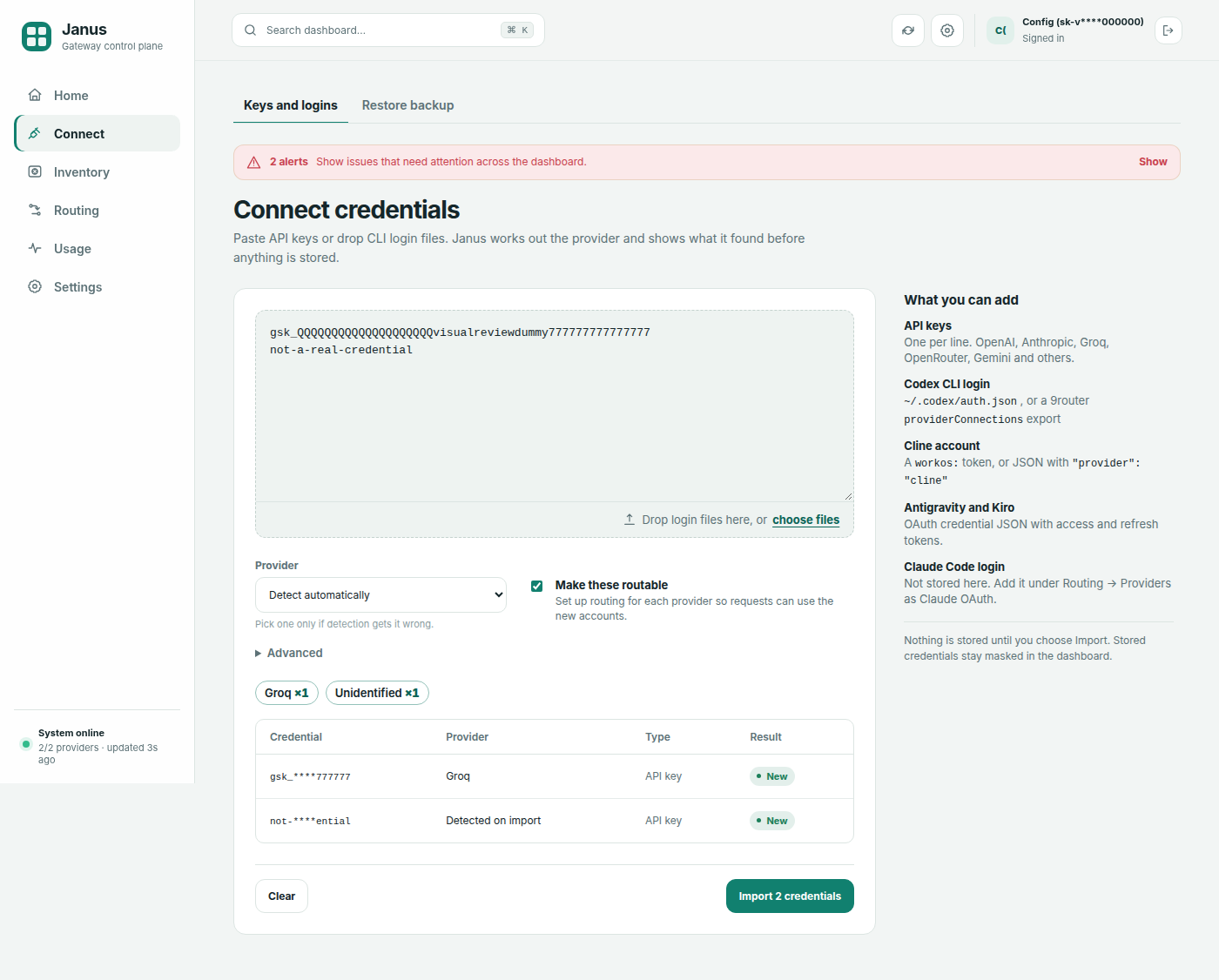
Open Connect (/dashboard/ui/connect) and paste API keys (one per line) or
drop credential files onto the page. Files are read in your browser, and nothing
is stored until you import.
- Preview first. Janus detects the provider for each entry and shows masked values with per-provider counts. Each entry is marked new, exists (already in your inventory), or rejected (with a reason, such as an unsupported credential format). Previewing never writes to the database.
- Import. Importing adds the new entries to your key inventory. Make these routable is on by default: Janus creates the matching routing provider if needed, so the credentials join fallback rotation once validation succeeds.
- Supported inputs: raw provider API keys (auto-detected), Codex (ChatGPT)
OAuth credential JSON including 9router
providerConnectionsexports with many accounts, and Antigravity, Kiro, and Cline credentials. For OAuth credentials, choose the provider in the selector. The full list is in Key Inventory.
To restore a full inventory export instead, use Connect → Restore backup.
5. Point your client at the endpoint
The Your endpoint card on Home shows your base URL and a copyable curl
request. Settings → Tools has ready-made settings for Claude Code, Codex,
Cursor, and Cline. For example:
curl http://localhost:20128/v1/chat/completions \
  -H "Authorization: Bearer sk-janus-yourkey" \
  -H "Content-Type: application/json" \
  -d '{
    "model": "openai/gpt-4o",
    "messages": [{"role": "user", "content": "Hello!"}],
    "max_tokens": 50
  }'
Use prefix/model in requests (for example openai/gpt-4o or
anthropic/claude-sonnet-4-20250514) or a combo name like best-effort.
GET /v1/models lists everything your key can reach.
📚 Documentation · Contributing · Changelog
Dashboard at a glance
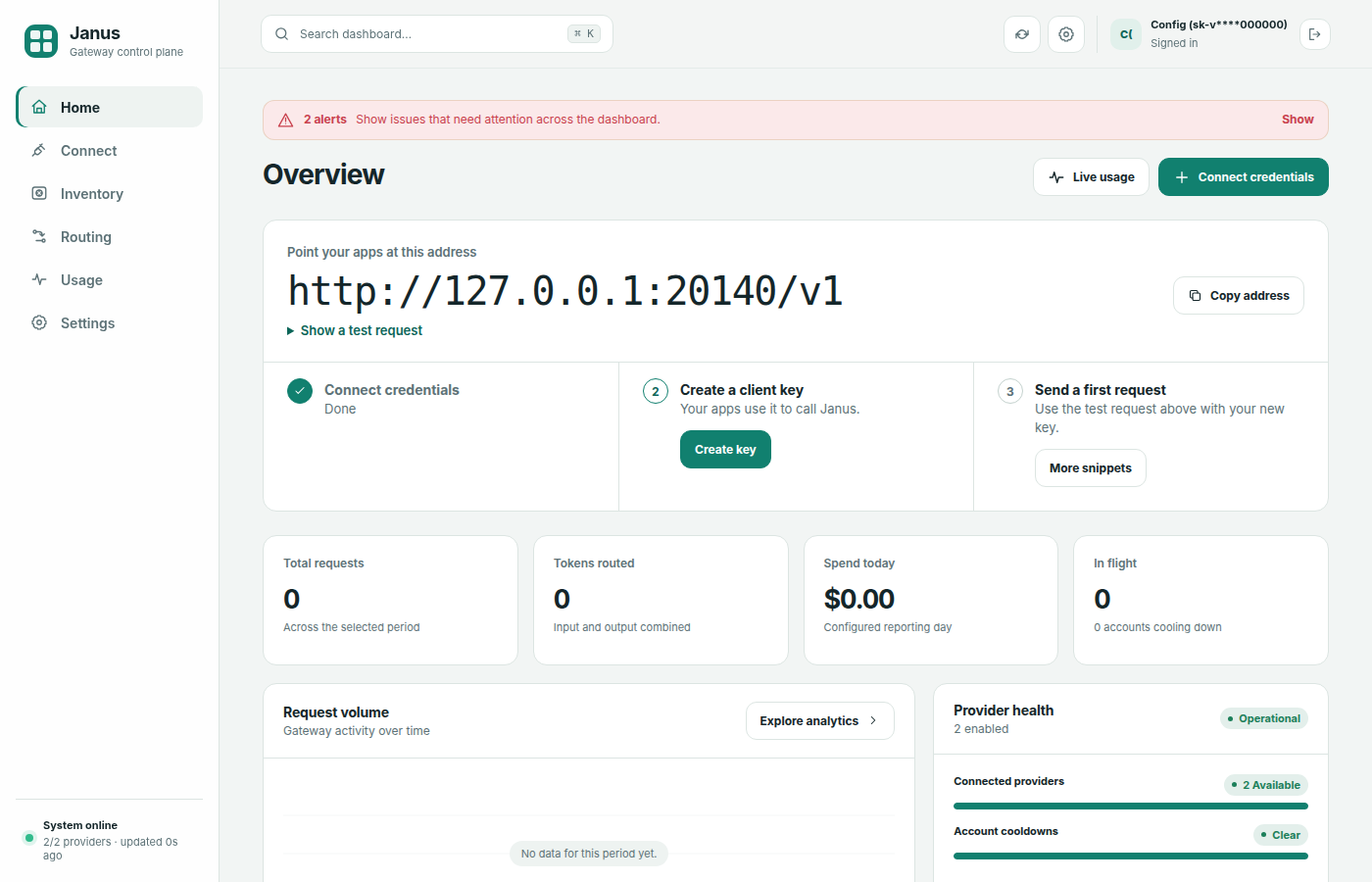
The sidebar has six sections. Each one groups related pages as tabs, and every
page keeps its own URL, so deep links and bookmarks work. The command palette
(Ctrl+K, Cmd+K, or /) jumps straight to any page.
| Section | Tabs |
|---|---|
| Home | Overview: setup checklist, your endpoint, spend and traffic |
| Connect | Keys and logins, Restore backup |
| Inventory | Overview, Keys |
| Routing | Providers, Models, Combos, Health, Token savers |
| Usage | Live, Analytics, Leaderboard, Request logs |
| Settings | General, API keys, Budgets, Pricing, Tools |
Dashboard access rules:
- All clients, including localhost, sign in at
/dashboard/loginwith a Janus API key. - DB-managed keys must be active and have Allow dashboard login
(
can_login=true). Static keys configured in YAML are also accepted. - Username/password login and a loopback bypass are not supported.
- Require API key (Settings → General) controls authentication on the API endpoints only. It never makes the dashboard anonymous. Turn it on for remote access.
After the first startup the database is authoritative: editing YAML and restarting does not re-apply changes, so make changes in the dashboard.
Client setup
Full guides: Client Setup.
Settings → Tools (/dashboard/ui/tools) generates the exact values for your
server URL and auth settings.
Claude Code / Anthropic tools:
export ANTHROPIC_BASE_URL=http://localhost:20128/v1
export ANTHROPIC_API_KEY=sk-janus-yourkey   # if require_api_key is on
Cursor / OpenAI Chat Completions tools:
export OPENAI_BASE_URL=http://localhost:20128/v1
export OPENAI_API_KEY=sk-janus-yourkey      # if require_api_key is on
Codex CLI speaks the Responses API (POST /v1/responses). Configure a
~/.codex/config.toml provider with wire_api = "responses" and
base_url = "http://localhost:20128/v1".
Ollama-only tools use OLLAMA_HOST=http://localhost:20128 (/api/chat,
/api/generate, /api/show, /api/tags). Gemini-native tools use
GOOGLE_GEMINI_BASE_URL=http://localhost:20128.
Janus serves plain HTTP only. Use http://, not https://, unless you put
a reverse proxy with TLS in front. For access from other machines on your LAN or
Tailscale, start the server with janus serve --host 0.0.0.0 --port 20128.
Docker
mkdir -p janus-data
janus config-init --path janus-data/config.yaml
docker compose up -d
docker compose exec -u janus janus janus keys create --name admin   # sign-in key, shown once
The image binds to 0.0.0.0:20128. SQLite and config persist in ./janus-data/.
Open http://localhost:20128/dashboard/ui, sign in with the key, and continue
from step 4.
Features
- Multi-format inbound — OpenAI Chat Completions, OpenAI Responses (
/v1/responsesfor Codex CLI), Anthropic Messages, Gemini GenerateContent, and Ollama (/api/chat,/api/generate,/api/show,/api/tags) - Fallback routing — multi-account rotation with cooldowns (429→60s, 5xx→30s, auth→300s, network→15s)
- Rate-limit-aware rotation — accounts at their per-minute or per-day request quota are tried last
- Subscription quotas — per-provider 5h / daily / weekly / monthly windows; near-limit banners and soft deprioritization in routing
- Combos — named ordered model sequences (e.g.,
"model": "best-effort") - Token savers — RTK compression (default ON), Caveman, Ponytail, and optional Headroom compression proxy
- GitHub Copilot OAuth — device-code connect from the dashboard; session tokens refreshed automatically
- API key scopes — dashboard access (
can_login), model allowlists (prefix/*), optional daily budgets - Budgets — daily spending limits per API key or global, with warn/block thresholds
- Request logging — opt-in debug capture of request/response bodies (enable in Settings → General, view in Usage → Request logs)
- Analytics — cost tracking, spend trends, success rates, per-model/provider/key breakdowns
- Pricing — builtin model prices, YAML/DB overrides, cache token rates
- Cloudline dashboard — responsive SvelteKit 2 + Svelte 5 + TypeScript SPA at
/dashboard/ui: six sidebar sections with in-page tabs, a Connect screen for pasting or dropping credentials, a first-run checklist, light/dark/system themes, a command palette, live usage, analytics, and routing visibility - Single self-hosted dashboard — the versioned Cloudline bundle ships with Janus; production rendering has no runtime CDN or Node.js dependency.
/dashboardand former page URLs are compatibility redirects to/dashboard/ui - Upstream key inventory — validate, monitor, and route through a multi-key pool for 29 providers (
/dashboard/ui/inventory) - Account value tracking — per-key credit balances and usage windows (OpenRouter credits, Z.AI/GLM coding-plan quota, DeepSeek/Moonshot/Kimi balances, MiniMax/Venice plans, Synthetic/Ollama Cloud/Cline usage) surfaced in the inventory dashboard with low-quota alerts
Upstream Key Inventory
The inventory holds your upstream provider credentials. It runs health checks,
tracks credit and usage windows, and routes through the best available key. Add
credentials through Connect, then manage them under Inventory
(/dashboard/ui/inventory).
- Overview stats, a paginated and sortable keys table, a key detail modal, and a best-keys widget
- Connect previews pastes and dropped files before anything is stored; Restore backup imports a Dashboard export JSON; misclassified keys can be re-identified
- Encryption at rest; routable keys are wired into gateway fallback rotation
- Credentials are masked by default; authenticated Reveal/Copy actions clear the value after 30 seconds
- History shows real status transitions and credit snapshots without no-op transition noise
- Detected rate limits (RPM/RPD) deprioritize near-quota keys during routing
- Account-value probes query each provider's own billing/usage endpoint — OpenRouter
/key, Z.AI & BigModel coding-plan quota, DeepSeek/Moonshot/Kimi balances, MiniMax coding-plan remains, Venice billing, Synthetic/Ollama Cloud/Cline usage windows — and render usage windows (5h/weekly) with reset times; results are cached for 10 minutes and refreshed on every validation or via Refresh usage on a key - Near-exhausted windows (≥90%) raise a dashboard alert
- Background recheck scheduler (twice daily by default)
| Variable | Purpose |
|---|---|
INVENTORY_ENCRYPTION_KEY |
Fernet key for encrypting upstream keys at rest |
INVENTORY_PUSH_TOKEN |
Auth token for POST /dashboard/api/inventory/push |
INVENTORY_SCHEDULER_ENABLED |
Set to false to disable background rechecks (default: true) |
VALIDATION_MAX_FAILURES |
Pause automatic validation after this many consecutive failures (default: 3) |
Headless / automation
Everything below is optional. Use it for servers without a browser, scripted provisioning, or CI. For day-to-day operation, use the dashboard.
Seed configuration (YAML)
Janus reads YAML from ~/.janus/config.yaml (or --config) with ${ENV_VAR}
token resolution. Generate a template with janus config-init.
On first startup only, YAML seeds the SQLite database with providers,
combos, token_savers, and pricing. After that the database is
authoritative: editing YAML and restarting does not re-apply changes. Make later
changes in the dashboard, or use Export Config / Reset to Defaults in
Settings.
server:
  port: 20128
  host: 127.0.0.1
  require_api_key: false

providers:
  - id: openai
    prefix: openai
    api_type: openai_compat
    base_url: https://api.openai.com/v1
    api_key: ${OPENAI_API_KEY}
    models: [gpt-4o, gpt-4o-mini, o3, o4-mini]

  - id: anthropic
    prefix: anthropic
    api_type: anthropic
    base_url: https://api.anthropic.com
    api_key: ${ANTHROPIC_API_KEY}
    models: [claude-sonnet-4-20250514, claude-opus-4-20250514]

combos:
  - name: best-effort
    models: [anthropic/claude-sonnet-4-20250514, openai/gpt-4o]
Supported provider types
api_type |
Use For |
|---|---|
openai_compat |
Any OpenAI-compatible API (OpenAI, Groq, Together, DeepSeek, OpenRouter, Mistral, Fireworks, Perplexity, xAI, ...) |
anthropic |
Direct Anthropic API |
gemini |
Direct Google Gemini API |
github_copilot |
GitHub Copilot (device-code OAuth from the dashboard) |
opencode_free |
OpenCode Zen free tier |
Known provider base URLs
| Provider | base_url |
|---|---|
| OpenAI | https://api.openai.com/v1 |
| Groq | https://api.groq.com/openai/v1 |
| Together AI | https://api.together.xyz/v1 |
| DeepSeek | https://api.deepseek.com/v1 |
| OpenRouter | https://openrouter.ai/api/v1 |
| Mistral | https://api.mistral.ai/v1 |
| Fireworks | https://api.fireworks.ai/inference/v1 |
| Perplexity | https://api.perplexity.ai |
| xAI (Grok) | https://api.x.ai/v1 |
| Qwen/DashScope | https://dashscope.aliyuncs.com/compatible-mode/v1 |
CLI reference
| Command | Description |
|---|---|
janus dashboard |
Open the Cloudline dashboard in your browser |
janus serve |
Start the gateway server |
janus config-init |
Generate default config YAML |
janus config-path |
Print config file path |
janus keys create/list/update/revoke |
Manage API keys (scopes: --no-login, --models, --daily-budget) |
janus usage stats/cost/by-key |
Usage and cost reports |
janus budgets list/set/delete |
Manage spending budgets |
janus pricing list/show |
View model pricing |
janus inventory migrate/verify/encrypt-keys/generate-encryption-key |
Upstream key inventory and cutover |
janus inventory generate-encryption-key          # create Fernet key
janus inventory migrate export.json --verify     # import Dashboard export + summary
janus inventory verify                           # cutover verification summary
janus inventory encrypt-keys                     # encrypt plaintext keys in DB
Scripts and other machines can add upstream keys without a browser through the inventory Push API.
Development
git clone https://github.com/amanverasia/Janus.git
cd Janus
python -m venv .venv
pip install -e ".[dev]"

# Run tests
.venv/bin/python -m pytest

# Lint + typecheck
.venv/bin/ruff check src/janus/ tests/
.venv/bin/mypy src/janus/

# Start dev server
.venv/bin/janus serve --port 20128 --reload

# Verify and rebuild the Cloudline frontend
.venv/bin/python scripts/build_dashboard_ui.py --check
.venv/bin/python scripts/build_dashboard_ui.py
Tech Stack
Python 3.11+ / FastAPI / httpx / Pydantic v2 / aiosqlite / SvelteKit 2 / Svelte 5 / TypeScript
License
GPL-3.0 © 2026 Aman Verasia
1 maintainer

Metadata
1 maintainer
Release files for janus-ai 4.0.0
For a detailed explanation of source distributions (sdists) and built distributions (wheels), please see the package formats documentation.
Source distribution (sdist)
| File | Size | Uploaded | Provenance | Actions |
|---|---|---|---|---|
| janus_ai-4.0.0.tar.gz | 1.1 MB | With provenance | Details for janus_ai-4.0.0.tar.gz |
Built distribution (wheel)
| File | Interpreter | ABI | Platform | Actions Reset |
|---|---|---|---|---|
| janus_ai-4.0.0-py3-none-any.whl | Python 3 | none | any | Details for janus_ai-4.0.0-py3-none-any.whl |
Total release size: 1.6 MB
Release files / janus_ai-4.0.0.tar.gz
| Download URL | janus_ai-4.0.0.tar.gz |
|---|---|
| Size | 1.1 MB |
| Tags | Source |
|
SHA-256 checksum How to use checksums |
5e96641849a32c1127e4310e0a4903d54bf9ac112d38c11e577107be881b72c9
|
|
BLAKE2b-256 checksum How to use checksums |
560d421ca4424767c9322948b3460be2e24ade44f21f7ff099f2d8328fc1b423
|
| Upload date | |
|
Uploaded using Trusted Publishing? What is trusted publishing? |
Yes |
| Uploaded via |
twine/7.0.0 CPython/3.13.14
|
Provenance
Provenance describes where a file came from. On PyPI, provenance is shared via attestations, which provide a verifiable record of the build or publishing details. View details, limitations and caveats.


PyPI Publish Attestation
PyPI verified that this artifact, at this checksum, originated from the publisher listed below.
Signed by GitHub Actions, verified by PyPI on Sep 29, 2026.
Transparency logRelease files / janus_ai-4.0.0-py3-none-any.whl
| Download URL | janus_ai-4.0.0-py3-none-any.whl |
|---|---|
| Size | 500.8 kB |
| Tags | Python 3 |
|
SHA-256 checksum How to use checksums |
be0f92333fd58e310b3d3db999808f1d8747c73dec49f6e0a5212b147fd0398e
|
|
BLAKE2b-256 checksum How to use checksums |
663a8f92944240fb24bc4ec05f1a4859cba15049bd76e03686b446b98d3b4e13
|
| Upload date | |
|
Uploaded using Trusted Publishing? What is trusted publishing? |
Yes |
| Uploaded via |
twine/7.0.0 CPython/3.13.14
|
Provenance
Provenance describes where a file came from. On PyPI, provenance is shared via attestations, which provide a verifiable record of the build or publishing details. View details, limitations and caveats.
PyPI Publish Attestation
PyPI verified that this artifact, at this checksum, originated from the publisher listed below.
Signed by GitHub Actions, verified by PyPI on Sep 29, 2026.
Transparency logSecurity for janus-ai 4.0.0
Provenance
Provenance describes where a file came from. On PyPI, provenance is shared via attestations, which provide a verifiable record of the build or publishing details. View details, limitations and caveats.
Full provenance
Both files in this release have been uploaded with provenance metadata.
Attestation for janus_ai-4.0.0.tar.gz
PyPI Publish Attestation
PyPI verified that this artifact, at this checksum, originated from the publisher listed below.
Signed by GitHub Actions, verified by PyPI on Sep 29, 2026.
Transparency logA note on package security
PyPI is a repository for distributing packages, not a service for auditing them. While third-party security researchers and our staff do their best to detect and remove malicious packages, PyPI cannot guarantee the quality, security or suitability of any given package.
To learn more about protecting yourself from malicious actors, visit our package security documentation.














