
Jayrun




Jayrun is an artifact-centric Python execution framework for pipelines, iterative computation and application services. Operators consume and produce artifact values; an Engine manages execution, resource lifetimes and control of running work. Components use ordinary synchronous or asynchronous Python methods.
Documentation · First program · Tutorials · API reference
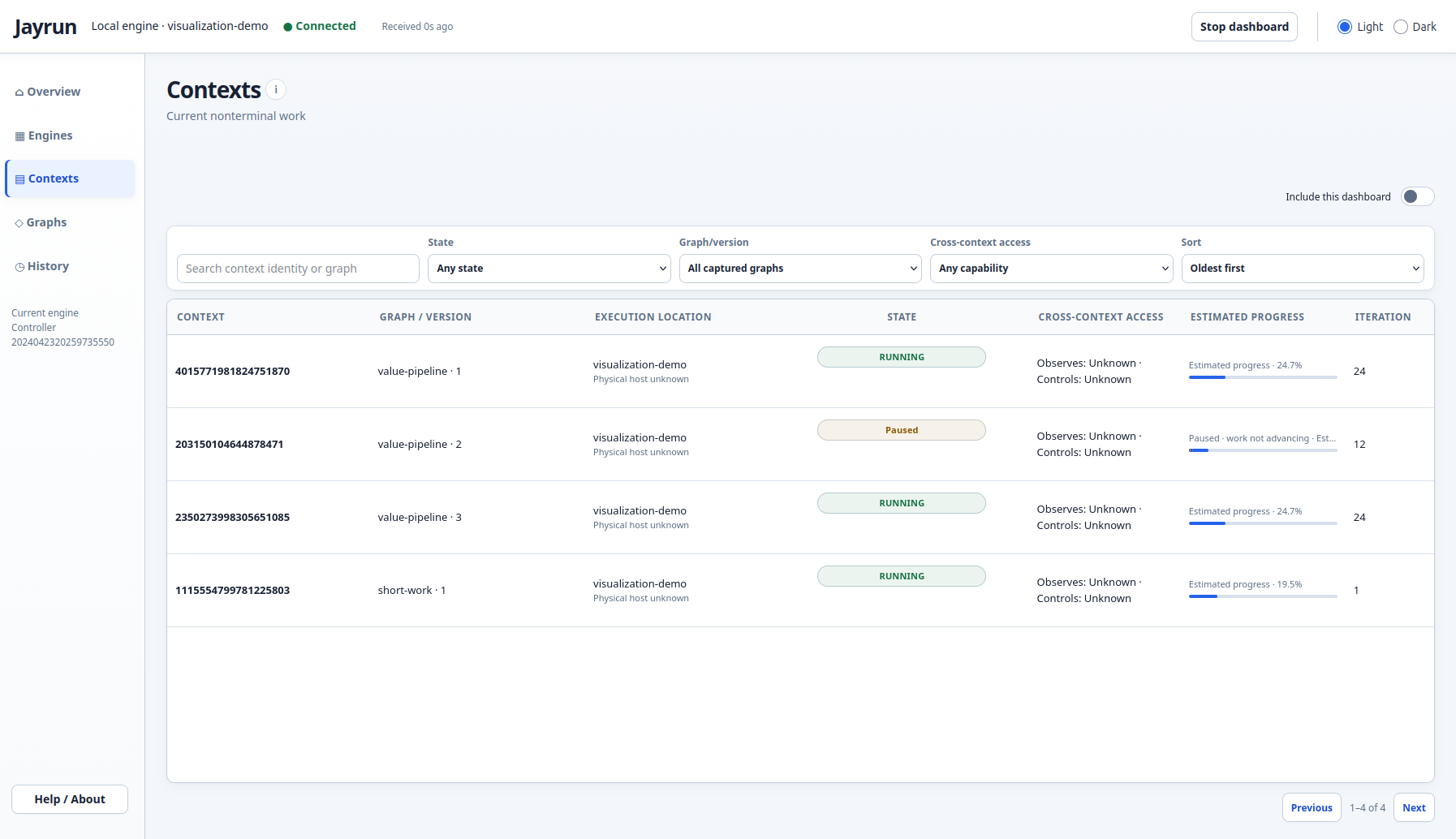
Running and paused work in the dashboard. The dashboard is itself a graph, built from an observing operator and a managed service resource. Click the screenshot for an interactive offline preview and setup guide.
What Jayrun does
- Release intermediate data automatically. Artifact flow lets Jayrun release consumed values when execution no longer needs them. Entry/exit retention policies and application references still determine what stays alive.
- Reuse expensive resources. Models, calibration data and clients can remain available across compatible runs. The Engine manages acquisition, reuse and eventual teardown.
- Build your own observers and controllers. Use graphs for monitoring, experiment scheduling or distributed-work coordination. They use the existing execution and lifecycle machinery, with separate supervision capacity. Your application supplies transport and authentication.
- Separate declaration from execution. Validate and visualize a graph before running it, then submit it repeatedly with different inputs and configuration. Each submission returns its own
ContextRun. - Manage iteration and capacity explicitly. Combine graph iteration, operator repetition, conditional routes, sync/async execution and placement requests with lifecycle controls and scoped authority.
- Keep dependencies small. The required third-party runtime dependency is
packaging; PyYAML is optional. HTML visualization needs no additional plotting package.
See what Jayrun does for practical benefits and boundaries, and data and lifetimes for how artifacts, configuration and resources work together.
Install
Requires Python 3.11 or later:
python -m pip install jayrun
For YAML configuration support, install jayrun[yaml]. Workload libraries such as PyTorch are application dependencies, not core requirements.
A complete first graph
This program declares a multiplication, confirms the graph, supplies input and configuration, and prints 21:
from jayrun import (
    Artifact, ArtifactContext, ArtifactField, ArtifactFlow, BaseOperator,
    ConfigContext, ConfigField, Engine, GraphDefinition,
)
from jayrun.context import ContextState


class Scale(BaseOperator):
    def __init__(self, *, source, outputs):
        super().__init__()
        self.source = ArtifactField()
        self.factor = ConfigField(value_type=int)
        self.outputs = (ArtifactField(),)

    def execute(self):
        result = self.source.value * self.factor.value
        self.context.record("scaled", result)
        return result


source = Artifact(name="source")
result = Artifact(name="result")
scale = Scale(source=source, outputs=(result,))
flow = ArtifactFlow(scale, artifact=source)
graph = GraphDefinition(flow, entry_flows=flow)
graph.confirm()

with Engine() as engine:
    run = engine.submit(
        graph,
        ArtifactContext({source: 7}),
        ConfigContext({scale.factor: 3}),
    )
    run.wait(timeout=10)
    if run.state is not ContextState.FINISHED:
        raise RuntimeError(str(run.report.data.failure))
    print(run.artifact(result).value)  # 21
ArtifactContext supplies data; ConfigContext supplies the operator's parameters. Execution settings separately control policies such as retries and iteration limits. run.wait() waits for finalization, which can include failure; the example checks the outcome before reading the result.
The same confirmed graph can serve another submission. The complete walkthrough explains each declaration, inspects recorded values and visualizes the finished run.
Inspect declarations and execution
Save a declaration with graph.plot.save("graph.html"), a registry with registry.plot.save("registry.html"), or a completed run with run.plot.save("run.html"). These HTML viewers are interactive and open in a browser. Declaration views show structure; run views add captured outcomes, timings, records and reports.
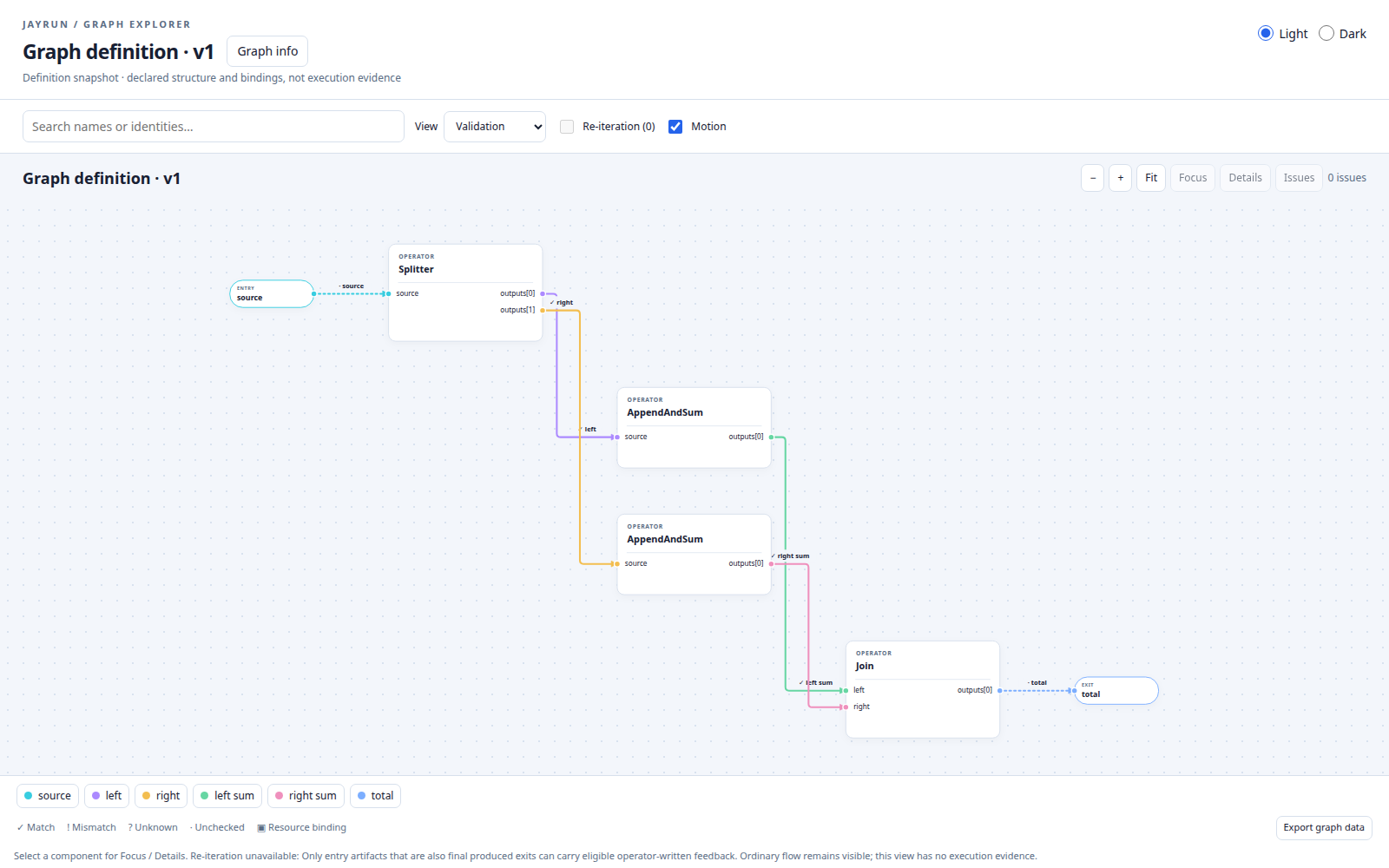
An explicit split-and-join declaration. Click to explore the interactive graph and its explanation.
The visualization and reporting chapter covers graph definitions, registries, completed runs and the dashboard. A controller graph can use self.runtime to observe or coordinate work; see the Controller example and Engine/runtime correspondence.
Persist execution history
Pass Database("execution.sqlite") from jayrun.persistence to Engine(database=...) to retain bounded execution/session history and timing profiles. The Engine owns the database lifecycle. After a run finishes, explicit engine.database.flush() checks storage settlement; computation completion alone does not establish successful persistence.
The Persistence and Database guide includes a complete write–close–read example. Stored diagnostic history is separate from application checkpoints and arbitrary artifact storage.
Tutorials
Explore complete applications with a walkthrough, runnable Python source and notebook:
| Tutorial | Python source | Notebook | What it demonstrates |
|---|---|---|---|
| Build and validate | build_graph.py | 01_build_graph | Properties, diagnostics and corrected execution |
| Image service | denoise_images.py | 02_denoise_images | Async service, shared client and routing |
| Shared model inference | mnist_inference.py | 03_mnist_inference | Read-only model reuse and placement |
| Supervised training | mnist_training.py | 04_mnist_training | Iteration, mutable state and scoped supervision |
| Document service | document_ingestion.py | 05_document_ingestion | Long-running jobs and transactional publication |
| Adapter checkpointing | adapter_finetuning.py | 06_adapter_finetuning | Model/optimizer/RNG checkpoints |
| Scientific campaign | heat_calibration.py | 07_heat_calibration | Adaptive control and reproducibility |
Each tutorial includes a small offline CPU path. See the tutorial setup guide for dependencies and optional GPU/model workloads.
Find your next step
| Task | Guide |
|---|---|
| Build, validate, submit and inspect a graph | From declaration to execution |
| Resolve fan-out, fan-in and conditional routes | Graph-definition resolutions |
| Use context, execution, placement and runtime handles | Component interfaces |
| Add reusable models or clients | Resources |
| Integrate services, remote work and checkpoints | Application integration |
| Check exact imports and contracts | Public API |
The documentation sources are included in this repository. Supported public imports come from jayrun and its documented public modules; jayrun.core and jayrun.engine are implementation details.
Scope and project status
Jayrun manages graph execution and ownership; applications own network transport, authentication, external side effects and checkpoint contents. Placement accounts for declared capacity rather than performing device allocation. Cleanup releases framework references rather than guaranteeing an immediate drop in process memory. See supported behavior and limitations.
Jayrun provides a tested foundation for graph execution, with ongoing improvements to reliability, usability and documentation. Report bugs and request features through GitHub Issues.
License
Apache License 2.0. Copyright 2026 Masoud Yavari.
1 maintainer

Metadata
1 maintainer
Release files for jayrun 0.3.0
For a detailed explanation of source distributions (sdists) and built distributions (wheels), please see the package formats documentation.
Source distribution (sdist)
| File | Size | Uploaded | |
|---|---|---|---|
| jayrun-0.3.0.tar.gz | 423.7 kB | Details |
Built distribution (wheel)
| File | Interpreter | ABI | Platform | Reset |
|---|---|---|---|---|
| jayrun-0.3.0-py3-none-any.whl | Python 3 | none | any | Details |
Total release size: 930.7 kB
Release files / jayrun-0.3.0.tar.gz
| Download URL | jayrun-0.3.0.tar.gz |
|---|---|
| Size | 423.7 kB |
| Tags | Source |
|
SHA-256 checksum How to use checksums |
29ce0644620b108d5f3d30a1cadba6cad09d72afd276111758feb84ef628ae13
|
|
BLAKE2b-256 checksum How to use checksums |
3149f5df33f8202d6b1fd7a9ce09c04fcee6019f0f753ef29cabdcc54610b70a
|
| Upload date | |
|
Uploaded using Trusted Publishing? What is trusted publishing? |
Yes |
| Uploaded via |
twine/7.0.0 CPython/3.13.14
|
Provenance
Provenance describes where a file came from. On PyPI, provenance is shared via attestations, which provide a verifiable record of the build or publishing details. View details, limitations and caveats.


PyPI Publish Attestation
PyPI verified that this artifact, at this checksum, originated from the publisher listed below.
Signed by GitHub Actions, verified by PyPI on Sep 28, 2026.
Transparency logRelease files / jayrun-0.3.0-py3-none-any.whl
| Download URL | jayrun-0.3.0-py3-none-any.whl |
|---|---|
| Size | 507.0 kB |
| Tags | Python 3 |
|
SHA-256 checksum How to use checksums |
c6191306eac10822efa075d2df70ffd9d3159584659afca797cdbf66e0aef991
|
|
BLAKE2b-256 checksum How to use checksums |
5abe7edfa89a73b80a06f9be74f12b93f88318ad60ba55c5b7ffcf1fbf8bd1eb
|
| Upload date | |
|
Uploaded using Trusted Publishing? What is trusted publishing? |
Yes |
| Uploaded via |
twine/7.0.0 CPython/3.13.14
|
Provenance
Provenance describes where a file came from. On PyPI, provenance is shared via attestations, which provide a verifiable record of the build or publishing details. View details, limitations and caveats.
PyPI Publish Attestation
PyPI verified that this artifact, at this checksum, originated from the publisher listed below.
Signed by GitHub Actions, verified by PyPI on Sep 28, 2026.
Transparency log













