
Utilities for dataset similarity and joins

Project description
Jellyjoin Python Package
"Jellyjoin: the softest of joins."
Join dataframes or lists based on semantic similarity.



Jellyjoin does "soft joins" based not exact matches, but on approximate similarity. It uses a cost based optimization to find the "best" match. It can use older string similarity metrics as well but using a embedding model allows semantic similarity to be used and gives very robust and high quality matches.
By default, jellyjoin will attempt to use OpenAI embedding models to calculate similarity if you have the openai
package installed and an OPENAI_API_KEY in the environment. If that fails, it uses Damerau-Levenshtein similarity,
a string distance metric suitable for a wide range of use cases.
(You can, of course, fully specify the similarity strategy to use a different embedding model or similarity metric;
this is covered in the Advanced Usage section below.)
Installation
pip install jellyjoin
Basic Usage
import jellyjoin

association_df = jellyjoin.jellyjoin(
    ["Introduction", "Mathematical Methods", "Empirical Validation", "Anticipating Criticisms", "Future Work"],
    ["Abstract", "Experimental Results", "Proposed Extensions", "Theoretical Modeling", "Limitations"],
)
It always returns the result as a Pandas DataFrame, with the left index, right index, similarity score. If you pass lists or other iterables, it will name the columns for the values "Left Value" and "Right Value".
| Left | Right | Similarity | Left Value | Right Value |
|---|---|---|---|---|
| 0 | 0 | 0.689429 | Introduction | Abstract |
| 1 | 3 | 0.403029 | Mathematical Methods | Theoretical Modeling |
| 2 | 1 | 0.504316 | Empirical Validation | Experimental Results |
| 3 | 4 | 0.415846 | Anticipating Criticisms | Limitations |
| 4 | 2 | 0.478649 | Future Work | Proposed Extensions |
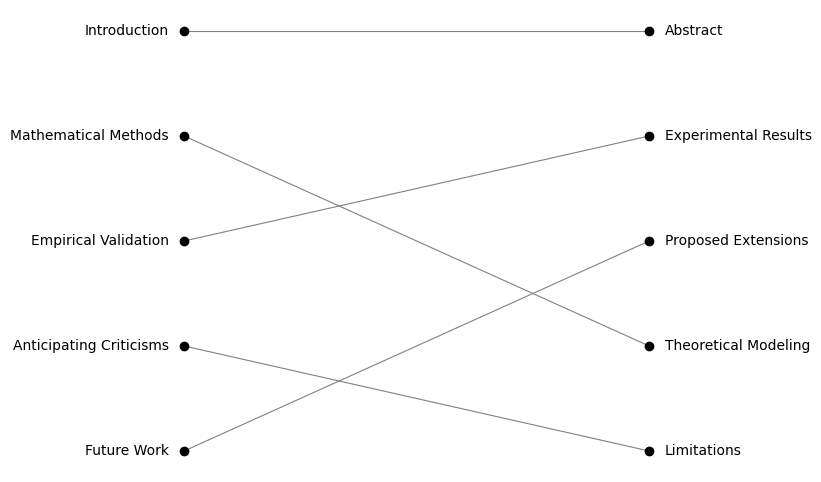
Jellyjoin also provides some rudimentary utilities for visualizing these associations:
from jellyjoin.plots import plot_associations

plot_associations(association_df)
from jellyjoin.plots import plot_similarity_matrix

plot_similarity_matrix(similarity_matrix)

Intermediate Usage
Often, though, your records will have multiple fields, so jellyjoin is designed to work
on Pandas DataFrames.
Let's say we have a list of database columns:
| Qualified Column Name | Type | Table |
|---|---|---|
| user.email | text | user |
| user.touch_count | integer | user |
| user.propensity_score | numeric | user |
| user.ltv | numeric(10, 2) | user |
| user.purchase_count | integer | user |
| account.status_code | char(1) | account |
| account.age | integer | account |
| account.total_purchase_count | integer | account |
And we want to associate them to these front-end fields:
| Field Name | Type |
|---|---|
| Recent Touch Events | number |
| Total Touch Events | number |
| Account Age (Years) | number |
| User Propensity Score | number |
| Estimated Lifetime Value ($) | currency |
| Account Status | string |
| Number of Purchases | number |
| Freetext Notes | string |
jellyjoin.jellyjoin(left_df, right_df, threshold=0.4)
| Left | Right | Similarity | Qualified Column Name | Type_left | Table | Field Name | Type_right |
|---|---|---|---|---|---|---|---|
| 1 | 0 | 0.471828 | user.touch_count | integer | user | Recent Touch Events | number |
| 2 | 3 | 0.819823 | user.propensity_score | numeric | user | User Propensity Score | number |
| 3 | 4 | 0.476054 | user.ltv | numeric(10, 2) | user | Estimated Lifetime Value ($) | currency |
| 4 | 6 | 0.74174 | user.purchase_count | integer | user | Number of Purchases | number |
| 5 | 5 | 0.606886 | account.status_code | char(1) | account | Account Status | string |
| 6 | 2 | 0.556893 | account.age | integer | account | Account Age (Years) | number |
This only shows the single best match above a threshold of 0.4, which is useful if you want reliable, one-to-one matches.
To include rows that didn't match, specify how you want to join: left, right, or outer. (The default is inner.)
jellyjoin.jellyjoin(left_df, right_df, threshold=0.4, how="outer")
| Left | Right | Similarity | Qualified Column Name | Type_left | Table | Field Name | Type_right |
|---|---|---|---|---|---|---|---|
| 0 | nan | nan | user.email | text | user | nan | nan |
| 1 | 0 | 0.471828 | user.touch_count | integer | user | Recent Touch Events | number |
| 2 | 3 | 0.819823 | user.propensity_score | numeric | user | User Propensity Score | number |
| 3 | 4 | 0.475964 | user.ltv | numeric(10, 2) | user | Estimated Lifetime Value ($) | currency |
| 4 | 6 | 0.741805 | user.purchase_count | integer | user | Number of Purchases | number |
| 5 | 5 | 0.606886 | account.status_code | char(1) | account | Account Status | string |
| 6 | 2 | 0.556831 | account.age | integer | account | Account Age (Years) | number |
| 7 | nan | nan | account.total_purchase_count | integer | account | nan | nan |
| nan | 1 | nan | nan | nan | nan | Total Touch Events | number |
| nan | 7 | nan | nan | nan | nan | Freetext Notes | string |
These join types show the missing rows, but they are still orphaned (not joined to anything) because by default the algorithm only takes
the single best match. To get one-to-many, many-to-one, or many-to-many matches, specify the allow_many option: left, right, or both.
jellyjoin.jellyjoin(left_df, right_df, threshold=0.4, how="outer", allow_many="both")
| Left | Right | Similarity | Qualified Column Name | Type_left | Table | Field Name | Type_right |
|---|---|---|---|---|---|---|---|
| 0 | nan | nan | user.email | text | user | nan | nan |
| 1 | 0 | 0.471828 | user.touch_count | integer | user | Recent Touch Events | number |
| 1 | 1 | 0.48877 | user.touch_count | integer | user | Total Touch Events | number |
| 2 | 3 | 0.819823 | user.propensity_score | numeric | user | User Propensity Score | number |
| 3 | 4 | 0.476054 | user.ltv | numeric(10, 2) | user | Estimated Lifetime Value ($) | currency |
| 4 | 6 | 0.74174 | user.purchase_count | integer | user | Number of Purchases | number |
| 5 | 5 | 0.606886 | account.status_code | char(1) | account | Account Status | string |
| 6 | 2 | 0.556844 | account.age | integer | account | Account Age (Years) | number |
| 7 | 6 | 0.665931 | account.total_purchase_count | integer | account | Number of Purchases | number |
| nan | 7 | nan | nan | nan | nan | Freetext Notes | string |

Records that don't join to anything on the other side with a similarity greater than the threshold will still be left unjoined.
Advanced Usage
TODO: Configuring custom similarity strategies TODO: Hungarian Algorithm.
Development
To set up a development environment:
git clone https://github.com/olooney/jellyjoin.git
cd jellyjoin
pip install -e .[dev]
Run tests:
pytest
Release history Release notifications | RSS feed


Download files
Download the file for your platform. If you're not sure which to choose, learn more about installing packages.
Source Distribution
Built Distribution
Filter files by name, interpreter, ABI, and platform.
If you're not sure about the file name format, learn more about wheel file names.
Copy a direct link to the current filters
File details
Details for the file jellyjoin-0.1.3.tar.gz.
File metadata
- Download URL: jellyjoin-0.1.3.tar.gz
- Upload date:
- Size: 13.8 kB
- Tags: Source
- Uploaded using Trusted Publishing? No
- Uploaded via: twine/6.2.0 CPython/3.12.3
File hashes
| Algorithm | Hash digest | |
|---|---|---|
| SHA256 |
40fe11310317e9fa19c1be46a1bd438540659b867836c46f0a07d7adb003654e
|
|
| MD5 |
50632d4d0703e947b213347fd7ee69c8
|
|
| BLAKE2b-256 |
19d2c9b2fda5d73d865db9f22aa8ef48362d121a09e4c28f344b9b922d23ddaf
|
File details
Details for the file jellyjoin-0.1.3-py3-none-any.whl.
File metadata
- Download URL: jellyjoin-0.1.3-py3-none-any.whl
- Upload date:
- Size: 10.2 kB
- Tags: Python 3
- Uploaded using Trusted Publishing? No
- Uploaded via: twine/6.2.0 CPython/3.12.3
File hashes
| Algorithm | Hash digest | |
|---|---|---|
| SHA256 |
59fcfa206e9ec6cbd2cd1179ff5de4a84089e98525d3ffffa61f9b90446d1447
|
|
| MD5 |
a04736ee7762b6c6d3ba6d3c4247c52c
|
|
| BLAKE2b-256 |
f413b92d9555a0e41dd75efd6cbc08c3393d5eb1f59059a3658ecc8228a026b0
|






