

About Jetty Scorecard
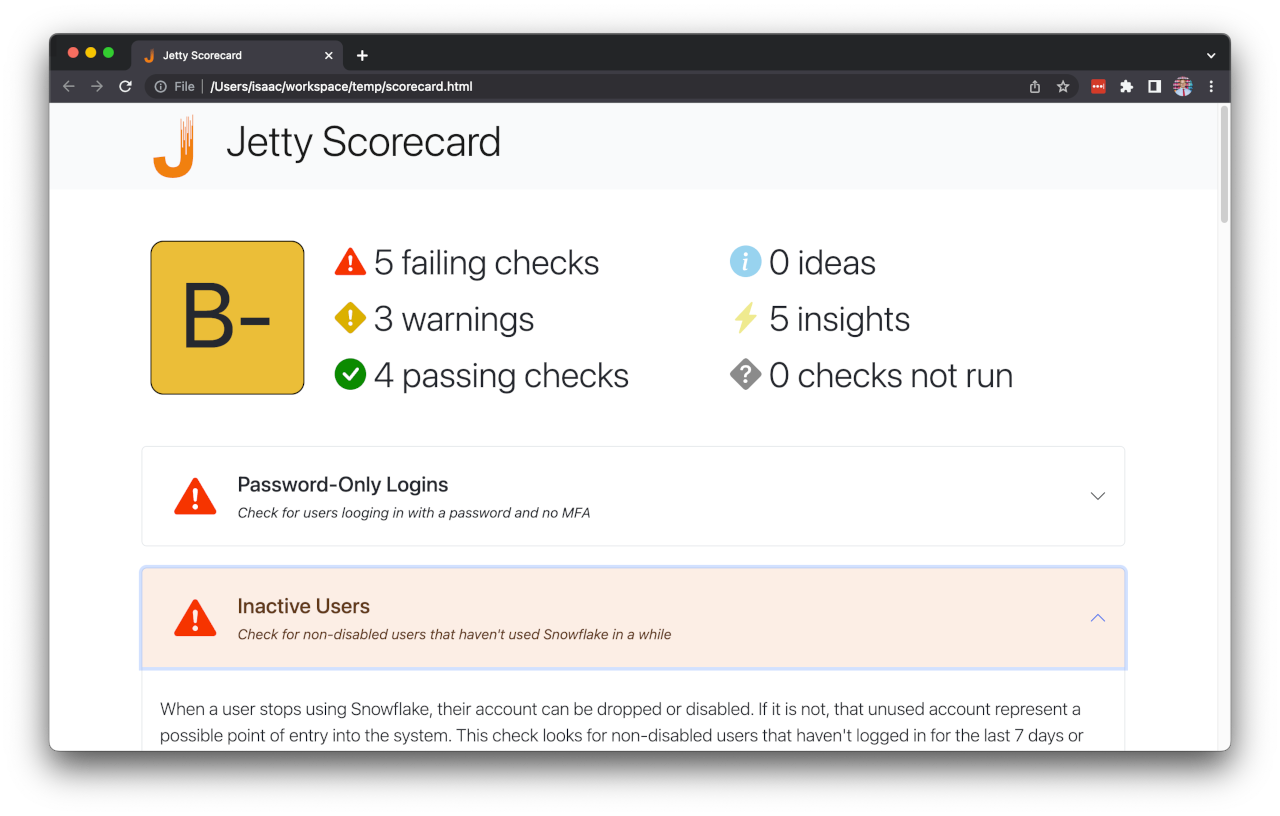
It can be hard to keep track of, not to mention follow, data infrastructure best practices - we want to change that!
Jetty Scorecard is living documentation of Snowflake best practices - it outlines recommendations with links to relevant documentation, and does so in the context of your existing environment. This makes it easy to know what you can do right now to improve your security and maintainability.
Getting Started
Installation
Install Jetty Scorecard with
pip install jetty-scorecard
Running Jetty Scorecard
Once installed, you can launch it by simply running
jetty_scorecard
This will take you through an interactive connection setup to connect to your Snowflake instance. You can authenticate using browser-based SSO, a password, or a private key.
NOTE: If you don't want to connect to Snowflake, you can still see the the best practices Scorecard looks for. Just run
jetty_scorecard -dto generate a dummy scorecard to show an example scorecard (without any actual scores).
Once you've authenticated with Snowflake, Scorecard will run for a few moments and then open up a browser with your results!
Interpreting your results
Each result includes:
- A description of what is being checked
- Links to relevant documentation
- The queries used to run the check
- Specific insights into your roles, users, polices, and permissions to help you improve your configuration
Getting for updated results
After making changes to your Snowflake environment, you can run Scorecard again. You can choose to go through the wizard again, or, if you'd rather, you can include all of the relevant information on the command line (you can even do this the first time around!).
After you run Scorecard the first time, it will print to your console a command that you can use to generate the scorecard again using the same configuration. You can also just read the CLI documentation by running
jetty_scorecard --help
If you think this is neat, give it a star, and share it with someone you know!
Contributing
This is just a first draft of Scorecard - there's so much more that can be done!
Do you have ideas for additional best practices that should be included? Would you like to modify some that already exist? Do you have suggestions for the UI or UX?
If you have suggestions or comments, feel free to create an issue, open a pull request, or reach out in another way!
Security considerations
Unless run in dummy mode (jetty_scorecard -d) Jetty Scorecard pulls metadata from your database, and so requires a database connection. To get holistic account-level data, it should be run with an administrator role, such as SECURITYADMIN or ACCOUNTADMIN (or another role with similar, though perhaps read-only privileges).
To provide peace of mind, it is worth noting that the Jetty Scorecard application:
- Does not capture and/or share usage analytics of any sort
- Does not write any credentials to disk
- Runs exclusively read-only queries
About Jetty Labs
Jetty Labs is reinventing access control for the data teams.
Our principal offering, Jetty Core, integrates with tools from across the data stack and centralizes access control into a single, version-controlled interface. Jetty Core lets users configure access policies in code using the tools today's data owners know and love, and then deploy those configurations in seconds.
Try it out today with pip install jetty-core
Learn more
Get in touch
If any of this looks interesting, we'd love to hear your feedback!! If you'd be willing to chat, shoot us an email at product@get-jetty.com - if we end up having a conversation, we'd love to send you a gift card to show our appreciation for your time.
Disclaimer
Jetty Scorecard is designed to be an informative tool to help users understand some of the best practices related to Snowflake account management. It is NOT designed to find every possible vulnerability and misconfiguration. Any configuration decisions, suggested by Jetty Scorecard or not, are ultimately up to each account's database administrators.

1 maintainer

Release files for jetty-scorecard 0.1.5
For a detailed explanation of source distributions (sdists) and built distributions (wheels), please see the package formats documentation.
Source distribution (sdist)
| File | Size | Uploaded | |
|---|---|---|---|
| jetty_scorecard-0.1.5.tar.gz | 53.0 kB | Details |
Built distribution (wheel)
| File | Interpreter | ABI | Platform | Reset |
|---|---|---|---|---|
| jetty_scorecard-0.1.5-py3-none-any.whl | Python 3 | none | any | Details |
Total release size: 127.8 kB
Release files / jetty_scorecard-0.1.5.tar.gz
| Download URL | jetty_scorecard-0.1.5.tar.gz |
|---|---|
| Size | 53.0 kB |
| Tags | Source |
|
SHA-256 checksum How to use checksums |
9138a22b03359507c683a44502eb2e537b9587a9f16454917289fbf587f68dcb
|
|
BLAKE2b-256 checksum How to use checksums |
e6c4ca3931de6af840560c9e146affd9331d13dcbf3a56e30aa8bc4c7818f750
|
| Upload date | |
|
Uploaded using Trusted Publishing? What is trusted publishing? |
No |
| Uploaded via |
poetry/1.2.2 CPython/3.10.8 Darwin/22.2.0
|
Release files / jetty_scorecard-0.1.5-py3-none-any.whl
| Download URL | jetty_scorecard-0.1.5-py3-none-any.whl |
|---|---|
| Size | 74.8 kB |
| Tags | Python 3 |
|
SHA-256 checksum How to use checksums |
659834d906addcd20bc9d6aad7b54ecf94b5036b9ea7813c53849bfbcbf31e56
|
|
BLAKE2b-256 checksum How to use checksums |
47ee42cb406731a3e30b86d207f5b1af7c6f3573715b2ff80d546cabdd8c69e3
|
| Upload date | |
|
Uploaded using Trusted Publishing? What is trusted publishing? |
No |
| Uploaded via |
poetry/1.2.2 CPython/3.10.8 Darwin/22.2.0
|














