
jev-ultrafast-mcp


English · 简体中文
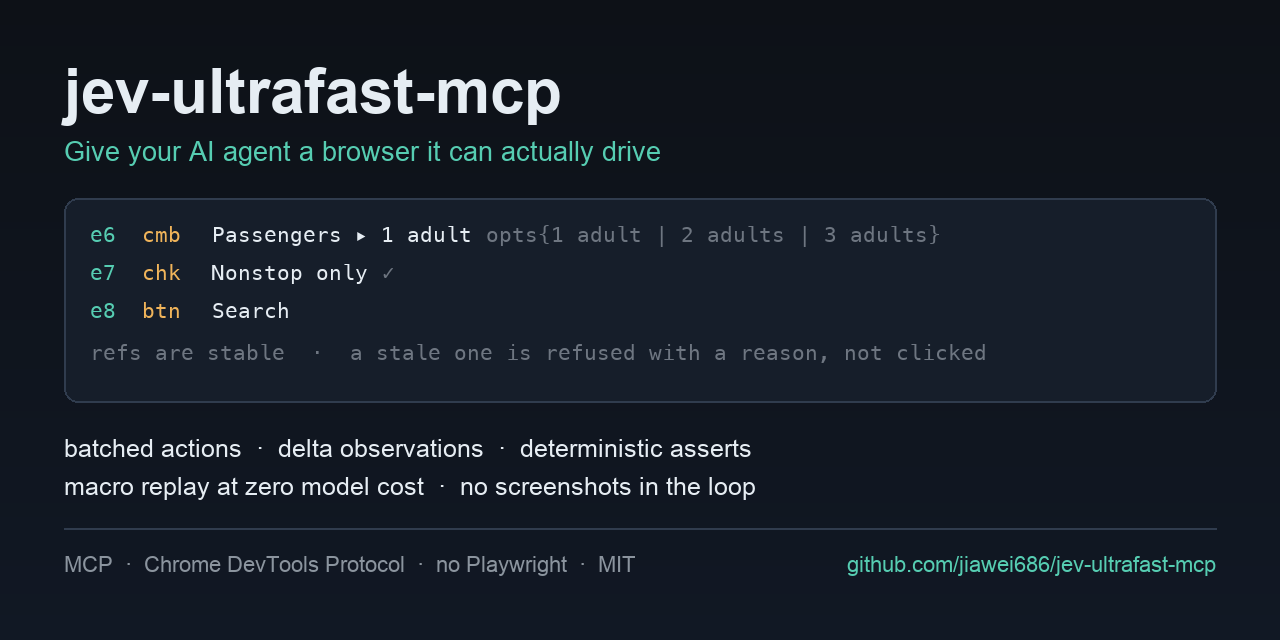
Hand the browser work off — an MCP server that drives the page for your agent.
One tool call instead of twenty. Three seconds instead of a minute. A cent instead of a frontier model's context. And it never invents a target: it picks from what the page actually has, and the server refuses rather than guesses.
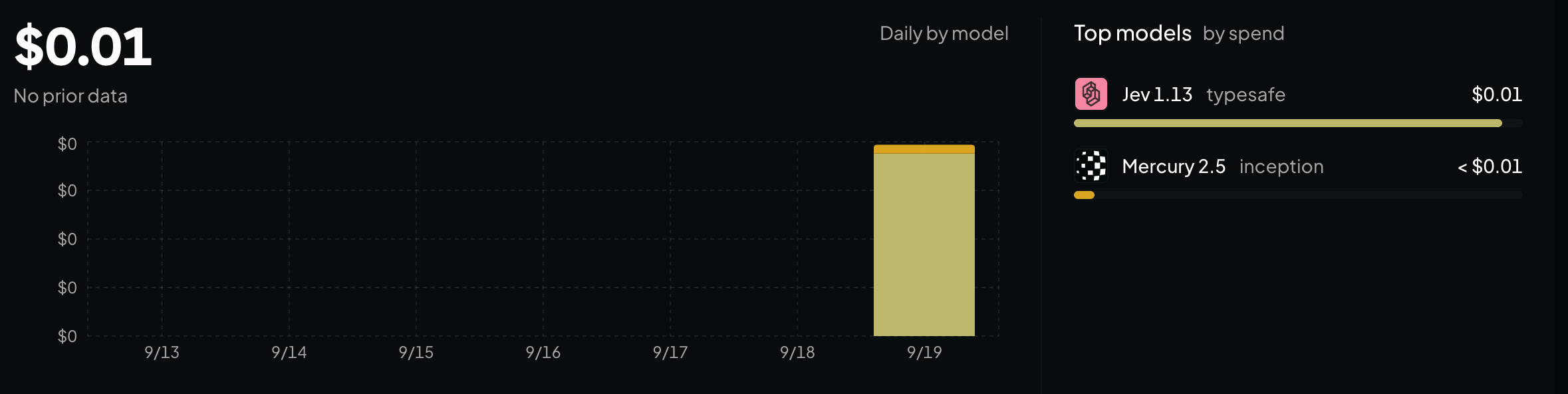
What it cost. A cent for the whole day, and a cent is all of it:
Quick start
Three commands, then restart your client.
git clone https://github.com/jiawei686/jev-ultrafast-mcp.git
cd jev-ultrafast-mcp
python3 -m venv .venv
.venv/bin/pip install -e .          # Windows: .venv\Scripts\pip install -e .

python scripts/install.py           # finds your MCP clients and writes their config
install.py looks for WorkBuddy, Claude Code, Claude Desktop, Codex CLI, Cursor, VS Code, Cline,
Windsurf and Gemini CLI, and writes the format each one expects — merging into your existing
config and saving a .bak first. Needs Python ≥ 3.10 and any Chromium-family browser.
Restart the client, and then just say what you want:
You: Set this form to 3 adults, tick Nonstop only, then submit it. Your agent:
browser_goal(goal=…, verify=[…])— one call; the loop runs server-side, and the page is checked by code afterwards. (what that costs)
You: Open example.com and tell me what the page says. Your agent:
browser_open→ reads the element table → answers. (verbatim run)
Restarted and the tools are not there? Some clients make you approve the server once. In WorkBuddy that is Connectors → Custom connectors → Trust. The approval is remembered against the config itself, so if you later edit the config it asks once more.
Cheap and fast, and here is the bill
A three-step goal on a real page, driven by browser_goal. This is everything your agent sent and
everything it got back — one turn, and the page never entered its context:
browser_goal(
  goal="On this flight search form: set Passengers to 3 adults, tick the 'Nonstop only' "
       "checkbox, then submit the search. Do not type into any city field.",
  verify=[{"type": "text_contains", "text": "3 adults · nonstop"}],
)

goal: On this flight search form: set Passengers to 3 adults, …
status: done
steps: 3
turbo: 4 decisions · 14,626 tokens · 1.8s model + 1.1s page · 3.3s wall
trace:
  1. SELECT e6 Passengers → ok (759ms model / 30ms browser)
  2. TOGGLE e7 Nonstop only → ok (336ms model / 692ms browser)
  3. CLICK e8 Search → ok (370ms model / 410ms browser)
  4. DONE (conf 0.93)
verified: PASS
  ok text_contains: '3 adults · nonstop' found in page text
What the second time costs. Nothing. The second time is a recorded macro, and a macro makes no model calls at all — it does not even need a key.
How long it took. 3.3 s wall for the whole goal: 1.8 s of model, 1.1 s of page. Every run prints that line itself, so the numbers are checkable rather than persuasive.
That run is not a mock-up. scripts/turbo_check.py reproduces it against a real Chrome and the real
model, and then checks the page with code rather than trusting the model's account of its own
work. The three actions — plus the reading and re-reading between them — all happened on the server.
Your agent spent one turn and never saw an element table.
The division of labour is the whole design decision, so it is yours to make per task:
| agent drives | browser_goal drives |
|
|---|---|---|
| Tool calls for a 3-step flow | 6+ (observe, act, observe, act…) | 1 |
| Who holds the page in context | your agent | the decision model, server-side |
| Per-step cost | one agent turn | one typed request, no screenshot |
| Who names the target | the model writes a selector | the model picks a ref from the page's own table |
| If it goes wrong | a wrong click, usually silent | the server refuses, with the reason |
| Knowing it worked | the model's summary | code-checked assertion, which wins the disagreement |
| Second time around | run the model again | macro replay, zero model calls |
Installing it as a package, and the installer's flags
No checkout needed if you would rather install it as a package. It is on PyPI, so the name is enough:
uvx jev-ultrafast-mcp                  # run it straight from PyPI, nothing installed
pip install jev-ultrafast-mcp          # or install it yourself
A client config wants a stable interpreter path rather than uvx's cache, so:
python3 -m venv ~/.jev-ultrafast-mcp/venv
~/.jev-ultrafast-mcp/venv/bin/pip install jev-ultrafast-mcp
That gives you a jev-ultrafast-mcp console script and a stable interpreter path to put in a
client config — verified against the latest mcp SDK on Python 3.13, every one of the ten tools
listed.
python scripts/install.py --list              # what is installed, and the file each one reads
python scripts/install.py --print             # show the config it would write, change nothing
python scripts/install.py -c cursor,codex     # only these two
python scripts/install.py --headed            # keep a visible browser window
python scripts/install.py --allow-domains example.com,*.example.org
python scripts/install.py --uninstall         # take the entry back out
Runtime dependencies: mcp, websockets, httpx. No Playwright, no Selenium, no
browser-harness.
What it is
Browser automation usually makes the agent do the driving: read the page, pick one element, act, read again to see whether that worked. Ten clicks is ten turns, the page passes through the agent's context every time, and a mis-click rarely announces itself.
This server can take that job instead. browser_goal is one tool call from your agent; the loop
runs here, server-side, with Jev — TypeSafe's decision model — choosing each step. The model never
writes a selector: it picks among the elements the page actually has, and the server refuses
anything that is not on the page rather than guessing. When it stops, browser_assert checks the
page it left behind in code, and a passing assertion outranks the model's own account of what it did.
Four things follow from that:
- One call, not one per click. The run above took a 3-step goal on a real page through 4 decisions, 14,626 tokens, 1.8 s model + 1.1 s page, 3.3 s wall — for one turn of your agent's context.
- Accurate by construction. A target is a
reffrom a numbered table of what is on the page, not a selector or a coordinate the model invented, and the action is re-checked against the page before it runs. - Free after the first run. Record the path once; replay costs zero model calls, works with no key at all, and refuses to proceed when the page no longer matches.
- Text, not pixels. No screenshots, no HTML dumps. It speaks CDP straight to a Chrome you already have — no Playwright, no Selenium, no screenshot pipeline.
Everything except browser_goal — browser_open, browser_observe, browser_act,
browser_assert, browser_macro — needs no key, no account, and no network beyond the page itself,
from any MCP client: WorkBuddy, Claude Code, Codex, Cursor or VS Code. If you would rather keep your
hands on the wheel, that whole surface is still here.
browser_open → element table → browser_act [refs] → browser_assert
Inspired by browser-use/jev-ultrafast and
TypeSafe's typed-question API. Independent project, not affiliated with either — see
docs/DESIGN.md for what is different and why.
Contents · Quick start · Cheap and fast · What it is · What a session looks like · Connecting an agent · What you can ask it to do · What the agent reads · Why another browser MCP? · Tools · Configuration · FAQ · Try it without an agent · See also
What a session actually looks like
You say:
Open example.com and tell me what the page says.
Your agent does this, and this is everything it sees:
browser_open("https://example.com")
  [obs#1] https://example.com/  "Example Domain"  scroll=0/216  reachable=1/1
  e1   lnk    More information...

browser_observe()
  [delta#2] … 1 element
    = no change (1 element)
Then it answers. No screenshot was taken, no HTML was dumped, and the page never entered a model's context: your agent read the table and answered.
A more realistic one — searching a real site, with your agent doing the driving:
browser_open("https://duckduckgo.com")
  e4   cmb*   Search with DuckDuckGo ▸ ""

browser_act([{type, ref: "e4", text: "python asyncio tutorial"}, {keys, key: "Enter"}])
      → 2/2 ops ok, one round trip, page navigated

browser_observe()
  [delta#3] https://duckduckgo.com/?…&q=python+asyncio+tutorial  reachable=9/59
  + e5   lnk    Python Asyncio Tutorial
  + e6   lnk    Async IO in Python: A Complete Walkthrough
  …
    43 new, 0 changed, 0 gone

browser_assert([{url_contains, text: "q="}, {count_at_least, role: "link", min: 5}])
  PASS
That is a verbatim run against the live web — scripts/live_check.py reproduces it end to end.
Connecting an agent
| Client | Config file install.py writes |
After installing |
|---|---|---|
| WorkBuddy | ~/.workbuddy-ai/mcp.json (older installs: ~/.workbuddy/mcp.json) |
restart, then Connectors → Custom connectors → Trust |
| Claude Code | ~/.claude.json (user scope) |
or claude mcp add --scope user … |
| Claude Desktop | ~/Library/Application Support/Claude/claude_desktop_config.json |
quit the app fully and reopen |
| Codex CLI | ~/.codex/config.toml |
codex mcp list to confirm |
| Cursor | ~/.cursor/mcp.json |
reload the window |
| VS Code (Copilot) | …/Code/User/mcp.json |
Agent mode only — not Ask/Edit |
| Cline | …/Code/User/globalStorage/saoudrizwan.claude-dev/settings/cline_mcp_settings.json |
reload the window |
| Windsurf | ~/.codeium/windsurf/mcp_config.json |
reload the window |
| Gemini CLI | ~/.gemini/settings.json |
gemini mcp list to confirm |
Manual setup — if you would rather not run the installer
Every client below needs the same three facts: an absolute interpreter path, the module, and one
environment variable. Substitute your own path for /ABS/PATH.
WorkBuddy — ~/.workbuddy-ai/mcp.json
WorkBuddy reads its config directory from WORKBUDDY_CONFIG_DIR and otherwise falls back to
~/.workbuddy. A machine can carry both — an older app alongside the current one — and writing
the one the app is not reading registers nothing and logs nothing. install.py resolves this
the same way the app does and tells you when it had to choose.
Then restart the app before looking for the tools. The config file is only watched if it already existed when the app launched, so a freshly created one is invisible until the next start. After the restart the server appears as a first connection, and you approve it once.
{
  "mcpServers": {
    "jev-ultrafast-mcp": {
      "command": "/ABS/PATH/jev-ultrafast-mcp/.venv/bin/python",
      "args": ["-m", "jev_ultrafast_mcp"],
      "env": { "JEVMCP_HEADLESS": "1" }
    }
  }
}
Claude Code
claude mcp add --scope user jev-ultrafast-mcp \
  --env JEVMCP_HEADLESS=1 \
  -- /ABS/PATH/jev-ultrafast-mcp/.venv/bin/python -m jev_ultrafast_mcp
Or write the same mcpServers object by hand: ~/.claude.json for user scope, .mcp.json in a
project for team scope (committed to git).
Codex CLI — ~/.codex/config.toml. Codex uses TOML, and the table is mcp_servers, not
mcpServers:
[mcp_servers.jev-ultrafast-mcp]
command = "/ABS/PATH/jev-ultrafast-mcp/.venv/bin/python"
args = ["-m", "jev_ultrafast_mcp"]
startup_timeout_sec = 20

[mcp_servers.jev-ultrafast-mcp.env]
JEVMCP_HEADLESS = "1"
The same entry works as codex mcp add jev-ultrafast-mcp --env JEVMCP_HEADLESS=1 -- /ABS/PATH/…/python -m jev_ultrafast_mcp.
Cursor — ~/.cursor/mcp.json for every project, .cursor/mcp.json for one. Same mcpServers
object as WorkBuddy.
VS Code (Copilot) — .vscode/mcp.json, or Command Palette → MCP: Open User Configuration for
all workspaces. VS Code is the odd one out twice over: the key is servers, and every entry must
declare "type": "stdio" or it is silently skipped.
{
  "servers": {
    "jev-ultrafast-mcp": {
      "type": "stdio",
      "command": "/ABS/PATH/jev-ultrafast-mcp/.venv/bin/python",
      "args": ["-m", "jev_ultrafast_mcp"],
      "env": { "JEVMCP_HEADLESS": "1" }
    }
  }
}
Claude Desktop — claude_desktop_config.json (%APPDATA%\Claude\ on Windows), same
mcpServers object. Restart the app from the tray, not just the window.
The browser does not start until the first browser_open, and the tab it drives is a background
tab it owns — focus emulation keeps animations and menus running without stealing your window.
What you can ask it to do
| Say this | What happens |
|---|---|
| "Open this page and tell me what it says" | reads the visible text and the controls |
| "Fill in this form and submit it" | one batched browser_act, many fields per round trip |
| "Log in and download last month's invoice" | you log in by hand once; the profile persists |
| "Check every product page in this list" | loop in your agent, refs stay valid between steps |
| "Do this same thing again tomorrow" | record a macro; replay costs zero model calls |
| "Did the deploy actually ship?" | browser_assert returns PASS/FAIL, not an opinion |
| "Click through checkout in staging" | payment-like buttons come back as needs_confirmation |
What it is not
Being clear about this saves everyone time:
- It never looks at pixels. A captcha, a chart, a canvas-only app — anything that needs real
visual judgement — is out of scope. Use a screenshot-and-vision agent for those, or use the
screenshotop here to capture evidence for a human. - It is not a scraper framework. One browser, one session at a time. No proxy rotation, no concurrency, no crawling at scale.
- It is not a recorder for humans. There is no click-to-record UI; macros are recorded by the agent driving the task normally.
What the agent actually reads
Not a DOM dump, not a screenshot — a table of the controls it can act on. Each row is a ref
(element number), a role code, flags, and the accessible name; editable things carry their current
value, and selectable things carry their options:
[obs#1] http://127.0.0.1:54409/fixture.html  "Ultrafast Fixture"  scroll=0/860  reachable=16/16
e1   lnk    Home
e2   lnk    About
e3   lnk    Open popup
e4   inp*   Where from? ▸ ""
e5   cmb*   Where to? ▸ ""
e6   cmb    Passengers ▸ 1 adult opts{1 adult=1 | 2 adults=2 | 3 adults=3 | 4 adults=4}
e7   chk·   Nonstop only
e8   btn    Search
e10  inp*   Password ▸ ""
e11  file    CV accept=.pdf,.txt
e12  btn    Delete account
Flags: * editable · » off-screen (the server scrolls it into view) · ⊘ covered by something
else · ▾ expanded · ✓/· checked state. reachable=16/19 means three controls exist but are
covered or off-screen right now.
After an action it reports only what changed — that is the single biggest saving in a long loop:
[delta#2] http://127.0.0.1:54409/fixture.html  "Ultrafast Fixture"  reachable=16/16
~ e4   inp*   Where from? ▸ "Zurich"   (was "")
~ e7   chk✓   Nonstop only
  2 changed, 0 new, 0 gone
An action that accomplished nothing is the most expensive thing in an agent loop, because the model retries it. So it is spelled out in one line:
[delta#3] … 16 elements
  = no change (16 elements)
New rows appear with + and disappear with -. When two controls share a name, the row carries the
context that tells them apart:
+ e17  btn    Select  @Zurich → Anywhere Option 1 · 1 adult · nonstop Select
+ e18  btn    Select  @Zurich → Anywhere Option 2 · 1 adult · nonstop Select
And a ref that no longer points at anything is refused, with a reason instead of a wrong click:
[{"op": "click", "ok": false, "ref": "e999", "error": "detached"}]
Why another browser MCP?
Two differences, and the first one is the reason this exists.
The agent is allowed to decline the driving. A browser flow is a loop, and in most servers that loop lives in the calling agent: read the page, name one element, wait, read again. Fine for two steps, absurd for twenty — twenty turns of an expensive context to do what a smaller model could have done in one call. Here you can hand the whole goal over instead and pay a single turn, or keep the wheel and drive it yourself. Same tools, same guards, either way.
The model never invents a target. Most browser MCP servers hand over CDP primitives —
click_at_xy, a CSS selector, evaluate. Maximum flexibility, minimum safety: a wrong selector
fails silently or, worse, succeeds on the wrong element. Here a target is a ref from a numbered
table of what is on the page, turning that ref into a real click is the server's problem, and the
server refuses rather than guesses. That is also what makes the handoff safe: whatever is driving
is choosing among options the page actually has, so accuracy does not rest on it being careful.
| primitives-based browser MCP | jev-ultrafast-mcp | |
|---|---|---|
| Who runs the loop | the calling agent, every step | either — browser_goal runs it server-side |
| How a target is named | a selector / coordinate / JS the model writes | a ref from an element table |
| Extra model calls | none | none to drive it yourself; browser_goal is opt-in |
| API keys required | none | none for the browser tools; a decision-model key only for browser_goal |
| Ref lifetime | n/a (agent re-invents each step) | stable across observations |
| Re-reading the page | full dump every time | delta — + added, ~ changed, - removed, = no change |
| Round trips | one per action | batched — many ops per call |
| Ambiguous target | agent guesses | server refuses with a reason |
| Shadow DOM / iframes | usually unsupported | traversed, with frame-offset-aware scrolling |
| Pages that render late | depends on the agent sleeping | waits for elements to appear, bounded |
| Repeating a flow | re-runs the model | macro replay at zero model cost |
| Knowing it worked | the model eyeballs the page | deterministic browser_assert, which overrules the model |
| Destructive clicks | whatever the model decides | needs_confirmation, domain envelope, secret redaction |
Batching and deltas are not cosmetic. In the bundled end-to-end run, 29 ops and their follow-up observations cost 15.4 KB of context, of which 13.6 KB was deltas and 1.8 KB full tables — the model re-reads only the part of the page that moved.
Tools
Ten tools. Most sessions need four of them.
browser_open(url, session="default", hint="")
Opens a URL in its own tab and returns the full element table. hint restates your goal in one
line and is echoed back.
browser_observe(session="default", mode="auto", include_text=True, include_json=False)
Re-reads the page. auto emits a delta; full forces the whole table, delta forces a diff.
= no change means the last action did nothing — change strategy, do not retry.
browser_act(ops, session="default", dry_run=False, stop_on_error=True, observe_after=True)
Executes ops in order in one round trip, then returns a delta.
| op | fields |
|---|---|
click |
ref |
type |
ref, text, clear=true, submit=false, slow |
select |
ref, value (option value or label) |
toggle |
ref, state (omit to flip) |
hover / upload |
ref / ref, path |
keys |
key ("Enter", "Meta+A", "ArrowDown") |
scroll |
dir, amount, ref |
nav / back / forward / reload |
url (for nav) |
wait / wait_for_ref / wait_for_text / wait_for_load |
ms / ref,timeout_ms / text / timeout_ms |
screenshot |
path, full, format (jpeg or png) |
tab |
action=list|new|switch|close, target_id, index, url |
eval |
js — only when JEVMCP_ALLOW_JS=1 |
{"ops": [
  {"op": "type",   "ref": "e4", "text": "Zurich"},
  {"op": "select", "ref": "e6", "value": "3 adults"},
  {"op": "toggle", "ref": "e7"},
  {"op": "click",  "ref": "e8"}
]}
A failing op reports why: occluded, detached, target_changed, page_changed,
needs_confirmation, blocked_by_policy. Reach for browser_observe, not a retry.
For tabs, prefer target_id over index. Indexes are positional and get renumbered whenever the
tab list changes, so an index read one call ago can address a different tab.
browser_assert(checks, session="default")
Deterministic checks — no model judgement about whether it worked.
{"checks": [
  {"type": "url_matches",    "pattern": "*/checkout*"},
  {"type": "text_contains",  "text": "Order confirmed"},
  {"type": "element_exists", "role": "button", "name": "Continue"},
  {"type": "value_equals",   "ref": "e4", "value": "Zurich"},
  {"type": "count_at_least", "role": "link", "min": 3}
]}
browser_macro(action, session="default", name="", params={}, ...)
record_start → drive the task → record_stop → run. Replay costs no model calls: it
navigates back to where the task began and re-resolves every step by role + accessible name,
refusing weak or ambiguous matches rather than clicking the wrong thing. params fills
{{placeholders}} in typed text and URLs.
browser_goal(goal, session="default", max_steps=20, verify=[...])
Runs the whole loop server-side using TypeSafe speculative fan-out (one request per step). Needs
TYPESAFE_API_KEY, or OPENROUTER_API_KEY with TYPESAFE_BASE_URL pointed at OpenRouter's
decisions route. Returns verified: PASS/FAIL when verify checks are supplied.
Every run also reports its own bill — turbo: 4 decisions · 14,626 tokens · 1.8s model + 1.1s page · 3.3s wall — so what the handoff cost is visible in the answer, alongside how much of the wall time
was the model and how much was the page.
Every way the decision model can fail — no key, no credits, unreachable, a malformed answer, a body
that is not JSON — comes back as turbo_unavailable: with nothing executed. The trace of the steps
already taken is kept, so a run that dies on step five still reports what steps one to four did.
status is the model's own summary, and verify is checked by code, so when the two disagree the
assertion decides: if the page passes your checks the run reports status: done whatever the model
said, and the trace records that it overruled. This is the ordinary shape of a goal whose last
action removes what it acted on — click a check-in button and the button is gone, so the model,
finding nothing left to do, reports BLOCKED on a goal that in fact succeeded.
browser_tabs · browser_sessions · browser_close · browser_doctor
Tab management (list / new / switch / close), session listing, teardown, and a self-check that reports which browser was found and whether it is reachable.
Configuration
All optional; the defaults are the point.
| Variable | Default | Meaning |
|---|---|---|
JEVMCP_CHROME |
auto-detected | Chrome/Chromium/Edge/Brave executable |
JEVMCP_MODE |
launch |
launch a browser, or attach to a running CDP endpoint |
JEVMCP_CDP_URL |
— | http://127.0.0.1:9222 when mode=attach, or a ws:// URL to skip discovery |
JEVMCP_ATTACH_PROFILE_DIR |
(browser defaults) | data directory of the browser being attached to, if DevToolsActivePort is not found automatically |
JEVMCP_HEADLESS |
1 |
0 for a visible window |
JEVMCP_FOREGROUND |
0 |
1 activates the owned tab |
JEVMCP_SANDBOX |
auto |
auto retries with --no-sandbox if the browser aborts on startup |
JEVMCP_WINDOW |
1280x860 |
browser window size |
JEVMCP_PROFILE_DIR |
~/.jev-ultrafast-mcp/chrome-profile |
persistent profile — log in once, stay logged in |
JEVMCP_ALLOW_DOMAINS |
(all) | comma-separated; navigation elsewhere is refused |
JEVMCP_DENY_DOMAINS |
(none) | comma-separated blocklist |
JEVMCP_CONFIRM_PATTERNS |
pay / delete / unsubscribe … | clicks matching these need "confirm": true |
JEVMCP_ALLOW_JS |
0 |
enables eval and js assertions |
JEVMCP_ALLOW_UPLOADS |
1 |
gates the upload op |
JEVMCP_MAX_ACTIONS |
250 |
element-table cap, applied by usefulness |
JEVMCP_MAX_TEXT |
6000 |
visible-text cap per observation |
JEVMCP_SETTLE_TIMEOUT |
4.0 |
how long to wait for a late-rendering page to show controls |
JEVMCP_SETTLE_POLL_MS |
120 |
how often to re-read while waiting |
JEVMCP_STATE_DIR |
~/.jev-ultrafast-mcp |
profile, macros and screenshots |
TYPESAFE_API_KEY |
— | optional; enables browser_goal against TypeSafe directly |
TYPESAFE_BASE_URL |
https://api.typesafe.ai/v1/systemone |
where the decision model lives; point it at https://openrouter.ai/api/alpha/decisions to route through OpenRouter instead |
OPENROUTER_API_KEY |
— | used as the decision-model key when TYPESAFE_BASE_URL is an OpenRouter URL |
TYPESAFE_MODEL |
jev-latest |
decision-model slug |
TEXT_MODEL_API_KEY |
— | optional; only for the small text helper browser_goal uses to type a value into a field |
TEXT_MODEL_BASE_URL |
https://api.deepseek.com/v1 |
endpoint for that helper |
TEXT_MODEL |
deepseek-chat |
model for that helper |
JEVMCP_MODE=attach is the "use the browser I already have open" route — the one to take when the
login you need already lives in your own profile. Chrome 144+ exposes that through
chrome://inspect/#remote-debugging, and its server answers 404 to /json/version by design; jev
falls back to DevToolsActivePort rather than treating that as "nothing is listening". Attach mode
only ever touches the tab it opens: browser_close detaches rather than quitting, and the same holds
when the server exits. Your other windows, and the session in them, are never closed.
Everything above the last seven rows is local: it configures a browser on your machine. Only the
decision-model group talks to the network, and only when browser_goal actually runs. Pointing
TYPESAFE_BASE_URL at OpenRouter means one OPENROUTER_API_KEY covers both the decision model and
the text helper, and needs no TypeSafe account.
Two of these are worth setting before you point an agent at your own accounts:
JEVMCP_ALLOW_DOMAINS pins the browser to a set of hosts and refuses everything else, and a
persistent JEVMCP_PROFILE_DIR means you log in once by hand instead of teaching the model your
password.
FAQ
So this is just another model doing the work? Who is in charge?
You are, and you choose per task. browser_goal puts Jev — a small decision model — in charge of
one goal: which of the page's elements to touch, one step at a time. It is not a general agent, it
has no memory between goals, and it never writes code or selectors, only picks from options the
server hands it. Your agent still decides what to ask for, and verify decides whether it
actually happened. If you would rather be in the loop for every step, do not call that one tool —
nothing else sends anything anywhere.
Do I need an API key or an account?
Not for the browser tools. browser_open, browser_observe, browser_act, browser_assert,
browser_macro and the tab/session tools never call out — no telemetry, no phone-home, nothing
leaves your machine. browser_goal is the exception, and it is opt-in: it sends your goal and the
current element table to a decision model, which is why it needs a key. Leave that one tool unused
and nothing about the page goes anywhere.
Will a browser window pop up and take over my screen?
No. It runs headless by default and drives a background tab it owns — animations and menus still
work, but nothing steals focus. --headed (or JEVMCP_HEADLESS=0) shows the window if you want to
watch it work.
How do I use it on a site I am logged into?
Set JEVMCP_PROFILE_DIR to a persistent directory, open the browser once by hand, log in, and the
session is remembered. That is far better than teaching an agent your password — and password
fields are redacted in observations when you do type them.
Can it just use the browser I already have open, with my logins in it?
Yes. JEVMCP_MODE=attach plus JEVMCP_CDP_URL=http://127.0.0.1:9222 drives your own Chrome. In
Chrome 144+ you switch debugging on from chrome://inspect/#remote-debugging — no restart, so your
tabs and logins survive — and Chrome asks you to approve the client. The first connection waits on
that click, so give it a moment before deciding it failed.
Do I have to approve that click for every action?
No. The approval is per browser session, not per connection and not per action. Once you have
approved it, every later action rides the same open WebSocket and never prompts again — not even
from a fresh process (measured: three new processes connecting twenty minutes after the click, all
accepted with no prompt). So the cost is one click per browser session, not one per operation. To
drop even that, use the default JEVMCP_MODE=launch: it starts its own browser on a real
debugging port with no approval dialog at all, at the price of logging in once in that profile.
curl http://127.0.0.1:9222/json/version returns 404. Is debugging even on?
Probably yes. The server behind chrome://inspect/#remote-debugging is WebSocket-only and
deliberately serves no HTTP discovery endpoints, so a 404 there is the documented behaviour rather
than a broken setup (and it is not the same thing as --remote-debugging-port=9222, even though both
print port 9222). jev does not rely on it: when /json/version does not answer, it reads the port and
the browser WebSocket path out of Chrome's DevToolsActivePort file. If your browser keeps its data
directory somewhere unusual, point JEVMCP_ATTACH_PROFILE_DIR at it.
Nothing is happening and the page looks empty.
A page that renders from JavaScript can briefly look empty. The server waits for controls to appear
(up to JEVMCP_SETTLE_TIMEOUT), but if a site is stuck behind a cookie wall or a consent dialog, the
element table will show it — look for the overlay warning in the observation header.
There is a captcha. Can it solve it? No, and that is deliberate — it never looks at pixels. Use a screenshot-and-vision agent for that.
Is it on PyPI? Is it in the MCP registry?
On PyPI, yes — pip install jev-ultrafast-mcp, or uvx jev-ultrafast-mcp to run it without
installing anything. The registry is the half still outstanding, and it is no longer blocked:
server.json is ready and
the package it names now resolves, which was the one thing holding the submission back. See
Publishing for
what is left.
How is this different from the Playwright MCP? Playwright's server exposes page primitives; the agent writes selectors and coordinates. This one exposes a numbered table of controls and refuses ambiguous targets. If you need pixel-level control or a mature recorded-testing ecosystem, use Playwright. If you want an agent that cannot silently click the wrong button, use this.
Is this an alternative to browser-use?
They solve the same problem from opposite ends. browser-use
is a library that runs the agent loop in-process; this is an MCP server that gives your existing
agent the same kind of hands. The optional turbo path here is a port of
browser-use/jev-ultrafast, which asks a decision
model one typed question per step instead of free-form text.
Is it safe to let it loose on my accounts?
It is built assuming it should not be trusted. Destructive-sounding clicks come back as
needs_confirmation instead of executing, JEVMCP_ALLOW_DOMAINS refuses navigation outside a
domain you list, sensitive fields are redacted, and eval is off unless you turn it on. Start with
a domain allowlist and an account you do not mind breaking.
Try it without an agent
.venv/bin/python scripts/smoke.py             # headless, 58 checks
.venv/bin/python scripts/smoke.py --headed    # watch it drive
This launches Chrome, serves tests/fixture.html, and drives the real code paths: batch execution,
autocomplete, a covering modal, shadow DOM, a same-origin iframe, a file upload, a password field, a
destructive-click guard, stale refs, macro record/replay, tab handoff, screenshots, and a page that
renders after readyState already says "complete".
1. Observation — one atomic read, indexed refs
  [ok  ] element table is not empty  — 16 elements
  [ok  ] shadow DOM element indexed  — Shadow action -> e14
...
5. Occlusion — precomputed, not discovered by a failed click
  [ok  ] covered control flagged before any click  — e8 occluded=True
  [ok  ] click on a covered control is refused with a reason  — occluded
...
  58/58 checks passed
To test against the real web rather than a fixture:
.venv/bin/python scripts/live_check.py            # Bing + DuckDuckGo + tabs + screenshots
.venv/bin/python scripts/live_check.py --headed   # watch it happen
That one needs the network and third-party sites, so it is deliberately not part of CI. Unreachable sites are reported as skipped, and the summary says so plainly, so a fully-skipped run cannot be mistaken for a passing one.
And to prove turbo mode itself — the one path that spends money, and therefore the one nothing else exercises end to end:
.venv/bin/python scripts/turbo_check.py           # the model drives: dropdown, checkbox, submit
.venv/bin/python scripts/turbo_check.py --headed  # watch it decide
It serves the same fixture, points a real Chrome at it, and lets Jev drive the goal, then verifies
the page the model left behind with code rather than trusting its claim of success. Without a key it
prints skipped and exits 0, so the exit code and the word agree.
A check-in that stops paying for itself
examples/checkin.html is a stand-in for the thing people actually automate: a daily button.
scripts/checkin.py drives it in three stages, cheapest first — and the point is that only the
first run ever costs anything.
.venv/bin/python scripts/checkin.py --port 8901           # learn once, then never again
.venv/bin/python scripts/checkin.py --port 8901 --record  # re-learn, ignoring the saved macro
1. Already done. Read the page. If today's check-in is already on it, stop — no click, no model call, nothing to undo.
2. Replay. Run the macro the first run recorded: zero model calls, a few hundred milliseconds, and it refuses rather than guessing when the page has moved on. This is the stage that runs on every ordinary day, and it needs no key at all.
3. Explore. Only when there is no macro, or the saved one no longer matches. The decision model works the page out, and what it did is recorded as a macro so stage 2 takes over tomorrow. Its path is only saved when the page proves it worked.
Pinning --port matters for the demo: a page's origin includes its port, so a second run on a
different port is a different site to the browser, with an empty localStorage and no memory of
having checked in.
For a real site:
.venv/bin/python scripts/checkin.py --url https://example.com/rewards \
    --goal "Click the daily check-in button" --expect "已签到"
.venv/bin/python scripts/checkin.py --url https://example.com/rewards --replay-only
The goal and the proof are separate arguments on purpose. --goal is what the model is asked to do;
--expect is the text the page must show afterwards, checked by code — so a run is judged by the
page, never by the model's summary of its own work. Sign in once with --headed --wait 120; the
browser profile persists, so later runs reuse the session. --replay-only never calls the model,
which is the flag you want in a cron job.
Layout
jev_ultrafast_mcp/
  js/observer.js   in-page observer: stable refs, shadow/frame traversal, verify/resolve
  cdp.py           synchronous CDP client + Chrome launch (no wrapper library)
  browser.py       sessions, guarded execution, op dispatch, macro recording
  observe.py       element model, compact renderer, delta computation
  macros.py        semantic descriptors, scored re-resolution, storage
  assertions.py    deterministic checks
  policy.py        optional TypeSafe turbo policy (speculative fan-out)
  safety.py        domain envelope, redaction, confirmation rules
  config.py        environment-driven configuration
  server.py        the MCP surface
scripts/
  install.py       writes the right config for each MCP client on this machine
  smoke.py         end-to-end proof against a real browser
  mcp_check.py     drives the server over real stdio MCP
  live_check.py    the same, against real websites (needs the network)
  turbo_check.py   lets the decision model drive a real browser (needs a key)
  checkin.py       a real check-in: learn once with the model, then replay for free
examples/
  checkin.html     the daily-button page checkin.py drives
assets/
  social-preview.png      the card GitHub shows when this repository is shared
  make_social_preview.py  renders it, so the words on it are placed rather than generated
llms.txt                  what this server is, for agents that read before recommending it
server.json               the MCP registry entry (lands once the package is on PyPI)
Development
.venv/bin/pip install -e ".[dev]"
.venv/bin/ruff check .
.venv/bin/python -m pytest -q
.venv/bin/python scripts/smoke.py        # 58 checks, real browser
.venv/bin/python scripts/mcp_check.py    # 17 checks, real stdio MCP
All of it runs in CI on Python 3.10, 3.12 and 3.13 against headless Chrome. Read
CONTRIBUTING.md before changing how targets are resolved — that logic is the
whole point of the project.
See also
browser-use/jev-ultrafast— the project the optional turbo path is a port of: one typed question per step, answered by a decision model.- TypeSafe — the typed-question decision API behind
browser_goal. - Model Context Protocol — the protocol this server speaks.
- The official MCP registry — where clients go looking for servers like this one.
- Chrome DevTools Protocol — what it drives the browser with, through no wrapper library.
License
MIT — see LICENSE.
1 maintainer

Release files for jev-ultrafast-mcp 0.1.3
For a detailed explanation of source distributions (sdists) and built distributions (wheels), please see the package formats documentation.
Source distribution (sdist)
| File | Size | Uploaded | |
|---|---|---|---|
| jev_ultrafast_mcp-0.1.3.tar.gz | 299.4 kB | Details |
Built distribution (wheel)
| File | Interpreter | ABI | Platform | Reset |
|---|---|---|---|---|
| jev_ultrafast_mcp-0.1.3-py3-none-any.whl | Python 3 | none | any | Details |
Total release size: 371.6 kB
Release files / jev_ultrafast_mcp-0.1.3.tar.gz
| Download URL | jev_ultrafast_mcp-0.1.3.tar.gz |
|---|---|
| Size | 299.4 kB |
| Tags | Source |
|
SHA-256 checksum How to use checksums |
54aa3092ea8cfdc9f7f7dd1f16265b758ac54affcaca149addff3e34772ee25e
|
|
BLAKE2b-256 checksum How to use checksums |
44c589f61c85ace07d29e5965968e5f21ca441b54e184e75ded56d4799419428
|
| Upload date | |
|
Uploaded using Trusted Publishing? What is trusted publishing? |
Yes |
| Uploaded via |
twine/7.0.0 CPython/3.13.14
|
Provenance
Provenance describes where a file came from. On PyPI, provenance is shared via attestations, which provide a verifiable record of the build or publishing details. View details, limitations and caveats.


PyPI Publish Attestation
PyPI verified that this artifact, at this checksum, originated from the publisher listed below.
Signed by GitHub Actions, verified by PyPI on Sep 19, 2026.
Transparency logRelease files / jev_ultrafast_mcp-0.1.3-py3-none-any.whl
| Download URL | jev_ultrafast_mcp-0.1.3-py3-none-any.whl |
|---|---|
| Size | 72.2 kB |
| Tags | Python 3 |
|
SHA-256 checksum How to use checksums |
f05b5c0f1797d97fdbc1233dba2274b6aaa990c8272065078d78583d44a0da86
|
|
BLAKE2b-256 checksum How to use checksums |
6bf308914a8cc122f3330fdc833d03ea80c5a2a5a01ee1e30dea35872375d845
|
| Upload date | |
|
Uploaded using Trusted Publishing? What is trusted publishing? |
Yes |
| Uploaded via |
twine/7.0.0 CPython/3.13.14
|
Provenance
Provenance describes where a file came from. On PyPI, provenance is shared via attestations, which provide a verifiable record of the build or publishing details. View details, limitations and caveats.
PyPI Publish Attestation
PyPI verified that this artifact, at this checksum, originated from the publisher listed below.
Signed by GitHub Actions, verified by PyPI on Sep 19, 2026.
Transparency log













