
jevbrief
Clean, traceable state briefings for TypeSafe's Jev, from any source.
Other tools show what Jev decided. jevbrief shows what Jev was told, what it wasn't told, and why.



Adapters · Quick start · Python · Viewer · How it works · Benchmarks · Build an adapter · Contributing
Why jevbrief
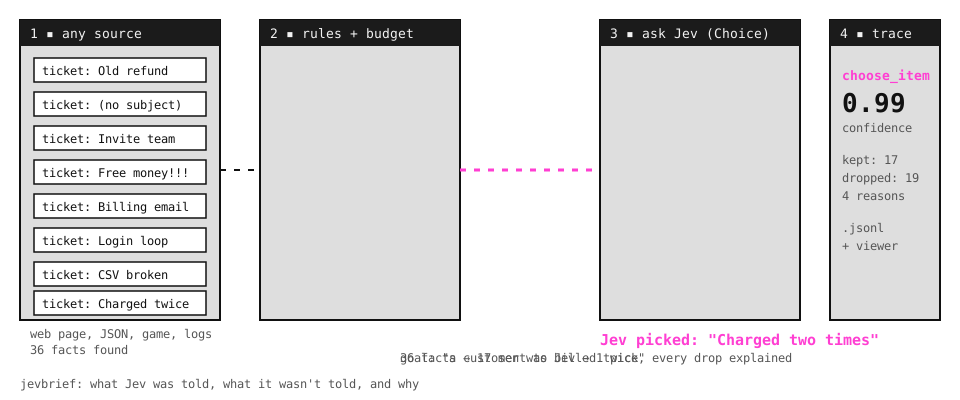
Jev turns state into typed decisions. It does its best work on small, relevant state, and it is weak at raw numbers, dates, and long lists of irrelevant detail. Real sources are the opposite: a web page has hundreds of elements, a ticket queue is full of closed and spam tickets, and an incident produces thousands of log lines.
jevbrief sits between your source and Jev. It keeps what matters, drops the rest with a reason for every drop, asks Jev one clear question, and records the whole decision so you can replay it.
|
Adapters Read a web page, a JSON file, or OpenTelemetry logs into facts, with numbers and dates already turned into plain words. |
Rules with reasons Fixed rules drop the noise. Every dropped fact gets a reason code, so a wrong answer is debuggable. |
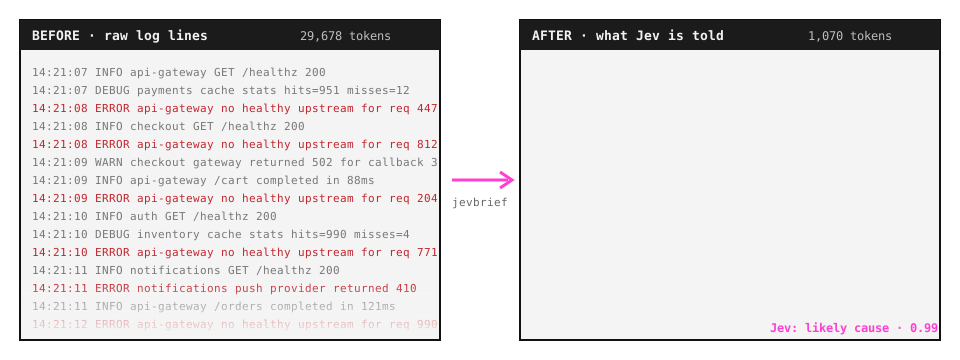
A token budget Up to 96% fewer input tokens on our benchmarks, with the same or better accuracy. |
|
One clear question Question packs ask Jev a narrow judgment and return a typed answer, a confidence, and every option's probability. |
A trace per decision One JSON line per decision: what was kept, what was dropped and why, and what Jev answered. |
An animated replay
|
Adapters
| Source | Status | Install | Jev answers | Docs |
|---|---|---|---|---|
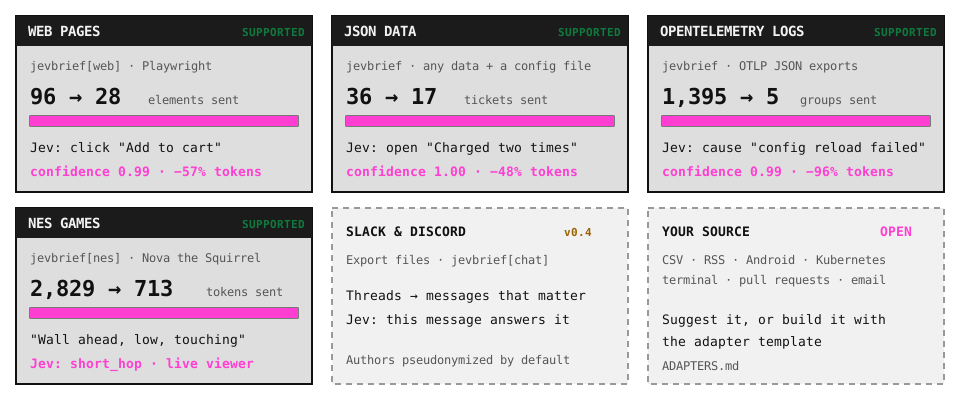
| Web pages (Playwright) | Supported | pip install "jevbrief[web]" |
Which element to click next | web |
| JSON and JSON Lines, with a config file | Supported | pip install jevbrief |
Which item fits, or which action to take | json |
| OpenTelemetry logs (OTLP JSON) | Supported | pip install jevbrief |
Which log group explains an incident | otel |
| NES games (Super Mario Bros) | Planned for v0.3 | jevbrief[nes] |
Which move to make next | roadmap |
| Slack and Discord exports | Planned for v0.4 | jevbrief[chat] |
Which message answers a question | roadmap |
| Your source | Open | Suggest it or build it |
Quick start
pip install "jevbrief[all]"       # everything; or jevbrief (json and otel), or jevbrief[web]
playwright install chromium       # only for web pages
inspect shows what would be kept and dropped, with no API key and no cost. ask calls Jev and writes a trace. --view opens the animated replay.
OpenTelemetry logs: find the cause of an incident
jevbrief ask logs.json --adapter otel --goal "Checkout requests started failing with 500 errors" --view
1447 log records -> 23 groups -> 5 sent to Jev
likely cause: auth: failed to load token signing key: certificate expired   (confidence 1.00)
JSON data: pick the right record
jevbrief ask tickets.json --adapter json --config tickets.toml --goal "a customer was billed twice" --view
A config maps your data to facts: which list to read, which fields to send, which rules drop noise, and what to ask. See the json docs and a complete example config.
Web pages: choose the next click
jevbrief ask https://news.ycombinator.com --goal "log in" --view
Get an API key at console.typesafe.ai. Set TYPESAFE_API_KEY in your environment, or put TYPESAFE_API_KEY=... in a .env file where you run the CLI. Run jevbrief adapters to list what is installed.
Use it in Python
Every adapter works the same way: create a Briefing, extract, decide.
from jevbrief import Briefing
from jevbrief.adapters.otel import OtelAdapter

brief = Briefing(OtelAdapter(), goal="Checkout requests started failing with 500 errors", trace="traces/incident.jsonl")
brief.extract("logs.json")
decision = brief.decide()
if decision.fact:
    print("likely cause:", decision.fact.label, decision.fact.attrs)
Web shortcut for Playwright agents
from jevbrief import Brief

brief = Brief(goal="add this item to the cart", trace="traces/agent.jsonl")
await brief.from_page(page)                 # or brief.from_page_sync(page)
decision = brief.next_click()
if decision.fact:
    await page.locator(decision.fact.selector).click()
Every decision comes back in the same shape:
decision.outcome |
Meaning | Your code should |
|---|---|---|
applied |
Jev answered at or above min_confidence (default 0.5) |
Act on decision.choice, and on decision.fact when the options are facts |
reused |
The facts did not change, so the last answer was reused with no API call | Act, but stop if nothing changes |
low_confidence |
Below min_confidence, or Jev chose "none" |
Take no action |
error |
The API call failed | Take no action |
Examples: otel_incident.py · json_triage.py · click_agent.py
See every decision
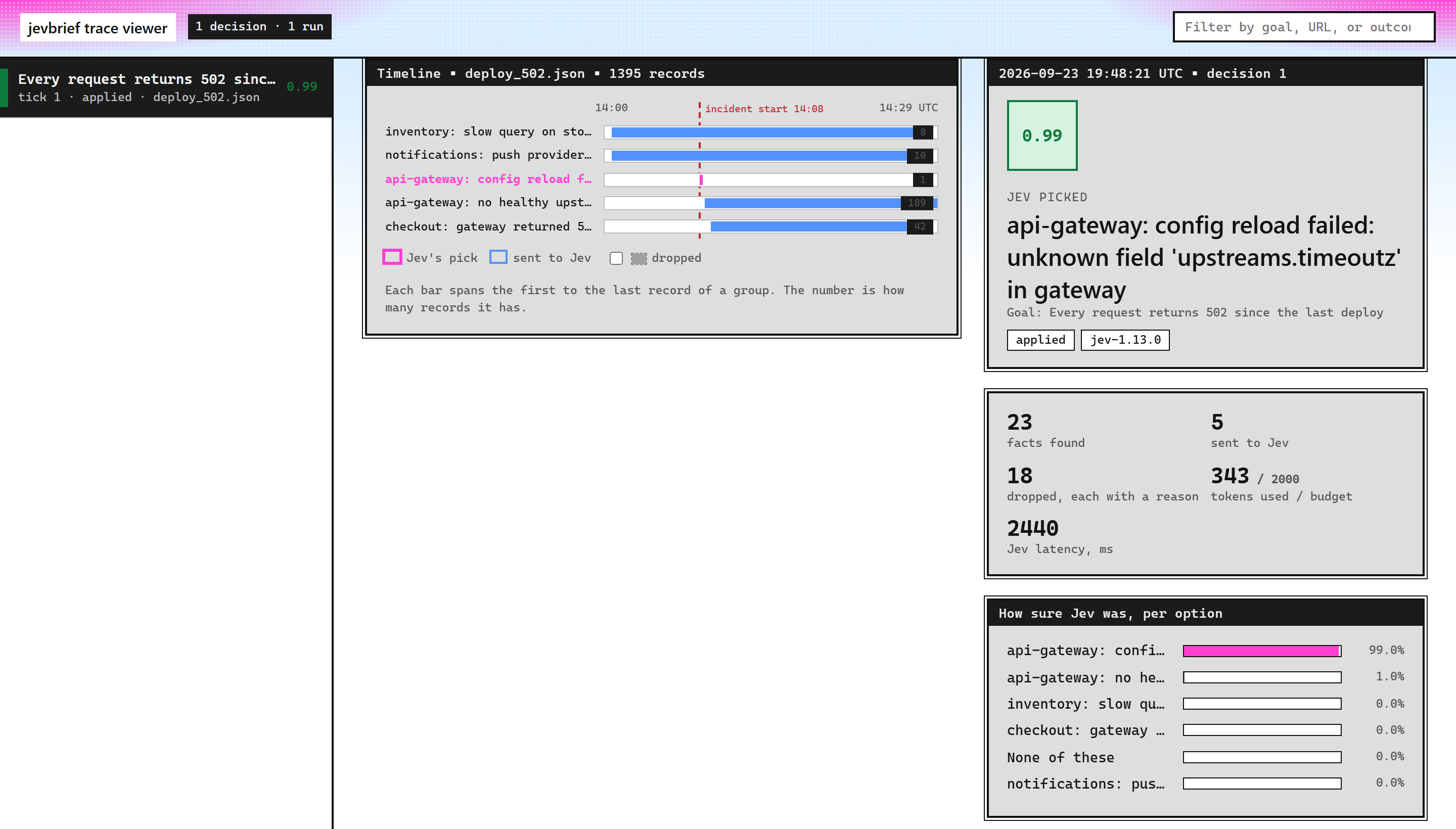
jevbrief ask ... --view opens the viewer after a run, and jevbrief view opens the newest trace. Each decision starts with an animated replay: every fact read, the dropped ones struck out with their reason, the ones sent to Jev, Jev's answer, and a plain-English summary of what it means.
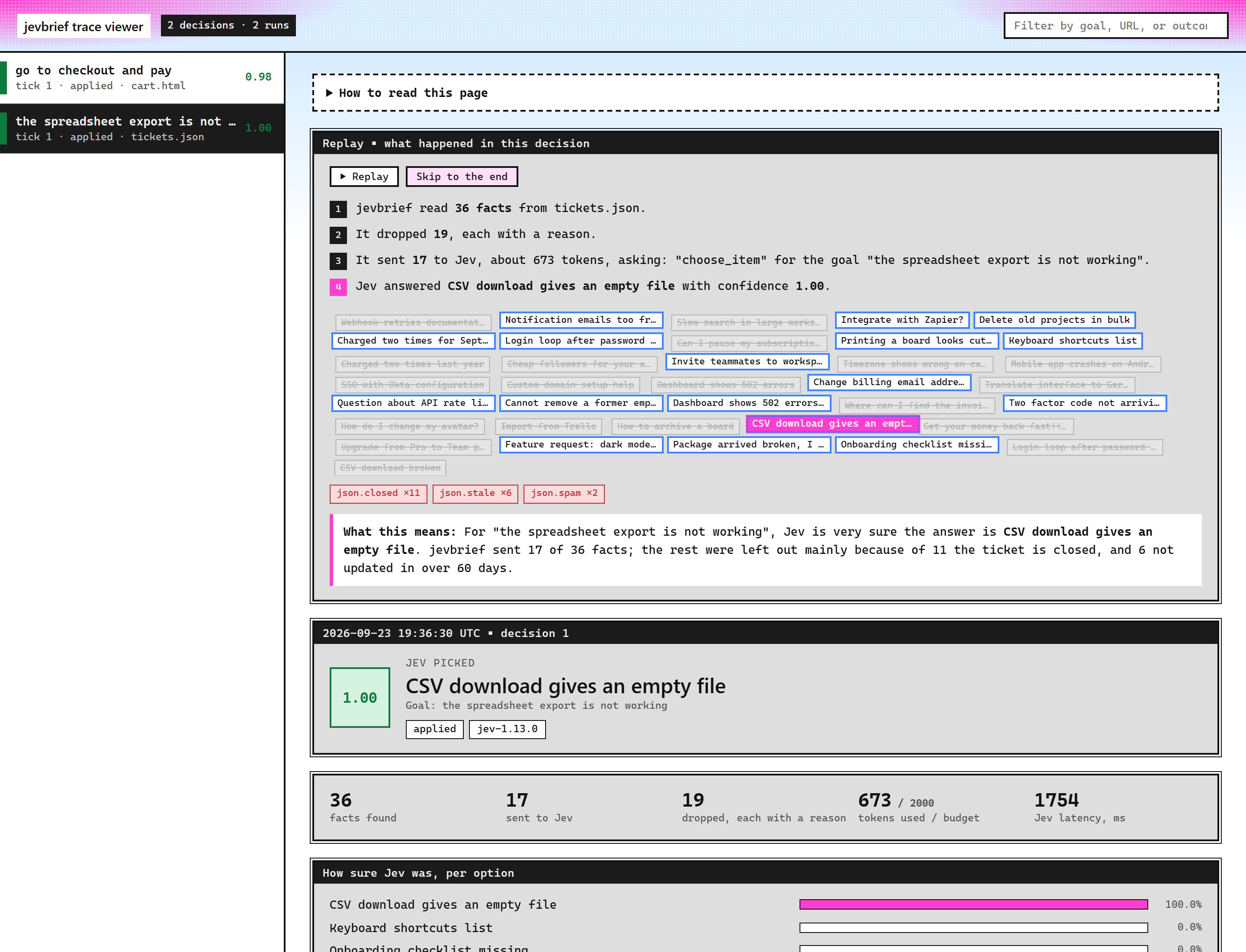
Each adapter chooses the view that fits its source.
|
Timeline, for logs: one bar per log group, with the incident start marked. |
Snapshot, for web pages: the page with Jev's pick outlined. |
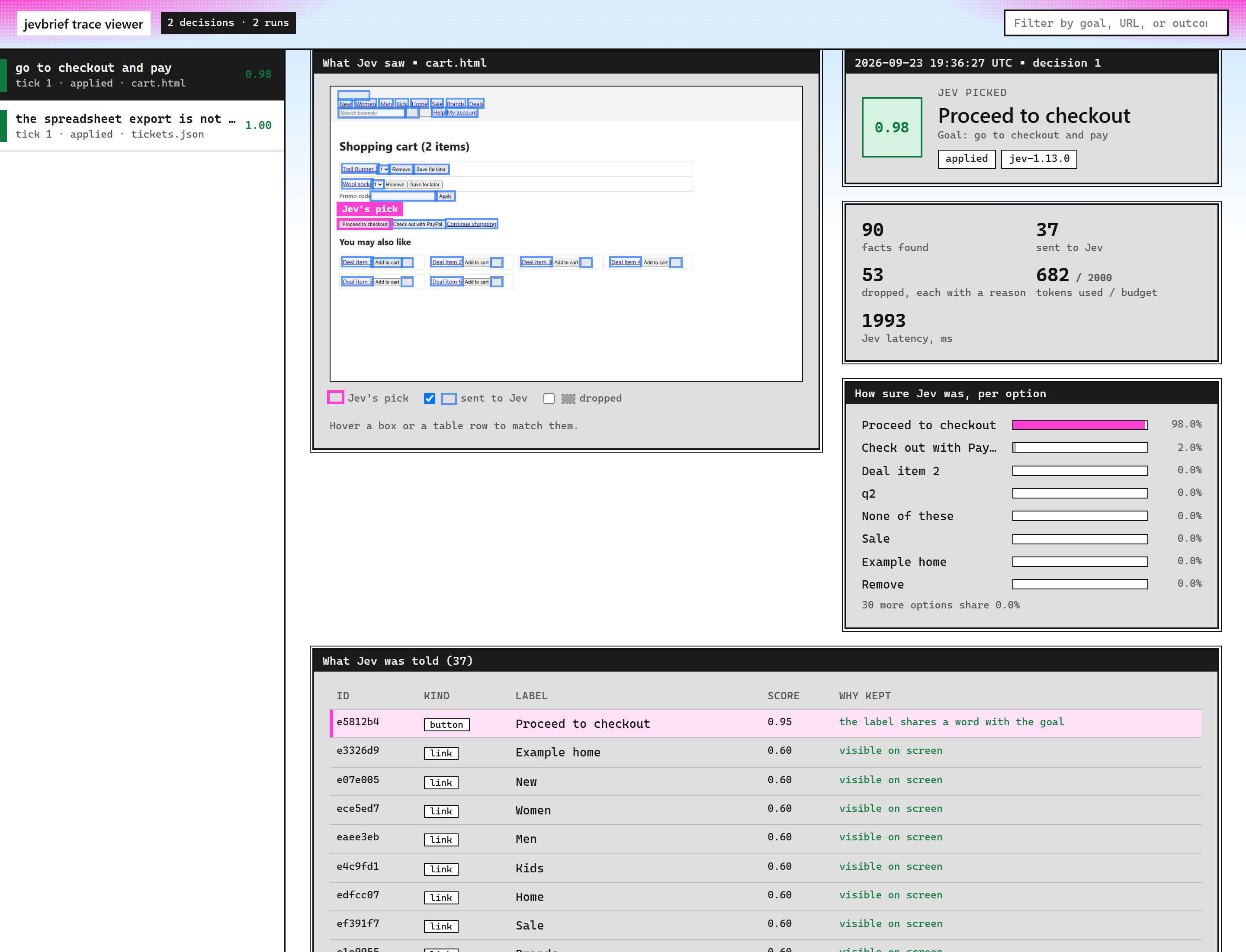
The viewer is a single HTML file with the trace and images embedded. It needs no server and no network, so it can be attached to a bug report.
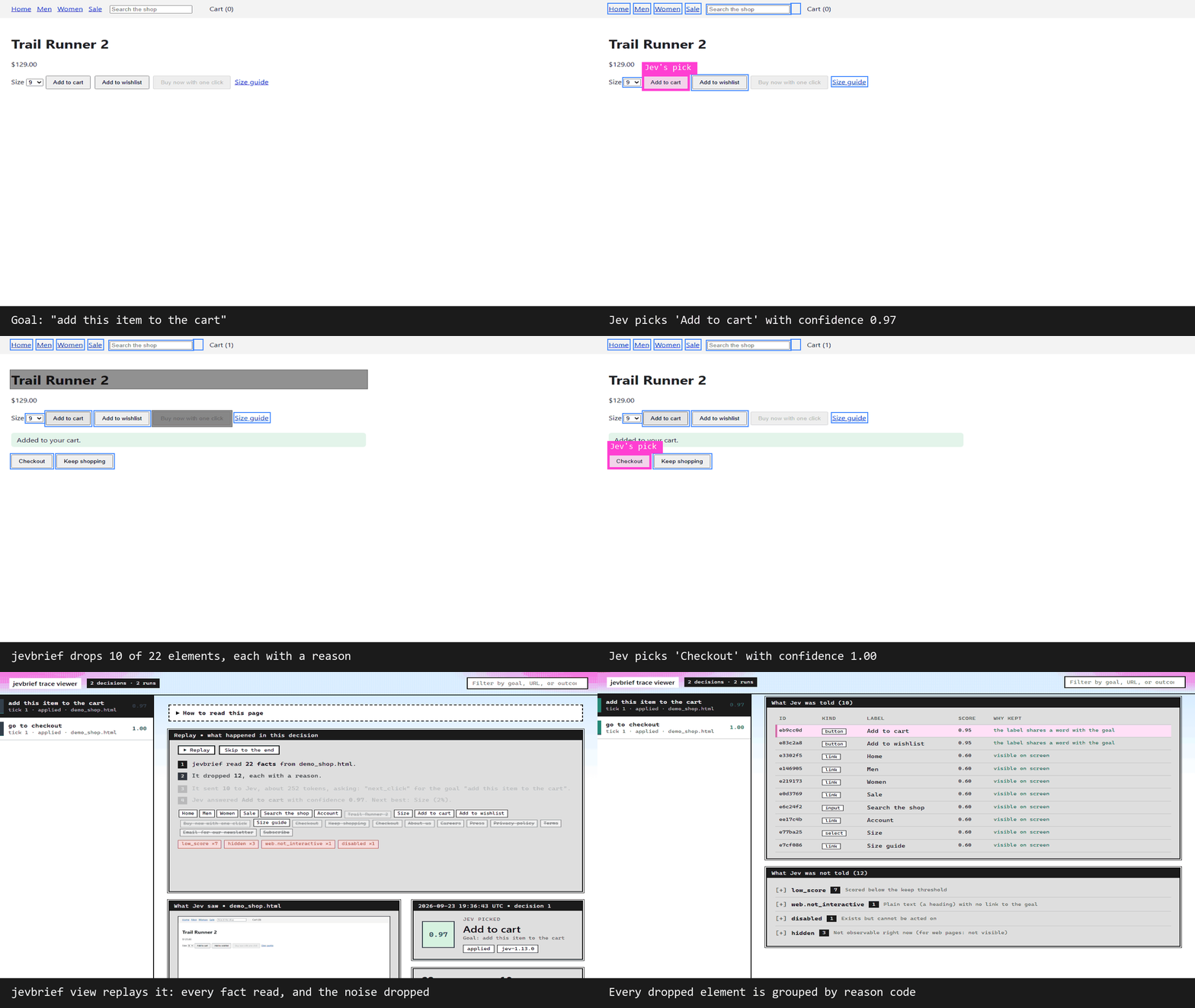
Watch the web adapter drive a browser
How it works
| Step | What happens |
|---|---|
| 1. Extract | The adapter reads the source into facts. Each fact has a kind, a label, attrs sent to Jev, and meta kept private. Numbers, counts, and dates become words here. |
| 2. Rules | A RuleSet scores each fact and drops noise. Core rules are shared, adapters add their own, and you can remove, add, or reorder rules without forking. |
| 3. Budget | Kept facts are sorted by score and cut to a token budget (default 2,000) and an option cap (default 60). |
| 4. Fingerprint | If the kept facts have not changed, the previous answer is reused and Jev is not called. |
| 5. Ask Jev | A question pack builds one or more questions (Choice, Noul, or Score) in a single call. Options are either the facts or a fixed set of actions. |
| 6. Trace | One JSON line per decision, with a legend of every reason code used. Images are stored next to the trace. |
Reason codes
Core codes are shared by every adapter. Adapter codes are namespaced, so adapters never collide.
| Code | Meaning |
|---|---|
hidden |
Not observable right now |
disabled |
Exists but cannot be acted on |
unlabeled |
No usable label, so Jev could not tell what it is |
duplicate |
Same kind and label as a higher-scored fact |
low_score |
Scored below the keep threshold |
budget |
Would have been kept, cut only to fit the token or option budget |
<adapter>.<code> |
Adapter rules such as web.not_interactive, json.closed, or otel.healthcheck, each described in the trace |
Force-keep facts with pins=["<fact id>"]. Fact IDs are stable across decisions.
Benchmarks
| Adapter | Tasks | Raw accuracy | jevbrief accuracy | Raw tokens | jevbrief tokens |
|---|---|---|---|---|---|
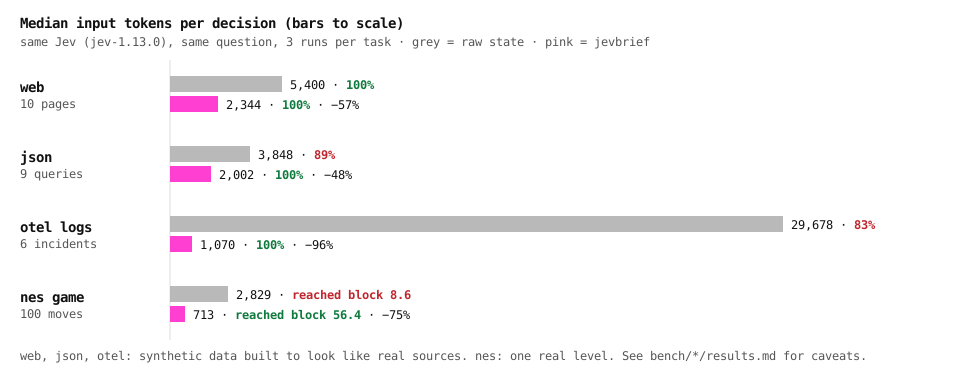
| web | 10 pages | 100% (30/30) | 100% (30/30) | 5,400 | 2,344 (−57%) |
| json | 9 queries | 89% (24/27) | 100% (27/27) | 3,848 | 2,002 (−48%) |
| otel | 6 incidents | 83% (15/18) | 100% (18/18) | 29,678 | 1,070 (−96%) |
Same Jev (jev-1.13.0), same question, three runs per task, median input tokens. The raw arm sends what a naive integration would send: every element, every record, or the most recent log lines. The data is synthetic and built to resemble real sources, and some rules were designed while building these sets, so treat the numbers as illustrations rather than general results. Details: web · json · otel. Reproduce them with jevbrief bench.
Build your own adapter
An adapter is one class with extract, rules, packs, and optionally state. Adding one never changes the core, and removing one never breaks anything.
- Copy contrib/adapter_template and its test.
- Follow ADAPTERS.md for facts, rules, the question pack, and the benchmark.
- Pass the shared contract test:
check_adapter(MyAdapter(), "sample.json", goal="..."). - Ship it here in a pull request, or as your own package with a
jevbrief.adaptersentry point, which jevbrief discovers automatically.
Working with a coding agent? Copy skills/jevbrief/SKILL.md into its skills folder (for Claude Code, .claude/skills/jevbrief/SKILL.md).
Contributing
| To | Do this |
|---|---|
| Suggest a source | Open an adapter request. Upvote the ones you want; the most requested are built first. |
| Build an adapter | Open a proposal, then follow ADAPTERS.md. |
| Report a wrong decision | Open a bug report and attach the trace. |
| Ask a question or share an idea | Start a discussion. |
git clone https://github.com/parthkomalwad/jevbrief && cd jevbrief
python -m venv .venv && . .venv/bin/activate    # Windows: .venv\Scripts\activate
pip install -e ".[dev]" && playwright install chromium
pytest -q
Privacy
- The API key is read from the environment or
.envand is never printed, logged, or written to a trace. - Adapters send only what they list. The web adapter never sends form values, the json adapter sends only the configured fields and buckets, and the otel adapter sends message templates with IDs, emails, and addresses replaced.
- Traces contain labels, source names, and, for web pages, a screenshot. Treat them like logs, and use
--no-screenshotfor private pages.
License
MIT. Community project, not affiliated with TypeSafe AI.
1 maintainer

Release files for jevbrief 0.1.0
For a detailed explanation of source distributions (sdists) and built distributions (wheels), please see the package formats documentation.
Source distribution (sdist)
| File | Size | Uploaded | |
|---|---|---|---|
| jevbrief-0.1.0.tar.gz | 59.7 kB | Details |
Built distribution (wheel)
| File | Interpreter | ABI | Platform | Reset |
|---|---|---|---|---|
| jevbrief-0.1.0-py3-none-any.whl | Python 3 | none | any | Details |
Total release size: 110.8 kB
Release files / jevbrief-0.1.0.tar.gz
| Download URL | jevbrief-0.1.0.tar.gz |
|---|---|
| Size | 59.7 kB |
| Tags | Source |
|
SHA-256 checksum How to use checksums |
9b22c8431d30eca1cf4c8e34b14bcf91a67a3107843549eab9d3682f2b91fc93
|
|
BLAKE2b-256 checksum How to use checksums |
492d4a4bf429c69cb9936b1f4af99c16dc1e54d7cd44b84793cefe3405f59e93
|
| Upload date | |
|
Uploaded using Trusted Publishing? What is trusted publishing? |
No |
| Uploaded via |
twine/7.0.0 CPython/3.14.7
|
Release files / jevbrief-0.1.0-py3-none-any.whl
| Download URL | jevbrief-0.1.0-py3-none-any.whl |
|---|---|
| Size | 51.1 kB |
| Tags | Python 3 |
|
SHA-256 checksum How to use checksums |
a9772ba9cafac1e62131262f2a401196e5ce6839c17f662b679b23445f8eef73
|
|
BLAKE2b-256 checksum How to use checksums |
89fd650eb1ee10d1d77628269dcaebaf2e1d8c97425049ab393fb026fe2899d3
|
| Upload date | |
|
Uploaded using Trusted Publishing? What is trusted publishing? |
No |
| Uploaded via |
twine/7.0.0 CPython/3.14.7
|














