
jevpipe
Give your coding agent a System 1.
Fast, cheap judgments over thousands of files, lines or records in one shell command,
so your agent decides at scale instead of reading everything itself.



Quick start · Example · Use cases · Measured · Cost
Quick start
uv tool install jevpipe                             # the CLI
jevpipe auth set-key                                # your OpenRouter key, kept in the system keychain
npx skills add fabianboth/jevpipe --skill jevpipe   # teaches your agent when and how to use it
You need an OpenRouter API key. Where there is no keychain,
as in containers, CI or headless Linux, set OPENROUTER_API_KEY instead; it also takes precedence.
No uv yet? Install it or use pipx.
Without uv, or with the GitHub CLI
pipx install jevpipe                                # instead of uv
gh skill install fabianboth/jevpipe jevpipe         # the skill, with the GitHub CLI
Example
Which of the 19 commits in ripgrep 15.1 are new features? Ask each commit message:
# in a clone of https://github.com/BurntSushi/ripgrep
git log --format=%s 15.0.0..15.1.0 | jevpipe filter "Is this a new feature?"
# the commit messages that match the question
ignore/types: add `ssa` type
printer: add Cursor hyperlink alias

# the summary, on standard error
jevpipe: 19 records, 2 kept, 0 skipped, 0 failed, $0.000225, 1.1s
Typed answers with map: sort every commit into feature, fix, docs or internal
# in a clone of https://github.com/BurntSushi/ripgrep
git log --format=%s 15.0.0..15.1.0 | jevpipe map -q '{
  "kind": {
    "type": "choice",
    "instructions": "What kind of change is this, for the release notes?",
    "criteria": {
      "feature": "a new capability for users",
      "fix": "a bug fix users would notice",
      "docs": "documentation only",
      "internal": "refactoring, tests, CI, dependencies or release chores"
    }
  }
}'
Every commit becomes one JSON line. One of the 19:
{
  "record": "printer: add Cursor hyperlink alias",
  "answers": {
    "kind": {
      "type": "choice",
      "choice": "feature",
      "probabilities": {"docs": 0.05, "feature": 0.87, "fix": 0.03, "internal": 0.05},
      "confidence": 0.82
    }
  }
}
All 19 took 1.1 seconds and cost $0.0003. Pick from them with jq, for example the fixes:
jq -r 'select(.answers.kind.choice == "fix") | .record'. A low confidence marks an answer worth
a second look.
Use cases
Each item is judged on its own, so ask what the item itself can answer:
| Job | Question for every item | Answer |
|---|---|---|
| Search code by meaning | Does this file retry failed requests? | yes/no |
| Triage CI failures | Timeout, network error, failed assertion or crash? | choice |
| Review a large diff | Does this change touch authentication or permissions? | yes/no |
| Label an issue backlog | Bug report, feature request or question? | choice |
| Route a support inbox | Which team? How urgent? | choice, score |
| Moderate a comment queue | Fine, spam or abusive? | choice |
| Screen papers | How relevant is this abstract to my question? | score 1 to 5 |
Measured
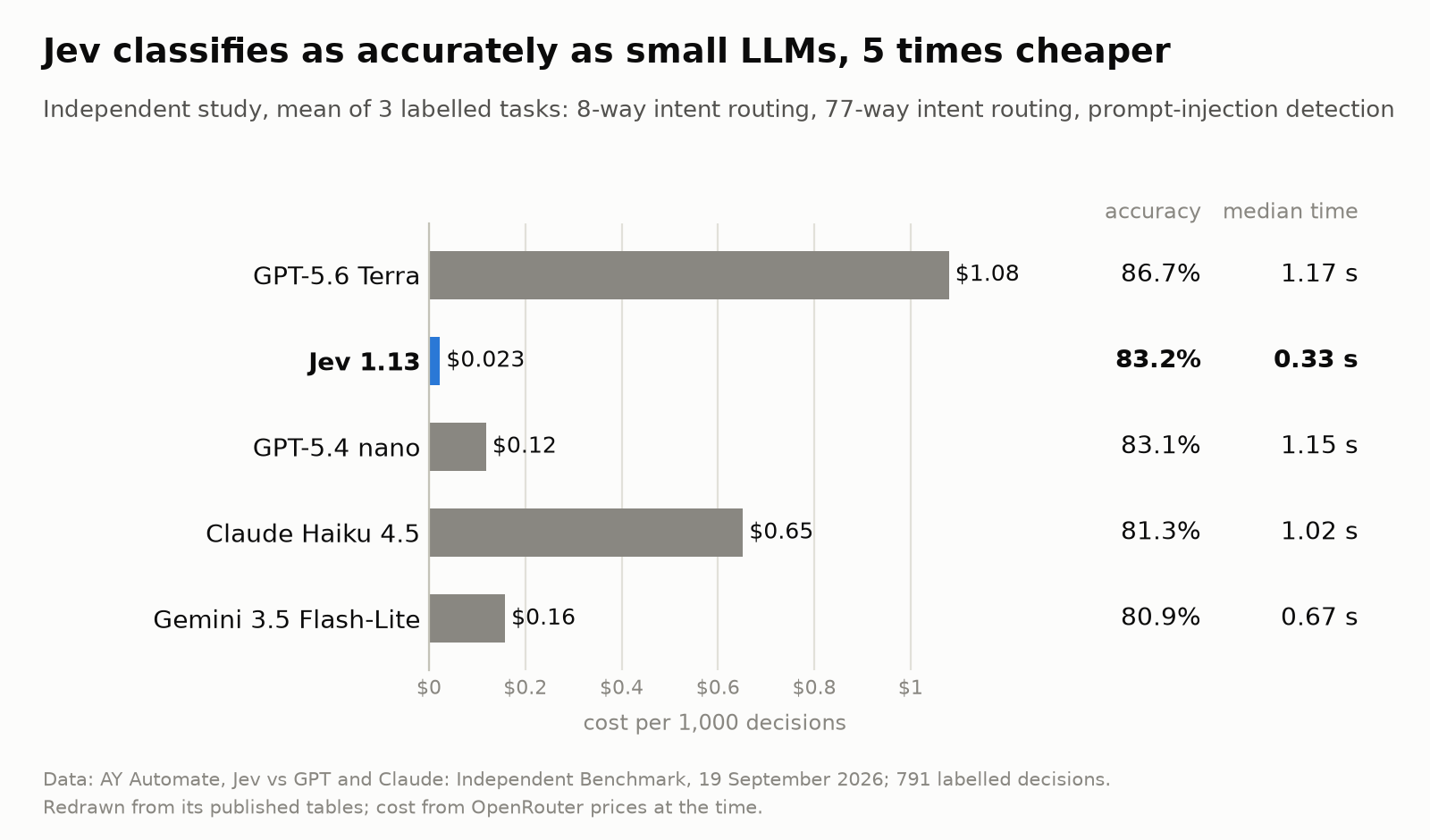
Classification. Jev against general LLMs on intent routing and prompt-injection detection, from an independent study:
Code search. jevpipe in an agent's hands: 470 searches from the extended CodeSearchNet Challenge in five languages, each over every function of its language.
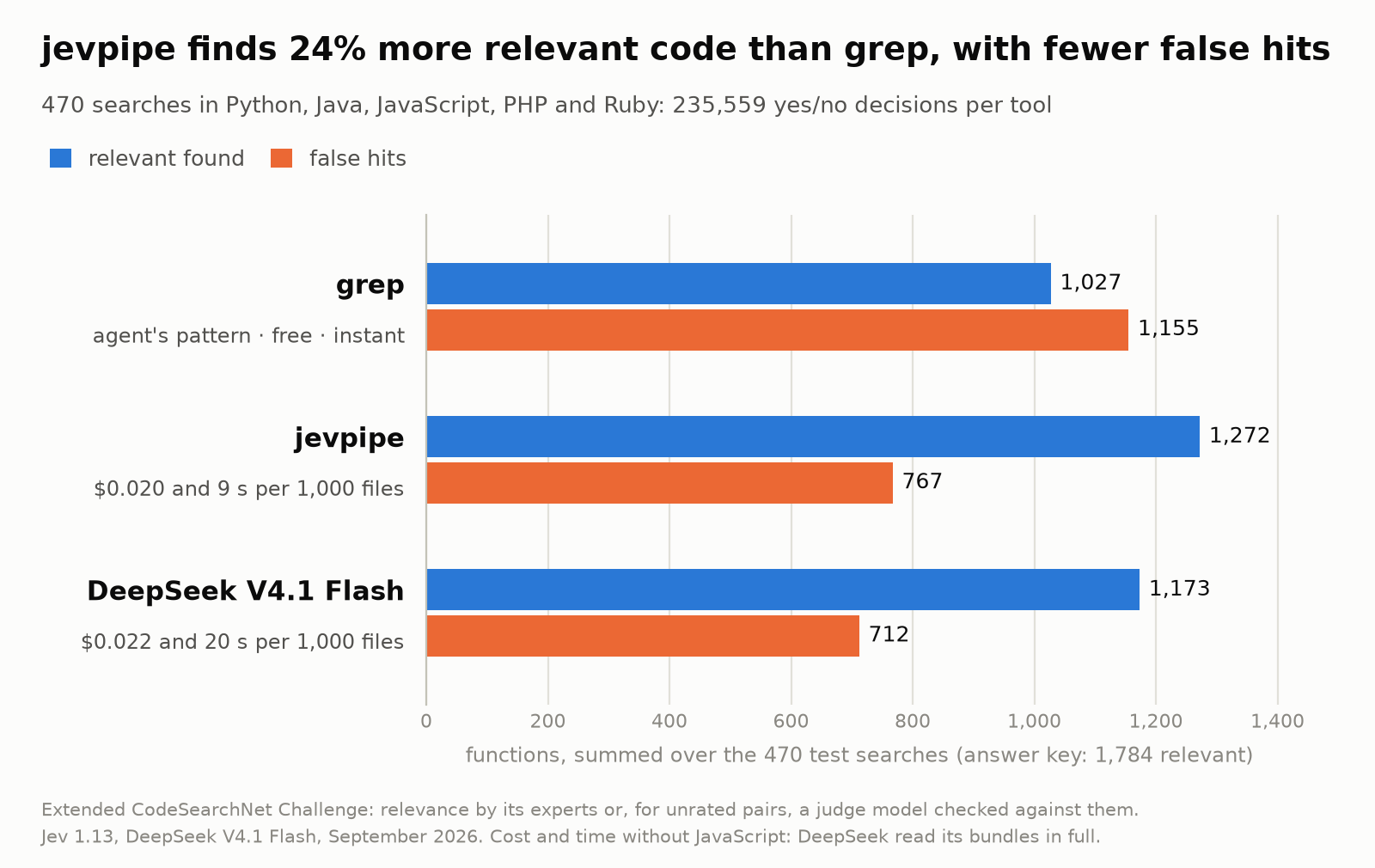
Read the full benchmark: every language, speed and cost, and the searches where jevpipe loses.
Commands
| Asks | Prints | |
|---|---|---|
jevpipe filter "question" |
one yes/no question | the lines answered yes, like grep |
jevpipe map -q '{...}' |
several typed questions: yes/no, one choice, a score | one JSON line per record |
Both read their input like grep: lines through a pipe or from the files you name. With
--read-files, each line is a path, and the file it names is judged instead:
git log --format=%s | jevpipe filter "Is this a new feature?"                       # each commit message
jevpipe filter "Is this an error worth a closer look?" app.log                      # each line of app.log
git ls-files | jevpipe filter "Does this file retry failed requests?" --read-files  # each file
jevpipe <command> --help has the rest.
Cost and speed
Every record is one request billed to your OpenRouter credit, and the cost follows the size of each record: about a cent per 1,000 commit messages, 4 to 18 cents per 1,000 source files. Asking several questions at once barely changes it. Up to 100 records run at the same time, so hundreds take seconds.
--max-cost 0.50 stops sending requests once the run has spent $0.50; it then exits with status 3
and names the line to resume from.
To cap every run by default, run jevpipe config set max-cost 0.50 once; jevpipe config --help
lists the other defaults you can set.
License
Apache-2.0. jevpipe is an independent
project, not affiliated with or endorsed by TypeSafe AI; the answers come from
Jev, TypeSafe AI's calibrated decision model, through OpenRouter. Building
from source needs Rust (rustup picks the pinned toolchain) and PowerShell 7 for ./check.ps1.
1 maintainer

Release files for jevpipe 0.1.1
For a detailed explanation of source distributions (sdists) and built distributions (wheels), please see the package formats documentation.
Built distributions (wheels)
| File | Reset | |||
|---|---|---|---|---|
| jevpipe-0.1.1-py3-none-win_arm64.whl | Python 3 | none | Windows ARM64 | Details |
| jevpipe-0.1.1-py3-none-win_amd64.whl | Python 3 | none | Windows x86-64 | Details |
| jevpipe-0.1.1-py3-none-manylinux_2_17_x86_64.manylinux2014_x86_64.musllinux_1_1_x86_64.whl | Python 3 | none | Linux musl 1.1+ x86-64, Linux glibc 2.17+ x86-64 | Details |
| jevpipe-0.1.1-py3-none-manylinux_2_17_aarch64.manylinux2014_aarch64.musllinux_1_1_aarch64.whl | Python 3 | none | Linux glibc 2.17+ ARM64, Linux musl 1.1+ ARM64 | Details |
| jevpipe-0.1.1-py3-none-macosx_11_0_arm64.whl | Python 3 | none | macOS 11.0+ ARM64 | Details |
| jevpipe-0.1.1-py3-none-macosx_10_12_x86_64.whl | Python 3 | none | macOS 10.12+ x86-64 | Details |
Total release size: 19.0 MB
Release files / jevpipe-0.1.1-py3-none-win_arm64.whl
| Download URL | jevpipe-0.1.1-py3-none-win_arm64.whl |
|---|---|
| Size | 2.7 MB |
| Tags | Python 3 Windows ARM64 |
|
SHA-256 checksum How to use checksums |
9a14306fc0cae525d88f14bfef9e09d8c076cf91855a5336846bd3e528c45d45
|
|
BLAKE2b-256 checksum How to use checksums |
54d9bd97087a1e402d8d7024808a7d5a7060867a05e743d11dfb61f0584fc5a9
|
| Upload date | |
|
Uploaded using Trusted Publishing? What is trusted publishing? |
Yes |
| Uploaded via |
twine/7.0.0 CPython/3.13.14
|
Provenance
Provenance describes where a file came from. On PyPI, provenance is shared via attestations, which provide a verifiable record of the build or publishing details. View details, limitations and caveats.


PyPI Publish Attestation
PyPI verified that this artifact, at this checksum, originated from the publisher listed below.
Signed by GitHub Actions, verified by PyPI on Sep 28, 2026.
Transparency logRelease files / jevpipe-0.1.1-py3-none-win_amd64.whl
| Download URL | jevpipe-0.1.1-py3-none-win_amd64.whl |
|---|---|
| Size | 2.7 MB |
| Tags | Python 3 Windows x86-64 |
|
SHA-256 checksum How to use checksums |
cf2951b6f46747b282332e913b6677eb28549ef9d729f54c0e2323afc919eff5
|
|
BLAKE2b-256 checksum How to use checksums |
7c6326991e479971cc370129caf0a431889741491d0b9628f37ec360f8e13e6d
|
| Upload date | |
|
Uploaded using Trusted Publishing? What is trusted publishing? |
Yes |
| Uploaded via |
twine/7.0.0 CPython/3.13.14
|
Provenance
Provenance describes where a file came from. On PyPI, provenance is shared via attestations, which provide a verifiable record of the build or publishing details. View details, limitations and caveats.
PyPI Publish Attestation
PyPI verified that this artifact, at this checksum, originated from the publisher listed below.
Signed by GitHub Actions, verified by PyPI on Sep 28, 2026.
Transparency logRelease files / jevpipe-0.1.1-py3-none-manylinux_2_17_x86_64.manylinux2014_x86_64.musllinux_1_1_x86_64.whl
| Download URL | jevpipe-0.1.1-py3-none-manylinux_2_17_x86_64.manylinux2014_x86_64.musllinux_1_1_x86_64.whl |
|---|---|
| Size | 4.1 MB |
| Tags | Linux glibc 2.17+ x86-64 Linux musl 1.1+ x86-64 Python 3 |
|
SHA-256 checksum How to use checksums |
82e44f373af9b7c918908256f1daac99c6cb57775e18be86a8fdeb54ae8511ba
|
|
BLAKE2b-256 checksum How to use checksums |
fe702e1606ccc984d29213193d65312260d21181566f9195932e96de90402c87
|
| Upload date | |
|
Uploaded using Trusted Publishing? What is trusted publishing? |
Yes |
| Uploaded via |
twine/7.0.0 CPython/3.13.14
|
Provenance
Provenance describes where a file came from. On PyPI, provenance is shared via attestations, which provide a verifiable record of the build or publishing details. View details, limitations and caveats.
PyPI Publish Attestation
PyPI verified that this artifact, at this checksum, originated from the publisher listed below.
Signed by GitHub Actions, verified by PyPI on Sep 28, 2026.
Transparency logRelease files / jevpipe-0.1.1-py3-none-manylinux_2_17_aarch64.manylinux2014_aarch64.musllinux_1_1_aarch64.whl
| Download URL | jevpipe-0.1.1-py3-none-manylinux_2_17_aarch64.manylinux2014_aarch64.musllinux_1_1_aarch64.whl |
|---|---|
| Size | 3.8 MB |
| Tags | Linux glibc 2.17+ ARM64 Linux musl 1.1+ ARM64 Python 3 |
|
SHA-256 checksum How to use checksums |
13d6a05f494b419aaa28d1513a7143d19a85627a5382c8770d4753d66a3ae494
|
|
BLAKE2b-256 checksum How to use checksums |
7f7900ac5cde817d1c53fa4b1dadf622da070c8683086cb52216c1cf7a5ffd29
|
| Upload date | |
|
Uploaded using Trusted Publishing? What is trusted publishing? |
Yes |
| Uploaded via |
twine/7.0.0 CPython/3.13.14
|
Provenance
Provenance describes where a file came from. On PyPI, provenance is shared via attestations, which provide a verifiable record of the build or publishing details. View details, limitations and caveats.
PyPI Publish Attestation
PyPI verified that this artifact, at this checksum, originated from the publisher listed below.
Signed by GitHub Actions, verified by PyPI on Sep 28, 2026.
Transparency logRelease files / jevpipe-0.1.1-py3-none-macosx_11_0_arm64.whl
| Download URL | jevpipe-0.1.1-py3-none-macosx_11_0_arm64.whl |
|---|---|
| Size | 2.7 MB |
| Tags | Python 3 macOS 11.0+ ARM64 |
|
SHA-256 checksum How to use checksums |
710e33b0e7100e3cca2295e6c16c8643d509f8fb5244a06e702add7f6510fc0d
|
|
BLAKE2b-256 checksum How to use checksums |
8718bdef387295a45c8a90585f8842847986db2c8fc1233185a36b0e9d4d431a
|
| Upload date | |
|
Uploaded using Trusted Publishing? What is trusted publishing? |
Yes |
| Uploaded via |
twine/7.0.0 CPython/3.13.14
|
Provenance
Provenance describes where a file came from. On PyPI, provenance is shared via attestations, which provide a verifiable record of the build or publishing details. View details, limitations and caveats.
PyPI Publish Attestation
PyPI verified that this artifact, at this checksum, originated from the publisher listed below.
Signed by GitHub Actions, verified by PyPI on Sep 28, 2026.
Transparency logRelease files / jevpipe-0.1.1-py3-none-macosx_10_12_x86_64.whl
| Download URL | jevpipe-0.1.1-py3-none-macosx_10_12_x86_64.whl |
|---|---|
| Size | 2.9 MB |
| Tags | Python 3 macOS 10.12+ x86-64 |
|
SHA-256 checksum How to use checksums |
5d67ea550de2e11df47ebf2e1c2ca522cb574e3b4ff1045e76de659e95477120
|
|
BLAKE2b-256 checksum How to use checksums |
c070cae8f948e2005b277a0c87dca722dea7d77c657a7001e5d151202c4e8ea2
|
| Upload date | |
|
Uploaded using Trusted Publishing? What is trusted publishing? |
Yes |
| Uploaded via |
twine/7.0.0 CPython/3.13.14
|
Provenance
Provenance describes where a file came from. On PyPI, provenance is shared via attestations, which provide a verifiable record of the build or publishing details. View details, limitations and caveats.
PyPI Publish Attestation
PyPI verified that this artifact, at this checksum, originated from the publisher listed below.
Signed by GitHub Actions, verified by PyPI on Sep 28, 2026.
Transparency log













