
Jezero
A shared, searchable library of your agents' past work.




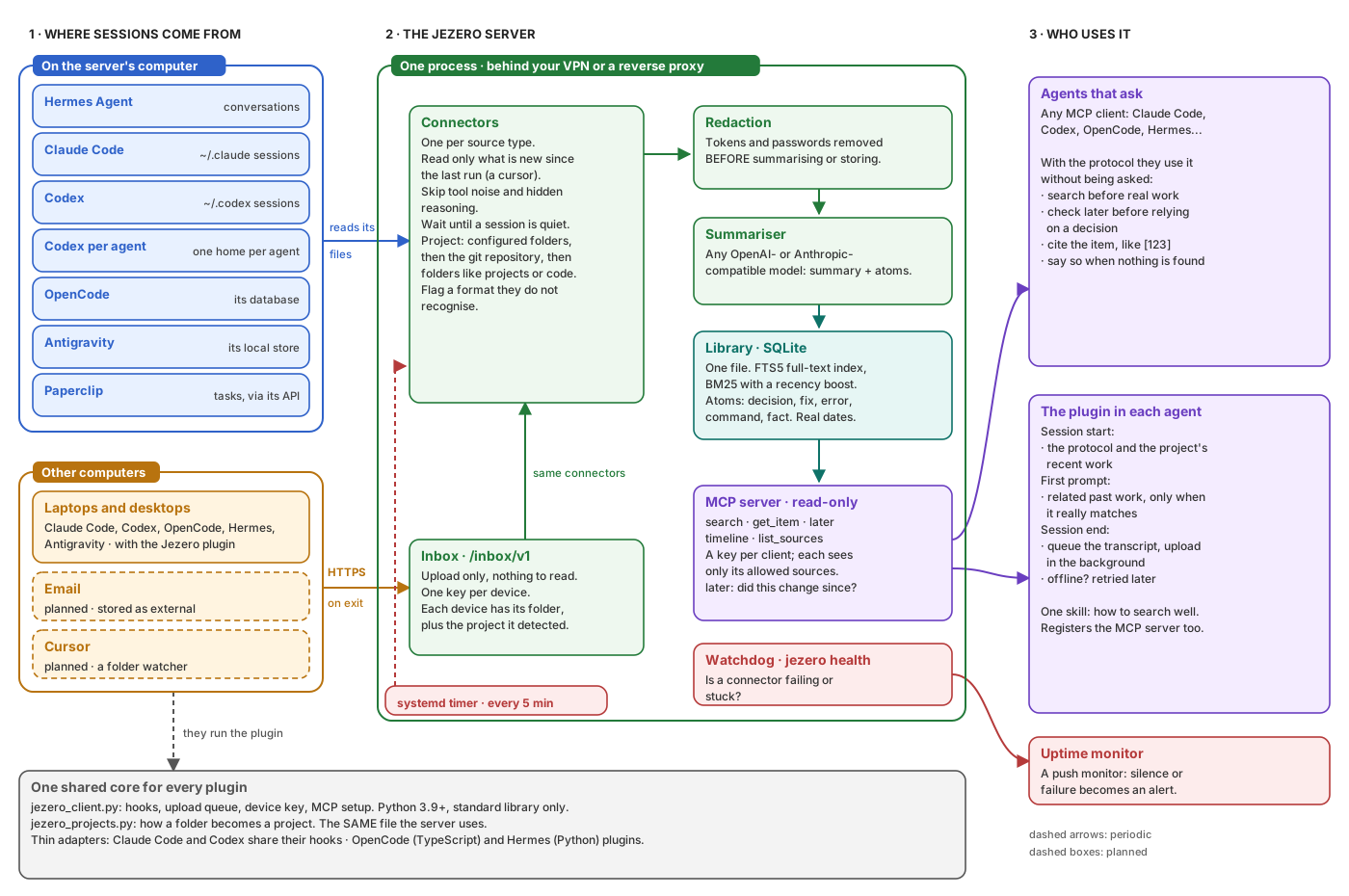
Your agents forget. Their sessions pile up as gigabytes of transcripts on several machines, and the decisions in them are written down nowhere else. Jezero collects those sessions, turns each one into a short summary plus atoms (decisions, rationale, fixes, exact errors, commands that worked, facts, risks), and serves it all, read-only, to every agent you run over MCP.
Documentation · Tutorial · Connect an agent · Reference · Changelog
What it looks like
You ask an agent about something another agent did weeks ago, on another computer. You do not mention Jezero; the plugin taught it to look:
you    > What did we end up doing with analytics on the shop site?

agent  · search("analytics shop site")
           [412] 2026-09-03  Shop site: remove the analytics script
           [431] 2026-09-10  Shop site: analytics back, only after consent
agent  · later(412, "analytics")
           [431] newer, same subject

agent  > It changed once. On 3 Sep the script was removed [412]; on 10 Sep it came
         back, loaded only after the visitor accepts the consent banner [431].
         That is the current state.
Each item is a summary with atoms, the date it happened and its project:
[431] Shop site: analytics back, only after consent        2026-09-10 · shop
summary   The analytics script returns, loaded only after consent. No cookies before.
atoms     decision  Load analytics only after the visitor accepts the banner.
          why       Consent is required before any tracking.
          fix       The banner test ran before the script loaded; wait for the event.
          command   npm run test:consent
(Synthetic example. Jezero never ships real transcripts.)
Features
- Every agent, every computer. Connectors for Claude Code, Codex, OpenCode, Hermes Agent, Antigravity and Paperclip tasks; plugins upload sessions from other computers.
- Used by habit. The plugins teach agents to search Jezero before working, to check whether a decision changed later, and to cite what they found, without being asked.
- Write once, read many. A small model summarises each session once; searches are plain full-text queries that take milliseconds and no GPU.
- One SQLite file. No database server to run; a backup is one file (how).
- Read-only by design. Agents can search but never write; each key sees only the sources it is allowed to.
- Private by default. Secrets are redacted before anything is stored, keys are made on each computer, and the config never holds a secret.
- An app for people. A terminal app to search, watch activity and keep every agent's plugin up to date.
Status: pre-alpha. Everything above is implemented and tested; email comes next.
Install
Requires Python 3.12+ on Linux or macOS.
uv tool install jezero      # or: pipx install jezero, or: pip install jezero
jezero --version
To run it as a server from PyPI (config, systemd units, and the plugin bundle downloaded
from the GitHub release with its SHA256SUMS), see
Run Jezero as a service. Upgrade with
uv tool upgrade jezero.
Get started
From a checkout, with uv:
git clone https://github.com/MarsGotta/jezero.git && cd jezero
uv sync
printf '[storage]\npath = "data/jezero.db"\n\n[server]\nhost = "127.0.0.1"\nport = 8765\nrequire_auth = false\n' > jezero.toml
uv run jezero check-config
uv run jezero init
uv run jezero import-jsonl examples/items.example.jsonl --source demo
uv run jezero search "migration rollback"
That jezero.toml is the tutorial's minimal local library; jezero.example.toml
documents every field. The tutorial takes it from
there: serve the library over MCP and connect an agent, in about fifteen minutes.
Connect your agents
Each computer makes its own key and the server approves it once (how). Then the plugins install straight from this repository:
claude plugin marketplace add MarsGotta/jezero && claude plugin install jezero@jezero
codex plugin marketplace add MarsGotta/jezero && codex plugin add jezero@jezero
python3 ~/.jezero-src/jezero-client/jezero_client.py setup --agent codex   # Codex's MCP
hermes plugins install MarsGotta/jezero/plugins/hermes --enable
agy plugin install https://github.com/MarsGotta/jezero/tree/main/plugins/antigravity
These follow main. To pin a release, add its tag: MarsGotta/jezero#v0.1.0 for Claude
Code, MarsGotta/jezero@v0.1.0 for Codex, tree/v0.1.0/plugins/antigravity for
Antigravity; Hermes Agent pins only to a commit SHA (--ref). The Jezero app installs the
plugins from its own release tag by itself. OpenCode and any other MCP client: see
Connect an agent.
The Jezero app
jezero with no command opens a terminal app that searches the library the way an agent
does, shows what each source has been doing, shows the exact context an agent receives,
and installs or updates the plugins on this computer.
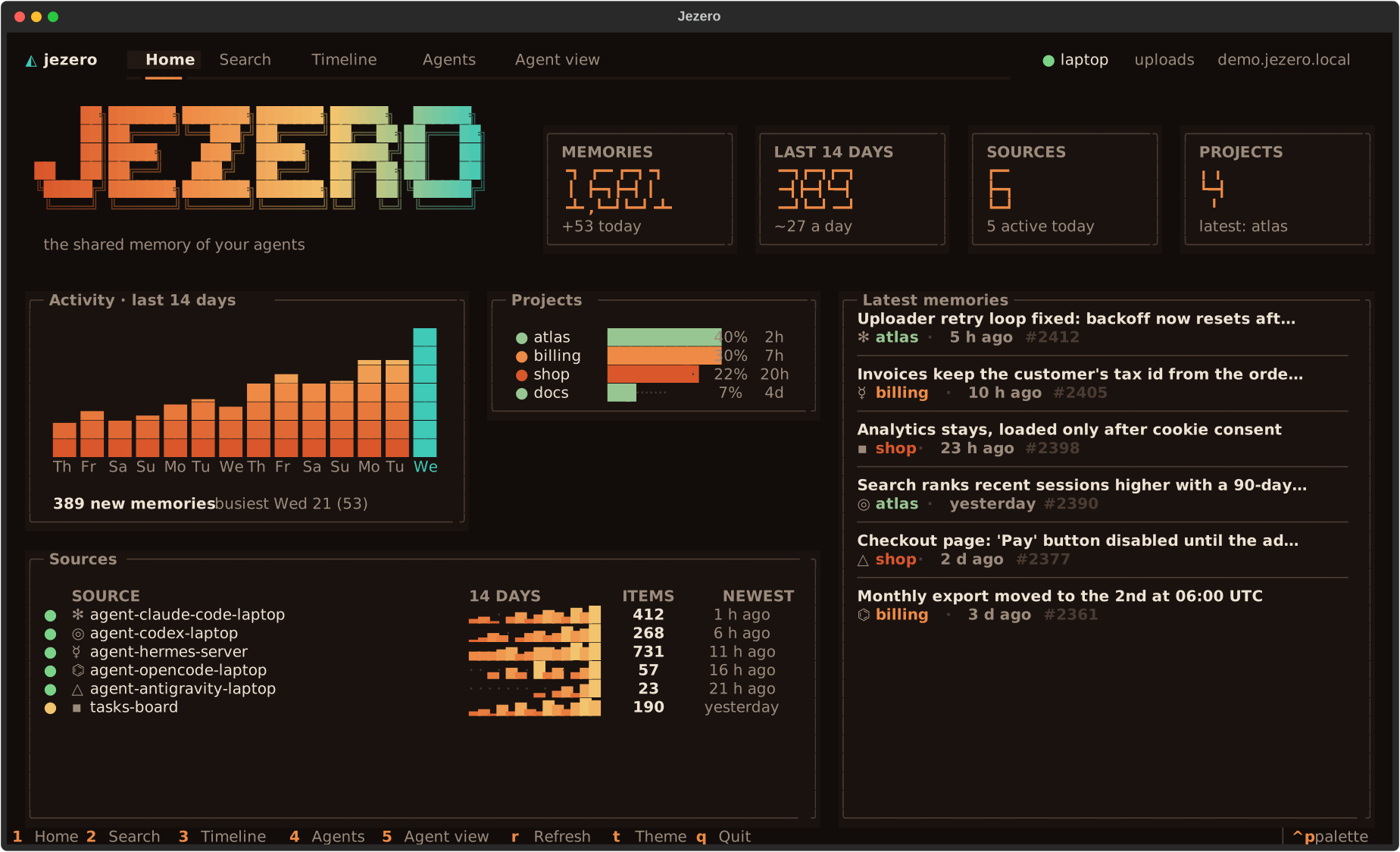
uv tool install jezero
jezero ui --demo        # look around with made-up data
More in Use the Jezero app.
Documentation
Read it at jezero.marsgotta.com, or right here on
GitHub in docs/:
| Learn | Your first library · Connect a second computer |
| Do | Run as a service · Sources · Monitor · Search quality · Agents · Computers and keys · App · Troubleshooting |
| Look up | Commands · Configuration · Connectors · MCP tools · HTTP API · Client · Data model · Glossary |
| Understand | Architecture · Search · Summaries · Security · Design decisions |
Contributing
Bug reports, ideas and pull requests are welcome: start with CONTRIBUTING.md. To report a vulnerability, see SECURITY.md.
Roadmap
- Gmail connector (read-only scope, per thread, newsletters skipped).
- A folder watcher for agents without hooks (Cursor) on other computers.
- Optional vector search with sqlite-vec.
The name
Jezero is the Martian crater that once held a lake. Its layered sediments keep the record of what happened there, and the Perseverance rover sets samples aside in it so they can be picked up later. That is the whole idea of this project.
License
1 maintainer

Metadata
1 maintainer
Release files for jezero 0.1.0
For a detailed explanation of source distributions (sdists) and built distributions (wheels), please see the package formats documentation.
Source distribution (sdist)
| File | Size | Uploaded | Provenance | |
|---|---|---|---|---|
| jezero-0.1.0.tar.gz | 511.8 kB | With provenance | Details |
Built distribution (wheel)
| File | Interpreter | ABI | Platform | Reset |
|---|---|---|---|---|
| jezero-0.1.0-py3-none-any.whl | Python 3 | none | any | Details |
Total release size: 733.1 kB
Release files / jezero-0.1.0.tar.gz
| Download URL | jezero-0.1.0.tar.gz |
|---|---|
| Size | 511.8 kB |
| Tags | Source |
|
SHA-256 checksum How to use checksums |
dea0e4ed7a2ff267226e3778294efa981391945376ae6452b287e56b2695d037
|
|
BLAKE2b-256 checksum How to use checksums |
c82952e55239f7b3fd50f95cdae65cb94d65ab888da5b47a9919a088398cd850
|
| Upload date | |
|
Uploaded using Trusted Publishing? What is trusted publishing? |
Yes |
| Uploaded via |
twine/7.0.0 CPython/3.13.16
|
Provenance
Provenance describes where a file came from. On PyPI, provenance is shared via attestations, which provide a verifiable record of the build or publishing details. View details, limitations and caveats.


PyPI Publish Attestation
PyPI verified that this artifact, at this checksum, originated from the publisher listed below.
Signed by GitHub Actions, verified by PyPI on Oct 23, 2026.
Transparency logRelease files / jezero-0.1.0-py3-none-any.whl
| Download URL | jezero-0.1.0-py3-none-any.whl |
|---|---|
| Size | 221.3 kB |
| Tags | Python 3 |
|
SHA-256 checksum How to use checksums |
725591d10dfcd205decf1740ea58f226929565b64d0a17ff0912a8809246cfc0
|
|
BLAKE2b-256 checksum How to use checksums |
a421a7155c70b847ae353cff53a954e9b0c70ba75ba684f80b2e8a7dc01886bc
|
| Upload date | |
|
Uploaded using Trusted Publishing? What is trusted publishing? |
Yes |
| Uploaded via |
twine/7.0.0 CPython/3.13.16
|
Provenance
Provenance describes where a file came from. On PyPI, provenance is shared via attestations, which provide a verifiable record of the build or publishing details. View details, limitations and caveats.
PyPI Publish Attestation
PyPI verified that this artifact, at this checksum, originated from the publisher listed below.
Signed by GitHub Actions, verified by PyPI on Oct 23, 2026.
Transparency logSecurity for jezero 0.1.0
Provenance
Provenance describes where a file came from. On PyPI, provenance is shared via attestations, which provide a verifiable record of the build or publishing details. View details, limitations and caveats.
Full provenance
All 2 files in this release have been uploaded with provenance metadata.
Attestation for jezero-0.1.0.tar.gz
PyPI Publish Attestation
PyPI verified that this artifact, at this checksum, originated from the publisher listed below.
Signed by GitHub Actions, verified by PyPI on Oct 23, 2026.
Transparency logA note on package security
PyPI is a repository for distributing packages, not a service for auditing them. While third-party security researchers and our staff do their best to detect and remove malicious packages, PyPI cannot guarantee the quality, security or suitability of any given package.
To learn more about protecting yourself from malicious actors, visit our package security documentation.













