
JupyterHub Apps Launcher


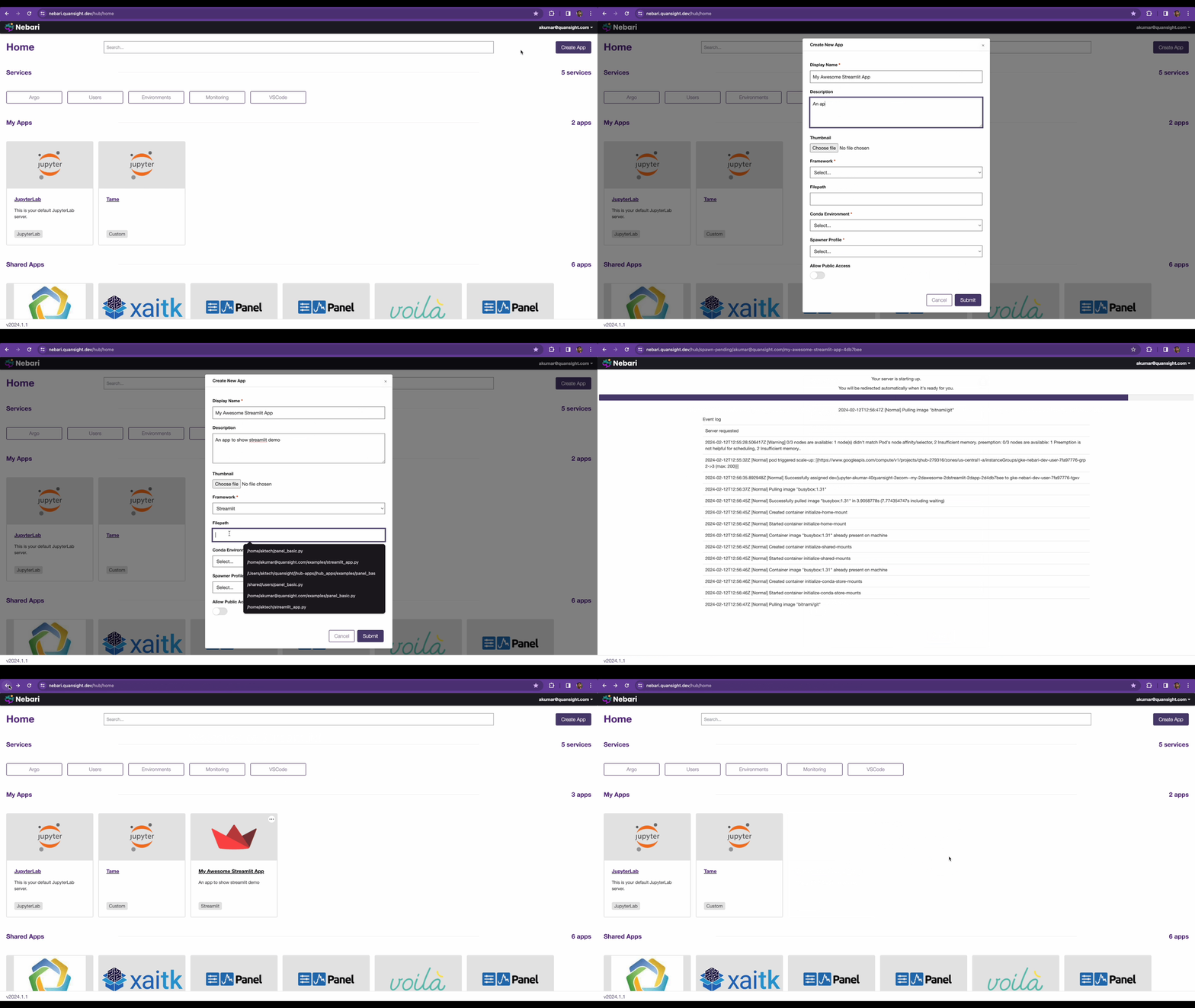
JupyterHub Apps Launcher is a generalized server launcher. The goal of this project is to support launching anything like say a Flask Server, FastAPI server or a Panel Dashboard via a user supplied command. Currently, the following frameworks are supported:
- Panel
- Bokeh
- Streamlit
- Plotly Dash
- Voila
- Gradio
- JupyterLab
- Generic Python Command
Installation
uv pip install jhub-apps
or via conda
conda install -c conda-forge jhub-apps
Development Installation
Install Dependencies
uv sync --extra dev
To develop the React UI frontend, also run:
cd ui
npm install
cd -
K3d Development Environment
For testing JupyterHub Apps with Kubernetes spawners (e.g., KubeSpawner), you can use the k3d development environment which provides a local Kubernetes cluster with Tilt for rapid development.
Prerequisites:
cd k3s-dev
make up
Once started, access JupyterHub at http://localhost:8000 (login with any username and password password)
To tear down the environment:
make down
Starting JupyterHub
Set the following environment variable:
export JHUB_APP_JWT_SECRET_KEY=$(openssl rand -hex 32)
Start JupyterHub:
jupyterhub -f jupyterhub_config.py
Now go to http://127.0.0.1:8000/hub/home to access JHub Apps Launcher
API Endpoints
The Hub service is exposed via FastAPI endpoints. The documentation for the same can be accessed at: http://127.0.0.1:10202/services/japps/docs
To try out authenticated endpoints click on the Authorize button on the top right of
the above url and choose OAuth2AuthorizationCodeBearer and click on Authorize.
Developing Locally
Note: In order to develop locally, both the JupyterHub backend and React UI frontend should be running.
- To start the JupyterHub Backend, run the following in a terminal:
jupyterhub -f jupyterhub_config.py
- To start the React UI frontend, run the following in a separate terminal from the
uidirectory:
npm run watch
Running Tests
Unit Tests
pytest jhub_apps/tests
E2E Tests
pytest jhub_apps/tests/tests_e2e -vvv -s --headed
Usage
JHub Apps has been tested with local JupyterHub using SimpleLocalProcessSpawner and with
The Littlest JupyterHub using SystemdSpawner.
- Install JHub Apps
uv pip install git+https://github.com/nebari-dev/jhub-apps.git
- Add the following in The Littlest JupyterHub's
jupyterhub_config.py
from tljh.user_creating_spawner import UserCreatingSpawner
from jhub_apps.configuration import install_jhub_apps

c.JupyterHub.bind_url = "<YOUR_JUPYTERHUB_URL>"
c.SystemdSpawner.unit_name_template = 'jupyter-{USERNAME}{JHUBSERVERNAME}'
c.JAppsConfig.apps_auth_type = "oauth" # or none (if you don't want authentication on apps)
c.JAppsConfig.python_exec = "python3"
# Pass in the path to jupyterhub config
c.JAppsConfig.jupyterhub_config_path = "jupyterhub_config.py"
# Either a static list of conda environments to show in the
# create panel apps form or a callable to fetch conda enviornments
# dynamically, e.g. from conda-store API
c.JAppsConfig.conda_envs = []
c = install_jhub_apps(c, UserCreatingSpawner)
Acknowledgments
This project is heavily inspired by and uses code from @danlester's cdsdashboards, without his work building this would have been a whole lot harder.


Download files
Download the file for your platform. If you're not sure which to choose, learn more about installing packages.
Source Distribution
Built Distribution
Filter files by name, interpreter, ABI, and platform.
If you're not sure about the file name format, learn more about wheel file names.
Copy a direct link to the current filters
File details
Details for the file jhub_apps-2026.7.1.tar.gz.
File metadata
- Download URL: jhub_apps-2026.7.1.tar.gz
- Upload date:
- Size: 13.0 MB
- Tags: Source
- Uploaded using Trusted Publishing? No
- Uploaded via: Hatch/1.16.5 cpython/3.12.13 HTTPX/0.28.1
File hashes
| Algorithm | Hash digest | |
|---|---|---|
| SHA256 |
73010e946fc07598c8596ac7013df95e186bf6ab6081ae67698186819b202d5a
|
|
| MD5 |
9e81128197650a2bfabc533ded16f56e
|
|
| BLAKE2b-256 |
ee850db743e37dc72573cd5847c49ce346acfec6878b87488f3eb760338c7201
|
File details
Details for the file jhub_apps-2026.7.1-py3-none-any.whl.
File metadata
- Download URL: jhub_apps-2026.7.1-py3-none-any.whl
- Upload date:
- Size: 3.2 MB
- Tags: Python 3
- Uploaded using Trusted Publishing? No
- Uploaded via: Hatch/1.16.5 cpython/3.12.13 HTTPX/0.28.1
File hashes
| Algorithm | Hash digest | |
|---|---|---|
| SHA256 |
108bfa65718e1fdef14128669ea5bccac75d9f75f72ccfb07f9f9c8b513b58f3
|
|
| MD5 |
2b3bac4caa50c12ef387784ffc0301ba
|
|
| BLAKE2b-256 |
99146f15329b62bf2a879c9ed2a3e76dbb057f289bd29ccfe75acdfa334826a0
|







