
- Introduction
- Installation
- Options
- All functions
- Optional Arguments
- Passphrase
- Injecting Key Generation Parameters
- Structure of the Output
- Speed Tests
- Credits
- License
- Bugs
Jihyocrypt
A simple, standalone library-based implementation of Salsa20 stream cipher developed by Daniel J Bernstein to encrypt and decrypt data along with a password determined key function.
Includes a multi-round nonce+password based key and hash function. The program is determined to be fairly cryptographically secure and is sufficiently fast for its implementation needs.
It implements a memory buffer for file encryptions and decryptions to make sure the memory usage does not blow up.
From the speed tests it can be asserted that it requires ~6s to encrypt 1GB of data. Which is fairly fast for most encryption/decryption operations required in Microservices and standalone applications(the main target for this).
A rust based library with equivalent API is soon underway.
Installation
Installing from PyPI
python3 -m pip install jihyocrypt
Or install from source
git clone https://gitlab.com/loggerheads-with-binary/jihyocrypt
cd jihyocrypt
python3 -m pip install -r requirements.txt
python3 -m setup.py install
Options
The following functions exposed for different purposes. The following mnemonic has been used for the encryption and decryption.
Syntax for functions::
- syntax: enc/dec_x2x
- where x: s -> Pickleable object; f-> File ; b -> bytestring
- enc/dec : enc -> Encryption , dec -> Decryption
- example: enc_s2f means encrypt from a standard object to a file
Ex:
import jihyocrypt as jihyo
jihyo.enc_f2f( 'plaintext.txt' , output_file = 'ciphertext.bin' , password = passphrase)
#Returns None, ciphertext.bin consists of encrypted data
Optional Arguments
The exposed encryption and decryption functions consist of two flags:
| Flag | Default | If True | If False |
|---|---|---|---|
progress_bar |
False | Prints a progress bar to stderr which can be used to monitor the progress of encryption/decryption | No such bar is produced |
redundant |
True | Encodes the hash of the nonce and passphrase inside the output Advisable to use since incorrect decryption will be flagged by the program |
The hash is not outputted. During decryption with incorrect passphrase, the program will generate incorrect output flagging no error. |
It also consists of an optional buffer_size argument in functions involving a file intermediary. The buffer size can be changed and is by default 3MB. A sweet spot for larger files with respect to time is ~100MB. The choice of time vs memory footprint is left to the developer
Passphrase
Passphrase can be a string/bytestring of any length. The phrase is put through a key generation function along with a nonce which generates a 256 bit key for the Salsa20 cipher and a 512 bit hash for the password verification.
If the redundant flag is set to False, the hash is not generated at all while if it is True, the hash is encoded in the output.
Note: The redundant flag should be the same in both encryption and decryption. Otherwise it can lead to erroneous output/DecryptionError
Injecting Key Generation Parameters
The program uses two different integers, DEFAULT_OBFUSCATION_ROUNDS and DEFAULT_JPIC_ROUNDS (JPIC is the 512 bit hash and is short for Jihyocrypt Password Integrity Check)
| Flag | Default | Recommended | Purpose |
|---|---|---|---|
DEFAULT_OBFUSCATION_ROUNDS |
6 | >4 | To create a suitable 256 bit key for Salsa20 cipher from provided password and nonce |
DEFAULT_JPIC_ROUNDS |
6 | >2 | To create a suitable 512 bit hash to verify validity of input password during decryption |
The following parameters can be modified for modifying the key generation process. A higher value of the DEFAULT_OBFUSCATION_ROUNDS will increase security of the key generated from a simple passphrase, but also increase the time needed. Similarly, a higher value of DEFAULT_JPIC_ROUNDS will reduce the chances of backtracking an encryption password but require more time.
Injection can be done as follows:
import jihyocrypt as jihyo
jihyo.DEFAULT_OBFUSCATION_ROUNDS = N	#N>0, N : int
jihyo.DEFAULT_JPIC_ROUNDS = M			#M>0, M : int

##Encryption/Decryption values must be same
Note that if injection is used, injection values should be same for both encryption and decryption
Structure of The output
Let's assume the plaintext input is a bytestring of N bytes, the following is the output structure
- If
redundant == True
Ciphertext Size = N + 72
-------------------|---------------------------------|---------------------------------

      8 (nonce)                64 (JPIC)                 N (encrypted ciphertext)
- If
redundant == False
Ciphertext Size = N + 8
-------------------|---------------------------------------------------


8 (nonce)                       N (encrypted ciphertext)
Speed Tests:
The following speed tests were performed using a Google Colab Script and Google Colab Resources. Your results may vary significantly.
The following tests were performed
- Key Generation vs No of Rounds
- JPIC Generation vs No of Rounds
- Plaintext Encryption and Decryption (b2b) vs size
- File to File Encryption and Decryption (f2f( vs size
- Plaintext Encryption (f2f) based on buffer size
Key Generation vs No of Rounds:
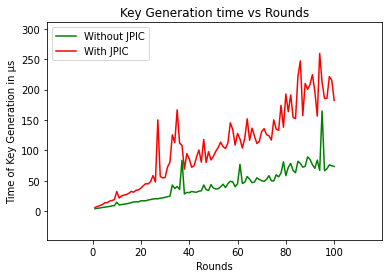
As expected, the behavior is fairly linear with O(N) complexity.
JPIC Generation vs No of Rounds:
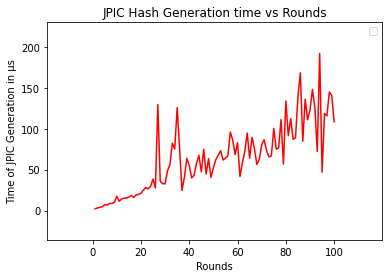
This behavior is fairly linear as well, and is ~(O(N)redundant=True - O(N)redundant=False)
Plaintext Encryption (b2b) vs size
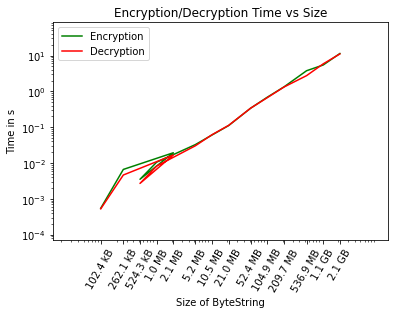
Standard linear behavior as expected.
File to File Encryption vs size
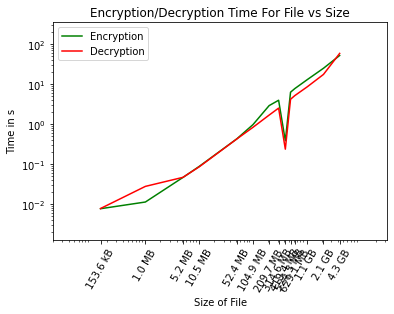
Similar behavior with added overhead of File I/O. Takes about 12.8 secs to encrypt a 1 GB, this can vary with disk I/O speeds.
Plaintext Encryption (f2f) based on buffer size
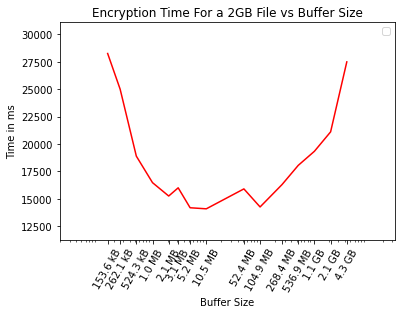
A weird trend I noticed is the drop and then rise in time needed for encryption alongwith increase in buffer size. In my experience, a buffer of about 100MB can significantly reduce time. While above, it starts becoming slower. I don't have a possible explanation for this.
Then why is the JihyoCrypt buffer defaulting to 3MB one could ask. It's because when I first developed it, memory was a larger concern than Speed. The program is regularly used to encrypt and decrypt large files(20 GB and above), and the time difference is not significant. However, having only ~6 MB of the memory being occupied vs ~100 MB of the memory being occupied for an hour or more is a choice left to the programmer. As mentioned before, one can easily change the buffer size since it is just a parameter of the encryption/decryption.
Credits:
Credits for the following libraries used: pycryptodome
And credits to Daniel J Bernstein for the Salsa20 stream cipher
License
The library is provided with MIT License
Bugs
Any bugs or cryptographic improvements can be suggested to dev@aniruddh.ml
1 maintainer

Release files for jihyocrypt 2.5.0.5
For a detailed explanation of source distributions (sdists) and built distributions (wheels), please see the package formats documentation.
Source distribution (sdist)
| File | Size | Uploaded | |
|---|---|---|---|
| jihyocrypt-2.5.0.5.tar.gz | 14.9 kB | Details |
Built distribution (wheel)
| File | Interpreter | ABI | Platform | Reset |
|---|---|---|---|---|
| jihyocrypt-2.5.0.5-py3-none-any.whl | Python 3 | none | any | Details |
Total release size: 31.7 kB
Release files / jihyocrypt-2.5.0.5.tar.gz
| Download URL | jihyocrypt-2.5.0.5.tar.gz |
|---|---|
| Size | 14.9 kB |
| Tags | Source |
|
SHA-256 checksum How to use checksums |
2d96841509082341d0f407e09da6010e82b34dee04d334667501af4e07aeb87f
|
|
BLAKE2b-256 checksum How to use checksums |
c3be7807cff10955e4a80e92079747c44de5ace593fc5765b2ce85beea51b721
|
| Upload date | |
|
Uploaded using Trusted Publishing? What is trusted publishing? |
No |
| Uploaded via |
twine/4.0.1 CPython/3.9.7
|
Release files / jihyocrypt-2.5.0.5-py3-none-any.whl
| Download URL | jihyocrypt-2.5.0.5-py3-none-any.whl |
|---|---|
| Size | 16.8 kB |
| Tags | Python 3 |
|
SHA-256 checksum How to use checksums |
3a89a52e40356da78e4e75eb21b4ff4e6e828ce5301154e52a9866a7326aa3a2
|
|
BLAKE2b-256 checksum How to use checksums |
878fb1bc5c88a643054a40c145bc22ee2b5d7bb87f2cf8e52b35d3a7d08ecfb2
|
| Upload date | |
|
Uploaded using Trusted Publishing? What is trusted publishing? |
No |
| Uploaded via |
twine/4.0.1 CPython/3.9.7
|














