
Jinja Partials
Simple reuse of partial HTML page templates in the Jinja template language for Python web frameworks. (There is also a Pyramid/Chameleon version here.)
Overview
When building real-world web apps with Flask + Jinja2, it's easy to end up with repeated HTML fragments. Just like organizing code for reuse, it would be ideal to reuse smaller sections of HTML template code. That's what this library is all about.
Example
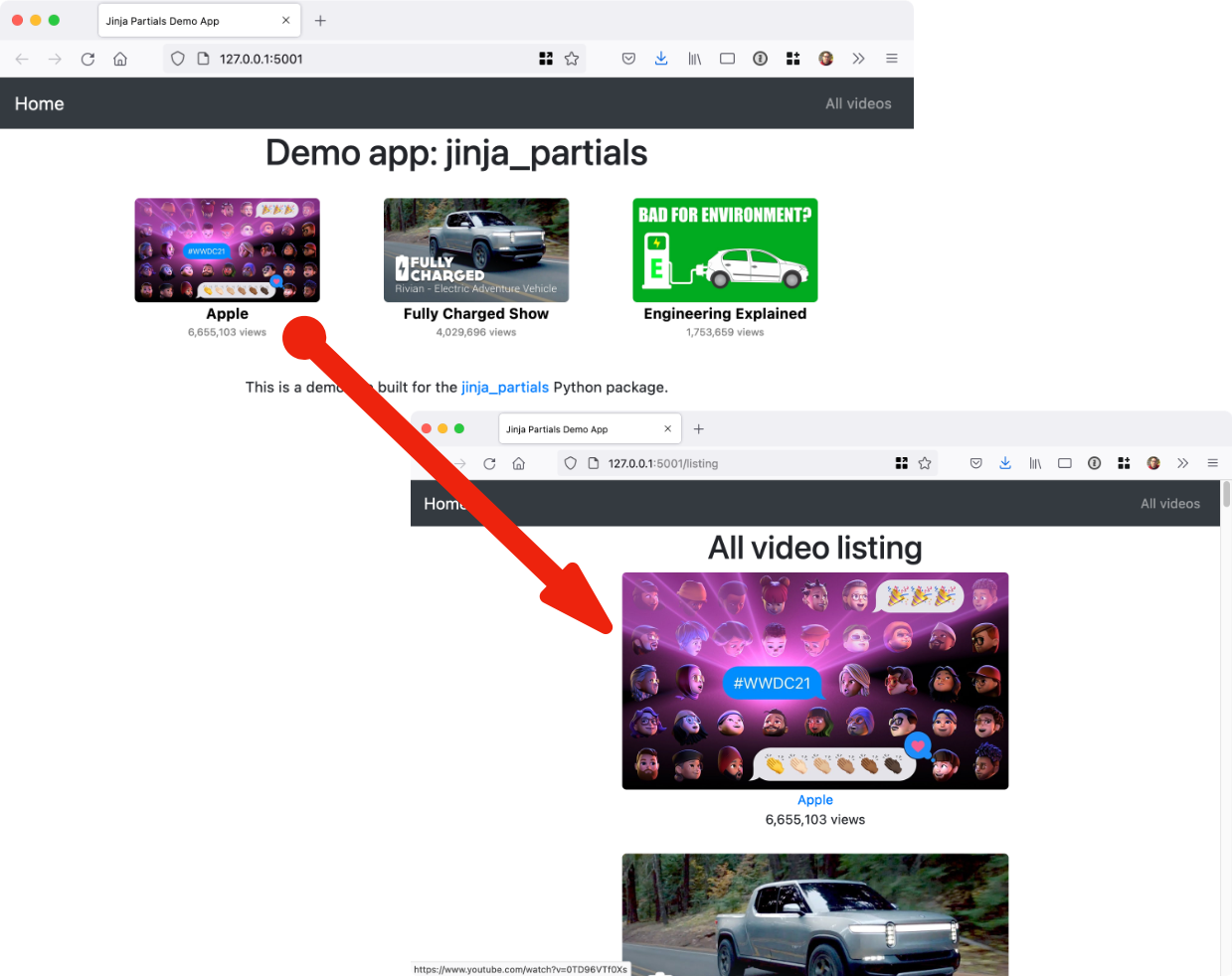
This project comes with a sample flask application (see the example folder). This app displays videos
that can be played on YouTube. The image, subtitle of author and view count are reused throughout the
app. Here's a visual:
Check out the demo / example application to see it in action.
Installation
It's just pip install jinja-partials and you're all set with this pure Python package.
Usage
Using the library is incredible easy. The first step is to register the partial method with Jinja and Flask. Do this once at app startup:
import flask
import jinja_partials

app = flask.Flask(__name__)

jinja_partials.register_extensions(app)
# ...
You can also use this library in your FastAPI (or Starlette) project!
from fastapi.templating import Jinja2Templates
# or `from starlette.templating import Jinja2Templates`

import jinja_partials

templates = Jinja2Templates("tests/test_templates")

jinja_partials.register_starlette_extensions(templates)
# ...
Or directly using a jijna environment!
import jinja_partials
from jinja2 import Environment, FileSystemLoader

environment = Environment(loader=FileSystemLoader("tests/test_templates"))
jinja_partials.register_environment(environment)
# ...
Next, you define your main HTML (Jinja2) templates as usual. Then define your partial templates. I recommend locating and naming them accordingly:
├── templates
│   ├── home
│   │   ├── index.html
│   │   └── listing.html
│   └── shared
│       ├── _layout.html
│       └── partials
│           ├── video_image.html
│           └── video_square.html
Notice the partials subfolder in the templates/shared folder.
The templates are just HTML fragments. Here is a stand-alone one for the YouTube thumbnail from the example app:
<img src="https://img.youtube.com/vi/{{ video.id }}/maxresdefault.jpg"
     class="img img-responsive {{ ' '.join(classes) }}"
     alt="{{ video.title }}"
     title="{{ video.title }}">
Notice that an object called video and list of classes are passed in as the model.
Templates can also be nested. Here is the whole single video fragment with the image as well as other info linking out to YouTube:
<div>
    <a href="https://www.youtube.com/watch?v={{ video.id }}" target="_blank">
        {{ render_partial('shared/partials/video_image.html', video=video) }}
    </a>
    <a href="https://www.youtube.com/watch?v={{ video.id }}" target="_blank"
       class="author">{{ video.author }}</a>
    <div class="views">{{ "{:,}".format(video.views) }} views</div>
</div>
Now you see the render_partial() method. It takes the subpath into the templates folder and
any model data passed in as keyword arguments.
We can finally generate the list of video blocks as follows:
{% for v in videos %}

    <div class="col-md-3 video">
        {{ render_partial('shared/partials/video_square.html', video=v) }}
    </div>

{% endfor %}
This time, we reframe each item in the list from the outer template (called v) as the video model
in the inner HTML section.
Why not just use include or macro from Jinja?
The short answer is they are nearly the same, but both fall short in different ways. For a more detailed response, see the discussion on issue #1
1 maintainer

Metadata
1 maintainer
Release files for jinja_partials 0.2.0
For a detailed explanation of source distributions (sdists) and built distributions (wheels), please see the package formats documentation.
Source distribution (sdist)
| File | Size | Uploaded | Provenance | Actions |
|---|---|---|---|---|
| jinja_partials-0.2.0.tar.gz | 5.6 kB | Without provenance | Details for jinja_partials-0.2.0.tar.gz |
Built distribution (wheel)
| File | Interpreter | ABI | Platform | Actions Reset |
|---|---|---|---|---|
| jinja_partials-0.2.0-py3-none-any.whl | Python 3 | none | any | Details for jinja_partials-0.2.0-py3-none-any.whl |
Total release size: 10.4 kB
Release files / jinja_partials-0.2.0.tar.gz
| Download URL | jinja_partials-0.2.0.tar.gz |
|---|---|
| Size | 5.6 kB |
| Tags | Source |
|
SHA-256 checksum How to use checksums |
ada44c441fe175d0a5d5f594b5f4c3301a1d5974d212e83031fbd8886785dd69
|
|
BLAKE2b-256 checksum How to use checksums |
dd21e5e1c83ae966000ce88623fb0b1c37a562afcb9ff32d32d1211f4629b185
|
| Upload date | |
|
Uploaded using Trusted Publishing? What is trusted publishing? |
No |
| Uploaded via |
python-httpx/0.26.0
|
Release files / jinja_partials-0.2.0-py3-none-any.whl
| Download URL | jinja_partials-0.2.0-py3-none-any.whl |
|---|---|
| Size | 4.8 kB |
| Tags | Python 3 |
|
SHA-256 checksum How to use checksums |
a83ab16c02a03412eb6b5a49345900fb56ad666fad11d3be7fff09dbf9ecf8f3
|
|
BLAKE2b-256 checksum How to use checksums |
ae607997f2b402502b9ea4e1f1b10526b9ce05538ae6f4f7057469e4f87f4c8f
|
| Upload date | |
|
Uploaded using Trusted Publishing? What is trusted publishing? |
No |
| Uploaded via |
python-httpx/0.26.0
|
Security for jinja_partials 0.2.0
Provenance
Provenance describes where a file came from. On PyPI, provenance is shared via attestations, which provide a verifiable record of the build or publishing details. View details, limitations and caveats.
No provenance found
None of the files in this release were uploaded with provenance metadata.
A note on package security
PyPI is a repository for distributing packages, not a service for auditing them. While third-party security researchers and our staff do their best to detect and remove malicious packages, PyPI cannot guarantee the quality, security or suitability of any given package.
To learn more about protecting yourself from malicious actors, visit our package security documentation.














