
Jinja Partials
Simple reuse of partial HTML page templates in the Jinja template language for Python web frameworks. (There is also a Pyramid/Chameleon version here.)
Overview
Every Jinja2 app of a certain age has a fragment that got copied. A video card, a badge, a table row. It started life on one page, got pasted onto a second, then a third, and by the time the designer asks for a small refresh there are fourteen of them and two have quietly drifted. In Python this never happens, because you would write a function with parameters and call it from everywhere. jinja_partials gives your templates that same move:
{{ render_partial('shared/partials/video_square.html', video=v) }}
That one call renders the fragment file with the data you hand it, and nothing else, and gives back HTML that is safe to drop straight into the page. Fragments nest as deep as the design needs. Every input is visible at the call site. And because a partial is just a template, the same file can render inline inside a page and be served on its own to an HTMX swap.
Documentation
The full documentation is available at mkennedy.codes/docs/jinja-partials. This README is the short version; the user guide tells the whole story:
- Why partials - the fourteenth copy of a video card, and how
render_partialdiffers fromincludeandmacro - Installation and the Quickstart, which builds that card properly, once, then serves it to HTMX
- Frameworks - Flask, Quart, FastAPI, Starlette, plain Jinja2, the declarative extension, and the one rule async apps must follow
- Troubleshooting - a field guide to every error and wrong output, with the fix for each
- Testing partials, How it works, and the FAQ
- API reference
Coding agents can load the agent skill or read llms-full.txt.
Supported Frameworks
Your templates never find out which framework is running them. {{ render_partial(...) }} looks the same in a Flask app from 2019 and a FastAPI app you started this morning. The only thing that changes is one registration line at startup:
- Flask -
register_extensions(app) - FastAPI -
register_fastapi_extensions(app, templates) - Starlette -
register_starlette_extensions(templates, app=app) - Quart -
register_quart_extensions(app) - Any Jinja2 environment -
register_environment(env)
Under every one of those is the same tiny primitive. The framework helpers only differ in how they find the Jinja environment and, for the async frameworks, how they keep a small render thread pool alive for exactly as long as the app is serving.
Examples
The examples folder holds a runnable app for each framework:
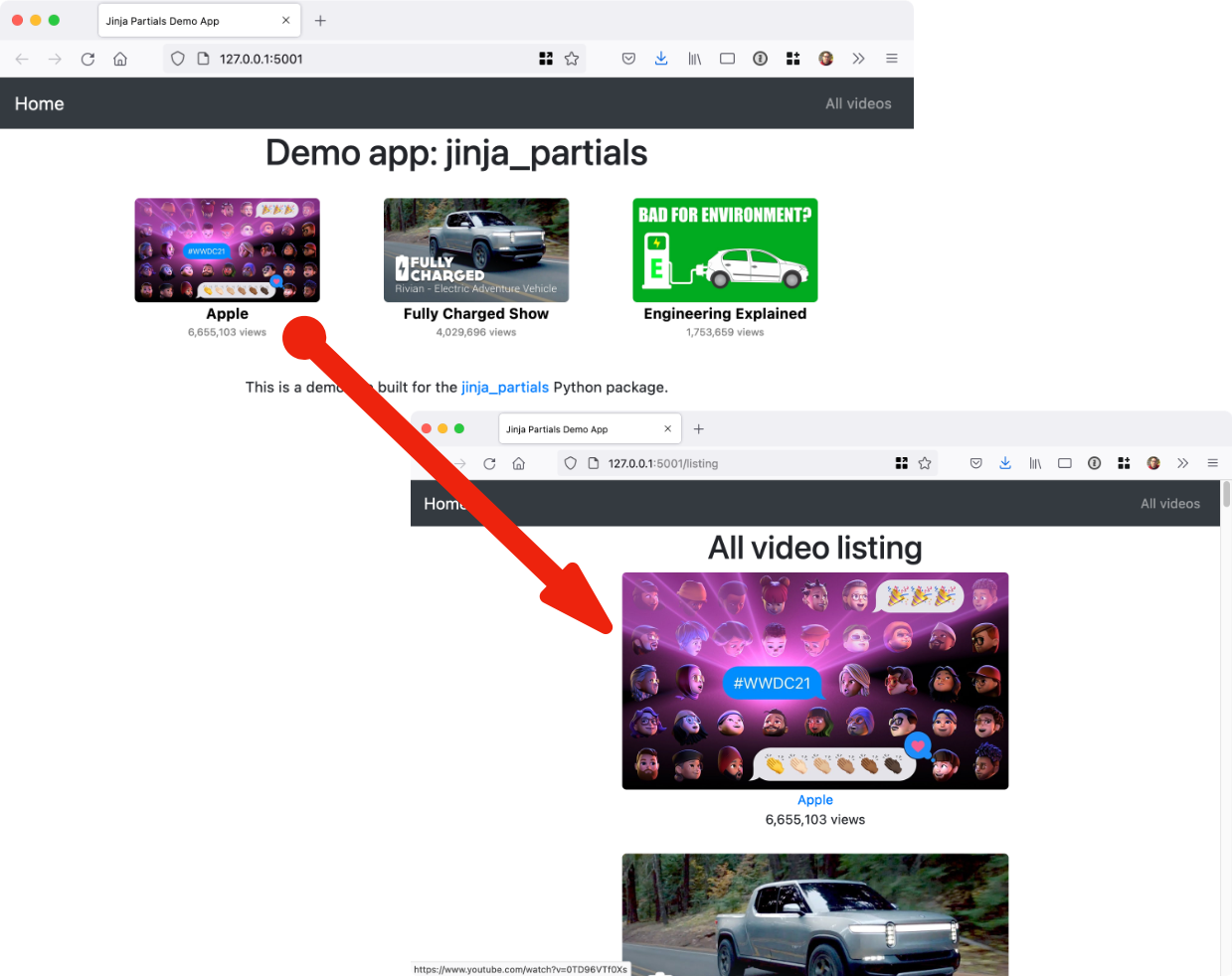
- Flask example - the complete video site from this README, with a layout, a listing page, and a small JSON database of videos
- FastAPI example - an
enable_async=Trueenvironment rendering cards with nested badge partials - Starlette example - the same cards and badges on Starlette, with lifespan-managed rendering
- Quart example - the async Flask cousin, rendering the same cards through
before_servingandafter_servinghooks
The three async examples are deliberately small and nearly identical, so you can diff them and see that the templates are the part that does not change. The screenshot below is the Flask example, and every card on it is one partial file rendered in a loop:
Installation
It's just pip install jinja-partials (or uv add jinja-partials) and you're all set with this pure Python package. The PyPI name has a hyphen and the import has an underscore, import jinja_partials, which is the first and only trap at the door.
Requires Python 3.10 or newer. On older interpreters pip does not refuse; it quietly hands you the 0.3.0 release, which predates the Quart and FastAPI support and the lifecycle-managed Starlette support described here. If a function on this page is mysteriously missing, check which version you actually got.
Usage
Register jinja_partials with your framework once, where the app is built, before it starts serving. After that the render_partial function is simply there in every template, like url_for. The Frameworks page covers each option in more depth, including the page-level rule for async apps.
Flask
Flask is the original home of this library and gets the richest behavior. Partials render through flask.render_template, so context processors, g, request, and session all work inside them exactly as they do in a page.
import flask
import jinja_partials

app = flask.Flask(__name__)
jinja_partials.register_extensions(app)
FastAPI
Registration wraps the app's lifespan, so the render pool exists for exactly as long as the app is serving. If you already pass a lifespan= to FastAPI, it keeps running and whatever state it yields still reaches your routes.
from fastapi import FastAPI
from fastapi.templating import Jinja2Templates
import jinja_partials

app = FastAPI()
templates = Jinja2Templates(directory='templates')

jinja_partials.register_fastapi_extensions(app, templates)
Starlette
Read the last line twice: templates comes first and app is a keyword, the reverse of the FastAPI call. Starlette support predates the app-aware version and kept its original first argument. Passing the app is optional but recommended, because that is what ties the render pool to the lifespan.
from starlette.applications import Starlette
from starlette.templating import Jinja2Templates
import jinja_partials

templates = Jinja2Templates(directory='templates')
app = Starlette(routes=[...])

jinja_partials.register_starlette_extensions(templates, app=app)
Quart
Quart templates are async, and registration adds before_serving and after_serving hooks that create and later shut down the pool that renders partials. Your pages keep using await render_template(...) as they always did.
from quart import Quart
import jinja_partials

app = Quart(__name__)
jinja_partials.register_quart_extensions(app)
One rule for async apps
Quart, FastAPI, and Starlette apps usually build their Jinja environment with enable_async=True. jinja_partials handles the partials inside those templates with no changes on your side. The page that contains them is your job, and there is exactly one rule: in FastAPI and Starlette, render it with await template.render_async(...) and return an HTMLResponse. The tempting templates.TemplateResponse(...) calls the synchronous render(), which tries to start an event loop inside the one already running your request, and Python declines with RuntimeError: asyncio.run() cannot be called from a running event loop. The partials were never the problem; the page was.
from fastapi.responses import HTMLResponse


@app.get('/')
async def index() -> HTMLResponse:
    template = templates.get_template('home/index.html')
    return HTMLResponse(await template.render_async(items=items))
Direct Jinja2 Environment
No framework, or one the library has not heard of? Register with the environment directly. The markup=True is not decoration: this is the one registration function whose markup defaults to False, and with autoescaping on, the default inserts your fragment as escaped text.
from jinja2 import Environment, FileSystemLoader
import jinja_partials

environment = Environment(loader=FileSystemLoader('templates'))
jinja_partials.register_environment(environment, markup=True)
Using the Jinja2 Extension (Declarative)
If your framework or settings file configures Jinja declaratively, PartialsJinjaExtension performs the same registration from the environment's extensions list, always with markup enabled.
For Flask Applications
With Flask, add the extension to your app's Jinja environment:
import flask
import jinja_partials

app = flask.Flask(__name__)

# Declarative registration with Flask
app.jinja_env.add_extension('jinja_partials.PartialsJinjaExtension')

# Alternative: traditional registration
# jinja_partials.register_extensions(app)
Note: With the extension approach, partials render directly through the Jinja environment rather than
flask.render_template. That means Flask context processors (@app.context_processor) and thetemplate_renderedsignal do not apply inside partials (g,request, andsessionstill work, since Flask installs them as environment globals). If your partials depend on context processors, usejinja_partials.register_extensions(app).
For Standalone Jinja2 Environments
For direct Jinja2 usage (without Flask):
from jinja2 import Environment, FileSystemLoader

# Declarative registration - extension automatically registers render_partial
environment = Environment(
    loader=FileSystemLoader('tests/test_templates'), extensions=['jinja_partials.PartialsJinjaExtension']
)
# render_partial is now available in templates, no additional setup needed!
When to Use the Extension Approach
Reach for the extension when the environment is configured somewhere you do not control the Python, such as a framework or settings file that takes a list of extension names, or when you are already stacking other Jinja2 extensions and want this one listed beside them. It always enables markup, so your partials come back as Markup objects and autoescaping leaves them alone.
Template Usage
Here is the video card from the screenshot, built once. Partials are ordinary templates, so they can live anywhere your loader can see. The convention this project uses is a partials folder under templates/shared:
├── templates
│   ├── home
│   │   ├── index.html
│   │   └── listing.html
│   └── shared
│       ├── _layout.html
│       └── partials
│           ├── video_image.html
│           └── video_square.html
Start with the smallest piece. The YouTube thumbnail takes a video and an optional list of CSS classes, and it declares that classes is optional by handling its own absence with | default([]):
<img src="https://img.youtube.com/vi/{{ video.id }}/maxresdefault.jpg"
     class="img img-responsive {{ (classes | default([])) | join(' ') }}"
     alt="{{ video.title }}"
     title="{{ video.title }}">
Now the card. It wraps the thumbnail in a link, adds the author and the view count, and it gets the thumbnail by rendering the image partial inside itself. Partials nest; that is half their charm.
<div>
    <a href="https://www.youtube.com/watch?v={{ video.id }}" target="_blank">
        {{ render_partial('shared/partials/video_image.html', video=video) }}
    </a>
    <a href="https://www.youtube.com/watch?v={{ video.id }}" target="_blank"
       class="author">{{ video.author }}</a>
    <div class="views">{{ "{:,}".format(video.views) }} views</div>
</div>
That is render_partial() in the wild. It takes the path of the fragment relative to the templates folder, extension included, and whatever data the fragment needs as keyword arguments.
Finally the page, which turns a list of videos into a grid of cards:
{% for v in videos %}

    <div class="col-md-3 video">
        {{ render_partial('shared/partials/video_square.html', video=v) }}
    </div>

{% endfor %}
The page calls the loop variable v. The card calls it video. That renaming at the boundary is not a workaround; it is the whole idea. The fragment names what it needs, and each caller maps its own data onto those names. The listing page, the search results, and the email digest can all call this one file with whatever they happen to have, and the fragment can never quietly depend on a page variable it was not given.
If a fragment shows up on the page as escaped text, or you hit PartialsException, TemplateNotFound, or an asyncio.run() error in an async app, the Troubleshooting page starts from what you see on the screen and works back to the fix.
Why not just use include or macro from Jinja?
Because both are nearly right, which is exactly why they frustrate. {% include %} hands the fragment the entire page context, so nothing at the call site tells you what it reads. {% macro %} has proper parameters but must be imported into every page and is not a file you can render on its own, so it cannot answer an HTMX request by itself. Why partials tells the story, and the original debate is on issue #1.
1 maintainer

Metadata
1 maintainer
Release files for jinja_partials 0.4.0
For a detailed explanation of source distributions (sdists) and built distributions (wheels), please see the package formats documentation.
Source distribution (sdist)
| File | Size | Uploaded | Provenance | Actions |
|---|---|---|---|---|
| jinja_partials-0.4.0.tar.gz | 3.0 MB | Without provenance | Details for jinja_partials-0.4.0.tar.gz |
Built distribution (wheel)
| File | Interpreter | ABI | Platform | Actions Reset |
|---|---|---|---|---|
| jinja_partials-0.4.0-py3-none-any.whl | Python 3 | none | any | Details for jinja_partials-0.4.0-py3-none-any.whl |
Total release size: 3.0 MB
Release files / jinja_partials-0.4.0.tar.gz
| Download URL | jinja_partials-0.4.0.tar.gz |
|---|---|
| Size | 3.0 MB |
| Tags | Source |
|
SHA-256 checksum How to use checksums |
5e85542741c445bf1320090d05d9e47dc9061deeb63a3fe2bc06e66690be9cbb
|
|
BLAKE2b-256 checksum How to use checksums |
9c256e1e3c5adba645fb715168918101b2ef067708febaa4eb343eab31ebf82d
|
| Upload date | |
|
Uploaded using Trusted Publishing? What is trusted publishing? |
No |
| Uploaded via |
uv/0.13.7 {"installer":{"name":"uv","version":"0.13.7","subcommand":["publish"]},"python":null,"implementation":{"name":null,"version":null},"distro":{"name":"macOS","version":null,"id":null,"libc":null},"system":{"name":null,"release":null},"cpu":null,"openssl_version":null,"setuptools_version":null,"rustc_version":null,"ci":null}
|
Release files / jinja_partials-0.4.0-py3-none-any.whl
| Download URL | jinja_partials-0.4.0-py3-none-any.whl |
|---|---|
| Size | 13.7 kB |
| Tags | Python 3 |
|
SHA-256 checksum How to use checksums |
035786aed17d7e6bdcd02b5e81917999ea29d4dc0f4d4b65d44368e1ff0cb331
|
|
BLAKE2b-256 checksum How to use checksums |
b14e9a1a42378bba65f348d2038db010967880c2f0888aa1d278247e12898440
|
| Upload date | |
|
Uploaded using Trusted Publishing? What is trusted publishing? |
No |
| Uploaded via |
uv/0.13.7 {"installer":{"name":"uv","version":"0.13.7","subcommand":["publish"]},"python":null,"implementation":{"name":null,"version":null},"distro":{"name":"macOS","version":null,"id":null,"libc":null},"system":{"name":null,"release":null},"cpu":null,"openssl_version":null,"setuptools_version":null,"rustc_version":null,"ci":null}
|
Security for jinja_partials 0.4.0
Provenance
Provenance describes where a file came from. On PyPI, provenance is shared via attestations, which provide a verifiable record of the build or publishing details. View details, limitations and caveats.
No provenance found
None of the files in this release were uploaded with provenance metadata.
A note on package security
PyPI is a repository for distributing packages, not a service for auditing them. While third-party security researchers and our staff do their best to detect and remove malicious packages, PyPI cannot guarantee the quality, security or suitability of any given package.
To learn more about protecting yourself from malicious actors, visit our package security documentation.














