
Jira to Confluence gantt chart generator


Table of Contents
Overview
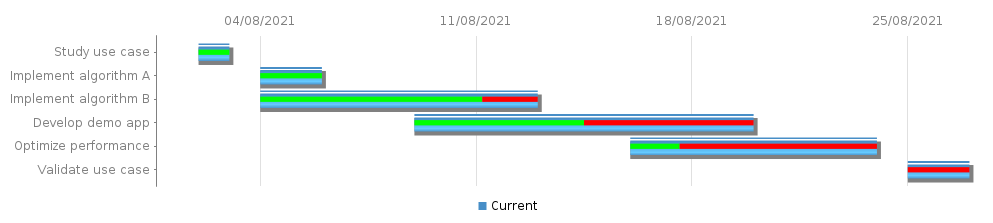
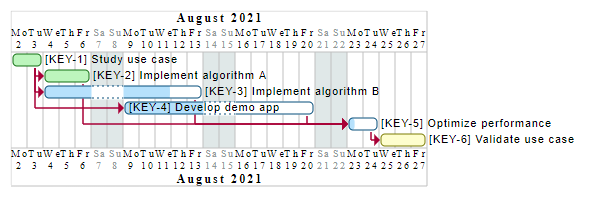
This module has the objective to create a gantt chart from Jira data and
publish and publish the resulting chart and status on Confluence.
It provides different render engines, but it is easy to add its own custom
engine :
Installation
From PyPI (Recommended)
You can install the exporter easily with the following command or insert into your requirements file :
pip install jira2confluence-gantt
From sources
All the project is managed with Poetry. To install it, please visit the official page and follow these instructions :
poetry shell
poetry install --without dev
For the developers, it is useful to install extra tools like :
These tools can be installed with the following command :
poetry install
The Git hooks can be installed with :
poetry run pre-commit install
The hooks can be run manually at any time :
poetry run pre-commit run --all-file
Usage
The script with required argument can be started by executing the following command :
jira2confluence-gantt my_config.yaml
The full list of arguments supported can be displayed with the following helper :
jira2confluence-gantt -h
usage: jira2confluence-gantt [-h] [-v] [config.yaml]

positional arguments:
  config.yaml    Configuration file

options:
  -h, --help     show this help message and exit
  -v, --verbose  Verbose mode
Configuration
The configuration file support 2 formats :
- YAML format (Recommended format)
- JSON format
In the configuration file, there are 2 main sections required :
- Server
- Projects
Server configuration
The server node will configure the URL of the Jira and Confluence server.
For the moment, only the username/token authentication is supported.
The credentials could be defined with environment variables or .env file.
ATLASSIAN_USER=<your login>
ATLASSIAN_TOKEN=<your token>
In Yaml :
server:
  jira: "https://my.jira.server.com"
  confluence: "https://my.confluence.server.com"
In Json :
{
  "server": {
    "jira": "https://my.jira.server.com",
    "confluence": "https://my.confluence.server.com"
  }
}
| Attribute | Required | Description |
|---|---|---|
| server | ✅ | Main configuration node for server. |
| jira | ✅ | Jira server URL to retrieve tickets information. |
| confluence | ❌ | Confluence server URL to publish the report. If the confluence server isn't set, only the gantt chart will be generated if the engine permit it. |
Project configuration
The projects node will provide the configuration for each project.
In Yaml :
projects:
  - name: "Project name"
    jql: "project = TEST"
    report:
      space: "SPACE"
      parent_page: "My Parent Page"
      engine: "PlantUML"
      legend: True
      template: "report.jinja2"
    fields:
      start_date: "Start date (WBSGantt)"
      end_date: "Finish date (WBSGantt)"
      progress: "Progress (WBSGantt)"
      link: "is blocked by"
In Json :
{
  "projects": [
    {
      "name": "Project name",
      "jql": "project = TEST",
      "report": {
        "space": "SPACE",
        "parent_page": "My Parent Page",
        "engine": "PlantUML",
        "legend": true,
        "template": "report.jinja2"
      },
      "fields": {
        "start_date": "Start date (WBSGantt)",
        "end_date": "Finish date (WBSGantt)",
        "progress": "Progress (WBSGantt)",
        "link": "is blocked by"
      }
    }
  ]
}
| Attribute | Required | Description |
|---|---|---|
| projects | ✅ | Main configuration node for all projects. |
| name | ✅ | Name of the project. This name will be used as a title in the Gantt chart and also as a name in Snake case format for the output gantt file. |
| jql | ✅ | JQL query to retrieve the list of tickets. |
| report | ✅ | Main configuration node for report generation. |
| fields | ✅ | Main configuration node for fields. |
Some attributes could use double quotes to preserve space in their names. The YAML syntax provides a solution by replacing with simple quote or escaping like JSON :
In Yaml :
jql: 'project = "MY TEST"'
In Json :
{
  "jql": "project = \"MY TEST\""
}
Report configuration
Configuration node for all attributes related to report generation.
| Attribute | Required | Description |
|---|---|---|
| space | ✅ | Confluence destination space. |
| parent_page | ✅ | Confluence parent page of the report page. |
| engine | ❌ | Engine used to create gantt report. Confluence is the default engine |
| legend | ❌ | Add a legend in the gantt chart. **By default the legend is not added. |
There are several engines available to produce Gantt chart :
-
Confluencechart macro : Produce a chart with a builtin macro. The graph will not include the dependency link. -
PlantUMLmacro : Produce a PlantUML graph which will be included in the Confluence page with the PlantUML macro.
Fields
Configuration node for all Jira fields used to construct Gantt chart.
It is a mandatory field.
In Yaml :
These fields are most of the time the same for all projects and like all others
fields they could be aliased to avoid redefinition.
In the following example, we define an anchor WbsFields :
Server:
  # ...

Fields: &WbsFields
  Start date: "Start date (WBSGantt)"
  End date: "Finish date (WBSGantt)"
  Progress: "Progress (WBSGantt)"

Projects:
  Project name:
    JQL: "project = TEST"
    Fields: *WbsFields
  Second project name:
    JQL: "project = TEST2"
    Fields: *WbsFields
In Json :
{
  "Projects": {
    "Project name": {
      "Fields": {
        "Start date": "Start date (WBSGantt)",
        "End date": "Finish date (WBSGantt)",
        "Progress": "Progress (WBSGantt)",
      }
    }
  }
}
Start date
Define the Jira field to use as a start date for task in Gantt chart.
It is a mandatory field.
End date
Define the Jira field to use as a start date for task in Gantt chart.
It is a mandatory field.
Progress
Define the Jira field to use as a percent of work done for task in Gantt chart.
It is an optional field.
Link
Define the Jira inward link to use in order to define how the tasks could be
blocked by others tasks task in Gantt chart.
It is an optional field. By default, the link used is "is blocked by"
Contribution
Unless you explicitly state otherwise, any contribution intentionally submitted for inclusion in the work by you, shall be as defined in the Apache-2.0 license without any additional terms or conditions.
See CONTRIBUTING.md.
1 maintainer

Metadata
1 maintainer
Release files for jira2confluence-gantt 0.3.3
For a detailed explanation of source distributions (sdists) and built distributions (wheels), please see the package formats documentation.
Source distribution (sdist)
| File | Size | Uploaded | |
|---|---|---|---|
| jira2confluence_gantt-0.3.3.tar.gz | 19.3 kB | Details |
Built distribution (wheel)
| File | Interpreter | ABI | Platform | Reset |
|---|---|---|---|---|
| jira2confluence_gantt-0.3.3-py3-none-any.whl | Python 3 | none | any | Details |
Total release size: 39.4 kB
Release files / jira2confluence_gantt-0.3.3.tar.gz
| Download URL | jira2confluence_gantt-0.3.3.tar.gz |
|---|---|
| Size | 19.3 kB |
| Tags | Source |
|
SHA-256 checksum How to use checksums |
cd3e11df1461fd397fa5344ba2e8dce3e5d3c75f86f5680fed488a9c2e783081
|
|
BLAKE2b-256 checksum How to use checksums |
4fde3742f8a46dc86bf368a04dac625afe87a747f1bca5a18f01b92e43185229
|
| Upload date | |
|
Uploaded using Trusted Publishing? What is trusted publishing? |
No |
| Uploaded via |
poetry/1.8.2 CPython/3.11.8 Linux/6.5.0-1015-azure
|
Release files / jira2confluence_gantt-0.3.3-py3-none-any.whl
| Download URL | jira2confluence_gantt-0.3.3-py3-none-any.whl |
|---|---|
| Size | 20.1 kB |
| Tags | Python 3 |
|
SHA-256 checksum How to use checksums |
288e77b2b19fc225b96c2653cee083d0ce8a11943b9a663b4d18e827a06d4961
|
|
BLAKE2b-256 checksum How to use checksums |
f278c1d70da94a0a3d3755b4a80f4043e7a37ca6857b9036459c01fd4ace216a
|
| Upload date | |
|
Uploaded using Trusted Publishing? What is trusted publishing? |
No |
| Uploaded via |
poetry/1.8.2 CPython/3.11.8 Linux/6.5.0-1015-azure
|














