
A TUI for interacting with Atlassian Jira from your terminal.
Verified details
These details have been verified by PyPIProject links
GitHub Statistics
Maintainers

Project description
JiraTUI
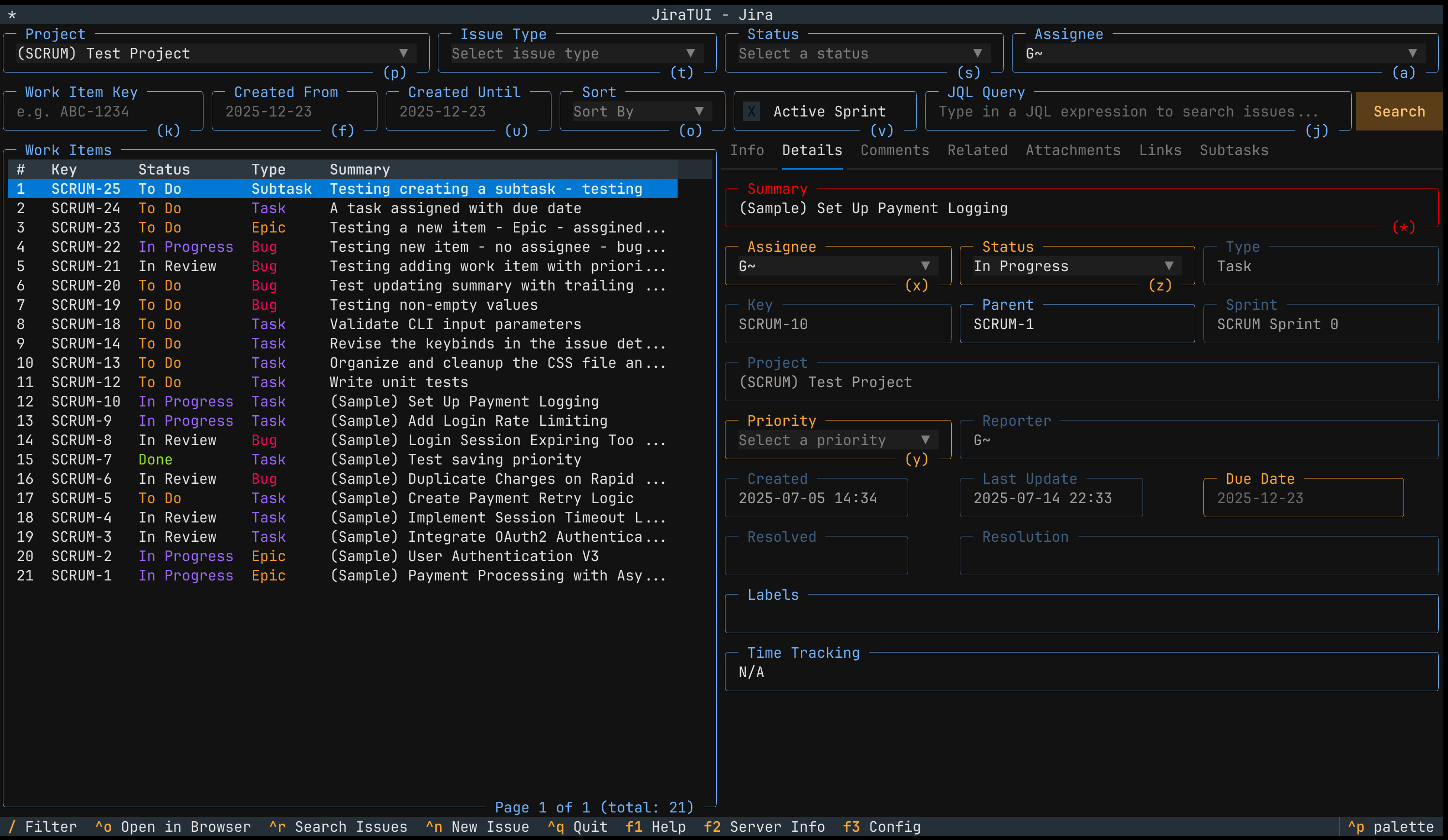
A Text User Interface (TUI) for interacting with Atlassian Jira directly from your shell.
Installation
The recommended way to install the application is via uv:
uv add jiratui
Alternatively, you can install it using pip:
pip install jiratui
Usage
After installing the package, you can run the CLI tool with the following command:
jiratui
This will show you the available commands for the CLI tool
Usage: jiratui [OPTIONS] COMMAND [ARGS]...

Options:
  --help  Show this message and exit.

Commands:
  comments  Use it to add, list or delete comments associated to work items.
  issues    Use it to search, update or delete work items.
  ui        Launches the Jira TUI application.
  users     Use it to search users and user groups.
Settings
Before using the application, you need to configure a few settings.
Tip: the application uses Pydantic Settings. This allows
you to define the configuration variables as ENV variables. To do that simply set the value of the config variable you
want to define in a ENV variable called JIRA_TUI_*; where * is the name of the config variable.
Example: to define the value of jira_api_username do this: JIRA_TUI_JIRA_API_USERNAME=...
Setting Up the Jira's Instance API
You must provide the following values to connect to your Jira instance API:
jira_api_username: the username for connecting to your Jira's API.jira_api_token: the token for connecting to your Jira's API.jira_api_base_url: the base URL of your Jira instance API.
You have a couple of options for setting these values.
Use a .env File
Create a .env file named .env.jiratui and add the following content:
JIRA_TUI_JIRA_API_USERNAME=<your-jira-api-username>
JIRA_TUI_JIRA_API_TOKEN=<your-jira-api-token>
JIRA_TUI_JIRA_API_BASE_URL=https://<your-jira-instance-hostname>.atlassian.net
Use a Config File
You can also use a combination of a .env file and a config file. For example, keep the API username and token in the
.env file while placing the rest of the settings in a config file. The default config file expected by the application
is jiratui.yaml, but you can name your config file anything you like and specify it using the environment variable
JIRA_TUI_CONFIG_FILE when interacting with the CLI/app.
Example: Create a file called my-jiratui-config.yaml and add the following:
jira_api_base_url: 'https://<your-jira-instance-hostname>.atlassian.net'
Tip: The application provides a sample config file called jiratui.example.yaml that you can use to define yours.
Running the Application UI
Once you have provided the necessary settings, you can run the application's UI with the following command:
jiratui ui
If you are using a custom config file, run:
JIRA_TUI_CONFIG_FILE=my-file.yaml jiratui ui
CLI Interface
In addition to the ui command, the CLI tool offers several commands to help you manage issues, comments, and users.
Searching for Issues
To search for work items in the project SCRUM, use the issues search command and pass the --project-key argument
with the (case-sensitive) project key.
Example: searching for issues of the project SCRUM
$ jiratui issues search --project-key SCRUM

| Key     | Type | Created          | Status (ID)   | Reporter          | Assignee          | Summary                                    |
|---------|------|------------------|---------------|-------------------|-------------------|--------------------------------------------|
| SCRUM-1 | Bug  | 2025-07-31 15:55 | To Do (10000) | lisa@simpson.com  | bart@simpson.com  | Write 100 times "I will be a good student" |
| SCRUM-2 | Task | 2025-06-30 15:56 | To Do (10000) | homer@simpson.com | homer@simpson.com | Eat donuts                                 |
To search for a specific work item, use the issues search command with the --key argument and the (case-sensitive)
issue key.
Example: searching for the issue with key SCRUM-1
$ jiratui issues search --key SCRUM-1

| Key     | Type | Created          | Status (ID)   | Reporter          | Assignee          | Summary                                    |
|---------|------|------------------|---------------|-------------------|-------------------|--------------------------------------------|
| SCRUM-1 | Bug  | 2025-07-31 15:55 | To Do (10000) | lisa@simpson.com  | bart@simpson.com  | Write 100 times "I will be a good student" |
The full list of commands you can use with the CLI and additional settings is available at https://jiratui.readthedocs.io
Documentation
The full documentation is available at https://jiratui.readthedocs.io
Contributing
If you would like to contribute to the project make sure you are familiar with the contribution guidelines and the Code of Conduct.
Project details
Verified details
These details have been verified by PyPIProject links
GitHub Statistics
Maintainers
Release history Release notifications | RSS feed


Download files
Download the file for your platform. If you're not sure which to choose, learn more about installing packages.
Source Distribution
Built Distribution
Filter files by name, interpreter, ABI, and platform.
If you're not sure about the file name format, learn more about wheel file names.
Copy a direct link to the current filters
File details
Details for the file jiratui-0.1.1.tar.gz.
File metadata
- Download URL: jiratui-0.1.1.tar.gz
- Upload date:
- Size: 105.8 kB
- Tags: Source
- Uploaded using Trusted Publishing? Yes
- Uploaded via: twine/6.1.0 CPython/3.13.7
File hashes
| Algorithm | Hash digest | |
|---|---|---|
| SHA256 |
c3118cbfa29d7863aceb05f61d42e81c136b2541cdcea7a2a72d66358b8264af
|
|
| MD5 |
b7e0f0b39961dc2f082ed85c2e3124c6
|
|
| BLAKE2b-256 |
6eb0eaa61c37287944347df47c1172ef5b15fed90a8fdceec1be51bfd09434fa
|
Provenance
The following attestation bundles were made for jiratui-0.1.1.tar.gz:
Publisher:
publish-to-pypi.yml on whyisdifficult/jiratui
-
Statement:
-
Statement type:
https://in-toto.io/Statement/v1 -
Predicate type:
https://docs.pypi.org/attestations/publish/v1 -
Subject name:
jiratui-0.1.1.tar.gz -
Subject digest:
c3118cbfa29d7863aceb05f61d42e81c136b2541cdcea7a2a72d66358b8264af - Sigstore transparency entry: 478599662
- Sigstore integration time:
-
Permalink:
whyisdifficult/jiratui@e452c34d41c03917ffaa1a26ffbd89521ca17853 -
Branch / Tag:
refs/tags/v0.1.1 - Owner: https://github.com/whyisdifficult
-
Access:
public
-
Token Issuer:
https://token.actions.githubusercontent.com -
Runner Environment:
github-hosted -
Publication workflow:
publish-to-pypi.yml@e452c34d41c03917ffaa1a26ffbd89521ca17853 -
Trigger Event:
release
-
Statement type:
File details
Details for the file jiratui-0.1.1-py3-none-any.whl.
File metadata
- Download URL: jiratui-0.1.1-py3-none-any.whl
- Upload date:
- Size: 140.7 kB
- Tags: Python 3
- Uploaded using Trusted Publishing? Yes
- Uploaded via: twine/6.1.0 CPython/3.13.7
File hashes
| Algorithm | Hash digest | |
|---|---|---|
| SHA256 |
fc7b81884cb326f89742f1ec22f34ce458a5fa17285efbf0381af1c4e491aa35
|
|
| MD5 |
492eecb32ce243ea0eed9adc19d9263c
|
|
| BLAKE2b-256 |
21ebd2b6b5fa5706523127117c7ec90741e1ee77e00ea84e8c8cebcc18466e2d
|
Provenance
The following attestation bundles were made for jiratui-0.1.1-py3-none-any.whl:
Publisher:
publish-to-pypi.yml on whyisdifficult/jiratui
-
Statement:
-
Statement type:
https://in-toto.io/Statement/v1 -
Predicate type:
https://docs.pypi.org/attestations/publish/v1 -
Subject name:
jiratui-0.1.1-py3-none-any.whl -
Subject digest:
fc7b81884cb326f89742f1ec22f34ce458a5fa17285efbf0381af1c4e491aa35 - Sigstore transparency entry: 478599674
- Sigstore integration time:
-
Permalink:
whyisdifficult/jiratui@e452c34d41c03917ffaa1a26ffbd89521ca17853 -
Branch / Tag:
refs/tags/v0.1.1 - Owner: https://github.com/whyisdifficult
-
Access:
public
-
Token Issuer:
https://token.actions.githubusercontent.com -
Runner Environment:
github-hosted -
Publication workflow:
publish-to-pypi.yml@e452c34d41c03917ffaa1a26ffbd89521ca17853 -
Trigger Event:
release
-
Statement type:






