
⚡ Jitly
Bridge between Jira tickets and your local Git workflow.
Stop switching between Jira, terminal, and GitHub. Jitly connects them all — one command to start a ticket, one command to finish it.
jitly start ABC-123   # pulls base, creates branch, moves ticket → In Progress
jitly done            # commits, pushes, moves ticket → Done
jitly standup         # generates your daily standup in seconds
📺 Demo
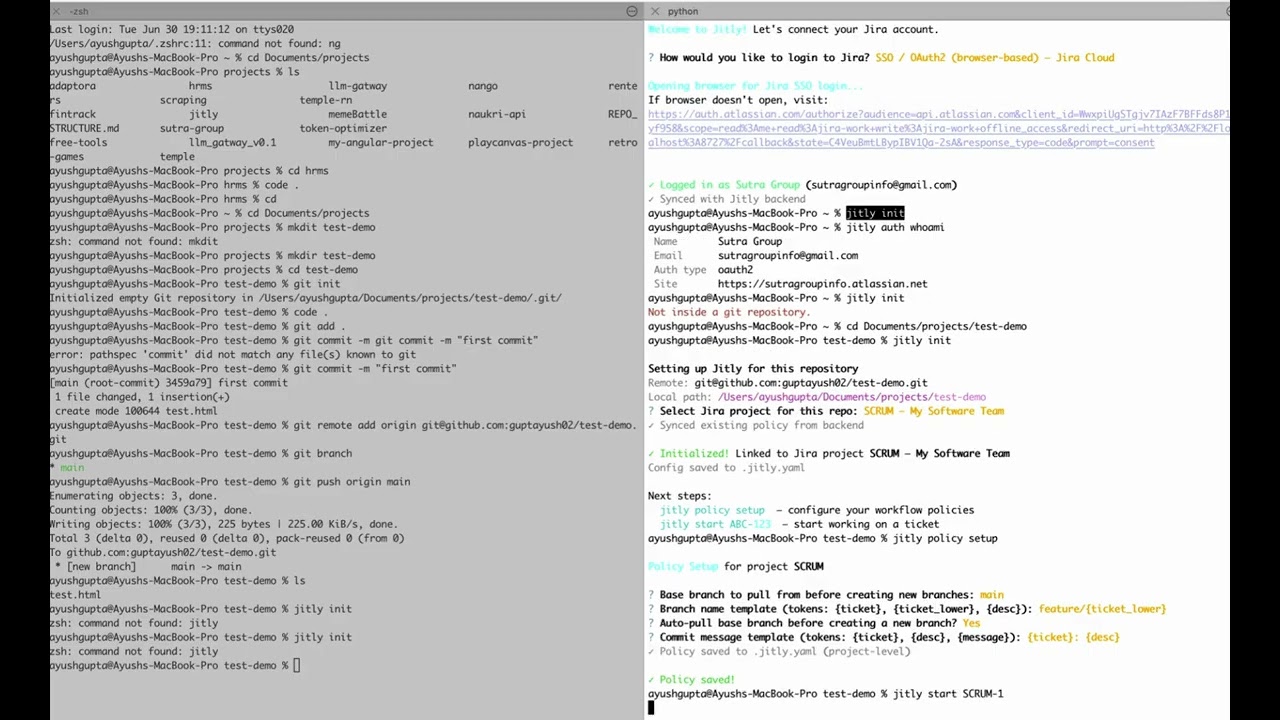
▶️ Watch the full demo on YouTube
Why Jitly?
Every developer has done this manually:
- Open Jira → find ticket → copy ticket ID
git checkout main && git pullgit checkout -b feature/ABC-123-some-long-name- Do the work...
git add . && git commit -m "ABC-123: did the thing"git push --set-upstream origin feature/ABC-123-some-long-name- Go back to Jira → move ticket to Done
- Get asked in standup — "what did you work on yesterday?"
Jitly automates all of this.
You define your team's policies once (branch naming, base branch, commit format) and Jitly enforces them automatically — for every developer on the team.
Standups become shorter. Scrum masters stop chasing ticket updates. Project managers get real-time visibility. Developers stay in flow.
Installation
pip install jitly
Works on macOS, Windows, and Linux with Python 3.9+.
Recommended on macOS:
pipx install jitly
Quick Start
Step 1 — Login to Jira
jitly auth login
Choose how you want to authenticate:
| Method | Best for |
|---|---|
| SSO / OAuth2 (browser) | Jira Cloud with SSO |
| API Token | Jira Cloud (email + token) |
| PAT / Password | Jira Server or Data Center |
Step 2 — Link your repo
Inside your git project:
jitly init
Connects the repo to a Jira project. Saves config to .jitly.yaml.
Step 3 — Set your workflow policy
jitly policy setup
Answer a few questions — set once, applies forever:
? Base branch to pull from:          main
? Branch name template:              feature/{ticket_lower}-{desc}
? Auto-pull base before branching?   Yes
? Commit message template:           {ticket}: {desc}
Step 4 — Start a ticket
jitly start ABC-123
Jitly will:
- ✅ Fetch ticket details from Jira
- ✅ Handle uncommitted changes (stash / push / discard / cancel)
- ✅ Pull latest from base branch
- ✅ Create
feature/abc-123-your-ticket-title - ✅ Move ticket to In Progress on Jira automatically
Step 5 — Finish the ticket
jitly done
Jitly will:
- ✅ Commit all changes (auto-fills message from ticket)
- ✅ Push to remote
- ✅ Show available Jira statuses fetched live — move ticket to Done / In Review / Ready for QA
Step 6 — Daily Standup
jitly standup
Jitly will:
- ✅ Pull yesterday's commits from git automatically
- ✅ Show today's active ticket
- ✅ Ask for any blockers (stored and tracked)
- ✅ Generate a copy-paste ready standup format for Slack / Teams / email
Example output:
⚡ Jitly Standup

╭──────────────┬──────────────────────────────────────────╮
│ Yesterday    │ • ABC-123: Add login page                │
│              │ • ABC-124: Fix null pointer on dashboard │
│ Today        │ • Working on ABC-125: Add dark mode      │
│ Blockers     │ • None                                   │
╰──────────────┴──────────────────────────────────────────╯

── Copy-paste format ──
*Yesterday:*
  • ABC-123: Add login page
  • ABC-124: Fix null pointer on dashboard
*Today:*
  • Working on ABC-125: Add dark mode
*Blockers:*
  • None
All Commands
jitly auth login        Login to Jira (SSO, API token, or PAT)
jitly auth logout       Remove saved credentials
jitly auth whoami       Show currently logged in user

jitly init              Link this repo to a Jira project

jitly policy setup      Interactive policy wizard
jitly policy show       View current policy
jitly policy set        Set a single policy value

jitly start <TICKET>    Start working on a Jira ticket
jitly done              Commit, push, and wrap up current ticket
jitly standup           Generate your daily standup update
jitly status            Show active ticket, branch, and git state
Branch Name Templates
Customize how branches are named using tokens:
| Token | Output |
|---|---|
{ticket} |
ABC-123 |
{ticket_lower} |
abc-123 |
{desc} |
add-login-page (slugified summary) |
Examples:
feature/{ticket_lower}-{desc}   →   feature/abc-123-add-login-page
{ticket}/{desc}                 →   ABC-123/add-login-page
bugfix/{ticket_lower}           →   bugfix/abc-123
Commit Message Templates
| Token | Value |
|---|---|
{ticket} |
Jira ticket ID |
{desc} |
Ticket summary |
{message} |
What you type at prompt |
Examples:
{ticket}: {desc}            →   ABC-123: Add login page
[{ticket}] {message}        →   [ABC-123] fixed null pointer issue
feat({ticket}): {desc}      →   feat(ABC-123): Add login page
Smart Branch Detection
If someone already started working on ABC-123 and pushed a branch — Jitly detects it automatically:
Branch feature/abc-123-add-login already exists on remote.
Someone may have already started this ticket. Fetching their work...
✓ Checked out existing branch feature/abc-123-add-login
No manual git fetch or git checkout needed.
Uncommitted Changes Handling
Run jitly start while you have unsaved work? Jitly asks:
? You have uncommitted changes on feature/old-branch. What would you like to do?
  > stash    — save changes, switch ticket, restore later
    push     — commit & push current changes first
    checkout — discard all changes and switch (irreversible)
    cancel   — abort
Multi-Project Support
Jitly works across multiple projects and machines:
- Each repo has its own
.jitly.yamlwith project-specific policy - Same project on a new machine? Run
jitly init— policy syncs automatically from backend - Policy hierarchy: Project policy → Global policy → Default
Supported Jira Versions
| Version | Auth Method |
|---|---|
| Jira Cloud | SSO / OAuth2, API Token |
| Jira Server | PAT, Username + Password |
| Jira Data Center | PAT, Username + Password |
Configuration
Jitly stores your global config at ~/.config/jitly/config.yaml.
Per-project config is saved in .jitly.yaml (add to .gitignore).
Environment variables:
| Variable | Default | Description |
|---|---|---|
JITLY_BACKEND_URL |
auto | Jitly backend URL |
Requirements
- Python 3.9+
- Git
Links
License
MIT
1 maintainer

Metadata
1 maintainer
Release files for jitly 0.1.8
For a detailed explanation of source distributions (sdists) and built distributions (wheels), please see the package formats documentation.
Source distribution (sdist)
| File | Size | Uploaded | |
|---|---|---|---|
| jitly-0.1.8.tar.gz | 20.8 kB | Details |
Built distribution (wheel)
| File | Interpreter | ABI | Platform | Reset |
|---|---|---|---|---|
| jitly-0.1.8-py3-none-any.whl | Python 3 | none | any | Details |
Total release size: 44.2 kB
Release files / jitly-0.1.8.tar.gz
| Download URL | jitly-0.1.8.tar.gz |
|---|---|
| Size | 20.8 kB |
| Tags | Source |
|
SHA-256 checksum How to use checksums |
4e2ce9693773169b11ccca81ff574ce3c2083e98b61ad955e0195098bb90ee46
|
|
BLAKE2b-256 checksum How to use checksums |
50eca86e7a9a73178a1f61e3520a8b60c401880872c69be24e68215e877aa3e9
|
| Upload date | |
|
Uploaded using Trusted Publishing? What is trusted publishing? |
No |
| Uploaded via |
twine/6.2.0 CPython/3.12.13
|
Release files / jitly-0.1.8-py3-none-any.whl
| Download URL | jitly-0.1.8-py3-none-any.whl |
|---|---|
| Size | 23.4 kB |
| Tags | Python 3 |
|
SHA-256 checksum How to use checksums |
0cebb410a089c32f698eb4eec5bc29e72859af1ca6d4d61c86a0054b314f9a30
|
|
BLAKE2b-256 checksum How to use checksums |
872d727139ee51f10a4819a0545a918f18582ab3b44df67befc19161b8402576
|
| Upload date | |
|
Uploaded using Trusted Publishing? What is trusted publishing? |
No |
| Uploaded via |
twine/6.2.0 CPython/3.12.13
|














