
九章光量子真机云接入软件包(jiuzhang SDK)

Project description
JiuZhang Photonic Quantum Cloud Platform Python SDK
GitHub: https://github.com/JiuZhangLiangZi/jiuzhang-sdk
jiuzhang-sdk is the Python SDK for the JiuZhang photonic quantum cloud platform. It helps Python scripts and Jupyter notebooks submit Gaussian Boson Sampling (GBS) tasks, poll task status, parse returned results, and run lightweight local analysis.
📥 Installation
Install the current pre-release:
pip install --pre jiuzhang-sdk
Install a specific version:
pip install jiuzhang-sdk==0.1.0a25
💡 Tip: If you want to experience the most complete workflow (including environment checks under Jupyter, HTML table rendering, and local sampling data analysis comparisons such as TVD, Hellinger distance, and JS divergence), it is recommended to check out the Jupyter Notebook Example (sdk_full_usage.ipynb) at the root of the repository.
🚀 Quickstart
Set your API Key and Project ID before running:
export JIUZHANG_API_KEY="your-api-key-here"
export JIUZHANG_PROJECT_ID="EXP-39dfbfdcab444d32"
PowerShell:
$env:JIUZHANG_API_KEY="your-api-key-here"
$env:JIUZHANG_PROJECT_ID="EXP-39dfbfdcab444d32"
Python:
import os
from jiuzhang import CloudClient, GBSParams

# Initialize client using environment API key and target API base URL
client = CloudClient(api_key=os.environ["JIUZHANG_API_KEY"])

# Build GBS task parameters (write other parameters directly in code)
params = GBSParams(
    project_id=os.environ["JIUZHANG_PROJECT_ID"],
    quantum_computer_id="PH_QC_04",
    mt=300,
    pump_energy_nj=4.6,
    task_name="GBS experiment 001",
)

result = client.run_gbs(params)
print(result.task_id)
print(result.status_name)
print(result.quantum_computer_id)

client.close()
🧩 Core Concepts
☁️ CloudClient
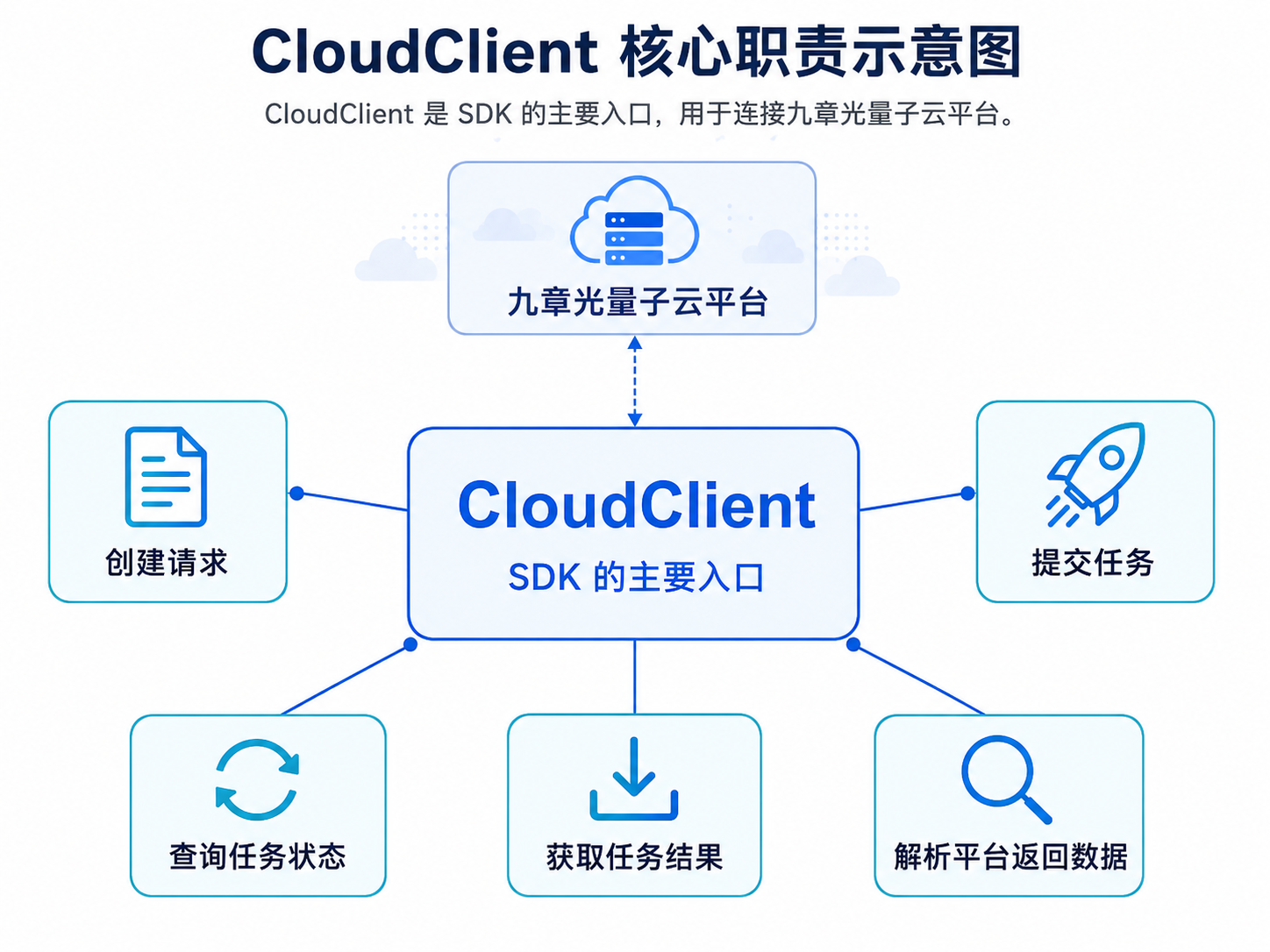
CloudClient is the main entry point of the SDK, used to establish HTTP communication with the remote JiuZhang Photonic Quantum Cloud Platform. It handles runtime complexity estimations, task submissions, and polling status queries.
⚛️ GBSParams
GBSParams is the typed task configuration object for GBS experiments.
from jiuzhang import GBSParams

params = GBSParams(
    project_id="EXP-39dfbfdcab444d32",
    quantum_computer_id="PH_QC_04",
    mt=300,
    pump_energy_nj=4.6,
    task_name="GBS experiment 001",
)
| Field | Type | Required | Description |
|---|---|---|---|
project_id |
str |
Yes | Project experiment_code on the cloud platform |
quantum_computer_id |
str |
Yes | Target cloud quantum computer ID (e.g. PH_QC_04) |
mt |
int |
Yes | Time-bin count, range 1 <= mt <= 500 |
pump_energy_nj |
float |
Yes | Pump pulse energy in nJ |
squeezing_param |
float | None |
No | Squeezing parameter |
task_name |
str |
No | Custom display name for the task, up to 200 characters |
📊 GBSResult
GBSResult is the parsed object that holds GBS task states and experimental result distribution curves.
| Property | Description |
|---|---|
task_id |
Unique task ID generated by the cloud platform |
status_name |
Normalized task status string (e.g., SUCCESS, FAILED, PENDING, RUNNING) |
project_id |
Associated Project ID |
quantum_computer_id |
Target quantum computer ID where the task ran |
experimental_distribution |
Experimental distribution data points (experimental inside result_map_points) |
ground_truth_distribution |
Reference ground-truth distribution data points (ground_truth inside result_map_points) |
result_map_points |
All computed probability distribution curves returned by the server |
download_url |
URL to download the raw sampling result data file from the cloud |
raw |
The original raw response JSON dictionary from the cloud API |
🏗️ Architecture
The SDK adopts a lightweight client-only architecture, shielding users from complex quantum hardware driver orchestration:
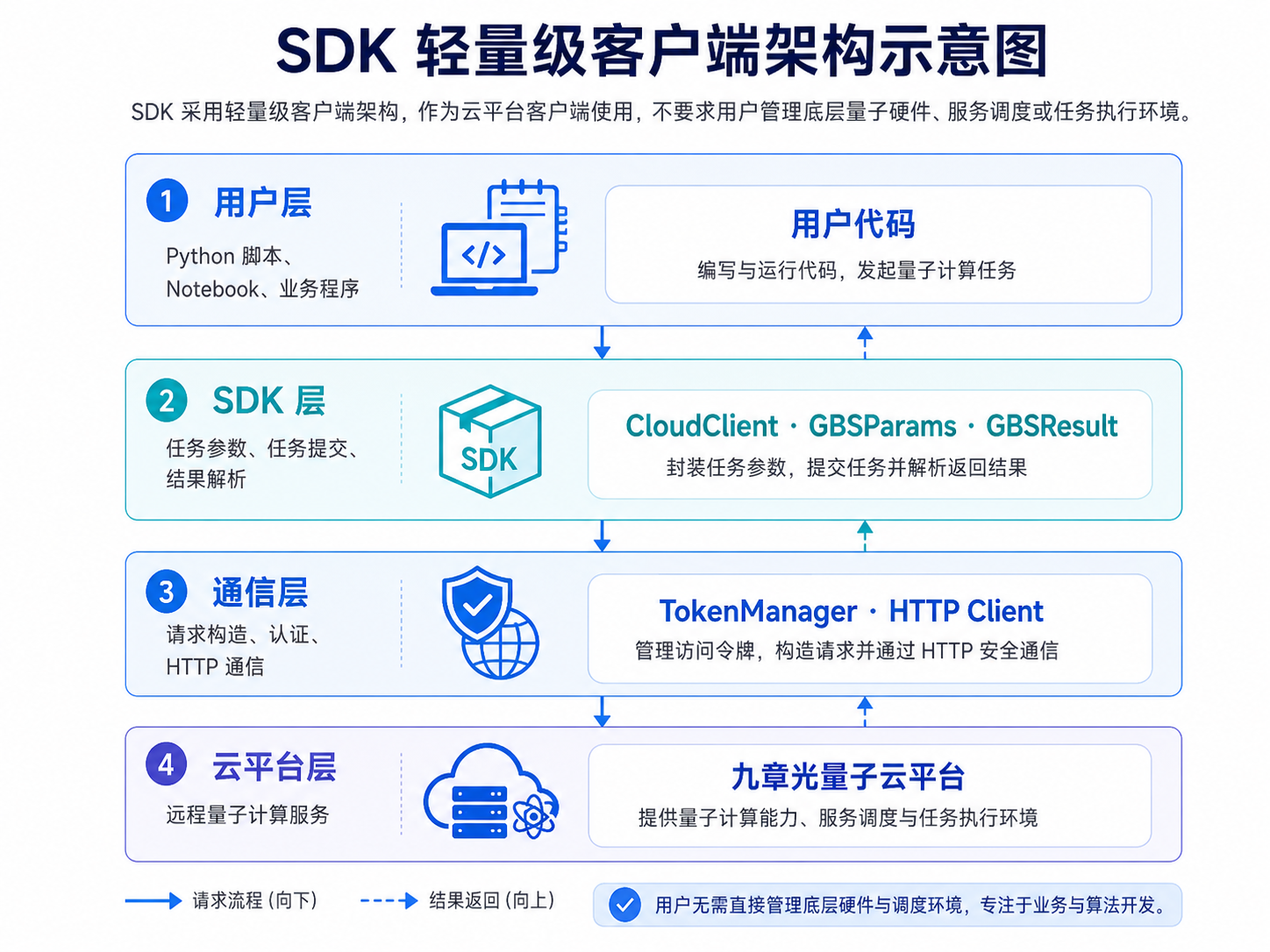
| Layer | Responsibility | Key Components |
|---|---|---|
| User Layer | Python scripts, Jupyter Notebooks, business applications | User Code |
| SDK Layer | Parameter validation, task lifecycle management, result parsing | CloudClient, GBSParams, GBSResult |
| Transport Layer | Request authentication, header injection, HTTP JSON transport | TokenManager, HTTP Client |
| Cloud Platform Layer | Quantum calculation services, classical complexity estimation | JiuZhang Photonic Quantum Cloud Platform |
🧱 Components
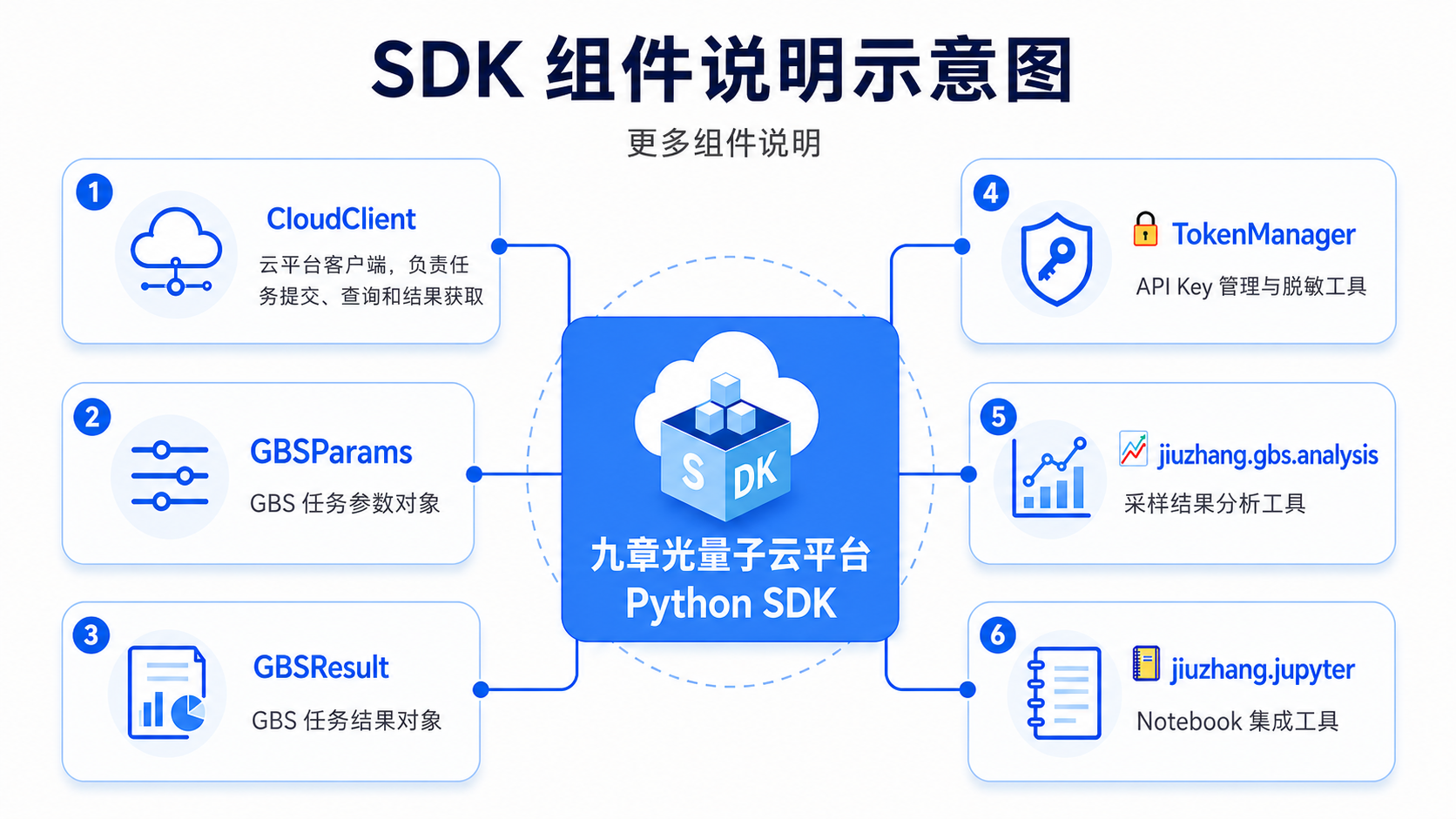
- ☁️
CloudClient: Connects to the cloud service, submits tasks, queries status, and gets GBS results. - ⚛️
GBSParams: Wraps physics and run configuration parameters for GBS GBS tasks. - 📊
GBSResult: Parses and holds task statuses and distribution curves. - 🔐
TokenManager: Validates API Keys and handles log masking/protection. - 📈
jiuzhang.gbs.analysis: Local lightweight analysis toolbox (e.g., TVD, Hellinger distance, JS divergence). - 📒
jiuzhang.jupyter: Jupyter Notebook integration helpers (HTML formatting and environment checks).
🌐 Cloud API Contract
The SDK interacts with the cloud service via these RESTful HTTP endpoints:
| SDK method | HTTP path | Description |
|---|---|---|
estimate_runtime(...) / estimate_gbs(params) |
POST /estimate |
Estimate classical simulation runtime |
submit_task(...) / submit_gbs(params) |
POST /tasks/submit |
Submit a GBS GBS experiment task |
get_result(task_id) |
GET /tasks/{task_id} |
Fetch task status and distribution curves |
run_experiment(...) / run_gbs(params) |
Integrated Workflow | Estimate -> Submit -> Poll -> Parse |
All communication is authenticated via the X-Jiuzhang-API-Key header. The SDK parses response payloads, validates internal code status, and raises specific exceptions if code != 0.
📒 Jupyter Notebook Integration
The SDK provides specialized helpers to optimize Jupyter interactive workflows. For the complete Notebook example, please refer to: sdk_full_usage.ipynb.
from jiuzhang.jupyter import display_gbs_result, get_notebook_client, show_environment

# 1. View masked current environment variables
show_environment()

# 2. Get client automatically and execute a GBS task
client = get_notebook_client()
result = client.run_gbs(params)

# 3. Render a beautiful HTML table summary in the notebook cell
display_gbs_result(result)
🛠️ Development & Testing
Under the code/ directory:
# Format code style
ruff format src tests
# Run static checks
ruff check src tests
# Run strict static typing checks
mypy src
# Run test suite
pytest
📄 License
Proprietary. Copyright 2026 JiuZhang Quantum. All rights reserved.
Release history Release notifications | RSS feed


Download files
Download the file for your platform. If you're not sure which to choose, learn more about installing packages.
Source Distribution
Built Distribution
Filter files by name, interpreter, ABI, and platform.
If you're not sure about the file name format, learn more about wheel file names.
Copy a direct link to the current filters
File details
Details for the file jiuzhang_sdk-0.1.0a26.tar.gz.
File metadata
- Download URL: jiuzhang_sdk-0.1.0a26.tar.gz
- Upload date:
- Size: 29.4 kB
- Tags: Source
- Uploaded using Trusted Publishing? No
- Uploaded via: uv/0.11.24 {"installer":{"name":"uv","version":"0.11.24","subcommand":["publish"]},"python":null,"implementation":{"name":null,"version":null},"distro":null,"system":{"name":null,"release":null},"cpu":null,"openssl_version":null,"setuptools_version":null,"rustc_version":null,"ci":null}
File hashes
| Algorithm | Hash digest | |
|---|---|---|
| SHA256 |
4a820e26c1ea8f5ec12d9759d8659261435668bb1fa5839fec7fff37315bf0d8
|
|
| MD5 |
37d40a136b4250ef8e29eea923dd8c48
|
|
| BLAKE2b-256 |
d5d87746869bada494d20b2ac5ac4fd4292f92783d1aaa2b1caecb6eda1b84b0
|
File details
Details for the file jiuzhang_sdk-0.1.0a26-py3-none-any.whl.
File metadata
- Download URL: jiuzhang_sdk-0.1.0a26-py3-none-any.whl
- Upload date:
- Size: 27.0 kB
- Tags: Python 3
- Uploaded using Trusted Publishing? No
- Uploaded via: uv/0.11.24 {"installer":{"name":"uv","version":"0.11.24","subcommand":["publish"]},"python":null,"implementation":{"name":null,"version":null},"distro":null,"system":{"name":null,"release":null},"cpu":null,"openssl_version":null,"setuptools_version":null,"rustc_version":null,"ci":null}
File hashes
| Algorithm | Hash digest | |
|---|---|---|
| SHA256 |
b32efbeb041758f862ffc812d65d3da88c8dbc7986c394fc0714664dfb6b25f4
|
|
| MD5 |
538e3bda0697760482cacd86ab9a220e
|
|
| BLAKE2b-256 |
a1391fe589f6457ec7671043d002199de90566628428a058e370d7347ceba359
|






