
jkctl
A cross-platform tool for JK BMS battery management systems on an RS485 bus,
with a browser front end and a command for everything it does. It finds the
units on the bus, reports their nameplate and live pack data, reads and
writes the whole configuration table, drives the one-key presets and the
other action registers, sets the port protocols and dry contacts, and
validates and flashes a .jkbms firmware file the way JK's own Windows
application does.
It is a web interface first. jkctl, with nothing after it, serves a
page on this machine and opens a browser on it — that is the default mode of
operation and how most people will use it. Everything the page does is also
a command you can type, for a script or a terminal.
Everything here was derived from JK BMS Monitor 3.11.0, the encrypted protocol
datasource shipped with it, and JK's own RS485 Modbus register-map documents.
The reverse-engineering record is in research/windows/windows-findings.md;
docs/how-it-works.md is the readable summary.
Install
uv tool install jkctl # or: pipx install jkctl
Python 3.10 or newer. The only third-party runtime dependency is pyserial; it also uses devicectl-core, this project's shared, pure-standard-library core. Firmware decryption needs no crypto package at all (see AES backends below).
First run
jkctl # the web interface, in a browser
With no arguments jkctl is jkctl ui: it serves a page on this machine and
opens a browser on it. There is nothing to configure first: with no port
chosen it opens on a picker listing the serial ports this machine has, scans
all sixteen addresses of whichever you choose, and shows you the bank — every
board on the bus, one tile each. Options for it can be given straight after
the bare name (jkctl --port /dev/ttyUSB1, jkctl --listen 0.0.0.0:8087 --read-only). See docs/web-ui.md.
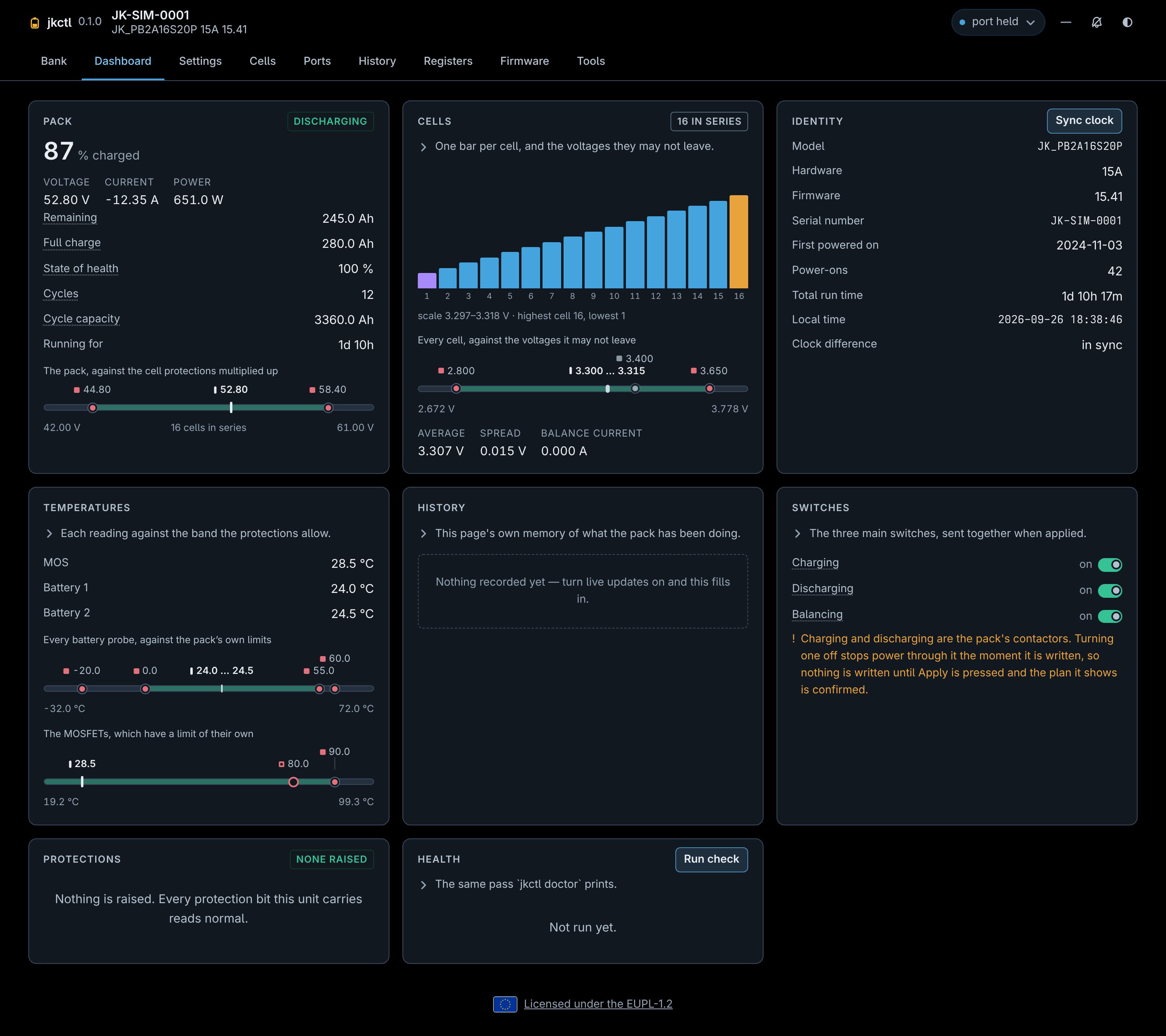
To see the whole interface without a battery anywhere near it:
jkctl ui --simulate # a bank of fake boards, no serial port opened
Everything it does is also a command:
jkctl scan                     # what is on /dev/ttyUSB0?
jkctl info --id 1              # model, versions, serial number
jkctl status --id 1            # voltage, current, SOC, temperatures, alarms
jkctl cells --id 1             # per-cell voltages and wire resistances
jkctl status --id all          # the whole bank at once
If nothing answers, jkctl probe sweeps the baud rates and addresses and
writes a report you can read or send on. It never writes a register.
Commands
| command | what it does |
|---|---|
jkctl ui |
what jkctl alone does: serve the web interface |
jkctl scan |
sweep addresses 0-15 for units |
jkctl info |
model, hardware and software versions, serial, run time, port protocols |
jkctl status |
pack voltage, current, power, SOC, SOH, temperatures, raised alarms |
jkctl cells |
per-cell voltages, wire resistances, spread, what the balancer is doing |
jkctl alarms |
every protection and warning bit raised, named |
jkctl registers |
every register of every table, with its value |
jkctl history |
the board's own stored fault records, where it maps them |
jkctl log-codes |
what each stored record's code means (no hardware) |
jkctl log |
sample the runtime data into CSV or JSON |
jkctl settings show|get|set|list|export|import |
the configuration table |
jkctl charge|discharge|balance [on|off] |
the three main switches |
jkctl switches show|set |
the sixteen multiplexed on/off settings |
jkctl preset lifepo4|li-ion|lto |
a one-key chemistry preset |
jkctl emergency / jkctl shutdown |
the emergency start; the power-off |
jkctl restart / jkctl factory-restore / jkctl erase-data |
three board actions JK's document does not list |
jkctl address show|set |
the address the board answers on |
jkctl time show|sync |
the unit's real-time clock |
jkctl calibrate voltage|current |
recalibrate a measurement |
jkctl protocols list|show|set |
which protocol each UART and the CAN port speaks |
jkctl dry-contact show|set |
the two dry contacts and the LCD buzzer |
jkctl firmware info|check|list|flash |
a .jkbms file or a directory of them: read, check, flash |
jkctl probe |
characterise a bus that is not answering |
jkctl simulate |
serve a fake BMS on a serial port, for testing |
jkctl doctor |
read a unit over and report what looks wrong |
jkctl config show|path|init |
the optional settings file |
--json is available on the commands that report; --watch [S] redraws
status and cells until Ctrl+C. Every command takes --port, --id,
--baud, --timeout, --retries and --trace. The read commands also take
--id 1,2,5, --id 1-4 or --id all, and print one section per board (or
one JSON document keyed by address).
$ jkctl status --id 1
BMS 1:

  Pack
    State of charge  95 %
    Voltage          53.27 V
    Current          -2.65 A
    Remaining        296.8 Ah

  Cells
    Average          3.329 V
    Spread           0.003 V

  Temperatures
    MOS              23.5 ℃
    Battery 1        21.8 ℃
The groups and the names are the web dashboard's cards and rows, so a reading is called the same in both.
Changing settings
Settings are typed, scaled and range-checked against JK's own datasource before anything goes out, and a write always shows what it will change:
$ jkctl settings set volCellUV=2.9 balanEn=off --id 1
2 setting(s) to change:

  Cell UVP (volCellUV): 2.800 V -> 2.900 V
  Balancing (balanEn): On -> Off

Wrote 2 setting(s).
--dry-run prints the plan and the exact Modbus frames without sending them.
jkctl settings list shows every setting with its unit, its allowed range and
its factory default. export/import move a whole configuration between
units; an import that would change nothing says so instead of rewriting sixty
registers.
Configuration file
jkctl config init writes a commented jk.toml under $XDG_CONFIG_HOME/jk
(or ~/.config/jk). Everything in it is optional and a flag always wins:
port = "/dev/ttyUSB0"
id = 1

[devices.shed]
id = 2
Then jkctl status --device shed.
Safety
scan,info,status,cells,alarms,log,doctor,probeand everyshow/get/listare strictly read-only. They never write a register.settings set, the three switches andprotocols setwrite, and say what they wrote. Range checks come from JK's own datasource, so a value the vendor's application would clamp is refused here instead.preset,shutdown,calibrate,address set,restart,factory-restoreanderase-dataask first, naming what they will do, because they replace every protection setpoint, turn the board off, move the address you are talking to, or erase what it has stored.-yskips the question; the browser asks for the word typed out instead.- The last three of those use action slots that appear in neither revision
of JK's register-map document. They were read out of the vendor
application's own buttons, a reading whose control is that it gives
0x04for "Shutdown Board", which the document does list at0x04. None has been fired at real hardware. - Flashing is irreversible and an interrupted transfer can leave a unit with
no working application. The compatibility gate enforces model and major
version;
--forcebypasses only the minor-version and expiry checks. Do not flash a battery you cannot afford to lose without a verified, compatible image. - Recovering a dead app is a bench job, and how bad depends on readout
protection. Re-arming the upgrade over RS485 is done by the application, so
a dead app cannot be reflashed over the wire. The fallback is the STM32 ROM
bootloader (BOOT0 high, a USB-TTL adapter,
stm32flash): if the MCU's readout protection (RDP) is off it can rewrite the application region from the imagejkctlextracts, leaving the JK bootloader untouched. If RDP is on, clearing it mass-erases the JK bootloader too, and recovery then needs a full image -- including the0x08000000–0x08003FFFbootloader that ships in no.jkbms. Seeresearch/windows/docs/bootloader-dump-procedure.md. - The image sent is the vendor's own, to the byte; the BMS is not known to
check it.
jkctldecodes a.jkbmsexactly as JK's application does, and the bytes it extracts match an independently pulled vendor image to the SHA-256 -- so the risk is not that it sends the wrong bytes. But a.jkbmscarries no signature and no whole-image checksum, JK's application validates only the metadata (model, version, expiry) and never the image itself, and on the wire the only guard is XMODEM's weak 8-bit per-block checksum. Whether the bootloader verifies the image before running it is unknown: it ships in no firmware file and could not be read. Assume a wrong or corrupt image can be written and run. - The web interface is bound to
127.0.0.1and needs no token. Off loopback it generates one, refuses aHostheader that is a name it was not told to expect, and requires a header on every write that a cross-origin form cannot set.--read-onlyrefuses every write server-side, so a page can be shared without handing over the battery. - No write path has yet been exercised against real hardware -- from the
browser or from the terminal. See
docs/reference.mdfor the full list of what has and has not been proven.
AES backends
Firmware and datasource files are AES-256-CBC. jkctl needs no crypto package
for that: it uses the first available of PyCryptodome, cryptography, the
system OpenSSL libcrypto (through stdlib ctypes -- nothing to install), or
a bundled pure-Python AES. On a small ARM host, simply having OpenSSL present
gives an instant decrypt with no compiler involved.
Development
uv sync                                 # pytest, ruff, ty -- pure Python
uv run pytest
uv run ruff format . && uv run ruff check . && uv run ty check
biome ci src/jkctl/web/static/          # the browser half
uv sync --group browser                 # the V8 and the browser, opt-in
The engine-backed checks are a separate dependency group so that installing and hacking on jkctl stays light on the small hosts it targets.
The tests need no hardware: they wire the Modbus master straight to
jkctl.simulator, which reproduces the real device's quirks, and the web
tests point the server at the same thing. See
CONTRIBUTING.md.
Licence
EUPL-1.2, except the files named in NOTICE: three of JK's own data files, and the vendored Preact/htm bundle the page is built with.
1 maintainer

Release files for jkctl 0.1.0
For a detailed explanation of source distributions (sdists) and built distributions (wheels), please see the package formats documentation.
Source distribution (sdist)
| File | Size | Uploaded | |
|---|---|---|---|
| jkctl-0.1.0.tar.gz | 930.3 kB | Details |
Built distribution (wheel)
| File | Interpreter | ABI | Platform | Reset |
|---|---|---|---|---|
| jkctl-0.1.0-py3-none-any.whl | Python 3 | none | any | Details |
Total release size: 1.2 MB
Release files / jkctl-0.1.0.tar.gz
| Download URL | jkctl-0.1.0.tar.gz |
|---|---|
| Size | 930.3 kB |
| Tags | Source |
|
SHA-256 checksum How to use checksums |
1008bf57cbaf925117b61a00df432371737000f3532a72c831dca8e8c62e4744
|
|
BLAKE2b-256 checksum How to use checksums |
1ca7b6d339cedc7da8364d8803e7316946575741300a48db583bccc642f805d9
|
| Upload date | |
|
Uploaded using Trusted Publishing? What is trusted publishing? |
Yes |
| Uploaded via |
twine/7.0.0 CPython/3.13.14
|
Provenance
Provenance describes where a file came from. On PyPI, provenance is shared via attestations, which provide a verifiable record of the build or publishing details. View details, limitations and caveats.


PyPI Publish Attestation
PyPI verified that this artifact, at this checksum, originated from the publisher listed below.
Signed by GitHub Actions, verified by PyPI on Sep 26, 2026.
Transparency logRelease files / jkctl-0.1.0-py3-none-any.whl
| Download URL | jkctl-0.1.0-py3-none-any.whl |
|---|---|
| Size | 253.5 kB |
| Tags | Python 3 |
|
SHA-256 checksum How to use checksums |
376e09f20e8481edd6eb7a355e59ea711caedad898915b985fb88e144b202cd8
|
|
BLAKE2b-256 checksum How to use checksums |
c6c136c94033a831842870b3c8b92eb1c3b39751141bec73fc3c96e40d6a67ab
|
| Upload date | |
|
Uploaded using Trusted Publishing? What is trusted publishing? |
Yes |
| Uploaded via |
twine/7.0.0 CPython/3.13.14
|
Provenance
Provenance describes where a file came from. On PyPI, provenance is shared via attestations, which provide a verifiable record of the build or publishing details. View details, limitations and caveats.
PyPI Publish Attestation
PyPI verified that this artifact, at this checksum, originated from the publisher listed below.
Signed by GitHub Actions, verified by PyPI on Sep 26, 2026.
Transparency log












