jlogtail
A Rust command-line tool and Python module that read the end of large JSON Lines transcripts without loading the whole file.

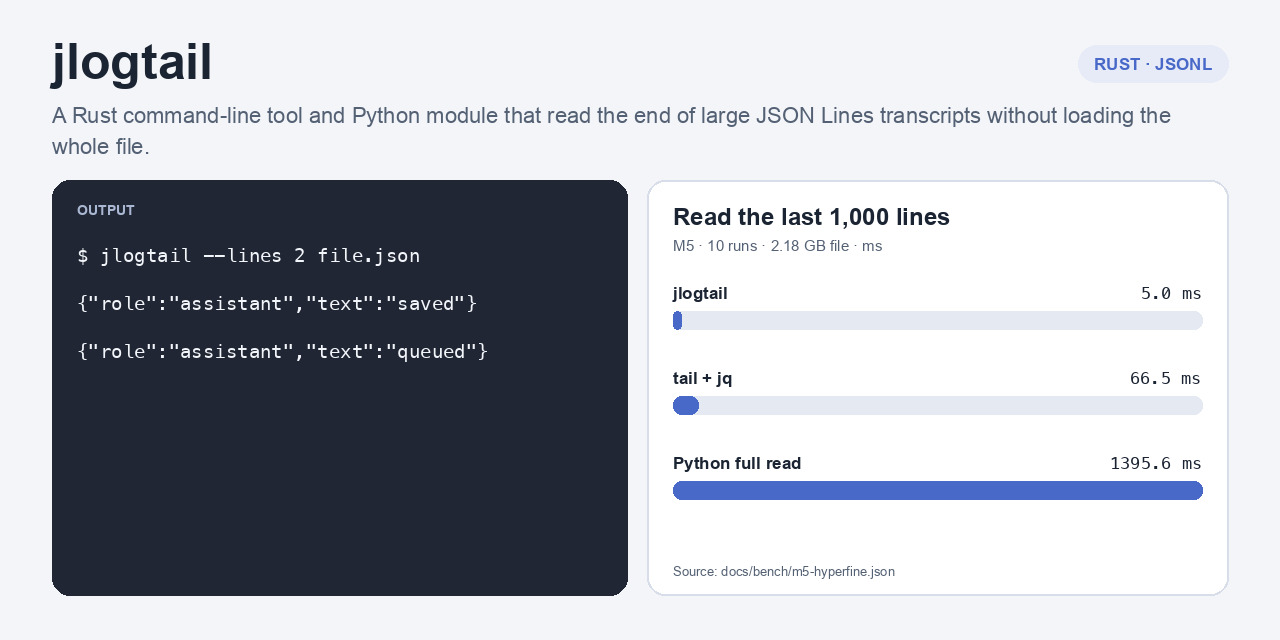
The demo uses synthetic transcript rows. It shows field selection and filtering, not benchmark data.
Install
cargo install --path .
pipx install jlogtail
# or: uv tool install jlogtail
The wheel installs the jlogtail command and the importable jlogtail PyO3 module. Use Cargo to install the standalone Rust CLI from this directory. Python 3.9+ is required; source builds also require Rust.
Quick start
jlogtail ~/.claude/projects/PROJECT/session.jsonl --lines 20
jlogtail ~/.codex/sessions/SESSION.jsonl --bytes 65536
jlogtail transcript.jsonl --filter payload.role=assistant --fields timestamp,payload.role
jlogtail transcript.jsonl --follow
Claude Code, Codex, and Pi transcripts use the same JSONL commands. The CLI outputs original rows by default. --fields emits a compact object with selected dotted paths. --filter PATH=VALUE compares JSON values; unquoted non-JSON values are strings. A byte window skips a partial first record but keeps it when the window starts at a line boundary. Follow reads each appended byte once, keeps an incomplete row in memory, and emits it when the newline arrives. A row that is already unfinished when follow starts is kept from its first byte, so the first poll emits the whole row rather than a fragment.
$ jlogtail docs/demo/agents.jsonl --lines 2 --fields role,text
{"role":"assistant","text":"Checkpoint 42 finished."}
{"role":"assistant","text":"The next run is queued."}
How it reads

Why
tail -n 20 file.jsonl | jq . is useful for full-file pipelines and richer JSON queries, but it reads from the start to find the last rows. This tool seeks backward to the requested records, then reads only that suffix. It is for large transcripts and repeated polling.
Measurements
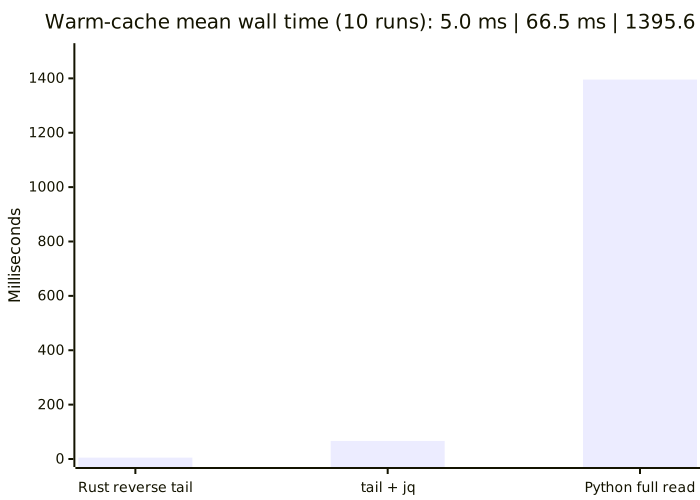
On M5 Pro, macOS arm64, hyperfine ran 3 warmups and 10 measured runs per command against one 2.18 GB temporary copy. The read-only 272.9 MB source transcript was repeated eight times. Mean wall times were 5.0 ms for jlogtail, 66.5 ms for tail | jq, and 1395.6 ms for Python's full read. See the summary, raw output, and raw measurements. Results describe this copy and host only.
Reference
| Option | Meaning |
|---|---|
--lines N, -n N |
Read the last N complete records; default 10 |
--bytes N, -c N |
Read N trailing bytes and drop a partial first record unless the window starts at a line boundary |
--follow, -f |
Emit complete appended records; restart from byte 0 after replacement or truncation |
--filter PATH=VALUE |
Keep rows whose dotted key path equals the JSON value |
--fields PATH,... |
Emit only the selected dotted paths as a compact object |
--poll-ms N |
Follow poll interval; default 250 ms |
--keep-partial-first |
Keep the first partial row in a byte window |
The Python module provides jlogtail.tail(path, lines=20) for raw complete rows; use byte_window=N to choose a suffix by bytes. jlogtail.select_native(path) returns a metadata dictionary and oldest-to-newest Codex message objects. lib/native-history-tail.py preserves feno-handoff's existing one-path command and metadata output.
Limits
The benchmark and demo ran on macOS arm64. Linux and Windows builds have not been exercised. Follow compares platform file IDs and resets when it observes a shorter file. The benchmark ran on macOS arm64; Linux and Windows follow behavior has not been exercised. A filter requires valid JSON. A follow poll waits for the newline that completes each row.
License
MIT. See LICENSE.
1 maintainer

Metadata
1 maintainer
Release files for jlogtail 0.1.2
For a detailed explanation of source distributions (sdists) and built distributions (wheels), please see the package formats documentation.
Source distribution (sdist)
| File | Size | Uploaded | Provenance | Actions |
|---|---|---|---|---|
| jlogtail-0.1.2.tar.gz | 161.2 kB | Without provenance | Details for jlogtail-0.1.2.tar.gz |
Built distributions (wheels)
| File | Actions Reset | |||
|---|---|---|---|---|
| jlogtail-0.1.2-cp39-abi3-win_amd64.whl | CPython 3.9 | abi3 | Windows x86-64 | Details for jlogtail-0.1.2-cp39-abi3-win_amd64.whl |
| jlogtail-0.1.2-cp39-abi3-manylinux2014_x86_64.manylinux_2_17_x86_64.whl | CPython 3.9 | abi3 | Linux glibc 2.17+ x86-64 | Details for jlogtail-0.1.2-cp39-abi3-manylinux2014_x86_64.manylinux_2_17_x86_64.whl |
| jlogtail-0.1.2-cp39-abi3-manylinux2014_aarch64.manylinux_2_17_aarch64.whl | CPython 3.9 | abi3 | Linux glibc 2.17+ ARM64 | Details for jlogtail-0.1.2-cp39-abi3-manylinux2014_aarch64.manylinux_2_17_aarch64.whl |
| jlogtail-0.1.2-cp39-abi3-macosx_11_0_arm64.whl | CPython 3.9 | abi3 | macOS 11.0+ ARM64 | Details for jlogtail-0.1.2-cp39-abi3-macosx_11_0_arm64.whl |
| jlogtail-0.1.2-cp39-abi3-macosx_10_12_x86_64.whl | CPython 3.9 | abi3 | macOS 10.12+ x86-64 | Details for jlogtail-0.1.2-cp39-abi3-macosx_10_12_x86_64.whl |
Total release size: 1.6 MB
Release files / jlogtail-0.1.2.tar.gz
| Download URL | jlogtail-0.1.2.tar.gz |
|---|---|
| Size | 161.2 kB |
| Tags | Source |
|
SHA-256 checksum How to use checksums |
432f312addee87fc959b45a583675f72bebef2f80f715d23d98991f879a62bc9
|
|
BLAKE2b-256 checksum How to use checksums |
b022084c791c9177cc1a42672bf33a01f6ad540902ef459fcecc10e95139ac3c
|
| Upload date | |
|
Uploaded using Trusted Publishing? What is trusted publishing? |
No |
| Uploaded via |
twine/7.0.0 CPython/3.12.8
|
Release files / jlogtail-0.1.2-cp39-abi3-win_amd64.whl
| Download URL | jlogtail-0.1.2-cp39-abi3-win_amd64.whl |
|---|---|
| Size | 192.2 kB |
| Tags | CPython 3.9 Windows x86-64 abi3 |
|
SHA-256 checksum How to use checksums |
de966967dde42fd13031871e9dbfd9d1f8318d6264db04e788540cfde3198ec2
|
|
BLAKE2b-256 checksum How to use checksums |
73ef763da32b027548b1b5c77664bc77238a529bda2d5a0459b3c8cf4f6d611c
|
| Upload date | |
|
Uploaded using Trusted Publishing? What is trusted publishing? |
No |
| Uploaded via |
twine/7.0.0 CPython/3.12.8
|
Release files / jlogtail-0.1.2-cp39-abi3-manylinux2014_x86_64.manylinux_2_17_x86_64.whl
| Download URL | jlogtail-0.1.2-cp39-abi3-manylinux2014_x86_64.manylinux_2_17_x86_64.whl |
|---|---|
| Size | 329.0 kB |
| Tags | CPython 3.9 Linux glibc 2.17+ x86-64 abi3 |
|
SHA-256 checksum How to use checksums |
a74bd24e9ef46b83fa773b61a8a280456159d597647805f2e475408a98a66216
|
|
BLAKE2b-256 checksum How to use checksums |
d3a297970a1eec5809e251c81bb82a48acf7dff1008acda26cb38028285c153d
|
| Upload date | |
|
Uploaded using Trusted Publishing? What is trusted publishing? |
No |
| Uploaded via |
twine/7.0.0 CPython/3.12.8
|
Release files / jlogtail-0.1.2-cp39-abi3-manylinux2014_aarch64.manylinux_2_17_aarch64.whl
| Download URL | jlogtail-0.1.2-cp39-abi3-manylinux2014_aarch64.manylinux_2_17_aarch64.whl |
|---|---|
| Size | 313.2 kB |
| Tags | CPython 3.9 Linux glibc 2.17+ ARM64 abi3 |
|
SHA-256 checksum How to use checksums |
86a6edee0d2baddb3fa14ff8d3b8af1769caf95a7535a6b3bebd484260f1f966
|
|
BLAKE2b-256 checksum How to use checksums |
8d7b2603535de2a31e87bcabc3546ac6890cedfbbfced9068ea1f02d94dcff33
|
| Upload date | |
|
Uploaded using Trusted Publishing? What is trusted publishing? |
No |
| Uploaded via |
twine/7.0.0 CPython/3.12.8
|
Release files / jlogtail-0.1.2-cp39-abi3-macosx_11_0_arm64.whl
| Download URL | jlogtail-0.1.2-cp39-abi3-macosx_11_0_arm64.whl |
|---|---|
| Size | 290.1 kB |
| Tags | CPython 3.9 abi3 macOS 11.0+ ARM64 |
|
SHA-256 checksum How to use checksums |
459437f0d8c5eda44391c10b662542ba1e9fc392643f32b347a1f9d136166a3f
|
|
BLAKE2b-256 checksum How to use checksums |
e9191f04310cdb7be3aea9dfe0c85a5d71ef1fcec05dbc8de66603ca3b76a513
|
| Upload date | |
|
Uploaded using Trusted Publishing? What is trusted publishing? |
No |
| Uploaded via |
twine/7.0.0 CPython/3.12.8
|
Release files / jlogtail-0.1.2-cp39-abi3-macosx_10_12_x86_64.whl
| Download URL | jlogtail-0.1.2-cp39-abi3-macosx_10_12_x86_64.whl |
|---|---|
| Size | 296.7 kB |
| Tags | CPython 3.9 abi3 macOS 10.12+ x86-64 |
|
SHA-256 checksum How to use checksums |
0d6c752afac0775a3dbcfc9e87af8c3525ac598336941921c41f8d1d3af9f064
|
|
BLAKE2b-256 checksum How to use checksums |
4518c441527d99040c6988390e3ba91fa97af7553301a74e3f859e3d750f73f2
|
| Upload date | |
|
Uploaded using Trusted Publishing? What is trusted publishing? |
No |
| Uploaded via |
twine/7.0.0 CPython/3.12.8
|
Security for jlogtail 0.1.2
Provenance
Provenance describes where a file came from. On PyPI, provenance is shared via attestations, which provide a verifiable record of the build or publishing details. View details, limitations and caveats.
No provenance found
None of the files in this release were uploaded with provenance metadata.
A note on package security
PyPI is a repository for distributing packages, not a service for auditing them. While third-party security researchers and our staff do their best to detect and remove malicious packages, PyPI cannot guarantee the quality, security or suitability of any given package.
To learn more about protecting yourself from malicious actors, visit our package security documentation.