
Validation of Jupyter notebooks and kernels

Project description
JUPYTER NOTEBOOK VALIDATION





PROJECT OVERVIEW
This repository contains scripts used to validate ipynb notebooks and Jupyter kernels.
There is another related repository which contains a large number of test ipynb notebooks and routines to help with the execution of the validation tests via docker images and slurm batch jobs:
PACKAGE
A python package has been created which can be installed via pip:
- PyPi package:
APPTAINER IMAGE
In addittion to installing jnbv into a conda environment, a standalone apptainer image can also be created for simpler execution and distribution of jnbv.
GOALS
The goals of this project are to be able to:
- Execute validation of Jupyter kernels using ipynb notebooks in the terminal
- Execute validations non-interactively in a CI pipeline
- Check execution output for errors
- Compare output of an execution to known output
- Select different Jupyter kernels to use
- Log results of notebook executions and tests
EXAMPLE OUTPUT
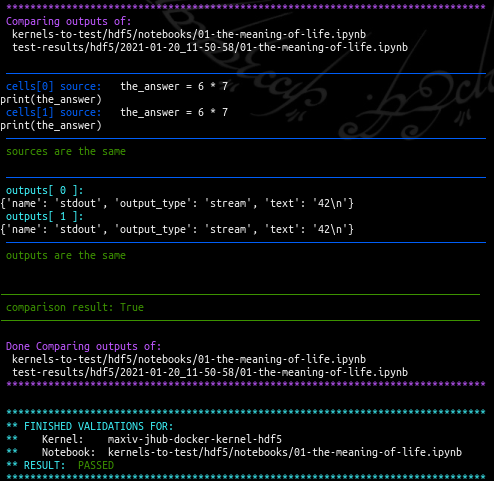
Partial output from validation tests run in the terminal:
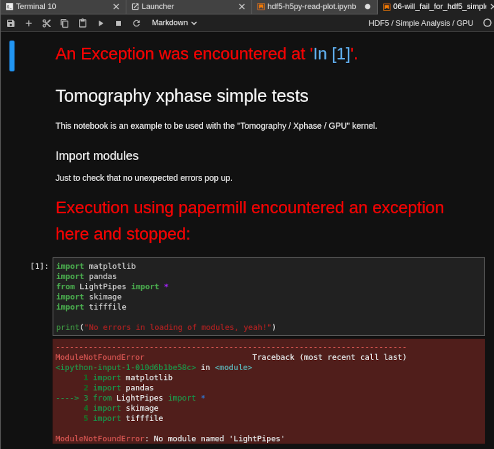
Output from an ipynb notebook created from failed execution of a notebook:
INSTALL
The jnbv module can be installed with pip:
- PyPi package:
- gitlab repository:
Or an apptainer image can be created, which contains a conda environment in which jnbv is installed.
INSTALL WITH PIP
Create a virtual environment if you don't already have one:
python3 -m venv venv
Activate your environment, in this example it's in venv/:
source venv/bin/activate
Install the code from PyPi using pip:
pip install jnbv
Or install from gitlab using pip and git:
pip install git+https://gitlab.com/MAXIV-SCISW/JUPYTERHUB/jnbv.git
With either method, dependencies will also be installed.
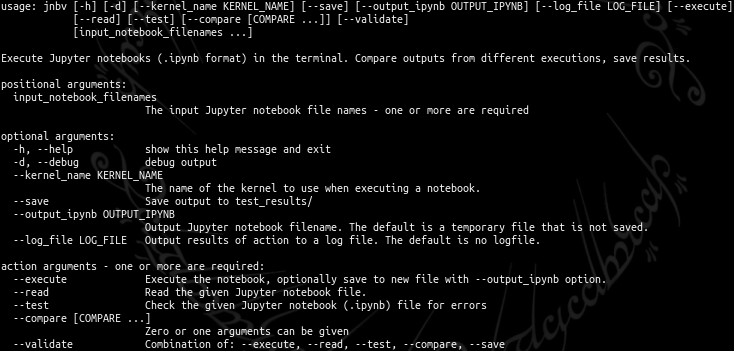
USAGE
jnbv -h
EXECUTE NOTEBOOK
For this, you will need to have:
- A base environment in which jnbv has been installed (see above)
- An ipynb notebook file
- A Jupyter kernel that will be used to execute the file
Once you have all these items, the base environment should be activated:
source venv/bin/activate
Check to see what kernels you have available:
jupyter kernelspec list
    Available kernels:
      hdf5-kernel    /var/www/jupyterhub/jnbv/venv/share/jupyter/kernels/hdf5-kernel
      python3        /var/www/jupyterhub/jnbv/venv/share/jupyter/kernels/python3
If you don't have any kernels, then install ipykernel into your environment with either pip or conda:
pip install ipykernel
conda install ipykernel
and then you should have the default kernel "python3" available.
If you don't have an ipynb notebook handy, you can get an example notebook file here:
wget https://gitlab.com/MAXIV-SCISW/JUPYTERHUB/jnbv/-/raw/master/development/the-meaning-of-life.ipynb
And then the ipynb notebook can be executed in the terminal, using the default kernel python3 for example:
jnbv the-meaning-of-life.ipynb \
    --kernel python3 \
    --execute

READ NOTEBOOK
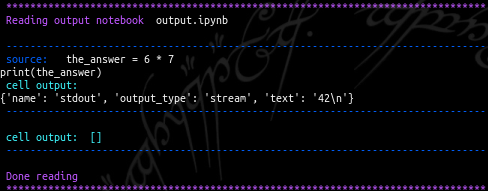
By defualt, the result of executing an ipynb file is a new ipynb file named output.ipynb. It can be read in the terminal with:
jnbv output.ipynb --read
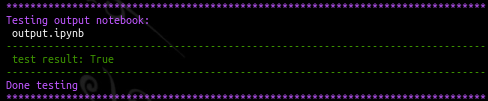
TEST NOTEBOOK
The same file can be checked for errors:
jnbv output.ipynb --test
COMPARE NOTEBOOKS
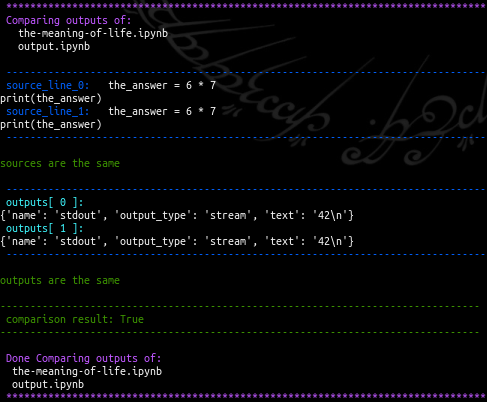
And two ipynb notebooks can be compared:
jnbv output.ipynb --compare the-meaning-of-life.ipynb
EXECUTE, TEST, COMPARE, SAVE
All steps can be made to run in succession with one command:
jnbv the-meaning-of-life.ipynb \
    --kernel python3 \
    --execute --read --test --compare --save
Or, more simply using the --validate option, which is a combination of 5 other options:
jnbv the-meaning-of-life.ipynb \
    --kernel python3 \
    --validate
Note that above the option --save was also added, which then creates the output
directory test-results/, and within that creates subdirectories with kernel
names, date stamps, and finally log files and new ipynb files.
For example:
test-results/
└── python3/
    └── 2021-06-11_14-39-40/
        ├── the-meaning-of-life.ipynb
        └── the-meaning-of-life.log
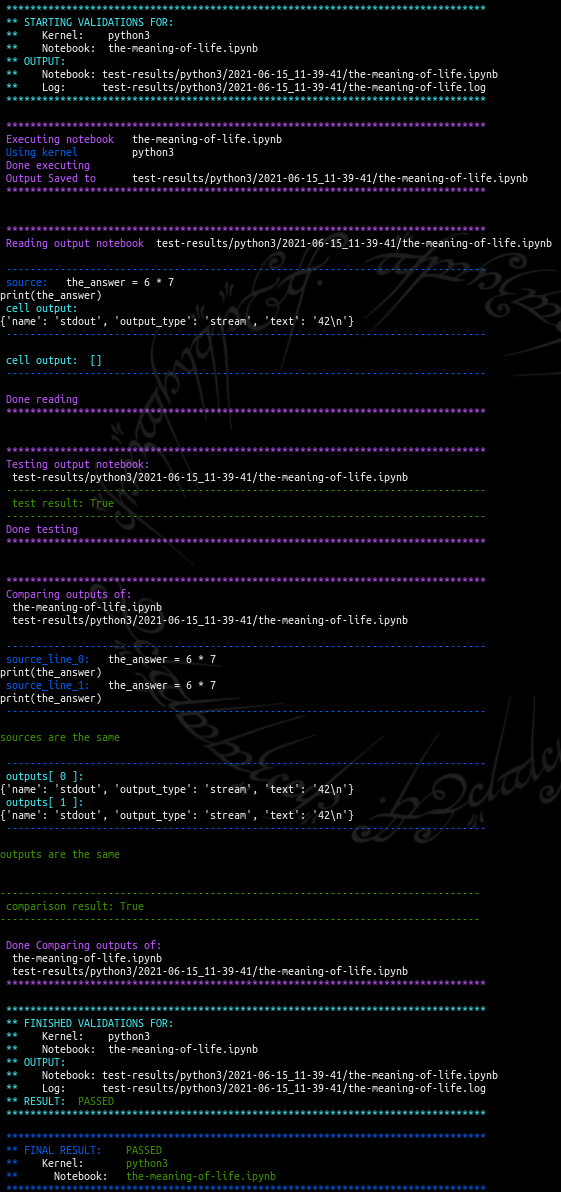
Example output from executing a simple notebook using the default kernel:
APPTAINER
The use of an apptainer image can make deployment and usage in a larger system simpler to handle. A stand-alone apptainer image containing jnbv can be created and then used to evaluate kernels and notebooks in different locations, i.e. on and HPC node, a personal laptop, etc. without the user needing create and update their own conda environment containing jnbv.
APPTAINER IMAGE CREATION
This requires that apptainer and fuse libraries are installed on the host system. On ubuntu systems the installation of apptainer is:
apt-get update
apt-get install -yq fuse-overlayfs squashfuse software-properties-common
add-apt-repository -y ppa:apptainer/ppa
apt-get update apt-get install -y apptainer
Next, this repository is needed:
git clone git@gitlab.com:MAXIV-SCISW/JUPYTERHUB/jnbv.git
cd jnbv/
Then to create an apptainer image which will contain a conda environment in which jnbv is installed:
make jnbv-sif
When run for the first time, a base image will be created along the way:
apptainer/
└── sif-img-files/
    ├── jnbv.sif
    └── micromamba.sif
APPTAINER IMAGE USAGE
To see the help message:
apptainer run apptainer/sif-img-files/jnbv.sif jnbv -h
Example when running on cluster front-end with the pre-existing HDF5 kernel image and the usual notebooks used for kernel validations:
cd /mxn/groups/kits/scisw/jupyterhub/jupyter-notebook-validation/
export APPTAINER_BINDPATH="/usr/bin/singularity,/usr/bin/apptainer,/etc/apptainer,/usr/libexec/apptainer,/var/lib/apptainer,/sw/jupyterhub/jupyter-kernels-apptainer/kernel-spec-files/share/jupyter:/usr/local/share/jupyter,/sw/jupyterhub/jupyter-kernels-apptainer/sif-img-files,/mxn/groups/kits/scisw/jupyterhub/jupyter-notebook-validation/notebooks,/mxn/groups/kits/scisw/jupyterhub/data-for-validations"

apptainer run /sw/jupyterhub/jnbv/apptainer/sif-img-files/jnbv.sif jupyter kernelspec list
apptainer run --nv /sw/jupyterhub/jnbv/apptainer/sif-img-files/jnbv.sif jnbv --kernel maxiv-jup-kernel-hdf5 --validate notebooks/maxiv/hdf5/*.ipynb
Note that the environmental variable APPTAINER_BINDPATH needs to be set, which tells apptainer to mount given files and directories within the apptainer image. Files and directories that need to be mounted include:
- Apptainer related executables and libraries -- /usr/bin/singularity -- /usr/bin/apptainer -- /etc/apptainer -- /usr/libexec/apptainer -- /var/lib/apptainer
- Kernels location on the host mounted to a particular place in the image -- /sw/jupyterhub/jupyter-kernels-apptainer/kernel-spec-files/share/jupyter:/usr/local/share/jupyter
- Kernel environment images -- /sw/jupyterhub/jupyter-kernels-apptainer/sif-img-files
- Jupyter notebooks -- /mxn/groups/kits/scisw/jupyterhub/jupyter-notebook-validation/notebooks
- Data location for any data files used in the notebooks -- /mxn/groups/kits/scisw/jupyterhub/data-for-validations
CONTRIBUTING
Would you like to contribute to this project? See: CONTRIBUTING.md
Release history Release notifications | RSS feed


Download files
Download the file for your platform. If you're not sure which to choose, learn more about installing packages.
Source Distribution
Built Distribution
Filter files by name, interpreter, ABI, and platform.
If you're not sure about the file name format, learn more about wheel file names.
Copy a direct link to the current filters
File details
Details for the file jnbv-2024.12.10.tar.gz.
File metadata
- Download URL: jnbv-2024.12.10.tar.gz
- Upload date:
- Size: 1.0 MB
- Tags: Source
- Uploaded using Trusted Publishing? No
- Uploaded via: twine/5.1.1 CPython/3.12.7
File hashes
| Algorithm | Hash digest | |
|---|---|---|
| SHA256 |
2cfffccf1d29d10a6b8b747f2dd8464cf927f9f60ef94d6169830a5ee37ad445
|
|
| MD5 |
0d8ab2974c437cc04a9128aac5200ef3
|
|
| BLAKE2b-256 |
3f2c3e652fb2aa9686f8d6d9d7ce13d69b5dc37236945d2a81a890fab9ed8875
|
File details
Details for the file jnbv-2024.12.10-py3-none-any.whl.
File metadata
- Download URL: jnbv-2024.12.10-py3-none-any.whl
- Upload date:
- Size: 19.0 kB
- Tags: Python 3
- Uploaded using Trusted Publishing? No
- Uploaded via: twine/5.1.1 CPython/3.12.7
File hashes
| Algorithm | Hash digest | |
|---|---|---|
| SHA256 |
a53060de1435d829c0748747b04060f0b6264eea2ebd4c4641c48686dd21df54
|
|
| MD5 |
31795e1302b1efe1b3015da1897dee7a
|
|
| BLAKE2b-256 |
60fb64b4d7f518e0fe01c9360f78de6d5b7a134b75d9ccb7c7ba07f4fea82d4f
|






