
The pipeline orchestration framework for data science workflows

Project description
Job-Orchestra
job-orchestra is a pipeline orchestration framework designed for data science workflows.
Installation
pip install job-orchestra
Quick start
In job-orchestra, you define any pipeline as a direct acyclic graph of Steps.
Declare the pipeline steps and their dependencies
Here is the recipe for the pasta al pomodoro e basilico translated into a pipeline, i.e., a directed acyclic graph of steps, connected by their dependencies. The final Step is the head of the pipeline. If a Step requires the completion of another one first, it is declared in the constructor argument depends_on.
water = BoilWater()
brown_onions = BrownOnions()
cut_tomatoes = CutTomatoes(depends_on=brown_onions)
pour_tomatoes = PourTomatoes(depends_on=[cut_tomatoes, brown_onions])
salt = Salt(depends_on=water)
pasta = PourPasta(depends_on=salt)
basil = PickBasil()
merge = PanFry(depends_on=[pasta, pour_tomatoes, basil])
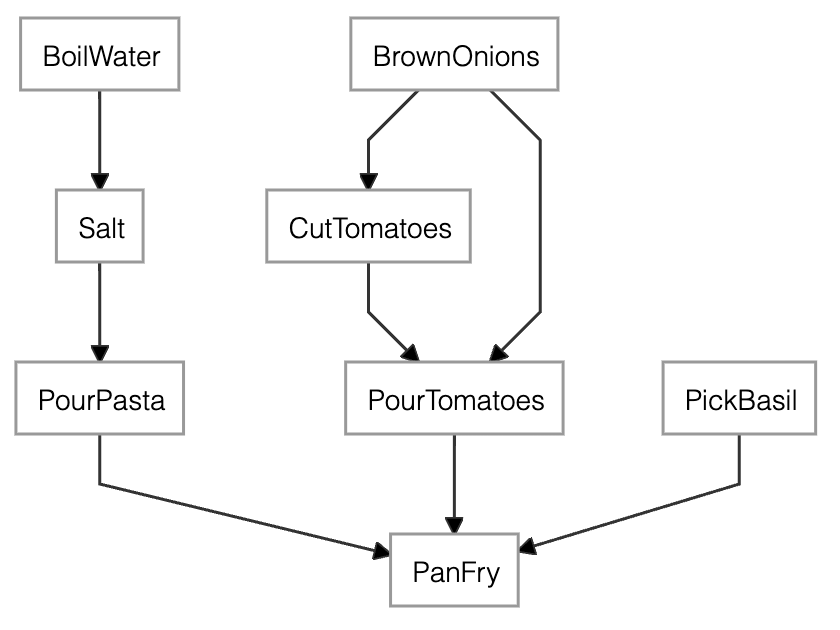
The dependency graph of the pasta recipe generated by merge.dependency_graph()
Any pipeline step must be of type Step and declare its action in the method run(). The method receives as many arguments as the dependencies of the Step.
Here for example, ingredients is the list of the ouputs of the steps PourPasta, PourTomatoes and PickBasil.
from job_orchestra import Step

class PanFry(Step):
    def run(self, *ingredients):
        pan = pick_pan()
        pan.pour(ingredients)
        pan.blend()
Check the pipeline before execution
-
As an image: by calling
dependency_graph(). For example, callingmerge.dependency_graph()produces the above image. -
As plain text: by calling
execution_plan().Execution plan. Result availability: [*] available - [ ] n/a - [x] no context. Scheduled execution: (H) head - (>) scheduled run on materialize - ( ) no run required. [x] (>) BrownOnions [x] (>) CutTomatoes [x] (>) BoilWater [x] (>) Salt [x] (>) PickBasil [x] (>) PourTomatoes [x] (>) PourPasta [x] (H) PanFryThe plan contains one row for each
Step. The name of the step is preceded by two symbols whose meaning is explained further down in Section Memory persistence.
To get a complete view of the pipeline, you should always call any of the above methods on the head of the pipeline, not on the intermediate steps.
Execute the pipeline
Finally, you execute the recipe with
lunch = merge.materialize()
Calling materialize() on the last Step makes all the dependent steps to be executed in the right order passing the output of a Step to its depending ones.
Memory persistency
job-orchestra is a memoryless system by default. But if you'd like to:
- stop/resume development - store the state of a pipeline to resume development at a later stage
- optimize the computation - save the result of one or many intermediate
Steps to avoid recomputing it whenever needed
you can create a Context object, and pass it to whatever Step you like. The ouptput of that Step will available in the Context for any depending Step.
For example, let's consider the previous recipe and add a Context to PourTomatoes.
from job_orchestra import Context

ctx = Context()
pour_tomatoes = PourTomatoes(depends_on=[cut_tomatoes, brown_onions], ctx=ctx)
merge = PanFry(depends_on=[pasta, pour_tomatoes, basil])
merge.execution_plan()
Execution plan. Result availability: [*] available - [ ] n/a - [x] no context.
                Scheduled execution: (H) head - (>) scheduled run on materialize - ( ) no run required.
 [x] (>) BrownOnions
 [x] (>) CutTomatoes
 [x] (>) BoilWater
 [x] (>) Salt
 [x] (>) PickBasil
 [ ] (>) PourTomatoes
 [x] (>) PourPasta
 [x] (H) PanFry
The execution plan shows that PourTomatoes has access to a Context, but the result is not yet available (n/a) since we haven't materialized the new PourTomatoes yet. Therefore, all the Steps are still “scheduled to run on materialize".
Let's materialize the recipe and then observe the execution plan once again.
lunch = merge.materialize()
merge.execution_plan()
Here is the result:
Execution plan. Result availability: [*] available - [ ] n/a - [x] no context.
                Scheduled execution: (H) head - (>) scheduled run on materialize - ( ) no run required.
 [x] ( ) BrownOnions
 [x] ( ) CutTomatoes
 [x] (>) BoilWater
 [x] (>) Salt
 [x] (>) PickBasil
 [*] ( ) PourTomatoes
 [x] (>) PourPasta
 [x] (H) PanFry
This time PourTomatoes is available in the Context, so the next time you call merge.materialize(), PourTomatoes and all its dependencies won't be executed again.
As usual, you can inspect the result of any Step by calling materialize() on it. If a Context is available for that Step, the result will be returned without executing run().
Load/Store the state of the pipeline
Simply use ctx.store("path") and ct.load("path") to store and load a Context to/from disk.
As a safety measure, no file or directory named “path" must exist already when calling store().
Reusing pipeline steps
Pipeline steps require to have a unique name. In those situations where you want to re-use the same Step twice or more, you can alias the Step name by passing the argument name_alias to the constructor of the subclass. For example, we can modify the previous example by adding Salt both to BoilWater and to PourTomatoes:
...
pour_tomatoes = PourTomatoes(depends_on=[cut_tomatoes, brown_onions])
salt_water = Salt(depends_on=water, name_alias="SaltWater")
salt_tomatoes = Salt(depends_on=pour_tomatoes, name_alias="SaltTomatoes")
pasta = PourPasta(depends_on=salt_water)
merge = PanFry(depends_on=[pasta, salt_tomatoes, basil])
...
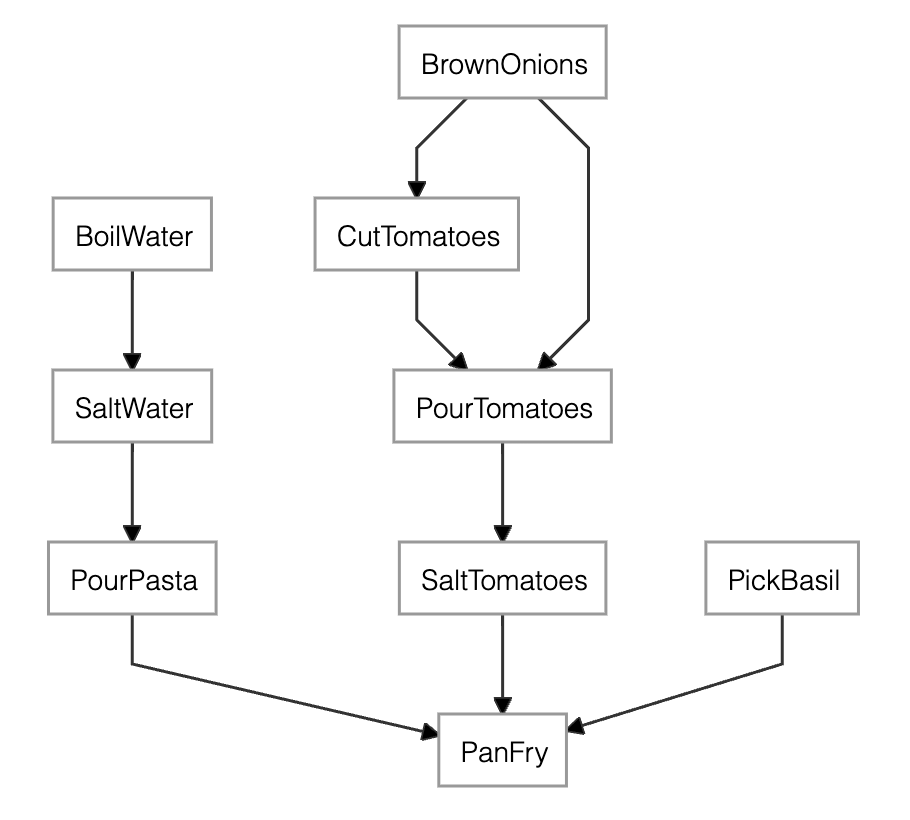
The dependency graph of the salty pasta recipe generated by merge.dependency_graph()
Release history Release notifications | RSS feed


Download files
Download the file for your platform. If you're not sure which to choose, learn more about installing packages.
Source Distribution
Built Distribution
Filter files by name, interpreter, ABI, and platform.
If you're not sure about the file name format, learn more about wheel file names.
Copy a direct link to the current filters
File details
Details for the file job_orchestra-1.1.4.tar.gz.
File metadata
- Download URL: job_orchestra-1.1.4.tar.gz
- Upload date:
- Size: 12.4 kB
- Tags: Source
- Uploaded using Trusted Publishing? No
- Uploaded via: uv/0.6.2
File hashes
| Algorithm | Hash digest | |
|---|---|---|
| SHA256 |
516a519e5c36e0e2b412b7897cd59f5f6b0b092e65a7bd5580273c633b53eebd
|
|
| MD5 |
e0d8a01ffd54bb290be495fd7bd4e0bf
|
|
| BLAKE2b-256 |
b3376a2a5165e3eca56bbda09449f78bd095bd004386ca618fa29713df8fd09e
|
File details
Details for the file job_orchestra-1.1.4-py3-none-any.whl.
File metadata
- Download URL: job_orchestra-1.1.4-py3-none-any.whl
- Upload date:
- Size: 11.7 kB
- Tags: Python 3
- Uploaded using Trusted Publishing? No
- Uploaded via: uv/0.6.2
File hashes
| Algorithm | Hash digest | |
|---|---|---|
| SHA256 |
12f7a80f193e608b5febacf4cedb8ff434c1b639a667a80a5dec978195b93a01
|
|
| MD5 |
27d44453f0a301b6cd9e5e8612d6d036
|
|
| BLAKE2b-256 |
3f30e80f7869e405a66753138bcb05eda2d2196c96d9804357cd88fea872350a
|






