
jobdraft
Paste a job. Get an honest draft in Gmail. You press Send.
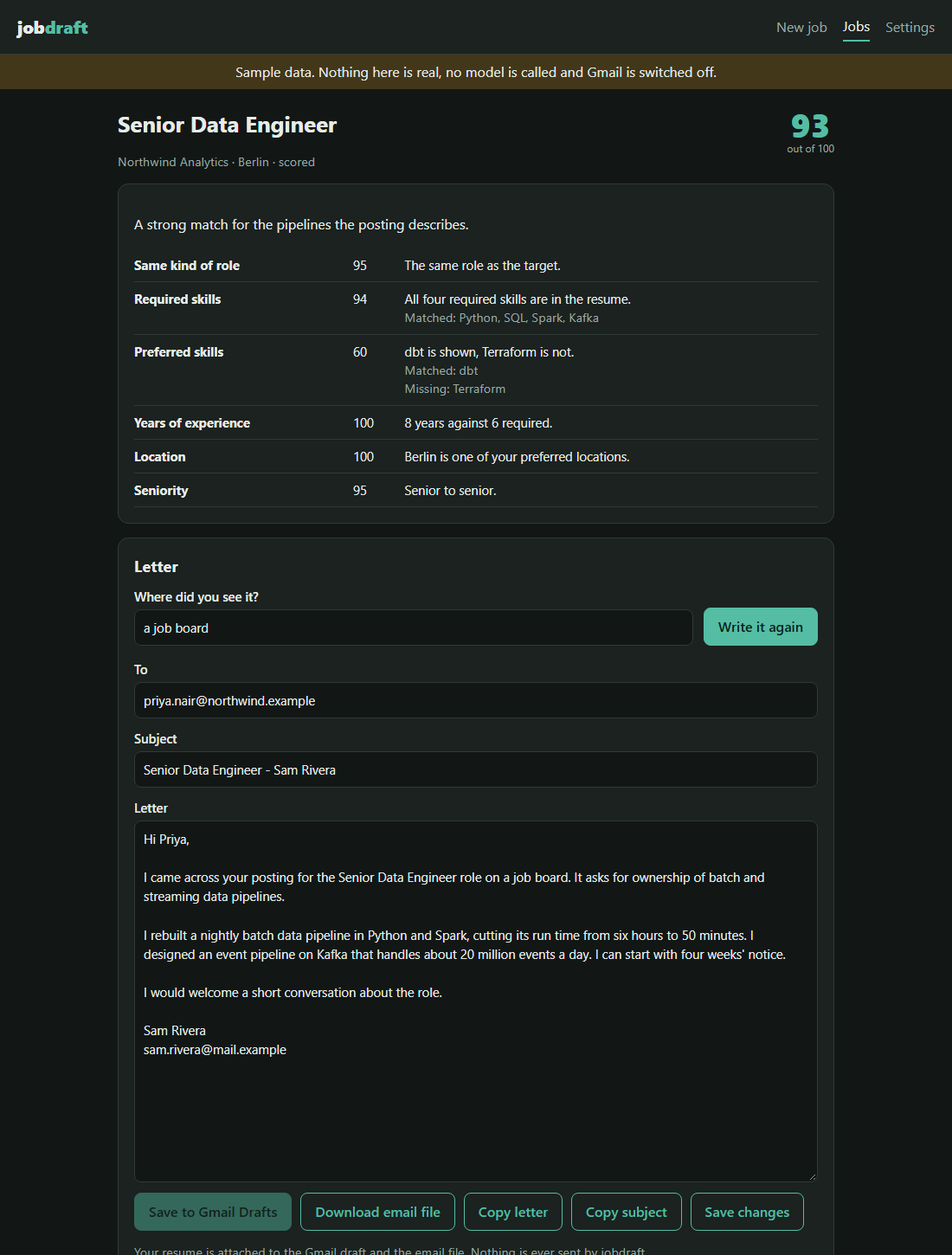
jobdraft is a small app you run on your own laptop or server. Paste a job description (text or a screenshot). It scores the job against your resume, writes a short application email using sentences you approved, and saves it as a Gmail draft with your resume attached.
- It never sends anything. There is no sending code, and a test fails the build if any appears.
- It never invents your experience. Your facts are copied into the letter word for word.
- Your data stays with you. One folder on your machine. The only outside calls are to the AI provider you choose and, if you set it up, Gmail.
Install
One command. It installs uv if needed, which fetches Python if needed, then installs jobdraft.
Windows (PowerShell or Command Prompt)
powershell -ExecutionPolicy ByPass -c "irm https://github.com/builditwithgk/jobdraft/releases/latest/download/install.ps1 | iex"
macOS and Linux
curl -LsSf https://github.com/builditwithgk/jobdraft/releases/latest/download/install.sh | sh
Prefer to read a script before running it? See install.ps1 and install.sh. If you already have uv:
uv tool install jobdraft
jobdraft
Run the install command again to update.
Try it first, with no key
jobdraft demo
A fictional person, three jobs and saved model replies. No key, no network, nothing real. It uses a temporary folder and cannot touch your data.
On a VPS
The same macOS/Linux command notices a server without a screen, sets up a background service and prints a password once. Then, from your own computer:
ssh -L 8420:127.0.0.1:8420 you@your-server
Open http://localhost:8420 and sign in. Lost the password? Run jobdraft password on the server, which also signs everyone out.
jobdraft listens only on the server itself. If you want it on a public address, put your own HTTPS reverse proxy in front of it and add the name with jobdraft serve --allow-host jobs.example.com. Do not expose it over plain HTTP.
With Docker
docker run -d --name jobdraft --restart unless-stopped -p 127.0.0.1:8420:8420 -v jobdraft:/data ghcr.io/builditwithgk/jobdraft
docker logs jobdraft    # shows the first password, once
Set up (in the browser)
| Step | What you do |
|---|---|
| 1. AI model | Choose a provider, paste your key, press Save and test |
| 2. Resume | Upload one PDF, Word or text file with selectable text |
| 3. Letter | Press Suggest facts, tick and edit the true ones (at least 3), add your closing and signature |
| 4. Preferences | Target role and the places you would work |
| 5. Gmail (optional) | Your address and an app password, then Save and test |
Then paste a job on New job.
AI providers
| Provider | Notes |
|---|---|
| OpenAI | Default model gpt-6-luna |
| DeepSeek | Default model deepseek-flash. Your data is processed by DeepSeek in China |
| Modal | Your own model server: run jobdraft modal setup. Modal includes $30 of credit a month but needs a payment card and charges for use beyond it, so set a budget. The first run downloads about 32 GB into your Modal account |
| Ollama | Free, on your own computer. Enter the model name. Screenshots need a vision model; small models may give weaker results. From Docker use http://host.docker.internal:11434/v1 (on Linux also add --add-host=host.docker.internal:host-gateway) |
| Other | Any OpenAI-compatible chat completions address |
Each provider has its own saved key. If you change a server address, the key is removed and you enter it again.
What has been tested: this first version is tested against stand-in servers. It has not yet been run against the live services above. Please report what you find. Model names and prices change; both are editable.
The job page shows the tokens used and, for models with a known price, an estimate of the cost. There is no spending limit inside jobdraft: set one with your provider.
How a letter is built
- Greeting, using the contact's first name when the posting gives one.
- "I came across your posting for the role role." The place you saw it is mentioned only if you say so.
- One sentence on what the posting asks for, written by the model.
- One or two of your facts, chosen by fit and copied exactly.
- Your note, closing, signature and optional P.S.
Code checks the model's sentence: a number or tool found in neither the posting nor your facts is rejected, retried once, then dropped, and you are told. If the posting demands a particular subject line, it is used. If it asks for details such as a notice period, you are reminded; they are never made up.
Always read the letter before you send it. The checks catch common mistakes, not all of them.
The score
The model judges six things; code does the arithmetic. Role type 20%, required skills 30%, preferred skills 10%, experience 15%, location 15%, seniority 10%. Anything the posting does not state is left out rather than counted as zero, and a score based on less than half is labelled. Location comes from your own lists.
Gmail
Create an app password (it needs 2-Step Verification). Company Google Workspace accounts usually cannot use app passwords.
An app password gives full access to your mailbox. jobdraft uses it only to sign in, find the Drafts folder, add a draft and sign out. It never opens a folder or reads a message; tests enforce this. You can revoke the password at any time. Without Gmail, download the letter as an email file or copy it. Mail programs differ in whether they open that file as an editable draft.
Your data
| Where | ~/.jobdraft (change with JOBDRAFT_HOME or --home) |
| Keys and passwords | secrets.json, a plain-text file (readable only by you on Linux and macOS) |
| Back up | Copy the folder, or jobdraft export (leaves keys and passwords out) |
| Delete | Settings → Delete all data. Gmail drafts stay in Gmail |
| Sent to the AI provider | Your resume text, the job text and your facts |
Commands
| Command | Does |
|---|---|
jobdraft |
Start and open the browser |
jobdraft demo |
Sample data |
jobdraft serve |
Run without a browser (--server requires a password) |
jobdraft doctor |
Check the settings, model and Gmail |
jobdraft export |
Save your data to a zip |
jobdraft password |
New sign-in password for server mode |
jobdraft modal setup |
Publish your own model on Modal |
jobdraft uninstall |
Remove the shortcut or service, then uv tool uninstall jobdraft |
What it does not do
By design: no auto-apply, no sending, no reading your mail, no scraping job sites. For now: one resume, one person.
Develop
git clone https://github.com/builditwithgk/jobdraft
cd jobdraft
uv venv && uv pip install -e ".[dev]"
uv run pytest
uv run ruff check src tests
See CONTRIBUTING.md and SECURITY.md.
License
MIT.
1 maintainer

Metadata
1 maintainer
Release files for jobdraft 0.1.0
For a detailed explanation of source distributions (sdists) and built distributions (wheels), please see the package formats documentation.
Source distribution (sdist)
| File | Size | Uploaded | Provenance | Actions |
|---|---|---|---|---|
| jobdraft-0.1.0.tar.gz | 90.7 kB | With provenance | Details for jobdraft-0.1.0.tar.gz |
Built distribution (wheel)
| File | Interpreter | ABI | Platform | Actions Reset |
|---|---|---|---|---|
| jobdraft-0.1.0-py3-none-any.whl | Python 3 | none | any | Details for jobdraft-0.1.0-py3-none-any.whl |
Total release size: 177.7 kB
Release files / jobdraft-0.1.0.tar.gz
| Download URL | jobdraft-0.1.0.tar.gz |
|---|---|
| Size | 90.7 kB |
| Tags | Source |
|
SHA-256 checksum How to use checksums |
c5faf2d37b419e03e8effbdbb92b118a0903d13876500a1718f58ac2efb745d3
|
|
BLAKE2b-256 checksum How to use checksums |
d08117b3808fdce239877b98367983723c8506a5baaa95dd46fdb7b83135048c
|
| Upload date | |
|
Uploaded using Trusted Publishing? What is trusted publishing? |
Yes |
| Uploaded via |
twine/7.0.0 CPython/3.13.16
|
Provenance
Provenance describes where a file came from. On PyPI, provenance is shared via attestations, which provide a verifiable record of the build or publishing details. View details, limitations and caveats.


PyPI Publish Attestation
PyPI verified that this artifact, at this checksum, originated from the publisher listed below.
Signed by GitHub Actions, verified by PyPI on Nov 29, 2026.
Transparency logRelease files / jobdraft-0.1.0-py3-none-any.whl
| Download URL | jobdraft-0.1.0-py3-none-any.whl |
|---|---|
| Size | 87.1 kB |
| Tags | Python 3 |
|
SHA-256 checksum How to use checksums |
d45214d47bf0bc1857590a73d16c96a86410a01cfa98a9293524f2ec590b9dca
|
|
BLAKE2b-256 checksum How to use checksums |
c0ece3d1b9a157b33b6ae2609ddb74cac39162366b08f79c483d1ca149d39680
|
| Upload date | |
|
Uploaded using Trusted Publishing? What is trusted publishing? |
Yes |
| Uploaded via |
twine/7.0.0 CPython/3.13.16
|
Provenance
Provenance describes where a file came from. On PyPI, provenance is shared via attestations, which provide a verifiable record of the build or publishing details. View details, limitations and caveats.
PyPI Publish Attestation
PyPI verified that this artifact, at this checksum, originated from the publisher listed below.
Signed by GitHub Actions, verified by PyPI on Nov 29, 2026.
Transparency logSecurity for jobdraft 0.1.0
Provenance
Provenance describes where a file came from. On PyPI, provenance is shared via attestations, which provide a verifiable record of the build or publishing details. View details, limitations and caveats.
Full provenance
Both files in this release have been uploaded with provenance metadata.
Attestation for jobdraft-0.1.0.tar.gz
PyPI Publish Attestation
PyPI verified that this artifact, at this checksum, originated from the publisher listed below.
Signed by GitHub Actions, verified by PyPI on Nov 29, 2026.
Transparency logA note on package security
PyPI is a repository for distributing packages, not a service for auditing them. While third-party security researchers and our staff do their best to detect and remove malicious packages, PyPI cannot guarantee the quality, security or suitability of any given package.
To learn more about protecting yourself from malicious actors, visit our package security documentation.













