
jobhop
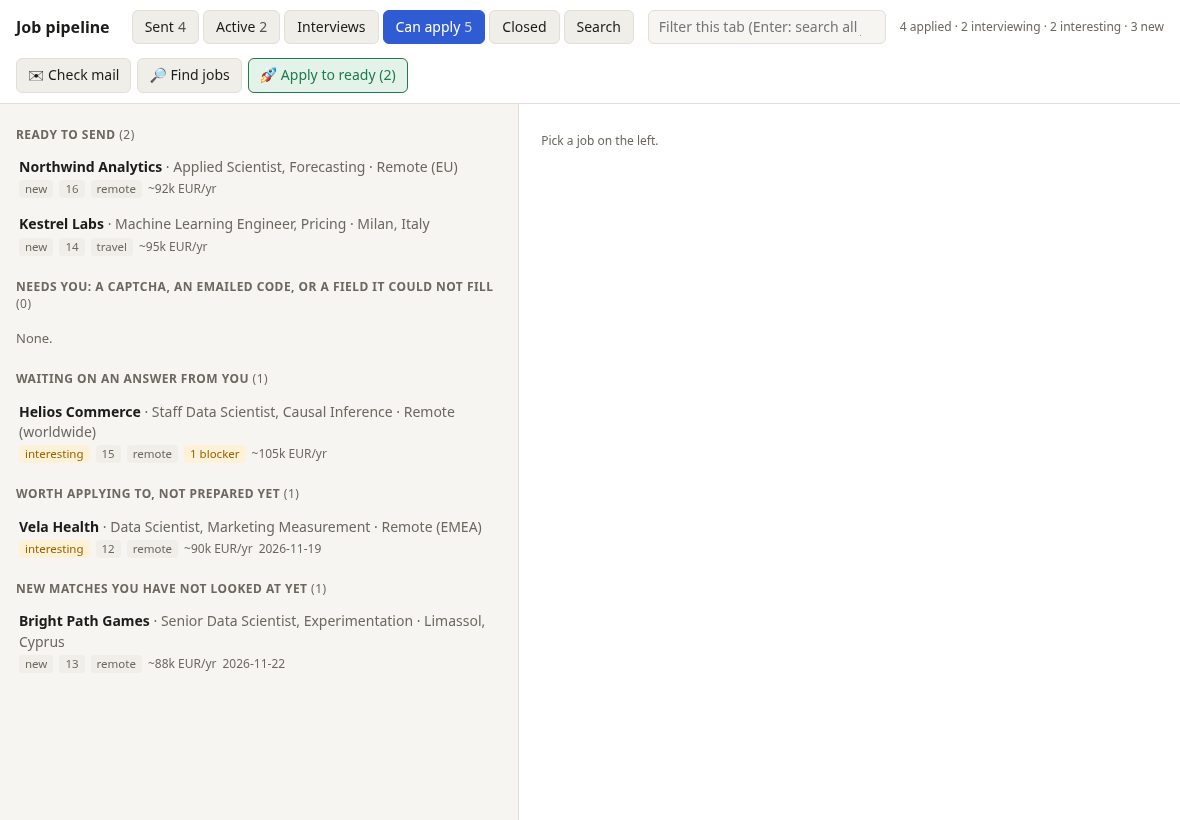
A local-first job application pipeline. It finds postings, scores them against your own rules, drafts the applications — and then stops.
Get it
| Linux | 19 MB, AppImage. No Python needed. |
| Windows | 12 MB, .exe. No Python needed. |
| wheel | Python 3.10+. |
Download the file for your computer and open it: it starts up and opens http://127.0.0.1:8770 in
your browser, which is jobhop. On Linux a downloaded file is not executable until you allow it
(right-click → Properties → Permissions → Is executable, or chmod +x); on Windows SmartScreen
will warn you once because the .exe is not code-signed — More info → Run anyway.
Or, with Python already present, one line fetches and installs it:
uvx --from git+https://codeberg.org/quietledger/jobhop jobhop ui
uv tool install git+https://codeberg.org/quietledger/jobhop   # then just `jobhop ui`
pipx install git+https://codeberg.org/quietledger/jobhop     # or pipx
pip install git+https://codeberg.org/quietledger/jobhop       # or plain pip
Once the package is on PyPI this shortens to uvx jobhop ui.
Then jobhop ui opens a short form the first time — your name, what you are looking for, your
salary bar, your CV — and writes the configuration for you. No account, no sign-up, no telemetry.
See it first
uvx --from git+https://codeberg.org/quietledger/jobhop jobhop demo
Opens the board on a throwaway tracker: 14 fictional jobs, a few demo drafts, one of them
deliberately held back on a question only a human can answer. Nothing is read from or written to
your own data — not the tracker, not the drafts, not the answer bank, not your profile — and the
temporary directory is deleted when you close it. No config to write, nothing to fill in. (Clone and
run ./jobhop.py demo if you would rather read the code first.)
The one rule
Nothing is ever submitted unattended.
The routine that runs on a timer has no browser and is instructed never to submit, send or post
anything. autoapply.py drives a real browser to fill a form and then hands control back for you to
confirm. There is no bulk-apply mode, by design: an application nobody read is worse than no
application at all.
That is not only caution — it is what keeps the tool on the right side of job boards' terms and of what employers expect. You are the one applying. The tool does the reading, the matching and the typing.
It does not need an agent
Most of jobhop is plain code: fetching, scoring, tracking, the board, the reply check, filling a form. None of that needs a language model, and none of it breaks if you have never set one up.
Two features do want one — jobhop cv propose, which drafts CV material from your commit history,
and the unattended daily routine, which reads each posting and judges fit. jobhop looks for
claude, codex, opencode or aider on your PATH, or whatever JOBHOP_AGENT names, and:
- with an agent, those two features run and the routine judges fit properly;
- without one,
cv proposesays so and exits, and the daily routine still fetches, scores and prepares what it can from your answer bank — no cover letters, no reading of descriptions, but the pipeline runs and nothing errors.
What it does
- Fetches postings from the sources you configure: an aggregator feed, per-company ATS boards (Ashby, Greenhouse, Lever), LinkedIn and freelancermap.
- Scores each posting against
profile.yaml: weighted keywords, location fit, title include/exclude, excluded employers. The score is a first filter, not a decision — the routine reads the full description and judges fit properly. - Tracks everything in one SQLite file (
data/jobs.db) with a status per posting, so nothing gets applied to twice and follow-ups don't get lost. - Drafts an application: the form's fields and a proposed answer for each, a cover letter if the
form wants one, and a machine-readable
submit.yamldescribing how to fill and submit it. - Fills the form in a real browser (
autoapply.py run), question by question, matching each field to the answer bank — and waits for your confirmation before submitting. - Watches for replies, so follow-ups surface on time.
- Builds a CV digest from your own commit history (
cv_builder/), so applications cite work you actually did rather than adjectives.
Your own listings
jobhop fetch knows a handful of public boards. If what you care about is on none of them — your
city's board, one company's careers page, an export from a tool you are leaving — import it:
jobhop import my-feed.jsonl                      # one JSON object per line
jobhop import export.csv --format csv --as old-tool
jobhop import stellen.tsv --format tsv \
  --map '{"postenname": "title", "bewerbungslink": "url"}'   # their field names -> ours
jobhop import job.json --preset jsonresume       # the JSON Resume job-posting format
jobhop import page.jsonld --preset jsonld        # schema.org JobPosting, as a page embeds it
Imported listings go through the same dedupe, scoring and tracker as fetched ones, and a field jobhop has no column for is kept rather than dropped. See Importing your own listings and Where the listings come from for the two named formats.
Not sure whether jobhop can handle the form at the other end? jobhop platforms says which
systems it can apply through and how well — including the ones it deliberately does not touch.
What it will not do
Worth saying as plainly as what it does, because these are choices rather than gaps:
- It never submits unattended. The daily routine has no browser at all, by construction.
- It never solves a CAPTCHA, and never asks you to.
- It never types or stores a password. Where a sign-in stands in the way — LinkedIn, Workday,
Taleo, SuccessFactors, iCIMS — it stops, says so, and hands you the browser you are already
logged into (
jobhop open <id>). - It does not automate LinkedIn. The User Agreement prohibits automating activity on the site, there is no API route for an individual, and Easy Apply is specifically instrumented against bots. See docs/platforms.md for the full reasoning.
Development
The checks, runnable by hand and by CI:
python tests/test_ingest_and_location.py    # the suite; pyyaml + requests are all it needs
python tests/check_docs.py                  # help, links and command references against the code
python -m build --wheel && python tests/check_wheel.py
python tests/check_release.py --all ~/jobhop-release   # do the artefacts match the code?
The suite needs no browser and no agent — those are extras, and testing with them installed would test a different program from the one most people run.
tests/check_wheel.py exists because of a bug that shipped: four modules were listed in
py-modules but absent from the wheel, which is invisible from a checkout (the files are on disk)
and an ImportError only for whoever installed from a release.
tests/check_docs.py exists because a sweep found four things at once that no test could catch and
no reader would all notice: two commands missing from --help, a troubleshooting page telling people
to run a jobhop autoapply queue command that has never existed (it is ./autoapply.py queue), and
a documentation index listing four pages of eight. Documentation drift is invisible by construction;
now it fails a check.
(That bad command is quoted in italics rather than backticks on purpose: this check reads a
backticked jobhop … as an instruction, which is the right rule, so an example of a wrong one has
to be marked as prose.)
tests/check_release.py exists because the same mistake happened twice in one evening: build the
wheel and the two binaries, publish them, then keep committing. A stale artefact is indistinguishable
from a current one, so the build now records the commit it came from (jobhop --version prints it)
and this compares that against the last commit to touch anything that actually ships. It is not in CI
because CI has no artefacts to check — run it before publishing.
How to cut a release, including the traps that bit at least once each, is in docs/releasing.md.
CI is Woodpecker, which is what Codeberg runs — not GitHub Actions, since
Codeberg is Forgejo. .github/workflows/ here would be read by nothing. Activating it is manual and
can only be done by the repository owner: request CI access from Codeberg once, then enable the
repository at ci.codeberg.org/repos/add and leave the "Pipeline
path" setting empty — pointing it at a single file silently disables the others.
Documentation
| Page | What is in it |
|---|---|
| Getting started | Installing, the first run, the board, where your data lives |
| Configuring | profile.yaml, the answer bank, what each field does |
| Where the listings come from | The built-in sources, the optional JobSpy boards, and your own files |
| Importing your own listings | Bring a feed in from any file, including one whose fields are named differently |
| Which systems it can apply through | Every ATS, and honestly how well each is handled |
| The daily routine | The unattended run — what it does, and why it never submits |
| Troubleshooting | What to check when something does not work |
Pieces
| Path | What it is |
|---|---|
jobhop.py |
CLI and tracker: demo, fetch, import, platforms, sources, open, list, show, mark, set, report, tracker, form, ui, mail, cv, sync-cv, prep |
autoapply.py |
The submit path: spec (build the fill plan), queue (what's ready), run (fill in a browser, confirm-gated) |
paths.py |
Where the code is, where your data is, and what this machine can do |
ingest.py |
Listings in from your own file — JSONL/CSV/TSV, with field renaming |
sources_jobspy.py |
The boards python-jobspy maintains, when it is installed |
agents.py |
Finds the agent CLI, if the machine has one (the drafting steps are optional) |
platforms.py |
Which ATS is behind a URL, and how well jobhop handles it |
store.py |
SQLite access, shared by the CLI and the board |
board/ |
Local web UI (binds 127.0.0.1 only) to work the pipeline |
demo.py |
The throwaway tracker behind jobhop demo |
cv_builder/ |
Turns GitHub/GitLab commit history into CV material |
routine/ |
The headless daily routine: prompt (daily.md), wrapper (run_daily.sh) |
systemd/ |
User units and timers for the routine, the reply check and the board |
docs/ |
The documentation in this table |
Where your data lives
Two directories, and the difference matters once jobhop is installed rather than cloned:
- The code — wherever it ended up: a download,
site-packages, a read-only AppImage mount. Never written to. - Your data —
profile.yaml, the tracker, the drafts, the CV.JOBHOP_HOMEif you set it, the repo if you are running from a clone, otherwise~/jobhop(C:\Users\<you>\jobhopon Windows), created on the first run with a.gitignoreof its own.
Keeping them apart is what lets the tool be installed at all: an installed package lives in
site-packages, which is the wrong place for a job search.
Or copy the examples and edit them by hand (from a clone):
cp profile.example.yaml            profile.yaml            # your search, as data
cp routine/answers.example.yaml    routine/answers.yaml    # your standing form answers
cp cv_builder/config.example.yaml  cv_builder/config.yaml

./jobhop.py fetch
Either way, the three files are yours from then on: the form is a shortcut to a working starting point, not something that keeps managing them. Configuring explains the fields.
Requirements
- Python 3.10+, with
pyyamlandrequests. Installing the package brings both. The downloads do not need Python at all. playwrightfor the submit path —pip install 'jobhop[apply]'— plus a browser.jinja2forcv build—pip install 'jobhop[cv]'.- A Proton Bridge — or any IMAP/SMTP reachable locally — for the reply check.
gh(GitHub CLI) if you use thecv/sync-cvcommands.
Linux and Windows
Everything except the unattended daily routine works on both, and on macOS.
The routine (routine/run_daily.sh) is a shell script that drives an agent CLI, so it needs bash.
On Linux it runs as a systemd user unit — systemd/ has the units, and installing them means copying
them to ~/.config/systemd/user/ and editing the paths to match where jobhop ended up. Without
systemd (and on Windows) the board falls back to running the script directly, and says so when it
cannot. See The daily routine.
Three desktop conveniences have fallbacks rather than hard dependencies: the keyring (secret-tool;
elsewhere use PROTON_IMAP_PASS), desktop notifications (notify-send; silence elsewhere), and the
service manager. Nothing else in the tool touches a Linux-only API.
Environment overrides
Each input below can be pointed somewhere else, which is how demo keeps its hands off your real
data — and how you can run the tool against a scratch copy:
| Variable | Default | What it redirects |
|---|---|---|
JOBHOP_HOME |
~/jobhop when installed |
the whole data directory |
JOBHOP_DB |
$JOBHOP_HOME/data/jobs.db |
the tracker |
JOBHOP_ANSWERS |
$JOBHOP_HOME/routine/answers.yaml |
the answer bank |
JOBHOP_APPS |
$JOBHOP_HOME/applications/ |
the drafts |
JOBHOP_PROFILE |
$JOBHOP_HOME/profile.yaml |
the profile |
JOBHOP_IMAP_HOST / _PORT / _USER / _PASS |
127.0.0.1 / 1143 / — |
the mailbox the reply check reads |
JOBHOP_SMTP_HOST / _PORT / _USER / _PASS |
127.0.0.1 / 1025 / — |
the mailbox email applications are sent from |
JOBHOP_KEYRING_SERVICE |
proton-bridge |
where the password is looked up in the keyring |
JOBHOP_AGENT / JOBHOP_AGENT_ARGS |
auto-detected | which agent CLI the drafting steps use |
JOBHOP_JOBSPY_SITES |
linkedin,glassdoor |
which boards --source jobspy asks for |
The PROTON_IMAP_* names still work — they are what the defaults were written for — but nothing is
Proton-specific: any IMAP/SMTP server reachable from the machine will do, and the JOBHOP_* names
are the ones to prefer.
Credentials
Nothing here is stored in the repo, and no secret should ever be committed. The reply check and the
email submit path read the Bridge password from the keyring (secret-tool, Linux) or from the
environment — and the environment is the only route on Windows:
export PROTON_IMAP_USER=you@example.com   # the Bridge account
export PROTON_IMAP_PASS=...               # or the keyring entry above
The browser profile that holds your job-board logins lives outside the repo.
Support
jobhop is free and open source under the MIT licence — no account, no telemetry, no paid tier.
If it saved you some time, you can buy me a coffee. It goes towards the things the project actually costs: a code-signing certificate, which is what would remove that Windows warning, and the time to repair the fetchers when a job board changes its mind about its HTML.

Licence
MIT — see LICENSE.
1 maintainer

Metadata
1 maintainer
Release files for jobhop 0.1.0
For a detailed explanation of source distributions (sdists) and built distributions (wheels), please see the package formats documentation.
Source distribution (sdist)
| File | Size | Uploaded | Provenance | Actions |
|---|---|---|---|---|
| jobhop-0.1.0.tar.gz | 116.7 kB | Without provenance | Details for jobhop-0.1.0.tar.gz |
Built distribution (wheel)
| File | Interpreter | ABI | Platform | Actions Reset |
|---|---|---|---|---|
| jobhop-0.1.0-py3-none-any.whl | Python 3 | none | any | Details for jobhop-0.1.0-py3-none-any.whl |
Total release size: 228.1 kB
Release files / jobhop-0.1.0.tar.gz
| Download URL | jobhop-0.1.0.tar.gz |
|---|---|
| Size | 116.7 kB |
| Tags | Source |
|
SHA-256 checksum How to use checksums |
f4ccab067593246061fe025f66a7ab10d699f7beef82ec024d9f1f00e2f46940
|
|
BLAKE2b-256 checksum How to use checksums |
a770ada3cd7ed7cf679bd8c726ead5ff75921afe02886c8d3b23691b531e24f2
|
| Upload date | |
|
Uploaded using Trusted Publishing? What is trusted publishing? |
No |
| Uploaded via |
twine/7.0.0 CPython/3.13.14
|
Release files / jobhop-0.1.0-py3-none-any.whl
| Download URL | jobhop-0.1.0-py3-none-any.whl |
|---|---|
| Size | 111.4 kB |
| Tags | Python 3 |
|
SHA-256 checksum How to use checksums |
bd419560aa34be58b7266d83374c821c21c37d97d0a0f365ae77619c4edf946b
|
|
BLAKE2b-256 checksum How to use checksums |
a959a3d8077d4f1bf46dbaa99b78e6c2d3e57e1a9f7e2ecbf11bcf9fa48f08a2
|
| Upload date | |
|
Uploaded using Trusted Publishing? What is trusted publishing? |
No |
| Uploaded via |
twine/7.0.0 CPython/3.13.14
|
Security for jobhop 0.1.0
Provenance
Provenance describes where a file came from. On PyPI, provenance is shared via attestations, which provide a verifiable record of the build or publishing details. View details, limitations and caveats.
No provenance found
None of the files in this release were uploaded with provenance metadata.
A note on package security
PyPI is a repository for distributing packages, not a service for auditing them. While third-party security researchers and our staff do their best to detect and remove malicious packages, PyPI cannot guarantee the quality, security or suitability of any given package.
To learn more about protecting yourself from malicious actors, visit our package security documentation.














