
JobRadar
A self-hosted job radar for any kind of work: it searches job boards, scores every opening against your CV, and writes a tailored one-page CV for each one — without inventing a single thing about you.
JobRadar runs on your machine, keeps your CV and your job search in a local SQLite file, and works with or without a language model. It is not tied to any industry: the profile, the filters, the skills, the job families and the salary tables are all data you can edit.
pip install -e ".[all]"
jobradar demo      # synthetic data, no network calls
jobradar serve     # dashboard on http://127.0.0.1:8000
Contents
- What it does
- Why the CV part is different
- Install
- Quick start
- The dashboard
- Command line
- Configuration
- Job sources
- Using a language model (optional)
- Running it on a schedule
- Repository layout
- Privacy and data
- Limitations, honestly
- Contributing and licence
What it does
- Searches every enabled source for your target job titles — public APIs and feeds by default, national boards opt-in, and the job boards of companies you name (
stripe.comis enough). - Deduplicates the same opening seen on several boards, by id, by a company-and-title fingerprint and by title overlap — never by substring.
- Reads the fine print of each ad: the real work mode, which countries a remote role accepts, years of experience asked for, any published salary.
- Filters on work mode, geography, salary floor (with live currency conversion), years, freshness, keywords and companies. Missing information never rejects a job, and nothing rejected is thrown away: Filtered out shows every dropped ad with its reason, and which filter is doing the damage.
- Sorts and prices. Every job gets a job family (healthcare, logistics, hospitality, software and twenty more — editable, with a priority each). Ads without a salary get an estimate from the family's band, adjusted for the kind of employer, the hiring country and signals in the ad; always labelled as an estimate.
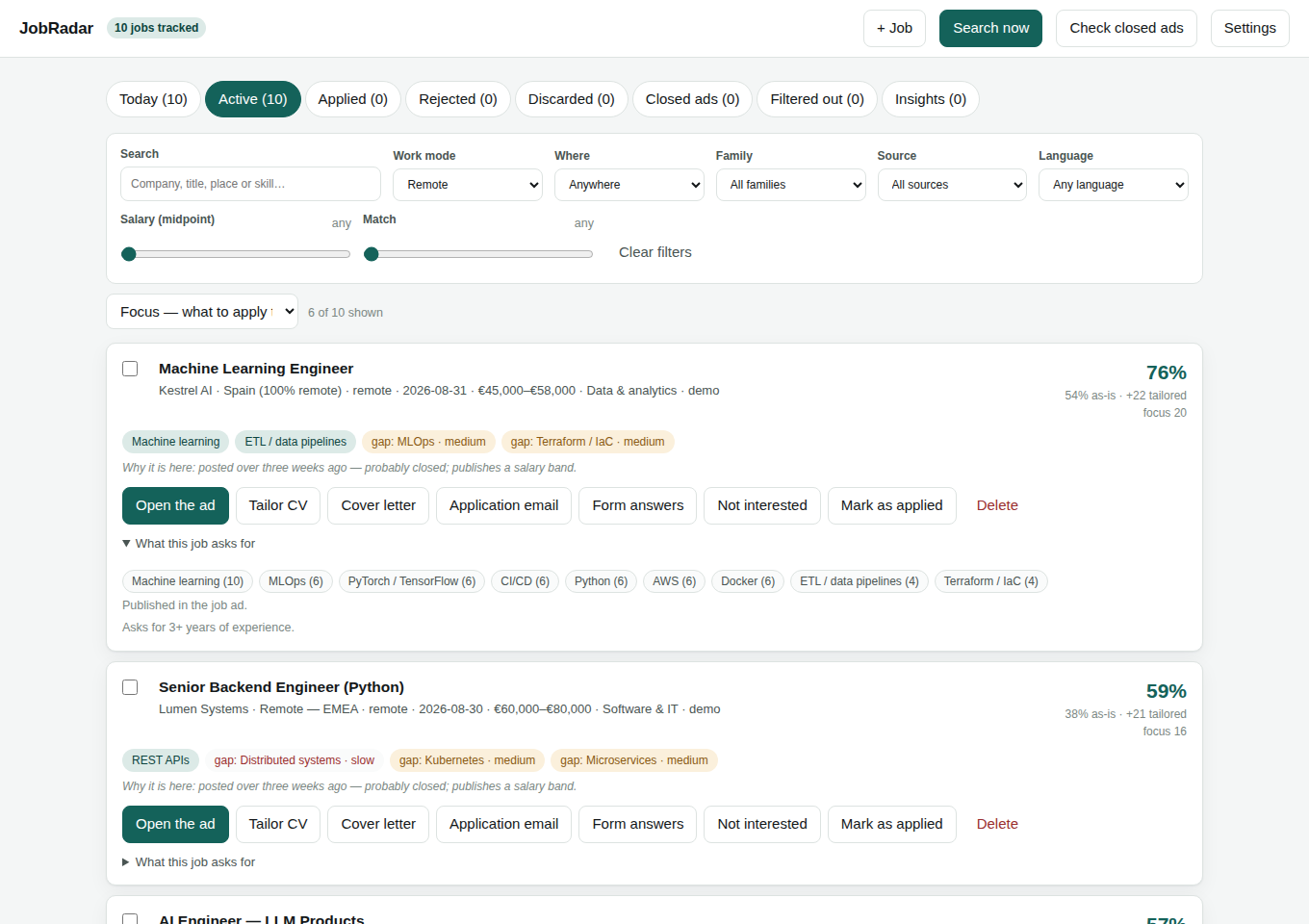
- Scores and triages. Two scores — what your CV proves today, and what it proves once tailored — plus your gaps, each marked with how long it would take to close. The board is ordered by focus: the match less what is known to go nowhere (stale ads, titles above your years). Today shows the six jobs to start with.
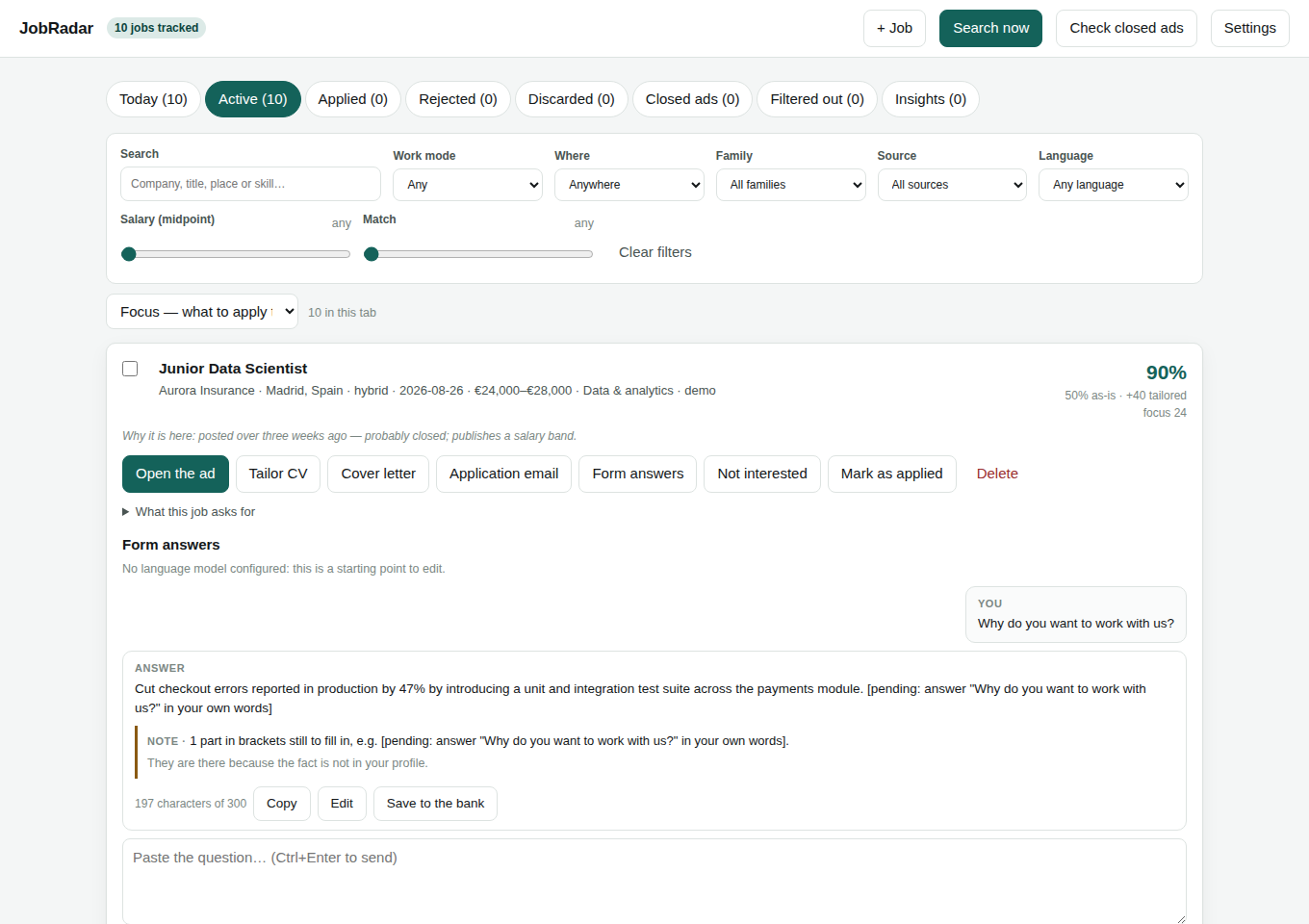
- Tailors and writes. A one-page CV per job (headline, summary, achievement and skill order), with an optional CV per job family; cover letters and emails, editable and downloadable as PDF; and answers to application-form questions within the form's limit, with a bank of your best answers to reuse.
- Checks every generated CV against your profile and lints it for what a recruiter spots in ten seconds. Letters, emails and answers get warnings (figures you cannot back, template phrases, a company never named…) that never block you.
- Tracks active, applied, rejected and discarded jobs with stages, dates and notes. Add a job you found elsewhere with + Job; delete one for good (with a week to undo). Applications are never sent for you.
- Reads your replies (optional, read-only IMAP): each reply is matched to its application as a rejection, a next step or an automatic acknowledgement, and a proposed interview becomes a calendar file.
- Says whether it is working. Insights shows replies by source, family and match score, and each source's record over past runs.
Why the CV part is different
Most CV tools optimise for a keyword match, which produces a CV you cannot defend in an interview. JobRadar is built around the opposite rule: tailoring may change which true things are prominent, never what is true.
- Evidence and ceilings. Each skill has an evidence (how strongly your CV proves it:
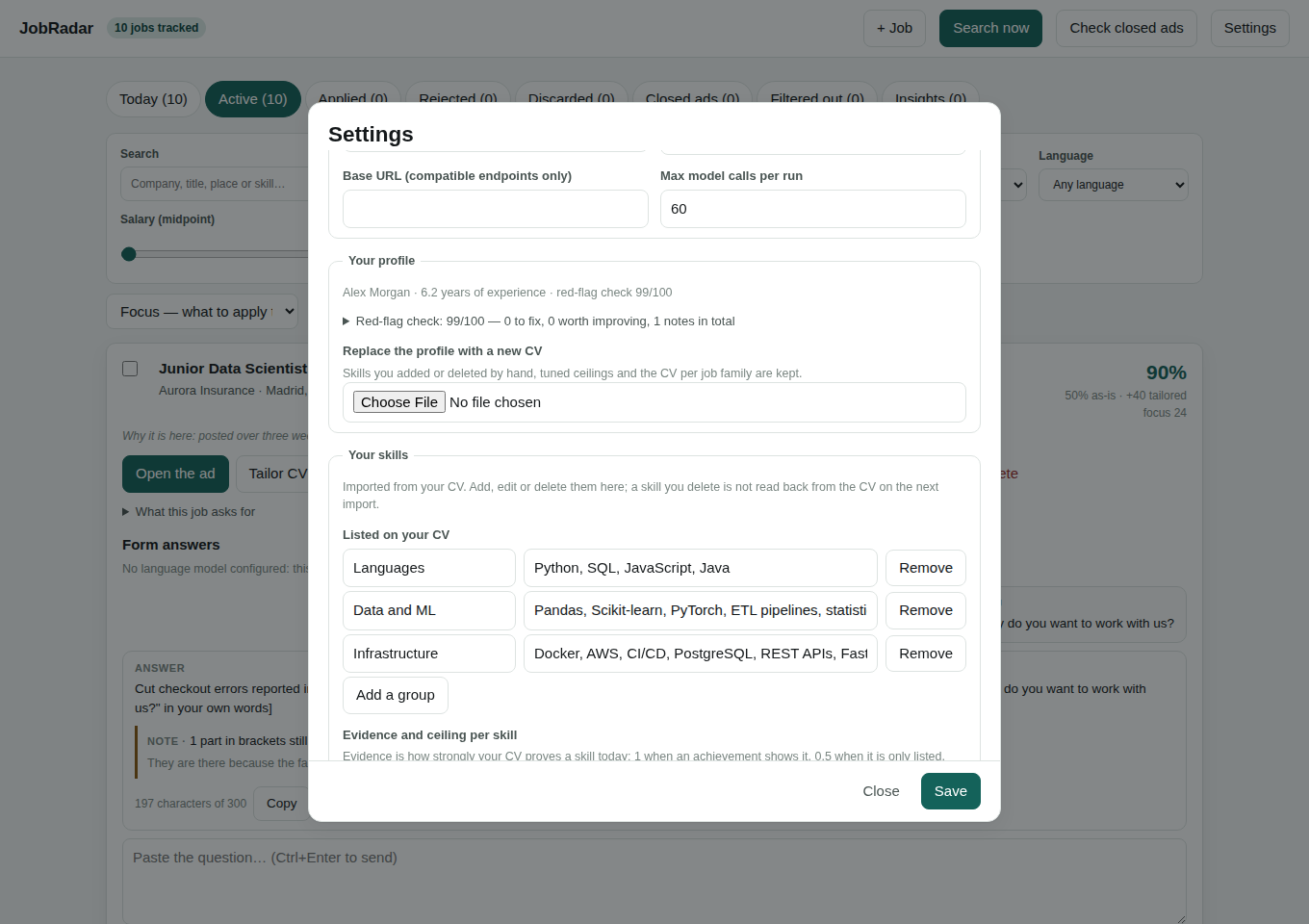
1.0in an achievement,0.5listed,0.0absent) and a ceiling (how far a tailored CV may push it). A skill with evidence0.0never rises — no amount of tailoring can invent experience. Both are proposed on import and editable in Settings → Your skills, where you can also add, edit and delete skills. - Your achievements are never rewritten. They are reordered within a position, never merged, moved or reworded, and positions keep their order.
- Everything generated is verified. An invented skill, an invented figure or inflated seniority gets a draft rejected, with or without a language model.
- A red-flag linter (
jobradar lint) reports gaps, missing dates, duty language, achievements without numbers, skills your achievements never show, and more. - ATS-safe output. One column of real text, a standard font, nothing in the margins.
The details, including every linter rule and every warning: docs/CV_TAILORING.md.
Install
Requires Python 3.10 or newer, on Linux, macOS or Windows.
pipx install "jobradar-cv[all]"  # or: pip install "jobradar-cv[all]"
playwright install chromium      # optional: the HTML templates' own typography in the PDF
scrapling install                # only if you enable LinkedIn, InfoJobs, Tecnoempleo or Indeed
The package is jobradar-cv on PyPI; the command it installs is jobradar. Or only what you need:
pip install jobradar-cv             # everything, including PDF CVs from the built-in writer
pip install "jobradar-cv[pdf]"      # + PDFs printed from the HTML templates (headless Chromium)
pip install "jobradar-cv[parse]"    # + importing a PDF or DOCX CV
pip install "jobradar-cv[excel]"    # + .xlsx export
With Docker instead — nothing else to install, browsers included:
git clone https://github.com/inigo99/jobradar.git && cd jobradar
docker compose up -d                # then open http://localhost:8000
Your data stays in a Docker volume, the dashboard is published on your own machine only, and keys go in a .env file next to docker-compose.yml (see .env.example). Run the CLI inside it with docker compose exec jobradar jobradar search.
From source, to change the code: clone the repository and pip install -e ".[all,dev]".
Without Playwright the CV is still a PDF, laid out more plainly by a built-in writer. With it, run playwright install chromium again after upgrading Playwright; if its browser build is missing, any other installed Chromium is used, or the one in JOBRADAR_CHROMIUM_PATH.
jobradar doctor tells you what is installed and what each missing piece would give you.
Quick start
jobradar demo                   # a synthetic profile and its jobs; no network
jobradar demo --profile nurse   # or lawyer, teacher, data (the default)
jobradar serve
Each demo is a different kind of work — an intensive-care nurse in Bilbao, a litigation lawyer in Madrid, an English teacher in Valencia, a data engineer — and its jobs exercise the interesting cases: an ad asking for more years than you have, an agency hiding its client, an ad with no salary, one abroad, one outside your areas.
For yourself, run jobradar serve and follow the setup wizard, or from the terminal:
jobradar init --cv ~/Documents/my-cv.pdf
jobradar search --explain
jobradar tailor --top 5
jobradar serve
The dashboard
jobradar serve opens a local page on http://127.0.0.1:8000. The first run asks who you are, for your CV (upload or paste), the jobs you want, your filters and your sources; everything is editable later in Settings.
The board has eight tabs — Today, Active, Applied, Rejected, Discarded, Closed ads, Filtered out and Insights. The filter bar narrows it by text, work mode, where (your areas, your country, abroad), job family, source, language, minimum salary and minimum match, and remembers your choice; sort by focus, match, date or salary. Each job shows both scores, its family, your strengths and gaps, the salary with its provenance, the latest reply from your inbox and anything to clarify before applying. Filtered out lists the ads just short on years in a table of their own.
Per job: open the ad, tailor the CV, write a cover letter or the application email, answer the application form's questions, mark it, or delete it. Tick several jobs to delete them at once.
Settings covers your details, target titles, every filter, which sources run (and which only weekly), job families and their priority, the mailbox check, the interface language (English or Spanish), the language model, phrases you never use, your skills with their evidence and ceiling, and the CV for each job family.
Command line
| Command | What it does |
|---|---|
jobradar init [--cv FILE] [--config FILE] |
Set up, interactively or from YAML |
jobradar demo [--profile data|nurse|lawyer|teacher] |
Load a synthetic profile and its jobs |
jobradar search [--explain] [--no-llm] [--no-enrich] [--refresh] [--notify] |
Run the pipeline. Ads already on file are not re-read unless --refresh |
jobradar sweep [--limit N] |
Retire ads that have closed |
jobradar tailor [JOB_ID] [--top N] [--no-llm] |
Generate tailored CVs |
jobradar lint [--language CODE] |
Run the red-flag check on your profile |
jobradar jobs [--status active|applied|discarded] [--all] [--limit N] |
List the pipeline, in focus order |
jobradar filtered [--restore ID] [--clear] [--limit N] |
What the filters rejected, and why |
jobradar mail [--days N] |
Read replies to your applications (read-only IMAP) |
jobradar insights [--runs N] |
The application funnel and each source's record |
jobradar export [--format csv|excel] [--output FILE] |
Export everything, including your notes |
jobradar notify [--dry-run] [--limit N] |
Send the digest of new jobs |
jobradar sources |
Show every source and whether it is on |
jobradar serve [--host HOST] [--port N] |
Start the dashboard |
jobradar doctor |
Check the installation |
Global flags: --home DIR (where the data lives; default ./data or $JOBRADAR_HOME) and -v for logging.
Configuration
Everything is stored in data/jobradar.sqlite3 and edited from the dashboard or jobradar init; jobradar init --config settings.yaml loads it from a file for unattended installs. Secrets live in .env (copy .env.example) and are never written to the database.
The full reference — every filter, job families, how salaries are estimated, the mailbox, environment variables and the editable data files (skills.yaml, families.yaml, salary_bands.yaml, countries.yaml) — is in docs/CONFIGURATION.md.
Job sources
| Source | Tier | Notes |
|---|---|---|
| RemoteOK, We Work Remotely, Himalayas | open | Public APIs and feeds |
| Arbeitnow (Germany, Austria, Switzerland) | open, national | Public API; on by default for those countries |
| Manfred (Spain) | open, national | Publishes salary, remote share and each skill's required level; on by default for Spain |
| EURES (EU public employment services) | open | About 3 million offers from every EU/EEA public employment service, Spain's regions included; every sector |
| Your portals | open | Any board you list in Settings: a search page with {query}, a feed, or a page of offers. docs/PORTALS.md lists tested ones by country and region |
| Bundesagentur für Arbeit (Germany) | open, national | The public employment service: every sector. On by default for Germany |
| Company career boards | open | Greenhouse, Lever, Ashby, Workable, Recruitee, SmartRecruiters, Personio — detected from a domain |
| Adzuna, Jooble | credentials | Every sector, many countries (Spain included). Free keys: paste them in Settings → Where to search, which links to the sign-up page |
| LinkedIn, InfoJobs, Tecnoempleo, Indeed | restricted | Off by default; fetched through a real browser (Scrapling) |
Open sources run by default, credentials ones once their key is set, and restricted ones — pages built for people, whose terms may not allow automated access — only if you switch them on by name. That decision is yours, under the site's terms and your jurisdiction. Every source is fetched politely: one request per second per host, an hour of caching, backoff on 429 and an honest user agent; open and credentials sources also honour robots.txt. Any source can be set to run once a week. Details, and how to add a source in one file: docs/SOURCES.md.
Using a language model (optional)
Everything works without one: ads are read with a skill taxonomy, summaries come from a template filled with your own material, and letters and form answers start as skeletons with the human parts in brackets. A model improves reading ambiguous ads, importing a CV, the tailored summary, letters and form answers. It is called over plain HTTP.
JOBRADAR_LLM_PROVIDER=gemini          # or anthropic, openai, openai-compatible, ollama
JOBRADAR_LLM_MODEL=                   # blank = the provider's default (gemini-3.5-flash)
GEMINI_API_KEY=...
The provider can also be chosen in Settings (.env wins). Busy, retired or rationed models hand over to JOBRADAR_LLM_FALLBACK_MODELS; max_calls_per_run caps an unattended run; --no-llm skips the model for one run; ollama and openai-compatible run fully offline. Whatever a model writes still goes through the validator.
Running it on a schedule
jobradar sweep && jobradar search --notify
Configure an email or Telegram digest in .env and enable it in Settings. Nothing is sent when nothing is new. With the mailbox on, the same search also reads new replies. Recipes for cron, systemd, Windows Task Scheduler and GitHub Actions: docs/SCHEDULING.md.
Repository layout
src/jobradar/
├── models.py · config.py · storage.py · taxonomy.py · textutils.py
├── families.py          Job families: classification, priority, salary band
├── insights.py          The application funnel and the run history
├── sources/             One file per job board (optional/ = restricted tier)
├── pipeline/            search · dedupe · filters · salary · scoring · focus · sweep
├── profile/             CV import, evidence and ceilings, skill edits
├── documents/           Tailoring, rendering, the built-in PDF writer, letters,
│                        form answers, the validator and the text review
├── lint/                The recruiter red-flag rules
├── mail/                Reading replies over IMAP (read-only) and matching them
├── llm/                 Provider-agnostic client and every prompt
├── web/                 FastAPI dashboard: one page, plain scripts in static/, no CDN
├── exporters/ · notify/ CSV/Excel export; email and Telegram digests
└── resources/           skills · families · countries · salary bands · demo data
docs/ARCHITECTURE.md explains why the pipeline is ordered the way it is and where to hook in.
Privacy and data
- Everything lives in
data/, which is git-ignored. Your CV and job-search history never leave your machine. - The dashboard binds to
127.0.0.1and has no login. It refuses requests for other host names (DNS rebinding) and changes from other origins; exposing it takes an explicit--host(then setJOBRADAR_ALLOWED_HOSTS). - The page loads nothing from outside: no CDN, fonts or analytics.
- Outbound requests go only to the job boards you enabled, the ECB (exchange rates), and your language-model provider and mail server if you configured them.
- The mailbox is opened read-only: nothing is marked as read, moved or deleted; only matched replies (sender, subject, one quoted sentence) are stored.
- API keys and passwords are read from the environment, never stored or exported.
Limitations, honestly
- Your CV's layout is not reproduced. Its content is imported into a structured profile and re-rendered — that is what makes it tailorable, scorable and checkable.
- Importing without a model is approximate. Review the profile before generating anything.
- Salary estimates are estimates, from editable tables, always labelled.
- Restricted sources can break when the sites change; a real browser makes them more resilient, not immune.
- The score is a triage aid. It measures overlap between an ad's requirements and your evidenced skills, nothing more.
Contributing and licence
New sources, skills and job families for under-covered fields, salary bands, CV templates and linter rules are welcome — see CONTRIBUTING.md. The test suite is fully offline: pytest needs no network and no keys. The full history is in CHANGELOG.md.
Copyright (C) 2026 Íñigo Fernández Barrill and JobRadar contributors.
AGPL-3.0 Use it, change it and share it freely; if you distribute a modified version, or let other people use one over a network, you must offer them its source code under the same license. Found a security problem? See SECURITY.md.
1 maintainer

Metadata
1 maintainer
Release files for jobradar-cv 1.6.0
For a detailed explanation of source distributions (sdists) and built distributions (wheels), please see the package formats documentation.
Source distribution (sdist)
| File | Size | Uploaded | |
|---|---|---|---|
| jobradar_cv-1.6.0.tar.gz | 395.2 kB | Details |
Built distribution (wheel)
| File | Interpreter | ABI | Platform | Reset |
|---|---|---|---|---|
| jobradar_cv-1.6.0-py3-none-any.whl | Python 3 | none | any | Details |
Total release size: 776.1 kB
Release files / jobradar_cv-1.6.0.tar.gz
| Download URL | jobradar_cv-1.6.0.tar.gz |
|---|---|
| Size | 395.2 kB |
| Tags | Source |
|
SHA-256 checksum How to use checksums |
3b045dd5b628d35078435c0b633d8b26a684eaa5e10d96a72d4619d1149df4b8
|
|
BLAKE2b-256 checksum How to use checksums |
82e5c8b11bc93634e33d47ef6cfaf0e0c4d7238e041bff5b0b0f29b006fdc95f
|
| Upload date | |
|
Uploaded using Trusted Publishing? What is trusted publishing? |
Yes |
| Uploaded via |
twine/7.0.0 CPython/3.13.14
|
Provenance
Provenance describes where a file came from. On PyPI, provenance is shared via attestations, which provide a verifiable record of the build or publishing details. View details, limitations and caveats.


PyPI Publish Attestation
PyPI verified that this artifact, at this checksum, originated from the publisher listed below.
Signed by GitHub Actions, verified by PyPI on Sep 27, 2026.
Transparency logRelease files / jobradar_cv-1.6.0-py3-none-any.whl
| Download URL | jobradar_cv-1.6.0-py3-none-any.whl |
|---|---|
| Size | 380.9 kB |
| Tags | Python 3 |
|
SHA-256 checksum How to use checksums |
3d929ded89619484458fa044ccaafa17321090f480c1274928bc711dbb8fb270
|
|
BLAKE2b-256 checksum How to use checksums |
59f3723682c9cf9d12ca1e8f243c8d4e1885775b7c7e899d4e348b1b1b7d8c6b
|
| Upload date | |
|
Uploaded using Trusted Publishing? What is trusted publishing? |
Yes |
| Uploaded via |
twine/7.0.0 CPython/3.13.14
|
Provenance
Provenance describes where a file came from. On PyPI, provenance is shared via attestations, which provide a verifiable record of the build or publishing details. View details, limitations and caveats.
PyPI Publish Attestation
PyPI verified that this artifact, at this checksum, originated from the publisher listed below.
Signed by GitHub Actions, verified by PyPI on Sep 27, 2026.
Transparency log













