

Jog your 3D printer or CNC machine with keys and knobs you can feel,
not with a touchscreen.




Sound familiar?
You are levelling the bed with a sheet of paper. Eyes on the touchscreen, finger on Z−. Eyes back on the nozzle, tap again. Blind, because you are watching the paper. The finger has slipped to the next button, the nozzle moves 10 mm instead of 0.1, or the wrong way, and digs into the bed.
A touchscreen has nothing to feel. You cannot find a button without looking at it, and you cannot look at the nozzle and the screen at once.
The mouse is no better when the printer does not stand right next to the monitor. Look away to the nozzle, click, and you do not know where the pointer is any more.
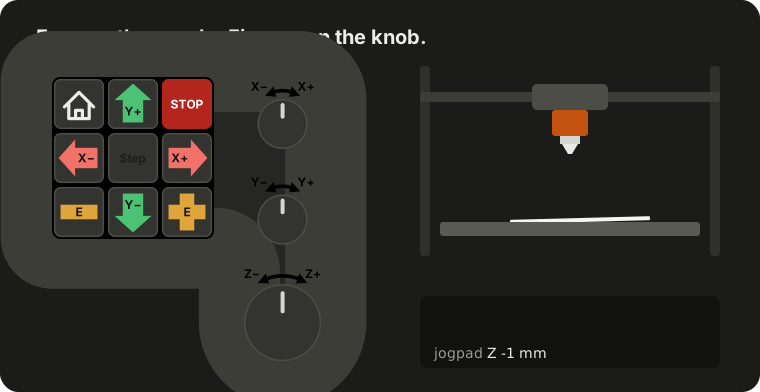
jogpad turns a numeric keypad or a small macro pad with knobs into a jog pendant for Klipper. Every key sits where your finger left it. One press or one knob detent is one step. Your eyes stay on the nozzle.
- Jog X, Y, Z and the extruder in steps of 0.01, 0.1 or 1 mm, switched with one key. Presses that pile up during a move are merged, so the axis stops when you stop. Hold a key, and the axis keeps moving until you let go, at a speed that goes with the step size.
- Feel it, hear it, see it. Keys and knob detents under your fingers, the step size as one, two or three beeps and in the colour of the pad, every press on the web page. Smell is left to a nozzle digging into the bed, and that is what jogpad is there to prevent.
- Home all axes or just the ones you pick, and stop with one key.
- Any USB keyboard works, from a cheap numeric keypad to a macro pad with knobs, see which pad.
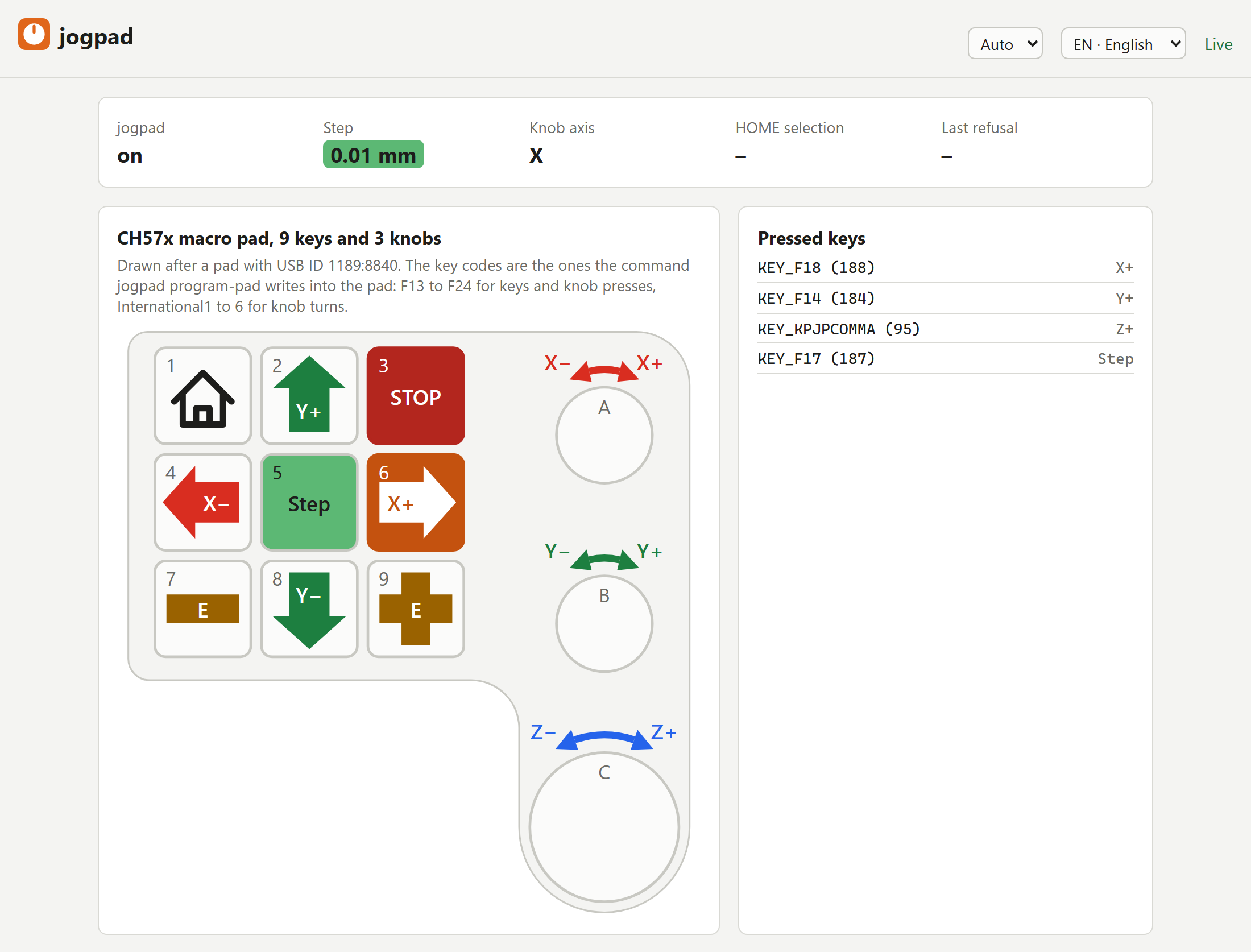
- A web page draws your pad, lights up every key you press, learns new keys and checks that each axis moves the way you expect.
- Visible to everyone at the machine: every move appears in the Mainsail or Fluidd console.
- Refuses to move during a print, and you can add your own locks.
- Switch it off in Mainsail or Fluidd when you do not need it; then no key does anything.
- Installs next to Klipper as a service with one script, shows up in the service menu of Mainsail and Fluidd, and updates from their update panel.
Useful for bed levelling, setting the Z offset, probing and measuring, positioning by eye and loading filament. Mills, lasers, plasma cutters and metal deposition machines have the same problem; use cases tells which of them jogpad covers today and which are planned.
Warning: The STOP key is not an emergency stop. It goes through USB, the host and the network. Keep a wired emergency stop on your machine. See Safety.
Which pad
- A small USB numeric keypad. It costs a few euros and works as it
comes: plug it in, enter it in
jogpad.toml, done. - An old keyboard from the drawer: its numeric block works the same way. Wireless keyboards work too, but take one with a cable if you can. A key release lost over radio keeps a held key's axis moving until you press another key, see Safety.
- A macro pad with 9 keys and 3 knobs (recommended). The knobs turn like
handwheels, the big one for Z, and the pad lights up in the colour of the
step size. It is sold under many names. jogpad is tested with one that
shows up with USB ID 1189:8840 (
lsusbshows it), andjogpad program-padsets it up without the vendor's software. Pads with 1189:8890 speak another protocol and do not work yet.
Status
Early development. Working today, on Linux with Klipper:
- jog, home and stop from a numeric keypad or any USB keyboard; tested on a QIDI Plus 4 with the keypad of a Logitech MX Keys S
- a held axis key keeps moving until released, at a speed set with the step key, at most 250 mm/s
- every move and homing shows up in the Mainsail or Fluidd console
- the printer's beeper can count the step size: once for the smallest, twice for the next; and a sound of its own tells a refused key
- a web page in English and German, light or dark, that draws the pad with arrows and signs in the colour of each axis on its keys and over its knobs, shows each key press live and the step size from green to red, learns keys and checks the direction of each axis; reachable from every computer in the network, changes only from those Moonraker trusts
- a switch in Mainsail and Fluidd that turns jogpad off, STOP included
- the pad and its state as a camera panel in Mainsail and Fluidd, sized to the pad and with a link to the full page
- an installer that sets jogpad up as a service next to Klipper and downloads Python 3.12 first where the system's is older than 3.10 (installation, setup); updates with one click from the update panel of Mainsail and Fluidd
jogpad program-padwrites its key codes into a CH57x macro pad with 9 keys and 3 knobs (USB ID 1189:8840), without the vendor's software, and reads them back to check; then its knobs move X, Y and Z and its keys form a cross for X and Y, with no key setup, and the pad lights up in the colour of the step size; tested on the QIDI Plus 4, held keys included
| Now | Later | |
|---|---|---|
| Firmware | Klipper (Moonraker) | RepRapFirmware, FluidNC |
| Operating system | Linux | Windows, macOS |
| Pads | numeric keypads, any USB keyboard, CH57x macro pad 1189:8840 programmed by jogpad | other CH57x macro pads |
Getting started
On the computer that runs Klipper, as the user that runs Klipper:
cd ~
git clone https://github.com/Aitch-ko/jogpad.git
./jogpad/scripts/install.sh
Then enter your pad in ~/printer_data/config/jogpad.toml, see
Klipper setup.
Then open, with your printer's name or address:
http://printer.local:7150/for the web pagehttp://printer.local:7150/docsfor the Swagger UI of the API
Every computer in your network can watch; only the computers Moonraker trusts may change settings, see who may change what.
Documentation
The documentation is online at https://aitch-ko.github.io/jogpad/. Its
source lives in docs/ and is built with
Zensical.
| Page | What |
|---|---|
| Installation | installer, updates, development setup |
| Klipper setup | find the pad, write jogpad.toml, keys, web page |
| Safety | what STOP does and does not do |
| Use cases | machines and tasks jogpad covers |
| Configuration, CLI, API | reference, generated from the code |
What is in the repository
| Path | What |
|---|---|
src/jogpad/ |
the program: input, moves, Moonraker client, web page and API |
src/jogpad/layouts/ |
drawings of the supported pads |
src/jogpad/locales/ |
English and German texts |
scripts/install.sh |
installer for the Klipper computer |
scripts/ |
also: reference generator, screenshots, CI checks |
docs/ |
documentation |
tests/ |
tests, run with pytest |
Why jogpad exists
jogpad comes from measuring the tool on the RatRig-based prototype of ADDITRIX, a startup for metal 3D printing. The touchscreen gave the finger nothing to feel: eyes on the display, finger on the button, eyes on the build plate while pulling the paper back and forth, then the next 0.05 mm closer. By then the finger had slipped, and the tap hit the wrong button. At worst that changes the step size, and the next move goes 1 mm or even 10 mm into the bed. jogpad grew out of that, as a project of its own.
Why another tool
Projects exist for single firmwares (keyboard plugins for OctoPrint and CNCjs,
hal_input in LinuxCNC). jogpad aims at what they leave open: one tool for
several firmwares, a knob that works like a handwheel without runaway moves,
programming the pad without the vendor's Windows software, and a web interface
to set it all up.
Keywords
Klipper jog pendant, Mainsail and Fluidd jogging, Moonraker keyboard control, handwheel and MPG for 3D printers, USB numpad jog, macro pad with knobs, bed levelling and Z offset by hand, CNC touch-off.
Development
python3 -m venv .venv
.venv/bin/pip install -e ".[dev,docs]"
.venv/bin/pytest
Documentation: docs/, built with Zensical.
Rules for contributions: CONTRIBUTING.md.
jogpad is developed with Claude Code. The person who merges a change answers for it.
Acknowledgements
Pad programming builds on the protocol work in
ch57x-keyboard-tool (MIT).
The icons at the foot of the web page come from Lucide
(ISC); their licence is in src/jogpad/web/icons.svg.
License
1 maintainer

Metadata
1 maintainer
Release files for jogpad 0.18.0
For a detailed explanation of source distributions (sdists) and built distributions (wheels), please see the package formats documentation.
Source distribution (sdist)
| File | Size | Uploaded | Provenance | Actions |
|---|---|---|---|---|
| jogpad-0.18.0.tar.gz | 690.6 kB | With provenance | Details for jogpad-0.18.0.tar.gz |
Built distribution (wheel)
| File | Interpreter | ABI | Platform | Actions Reset |
|---|---|---|---|---|
| jogpad-0.18.0-py3-none-any.whl | Python 3 | none | any | Details for jogpad-0.18.0-py3-none-any.whl |
Total release size: 751.5 kB
Release files / jogpad-0.18.0.tar.gz
| Download URL | jogpad-0.18.0.tar.gz |
|---|---|
| Size | 690.6 kB |
| Tags | Source |
|
SHA-256 checksum How to use checksums |
b63eec6b4ce10200a2bb0a60a3489341f01035c93b9a27b6abd2444f3e111909
|
|
BLAKE2b-256 checksum How to use checksums |
ddfb0a4392b944019e8dcff1dbcfd8ea32b48f4e2d7ec5747a2cea9e018e5d7b
|
| Upload date | |
|
Uploaded using Trusted Publishing? What is trusted publishing? |
Yes |
| Uploaded via |
twine/7.0.0 CPython/3.13.16
|
Provenance
Provenance describes where a file came from. On PyPI, provenance is shared via attestations, which provide a verifiable record of the build or publishing details. View details, limitations and caveats.


PyPI Publish Attestation
PyPI verified that this artifact, at this checksum, originated from the publisher listed below.
Signed by GitHub Actions, verified by PyPI on Nov 1, 2026.
Transparency logRelease files / jogpad-0.18.0-py3-none-any.whl
| Download URL | jogpad-0.18.0-py3-none-any.whl |
|---|---|
| Size | 61.0 kB |
| Tags | Python 3 |
|
SHA-256 checksum How to use checksums |
c5fd97644f57ea9bee56c08a38da35916a948bc7a11b3ab27338529b284c9e8b
|
|
BLAKE2b-256 checksum How to use checksums |
c63ad6ecc731aeb54a6e139c04a3f7972b5b2dbf0be3b86a7163df5f184fea10
|
| Upload date | |
|
Uploaded using Trusted Publishing? What is trusted publishing? |
Yes |
| Uploaded via |
twine/7.0.0 CPython/3.13.16
|
Provenance
Provenance describes where a file came from. On PyPI, provenance is shared via attestations, which provide a verifiable record of the build or publishing details. View details, limitations and caveats.
PyPI Publish Attestation
PyPI verified that this artifact, at this checksum, originated from the publisher listed below.
Signed by GitHub Actions, verified by PyPI on Nov 1, 2026.
Transparency logSecurity for jogpad 0.18.0
Provenance
Provenance describes where a file came from. On PyPI, provenance is shared via attestations, which provide a verifiable record of the build or publishing details. View details, limitations and caveats.
Full provenance
All 2 files in this release have been uploaded with provenance metadata.
Attestation for jogpad-0.18.0.tar.gz
PyPI Publish Attestation
PyPI verified that this artifact, at this checksum, originated from the publisher listed below.
Signed by GitHub Actions, verified by PyPI on Nov 1, 2026.
Transparency logA note on package security
PyPI is a repository for distributing packages, not a service for auditing them. While third-party security researchers and our staff do their best to detect and remove malicious packages, PyPI cannot guarantee the quality, security or suitability of any given package.
To learn more about protecting yourself from malicious actors, visit our package security documentation.














