
Jolt
Build anything, once. Jolt runs your build, test and deployment tasks, caches what they produce, and shares the results with your whole team and CI.


Tasks are plain Python classes. Jolt works out what each task depends on, computes a fingerprint of everything that influences its output, and skips it if that output already exists in a cache, on your machine or on a server shared with everyone else. What has been built once is never built again, whether by you, a colleague or a CI job. In one real-world deployment, Jolt cut the CI build time from 10 hours to 10 minutes.
Highlights
- Recipes in Python
Tasks, dependencies and parameters are Python code, so there is no new language to learn and no limit to what a task can do.
- Cached by content
A task’s identity is a hash of its source, parameters, files and dependencies, so a cached result is only reused when nothing that matters has changed.
- Shared caches
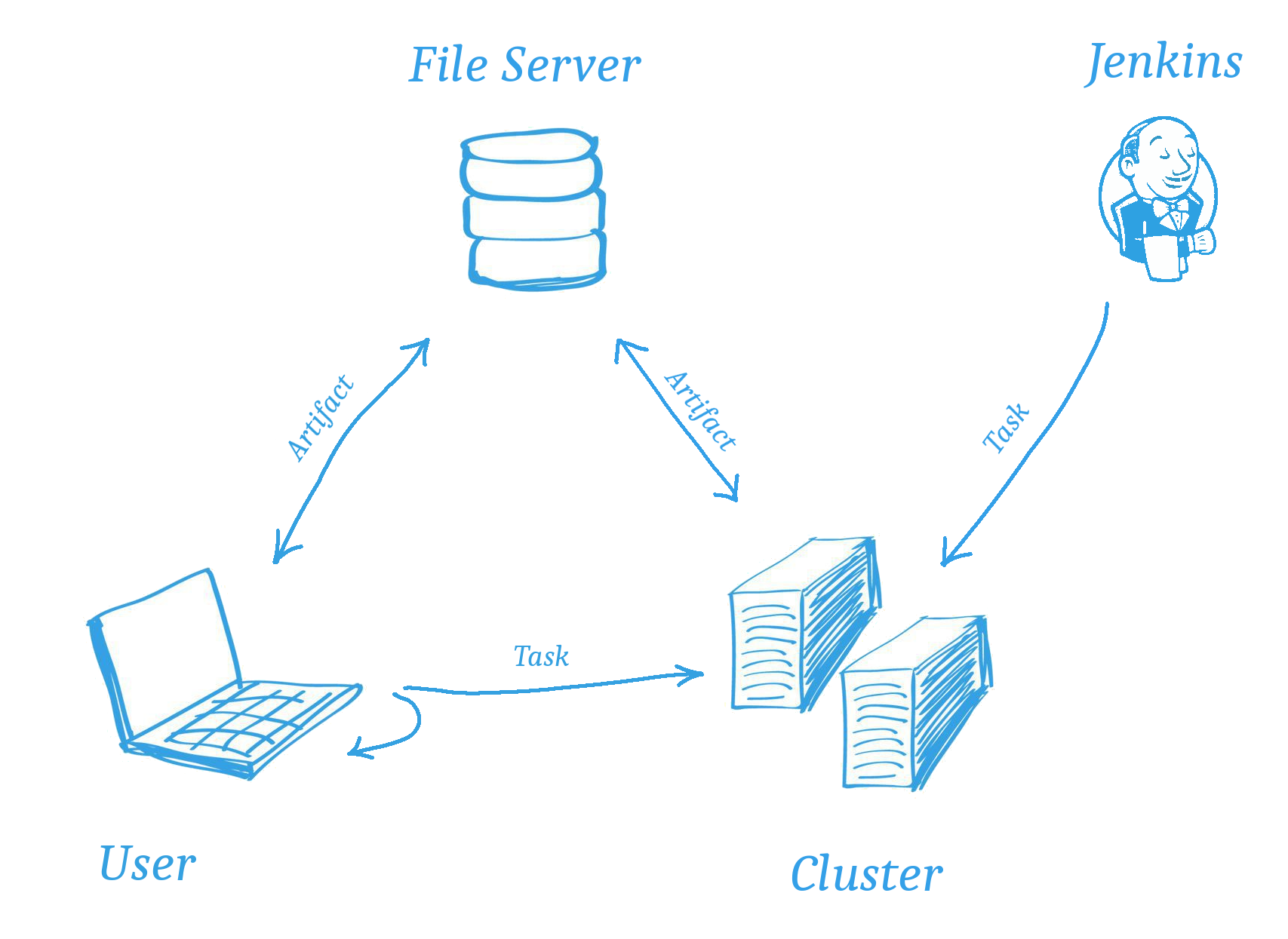
Artifacts are uploaded to a cache server, and anyone who needs the same result downloads it instead of building it.
- Distributed builds
jolt build -n sends tasks to a cluster of workers that run them in parallel. The scheduler, workers and cache run as containers on Docker or Kubernetes.
- Over 150 packages
Compilers, libraries and tools, from zlib and OpenSSL to LLVM, Qt and gRPC, built from source and kept apart for each platform and compiler.
- One command for everything
C++, Rust, Go, Node.js, Python or containers: every task is built the same way, so nobody needs to learn the others’ build tools.
- Secure by default
TLS between all services, tokens or single sign-on with an OpenID Connect provider, and builds that only their owners can stop.
- Kind to your machines
A built-in jobserver shares the CPUs between all builds on a machine and slows down before memory runs out.
Quick start
Install Jolt from PyPI:
$ pip install joltWrite a task in a file called hello.jolt:
from jolt import Task


class Hello(Task):
    """ Says hello, and publishes it. """

    def run(self, deps, tools):
        tools.write_file("hello.txt", "Hello, world!")

    def publish(self, artifact, tools):
        artifact.collect("hello.txt")
Build it:
$ jolt build hello
$ jolt build hello    # Nothing to do: the artifact is already cached
Change the message, and Jolt builds it again. Change it back, and the original artifact is used without building anything.
Examples
A C++ application built with CMake, using the fmt library from Jolt’s packages. Jolt builds fmt first, or downloads it if someone already has, and tells CMake where to find it:
from jolt.plugins import cmake
from jolt.pkgs import fmt


class App(cmake.CMake):
    """ The application, in the app directory. """

    requires = ["fmt"]
    srcdir = "app"
A web application built with a Node.js that Jolt provides, so the build doesn’t depend on what happens to be installed on the machine:
from jolt import Task
from jolt.pkgs import nodejs


class WebApp(Task):
    """ Builds the web application. """

    requires = ["nodejs"]

    def run(self, deps, tools):
        with tools.cwd("webapp"):
            tools.run("npm ci")
            tools.run("npm run build")
Parameters select variants of a task, each cached separately:
$ jolt build fmt:shared=true
$ jolt display app    # Show what app depends on
$ jolt inspect app    # Show its parameters, identity and cache status
Scaling up
Point Jolt at a cache server, and everyone shares their artifacts:
[cache]
http_uri = https://cache.example.com:8080
Add a scheduler and workers, and builds run in the cluster:
$ jolt build -n appThe build cluster guide shows how to deploy the services on Docker or Kubernetes, and how to secure them with TLS, tokens and single sign-on.
Installing
From PyPI, for Python 3.11 or later:
$ pip install joltAs a Docker image:
$ docker run robrt/joltLearn more
Documentation: the tutorial, user guides and reference
Packages: the packages that Jolt can build
Issues: bugs and ideas
Jolt is free software, licensed under the GNU General Public License v2.
1 maintainer

Metadata
1 maintainer
Release files for jolt-docker 0.10.84
For a detailed explanation of source distributions (sdists) and built distributions (wheels), please see the package formats documentation.
Source distribution (sdist)
| File | Size | Uploaded | Provenance | Actions |
|---|---|---|---|---|
| jolt_docker-0.10.84.tar.gz | 6.4 kB | Without provenance | Details for jolt_docker-0.10.84.tar.gz |
Built distribution (wheel)
| File | Interpreter | ABI | Platform | Actions Reset |
|---|---|---|---|---|
| jolt_docker-0.10.84-py3-none-any.whl | Python 3 | none | any | Details for jolt_docker-0.10.84-py3-none-any.whl |
Total release size: 12.8 kB
Release files / jolt_docker-0.10.84.tar.gz
| Download URL | jolt_docker-0.10.84.tar.gz |
|---|---|
| Size | 6.4 kB |
| Tags | Source |
|
SHA-256 checksum How to use checksums |
407b9d90b73c36b0821b79da017dccefa022a18e60cb6bf17cf2ee9e4c2996f2
|
|
BLAKE2b-256 checksum How to use checksums |
a99de09acc32c8f2ca08bd1424a3f5b79594f573b3d38074f5b42b534dc8a3a2
|
| Upload date | |
|
Uploaded using Trusted Publishing? What is trusted publishing? |
No |
| Uploaded via |
twine/7.0.0 CPython/3.12.16
|
Release files / jolt_docker-0.10.84-py3-none-any.whl
| Download URL | jolt_docker-0.10.84-py3-none-any.whl |
|---|---|
| Size | 6.4 kB |
| Tags | Python 3 |
|
SHA-256 checksum How to use checksums |
34617139d12f10529fba26b92b49ded004b6a02538e9a9a6315c7177cf397f35
|
|
BLAKE2b-256 checksum How to use checksums |
ff495458501a126d40be0d7c49b9dc9cc764b2e4f833c18d7f83c1c2b5135b4e
|
| Upload date | |
|
Uploaded using Trusted Publishing? What is trusted publishing? |
No |
| Uploaded via |
twine/7.0.0 CPython/3.12.16
|
Security for jolt-docker 0.10.84
Provenance
Provenance describes where a file came from. On PyPI, provenance is shared via attestations, which provide a verifiable record of the build or publishing details. View details, limitations and caveats.
No provenance found
None of the files in this release were uploaded with provenance metadata.
A note on package security
PyPI is a repository for distributing packages, not a service for auditing them. While third-party security researchers and our staff do their best to detect and remove malicious packages, PyPI cannot guarantee the quality, security or suitability of any given package.
To learn more about protecting yourself from malicious actors, visit our package security documentation.














