
jot




A tiny inline terminal editor built specifically for git commit messages.
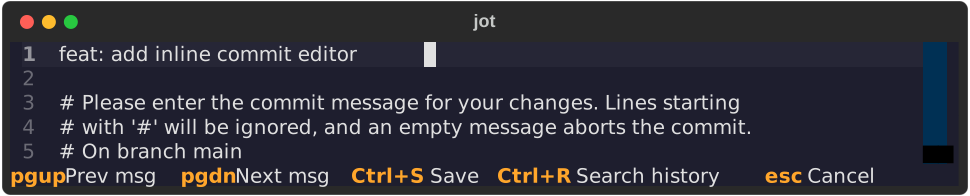
It renders directly in your terminal's scroll buffer, so there's no full-screen takeover and no context switch. Write the message, hit Ctrl+S, and your shell prompt comes back right below it.
Features
- Inline rendering: the editor appears in place, below your
git commit, and blends into your terminal's background color. - Batteries included: line numbers, soft wrap, and tab indentation out of the box.
- Message history: every message you write is remembered, even if you cancel, so a failed commit hook never eats your text.
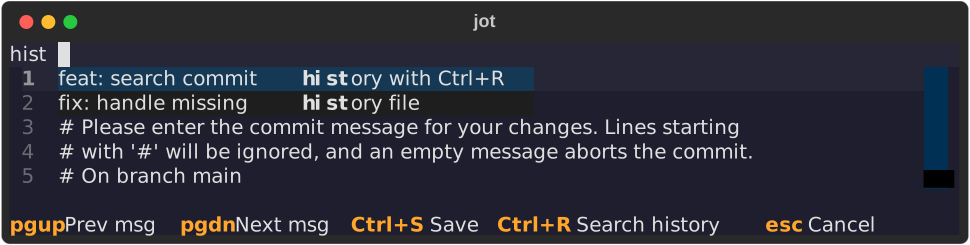
- Cycle and search: flip through past messages with PgUp/PgDn, or fuzzy-search them with Ctrl+R.
Installation
jot is a command-line tool, so install it in its own isolated environment with uv or pipx:
uv tool install jot-editor
# or
pipx install jot-editor
This puts the jot command on your PATH. The package on PyPI is named
jot-editor.
To try it without installing:
uvx --from jot-editor jot
Usage
As your git editor
git config --global core.editor jot
Or for a single commit:
GIT_EDITOR=jot git commit
Git's # comment lines stay visible while you type. If you cancel with
Esc, jot exits with status 1 and git aborts the commit. This also
applies to git commit --amend, git rebase -i, and so on.
Standalone
jot path/to/file     # edit a file in place
jot                  # write a quick note; the text goes to stdout on save
jot > note.txt       # ...so you can redirect or pipe it
Key bindings
| Key | Action |
|---|---|
| Ctrl+S | Save and exit |
| Esc | Cancel (exit status 1) |
| PgUp | Previous (older) message from history |
| PgDn | Next (newer) message; past the newest restores your draft |
| Ctrl+R | Search history (type to filter) |
| Enter (in search) | Apply the selected result and close search |
| Esc (in search) | Close search and return to the editor |
History
Every message is saved to ~/.cache/jot/git_history.json when you save or
cancel, so nothing is ever lost. jot keeps the most recent 100 messages and
skips consecutive duplicates.
Lines starting with # (git's status comments) are never stored. When you apply
a history entry, only the message part is replaced and the comment lines in the
current file are kept.
The search panel matches the first line of each message and also the full text. Results are listed newest first.
Requirements
- Python 3.12 or newer
- Linux or macOS (jot uses POSIX terminal APIs; Windows isn't supported)
- For seamless blending with your theme, a terminal that answers the OSC 11 background color query (most modern terminals do). Otherwise jot falls back to the default background.
Contributing
Bug reports and pull requests are welcome. See CONTRIBUTING.md for the development setup.
License
MIT. See LICENSE for details.
1 maintainer

Metadata
1 maintainer
Release files for jot-editor 0.2.0
For a detailed explanation of source distributions (sdists) and built distributions (wheels), please see the package formats documentation.
Source distribution (sdist)
| File | Size | Uploaded | |
|---|---|---|---|
| jot_editor-0.2.0.tar.gz | 7.6 kB | Details |
Built distribution (wheel)
| File | Interpreter | ABI | Platform | Reset |
|---|---|---|---|---|
| jot_editor-0.2.0-py3-none-any.whl | Python 3 | none | any | Details |
Total release size: 16.6 kB
Release files / jot_editor-0.2.0.tar.gz
| Download URL | jot_editor-0.2.0.tar.gz |
|---|---|
| Size | 7.6 kB |
| Tags | Source |
|
SHA-256 checksum How to use checksums |
864f2097e4bdfa339d21cd9bfe432e074f739d67b0c81948f60b1a9f988079af
|
|
BLAKE2b-256 checksum How to use checksums |
a0dab4ce9d5319bba171c5e4c7114e85b472149487081369280473a9d11db33c
|
| Upload date | |
|
Uploaded using Trusted Publishing? What is trusted publishing? |
Yes |
| Uploaded via |
twine/7.0.0 CPython/3.13.14
|
Provenance
Provenance describes where a file came from. On PyPI, provenance is shared via attestations, which provide a verifiable record of the build or publishing details. View details, limitations and caveats.


PyPI Publish Attestation
PyPI verified that this artifact, at this checksum, originated from the publisher listed below.
Signed by GitHub Actions, verified by PyPI on Sep 27, 2026.
Transparency logRelease files / jot_editor-0.2.0-py3-none-any.whl
| Download URL | jot_editor-0.2.0-py3-none-any.whl |
|---|---|
| Size | 8.9 kB |
| Tags | Python 3 |
|
SHA-256 checksum How to use checksums |
900a829664ad85414727e52e78a402bd94285458d70c42f65db76b6d49194c96
|
|
BLAKE2b-256 checksum How to use checksums |
52616023dd52d9492b0f63fe234fe2fb9d6c26d97604e41979f18920d666246d
|
| Upload date | |
|
Uploaded using Trusted Publishing? What is trusted publishing? |
Yes |
| Uploaded via |
twine/7.0.0 CPython/3.13.14
|
Provenance
Provenance describes where a file came from. On PyPI, provenance is shared via attestations, which provide a verifiable record of the build or publishing details. View details, limitations and caveats.
PyPI Publish Attestation
PyPI verified that this artifact, at this checksum, originated from the publisher listed below.
Signed by GitHub Actions, verified by PyPI on Sep 27, 2026.
Transparency log












