
J-Quants MCP server
Model Context Protocol (MCP) サーバーで、J-Quants APIにアクセスするための機能を提供します。
ツール
このサーバーは以下のツールを提供しています。利用可能なツールはJ-Quants APIのプランによって異なります。
無料プラン以上で利用可能
search_company: 日本語のテキストから、上場銘柄を検索するget_daily_quotes: 銘柄コードから、日次の株価を取得するget_financial_statements: 銘柄コードから、財務諸表を取得するget_fins_announcement: 決算発表予定を取得する
Lightプラン以上で利用可能
get_trades_spec: 投資部門別売買高データを取得する(個人・外国人・機関投資家等の売買動向)get_topix_prices: TOPIX四本値(日次データ)を取得する
Standardプラン以上で利用可能
get_option_index_option: 日経225オプション四本値を取得するget_markets_weekly_margin_interest: 信用取引残高(週次)を取得するget_markets_short_selling: 業種別空売り比率を取得するget_indices: 指数四本値を取得するget_markets_short_selling_positions: 空売り残高報告を取得するget_markets_daily_margin_interest: 信用取引残高(日次)を取得する
Premiumプラン以上で利用可能
get_markets_breakdown: 売買内訳を取得するget_prices_prices_am: 午前終値を取得するget_fins_dividend: 配当情報を取得するget_fins_fs_details: 財務諸表詳細を取得するget_derivatives_futures: 先物四本値を取得するget_derivatives_options: オプション四本値を取得する
使い方
認証設定
このサーバーを使用するには、J-Quants APIへの登録が必要です:
- J-Quants APIに登録してプランを選択
- 以下のいずれかの方法で認証情報を設定:
方法A: リフレッシュトークンを使用(推奨)
export JQUANTS_REFRESH_TOKEN="your_refresh_token"
方法B: メールアドレスとパスワードを使用
export JQUANTS_MAIL_ADDRESS="your_email@example.com"
export JQUANTS_PASSWORD="your_password"
注意:
- 利用できるツールはプランによって異なります。詳細は上記の「ツール」セクションを参照してください
- リフレッシュトークンはより安全ですが有効期限があります
Claude Desktop
以下の2つの方法でセットアップできます:
方法1: ローカル開発用(リポジトリをクローンした場合)
設定ファイルの場所:
- MacOS:
~/Library/Application\ Support/Claude/claude_desktop_config.json - Windows:
%APPDATA%/Claude/claude_desktop_config.json
リフレッシュトークンを使用する場合:
{
    "mcpServers": {
        "jquants": {
            "command": "uv",
            "args": [
                "--directory",
                "/path/to/jquants-mcp-server",
                "run",
                "src/jquants_mcp_server/server.py"
            ],
            "env": {
                "JQUANTS_REFRESH_TOKEN": "YOUR_REFRESH_TOKEN"
            }
        }
    }
}
メールアドレス/パスワードを使用する場合:
{
    "mcpServers": {
        "jquants": {
            "command": "uv",
            "args": [
                "--directory",
                "/path/to/jquants-mcp-server",
                "run",
                "src/jquants_mcp_server/server.py"
            ],
            "env": {
                "JQUANTS_MAIL_ADDRESS": "your_email@example.com",
                "JQUANTS_PASSWORD": "your_password"
            }
        }
    }
}
方法2: パッケージ公開後(PyPIから直接利用する場合)
リフレッシュトークンを使用する場合:
{
    "mcpServers": {
        "jquants": {
            "command": "uvx",
            "args": [
                "jquants-mcp-server"
            ],
            "env": {
                "JQUANTS_REFRESH_TOKEN": "YOUR_REFRESH_TOKEN"
            }
        }
    }
}
メールアドレス/パスワードを使用する場合:
{
    "mcpServers": {
        "jquants": {
            "command": "uvx",
            "args": [
                "jquants-mcp-server"
            ],
            "env": {
                "JQUANTS_MAIL_ADDRESS": "your_email@example.com",
                "JQUANTS_PASSWORD": "your_password"
            }
        }
    }
}
使用例
例えばClaudeに以下のような質問ができます:
- "コメダとルノアールの自己資本比率を比較して"
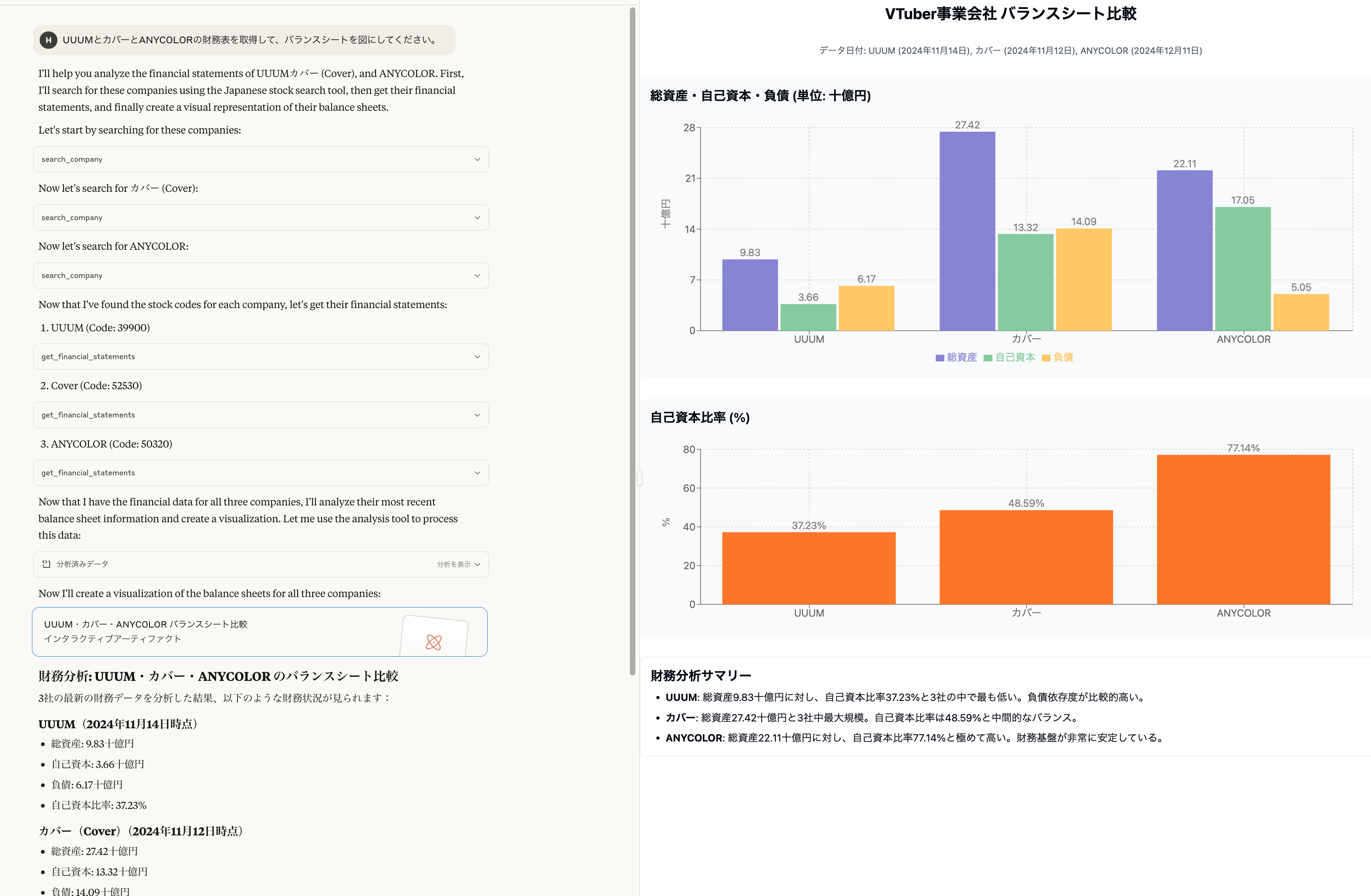
- "UUUMとカバーとANYCOLORの財務表を取得して、バランスシートを図にしてください。"
- "最近のTOPIXの動向を教えて"
- "外国人投資家と個人投資家の売買動向を分析して"
ライセンス
このプロジェクトはMITライセンスの下で提供されています
- 詳細はLICENSEファイルを参照してください。
1 maintainer

Metadata
1 maintainer
Release files for jquants-mcp-server 1.0.0
For a detailed explanation of source distributions (sdists) and built distributions (wheels), please see the package formats documentation.
Source distribution (sdist)
| File | Size | Uploaded | Provenance | |
|---|---|---|---|---|
| jquants_mcp_server-1.0.0.tar.gz | 55.1 kB | Without provenance | Details |
Built distribution (wheel)
| File | Interpreter | ABI | Platform | Reset |
|---|---|---|---|---|
| jquants_mcp_server-1.0.0-py3-none-any.whl | Python 3 | none | any | Details |
Total release size: 63.8 kB
Release files / jquants_mcp_server-1.0.0.tar.gz
| Download URL | jquants_mcp_server-1.0.0.tar.gz |
|---|---|
| Size | 55.1 kB |
| Tags | Source |
|
SHA-256 checksum How to use checksums |
6679e138e99a6ce7a34804ae6fe611b2cccde0f415e2f77f68e7e96ca7dd5333
|
|
BLAKE2b-256 checksum How to use checksums |
47a1da8c1c78bda7d48dff3f66cc5309b58afe1aacd5fe0a51858809279a847a
|
| Upload date | |
|
Uploaded using Trusted Publishing? What is trusted publishing? |
No |
| Uploaded via |
uv/0.7.16
|
Release files / jquants_mcp_server-1.0.0-py3-none-any.whl
| Download URL | jquants_mcp_server-1.0.0-py3-none-any.whl |
|---|---|
| Size | 8.7 kB |
| Tags | Python 3 |
|
SHA-256 checksum How to use checksums |
626a256f651133ea0b94394b665de77f3166a68df986778824509768b1a759ea
|
|
BLAKE2b-256 checksum How to use checksums |
cfc2eab171d28997e5dbd1018b26fd8596eca7e8b1f0c612c2a3a0c06a37b0ae
|
| Upload date | |
|
Uploaded using Trusted Publishing? What is trusted publishing? |
No |
| Uploaded via |
uv/0.7.16
|
Security for jquants-mcp-server 1.0.0
Provenance
Provenance describes where a file came from. On PyPI, provenance is shared via attestations, which provide a verifiable record of the build or publishing details. View details, limitations and caveats.
No provenance found
None of the files in this release were uploaded with provenance metadata.
A note on package security
PyPI is a repository for distributing packages, not a service for auditing them. While third-party security researchers and our staff do their best to detect and remove malicious packages, PyPI cannot guarantee the quality, security or suitability of any given package.
To learn more about protecting yourself from malicious actors, visit our package security documentation.













