
A package of reinforcement learning environments for flight control using the JSBSim flight dynamics model.
Verified details
These details have been verified by PyPIProject links
GitHub Statistics
Maintainers

Project description
JSBGym




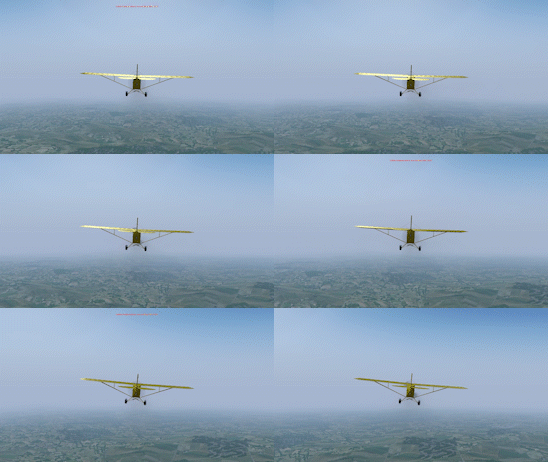
JSBGym provides reinforcement learning environments for the control of fixed-wing aircraft using the JSBSim flight dynamics model. The package's environments implement the Farama-Foundation's Gymnasium interface allowing environments to be created and interacted with.
Setup
Windows
Open a terminal and install jsbgym via pip:
pip install jsbgym
To render the environment with FlightGear, download and install it from here. Make sure the FlightGear bin directory is in PATH (Usually C:\Program Files\FlightGear 2024.1\bin) and if not already existant, add a system variable called FG_ROOT with the FG data folder as it's value (Usually C:\Users\USERNAME\FlightGear\Downloads\fgdata_2024_1).
If there are aircraft installed in a different location, add the folder to the FG_AIRCRAFT system variable.
3D visualisation requires installation of the FlightGear simulator. Confirm FlightGear is runnable from terminal with:
fgfs --version
Linux
Open a terminal and install jsbgym via pip:
pip install jsbgym
Rendering with some modes will require additional packages:
sudo apt-get install python3-tk
To render the environment with FlightGear, download the AppImage from here.
and rename the AppImage file to fgfs and place it in /usr/local/bin:
sudo mv fgfs /usr/local/bin
The data files must also be downloaded from here (approximately 2 GB) then in terminal, enter
export FG_ROOT=/path/to/datafolder
If there are aircraft installed in a different location, add the folder to the FG_AIRCRAFT system variable.
3D visualisation requires installation of the FlightGear simulator. Confirm FlightGear is runnable from terminal with:
fgfs --version
Getting Started
import jsbgym
import gymnasium as gym

env = gym.make(ENV_ID)
env.reset()
observation, reward, terminated, truncated, info = env.step(action)
Environments
Environment ID strings are constructed as follows:
f"{aircraft}-{task}-{shaping}-{flightgear}-v0"
Aircraft
The environment can be configured to use one of 14 aircraft:
- C172 Cessna 172P Skyhawk (Default FlightGear Aircraft)
- PA28 Piper PA-28-161 Warrior II
- J3 Piper J-3 Cub
- F15 McDonnell Douglas F-15C Eagle (F-15C in FlightGear)
- F16 General Dynamics F-16CJ Block 52
- OV10 North American OV-10A USAFE Bronco
- PC7 Pilatus PC-7
- A320 Airbus A320 (A320 Familiy in Flightgear)
- B747 Boeing 747-400
- MD11 McDonnell Douglas MD-11
- DHC6 de Havilland Canada DHC-6-300 Twin Otter
- C130 Lockheed C-130 Hercules
- WF Wright Flyer II 1903
- SS Royal Naval Air Service Submarine Scout Zero Airship
All aircraft except the Cessna 172P requires the aircraft to be downloaded via the launcher using the default FlightGear Hangar if using flightgear.
Task
JSBGym implements two tasks for controlling the altitude and heading of aircraft:
- HeadingControlTask aircraft must fly in a straight line, maintaining its initial altitude and direction of travel (heading)
- TurnHeadingControlTask aircraft must turn to face a random target heading while maintaining their initial altitude
Shaping
The environment can use three different shaping types:
- Shaping.STANDARD
- Shaping.EXTRA
- Shaping.EXTRA_SEQUENTIAL
FlightGear
If using FlightGear as a render mode, use FG, if not, use NoFG
Environment ID
To fly a Cessna on the Heading Control task withoug using FlightGear,
env = gym.make("C172-HeadingControlTask-Shaping.STANDARD-NoFG-v0")
Visualisation
2D
A basic plot of agent actions and current state information can be using human render mode by calling env.render() after specifying the render mode in gym.make().
env = gym.make("C172-HeadingControlTask-Shaping.STANDARD-NoFG-v0", render_mode="human")
env.reset()
env.render()
3D
Visualising with FlightGear requires the Gymnasium environment to be created with a FlightGear-enabled environment ID by specifying the render_mode in gym.make() and changing the value after {shaping} to FG. Using this render mode while training is strongly discouraged due to an error occuring midway through the training (Could not connect to socket for output!).
env = gym.make("C172-HeadingControlTask-Shaping.STANDARD-FG-v0", render_mode="flightgear")
env.reset()
env.render()
The environment can also be visualised with a 3D graph, using the render_mode="graph" or also graph_fg.
State and Action Space
JSBGym's environments have a continuous state and action space. The state is a 11-tuple:
(name='position/h-sl-ft', description='altitude above mean sea level [ft]', min=-1400, max=85000)
(name='attitude/pitch-rad', description='pitch [rad]', min=-1.5707963267948966, max=1.5707963267948966)
(name='attitude/roll-rad', description='roll [rad]', min=-3.141592653589793, max=3.141592653589793)
(name='velocities/u-fps', description='body frame x-axis velocity [ft/s]', min=-2200, max=2200)
(name='velocities/v-fps', description='body frame y-axis velocity [ft/s]', min=-2200, max=2200)
(name='velocities/w-fps', description='body frame z-axis velocity [ft/s]', min=-2200, max=2200)
(name='velocities/p-rad_sec', description='roll rate [rad/s]', min=-6.283185307179586, max=6.283185307179586)
(name='velocities/q-rad_sec', description='pitch rate [rad/s]', min=-6.283185307179586, max=6.283185307179586)
(name='velocities/r-rad_sec', description='yaw rate [rad/s]', min=-6.283185307179586, max=6.283185307179586)
(name='error/altitude-error-ft', description='error to desired altitude [ft]', min=-1400, max=85000)
(name='error/track-error-deg', description='error to desired track [deg]', min=-180, max=180)
Actions are 3-tuples of floats in the range [-1,+1] describing commands to move the aircraft's control surfaces (ailerons, elevator, rudder):
(name='fcs/aileron-cmd-norm', description='aileron commanded position, normalised', min=-1.0, max=1.0)
(name='fcs/elevator-cmd-norm', description='elevator commanded position, normalised', min=-1.0, max=1.0)
(name='fcs/rudder-cmd-norm', description='rudder commanded position, normalised', min=-1.0, max=1.0)
Project details
Verified details
These details have been verified by PyPIProject links
GitHub Statistics
Maintainers
Release history Release notifications | RSS feed


Download files
Download the file for your platform. If you're not sure which to choose, learn more about installing packages.
Source Distribution
Built Distribution
Filter files by name, interpreter, ABI, and platform.
If you're not sure about the file name format, learn more about wheel file names.
Copy a direct link to the current filters
File details
Details for the file jsbgym-0.4.3.tar.gz.
File metadata
- Download URL: jsbgym-0.4.3.tar.gz
- Upload date:
- Size: 47.6 kB
- Tags: Source
- Uploaded using Trusted Publishing? Yes
- Uploaded via: twine/6.1.0 CPython/3.13.12
File hashes
| Algorithm | Hash digest | |
|---|---|---|
| SHA256 |
ef0c0160c3ef865b456ece10ee20163560506451ce1e565bc4f007b8f6528880
|
|
| MD5 |
8303b7d4bdda721f458a660d4296e5cc
|
|
| BLAKE2b-256 |
6e2edc68552934c5b1d263708b0688d579dcf7ed454d2f1ef6101f7381e04789
|
Provenance
The following attestation bundles were made for jsbgym-0.4.3.tar.gz:
Publisher:
python-publish.yml on sryu1/jsbgym
-
Statement:
-
Statement type:
https://in-toto.io/Statement/v1 -
Predicate type:
https://docs.pypi.org/attestations/publish/v1 -
Subject name:
jsbgym-0.4.3.tar.gz -
Subject digest:
ef0c0160c3ef865b456ece10ee20163560506451ce1e565bc4f007b8f6528880 - Sigstore transparency entry: 1950935535
- Sigstore integration time:
-
Permalink:
sryu1/jsbgym@80adc75514ac2cf2d7120cc436a1cbfa49ba0bc8 -
Branch / Tag:
refs/tags/v0.4.3 - Owner: https://github.com/sryu1
-
Access:
public
-
Token Issuer:
https://token.actions.githubusercontent.com -
Runner Environment:
github-hosted -
Publication workflow:
python-publish.yml@80adc75514ac2cf2d7120cc436a1cbfa49ba0bc8 -
Trigger Event:
release
-
Statement type:
File details
Details for the file jsbgym-0.4.3-py3-none-any.whl.
File metadata
- Download URL: jsbgym-0.4.3-py3-none-any.whl
- Upload date:
- Size: 53.3 kB
- Tags: Python 3
- Uploaded using Trusted Publishing? Yes
- Uploaded via: twine/6.1.0 CPython/3.13.12
File hashes
| Algorithm | Hash digest | |
|---|---|---|
| SHA256 |
8101c1f278827bc75a76e091751772bbc75d5b2e09ef61ee5b3d59ee9a55b27d
|
|
| MD5 |
c435bbafa8b13200e2bf6dd21fda0a97
|
|
| BLAKE2b-256 |
834b8c5bdbece14f25b039f92cada22c0c25182c666eb183f704fb7659a2e47f
|
Provenance
The following attestation bundles were made for jsbgym-0.4.3-py3-none-any.whl:
Publisher:
python-publish.yml on sryu1/jsbgym
-
Statement:
-
Statement type:
https://in-toto.io/Statement/v1 -
Predicate type:
https://docs.pypi.org/attestations/publish/v1 -
Subject name:
jsbgym-0.4.3-py3-none-any.whl -
Subject digest:
8101c1f278827bc75a76e091751772bbc75d5b2e09ef61ee5b3d59ee9a55b27d - Sigstore transparency entry: 1950935815
- Sigstore integration time:
-
Permalink:
sryu1/jsbgym@80adc75514ac2cf2d7120cc436a1cbfa49ba0bc8 -
Branch / Tag:
refs/tags/v0.4.3 - Owner: https://github.com/sryu1
-
Access:
public
-
Token Issuer:
https://token.actions.githubusercontent.com -
Runner Environment:
github-hosted -
Publication workflow:
python-publish.yml@80adc75514ac2cf2d7120cc436a1cbfa49ba0bc8 -
Trigger Event:
release
-
Statement type:






