
Jupyter Scaffold

Project description
JScaffold
JScaffold is a library for quickly building user interfaces in Jupyter to manipulate configuration from differnt sources (e.g .env, json) and run shell script or callback.
This project is still under development. Use it at your own risk.
Features:
- Common Format File Read/Write
- Read/write .env, json file
- Read/write assignment operation in several programming languages
- A Form-Based Configuration Interface
- Generate from muiltiple source (.env, json, source code)
- Auto update on changes from other Jupyter cell
Introduction
Instead of bundling too many features into a UI and making it complicated, it is recommended to spread the features across individual Jupyter cells, with each cell doing just one thing. That is the design philosophy of JScaffold.
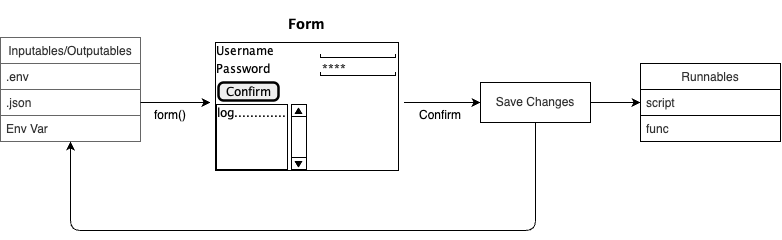
The basic element is a form that is rendered based on the types/format of the input source. Once the submit button is pressed, it will save the changes back to the input if possible, and then run scripts/functions.
By using different forms repeatedly, an application can be built for various purposes
- Link to Demo notebook
Examples
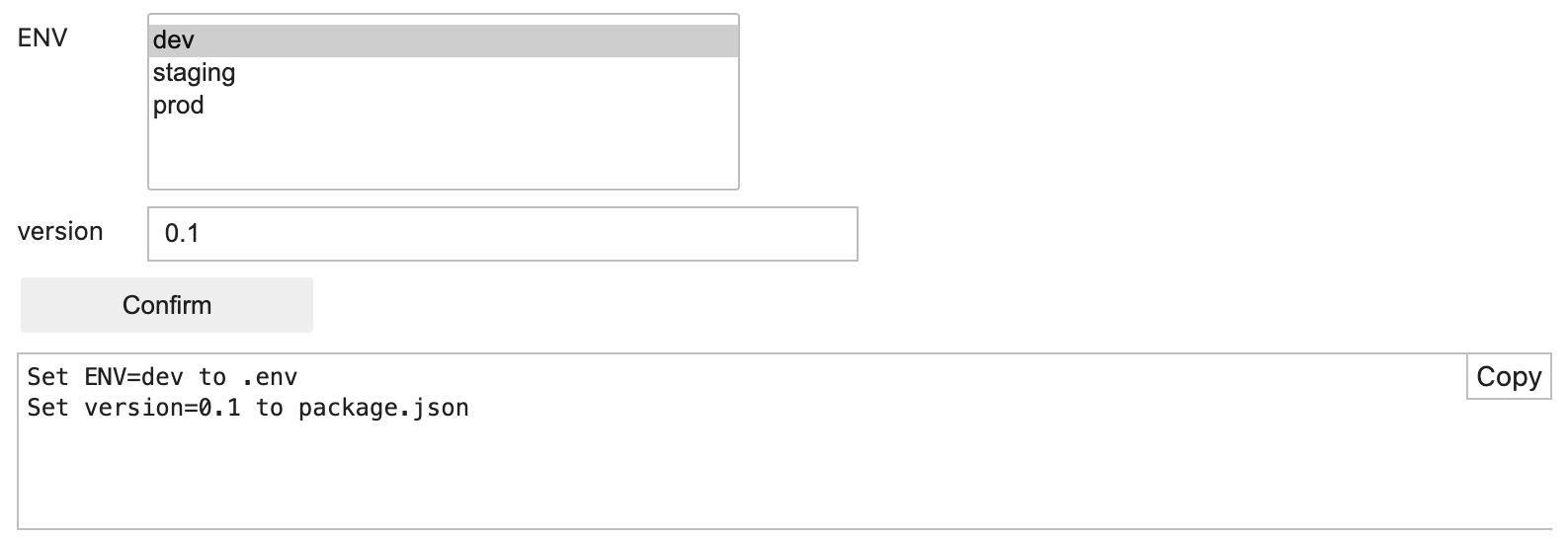
Edit .env and package.json
from jscaffold import form, EnvFileVar, JsonFileVar
env = EnvFileVar("ENV", ".env").select("dev", "staging", "prod")
version = JsonFileVar("version", "package.json").indent(4)
form(env, version)
Pick a file and pass to a shell script
from jscaffold import form, EnvVar
file = EnvVar("FILE").local_path()
script = '''
wc -l $FILE
'''
form(file).title("Count line").run(script)
- Run requests example
Case Study
- Complicated Application
- TODO
API
FormPanel
from jscaffold import form, FormPanel
form()
The form function serves as a shortcut for creating a FormPanel based on inputs and callback scripts or functions.
It accepts a list of Inputable objects (e.g., EnvVar, EnvFileVar, JsonFileVar), which can be passed directly as arguments or wrapped in a list.
If a string is passed, it will automatically be converted to a Var.
Remarks: You should use form to create FormPanel instead of creating a FormPanel directly.
Example:
from jscaffold import form, EnvVar
var1 = EnvVar("VAR1")
var2 = EnvVar("VAR2")
form(var1,var2)
form([var,var2])
form("VAR3") # It is equivalent to form(Var("VAR3"))
FormPanel.title(title:str)
Set the title of the form
Example Usage:
form(var).title("Title of the form")
FormPanel.run(*args)
Configure runnables that will be executed when the form is submitted.
*args: A list of runnable items to execute upon form submission.
Example Usage:
form().run("""
ls
""")

form().run(lambda log: log("Done"))
- Explain more
FormPanel.action_label(label:str)
Set the label of action button (default: "Submit")
label: The label
Example Usage:
form(var).action_label("OK")
FormPanel.save_changes(value:bool)
Configure whether to save changes when the form is submitted.
value: Boolean flag to save changes (True) or discard them (False).
Example Usage:
form().save_changes(True)
FormPanel.instant_update(value:bool)
Enable or disable instant updates for the form.
value: Boolean flag to turn instant updates on (True) or off (False).
Example Usage:
form().instant_update(True)
EnvVar
This class provides a wrapper for read/write environment variable.
It implemented the Formatable and Valuable interfaces.
The constructor:
EnvVar(key: str)
key: The key name of the environment variable.
Example Usage:
from jscaffold import EnvVar
var = EnvVar("ENV")
print(var.value) # Read from the env var "ENV"
var.update("dev") # Set "ENV" to dev
JsonFileVar
This class provides a wrapper for read/write a field inside a JSON file. It implemented the Formatable and Valuable interfaces.
The constructor:
JsonFileVar(key: str, filename: str)
key: The key associated with the variable.filename: The name of the JSON file.
Example Usage:
from jscaffold import JsonFileVar
json_var = JsonFileVar("config", "settings.json")
JsonFileVar.indent(indent: int)
Set the indentation level for the JSON output.
indent: The number of spaces used for indentation in the JSON file.
Example Usage:
json_var.indent(4)
JsonFileVar.path(value: str)
Set the JSON path where the variable will be read or written.
value: The path within the JSON structure.
Example Usage:
json_var.path("a.b.c")
JsonFileVar.use(filename: str, indent=None)
A context manager for creating JsonFileVar instances with a common source file and optional indentation.
filename: The name of the JSON file.indent: Optional indentation level for the JSON output.
Example Usage:
with JsonFileVar.use("data.json", indent=4):
    json_var1 = JsonFileVar("version")
    json_var2 = JsonFileVar("name")
Var
A Var object represents a variable that is stored in shared storage and is capable of reading and writing values. It inherits from the Valuable base class.
Var.init(key, shared_storage: SharedStorage = shared_storage)
Initialize a Var instance.
Release history Release notifications | RSS feed

Download files
Download the file for your platform. If you're not sure which to choose, learn more about installing packages.
Source Distribution
Built Distribution
Filter files by name, interpreter, ABI, and platform.
If you're not sure about the file name format, learn more about wheel file names.
Copy a direct link to the current filters
File details
Details for the file jscaffold-0.0.1.tar.gz.
File metadata
- Download URL: jscaffold-0.0.1.tar.gz
- Upload date:
- Size: 33.0 kB
- Tags: Source
- Uploaded using Trusted Publishing? No
- Uploaded via: twine/4.0.2 CPython/3.11.3
File hashes
| Algorithm | Hash digest | |
|---|---|---|
| SHA256 |
39bafddd14c857035e250e37e181bce676826057552d3af9e350fcf3705154fe
|
|
| MD5 |
c0bc30ec97b037c3b1af729a23d2841c
|
|
| BLAKE2b-256 |
0ad410921ee433280529e6c3d78d5dc67a156c65378fb5b246a8837e71770bc1
|
File details
Details for the file jscaffold-0.0.1-py2.py3-none-any.whl.
File metadata
- Download URL: jscaffold-0.0.1-py2.py3-none-any.whl
- Upload date:
- Size: 46.0 kB
- Tags: Python 2, Python 3
- Uploaded using Trusted Publishing? No
- Uploaded via: twine/4.0.2 CPython/3.11.3
File hashes
| Algorithm | Hash digest | |
|---|---|---|
| SHA256 |
3d50d5590daa1741e350f9b9d2a4a5113469ec4987587e242081f84f8595e58a
|
|
| MD5 |
204d1a21680dcaa8c446b8849f1a8922
|
|
| BLAKE2b-256 |
80d4c8d56840de6a2e69c2a39f28d960823f0dddaaffb896d661a8a2c7c41d79
|






